












What Is IaaS in Cloud Computing? Explained with Examples
IaaS in cloud computing is a model where you rent virtual machines, storage, and networking over the internet. It gives users control over operating systems and applications while the provider manages the physical hardware. IaaS is widely used for flexible, scalable infrastructure without buying expensive equipment
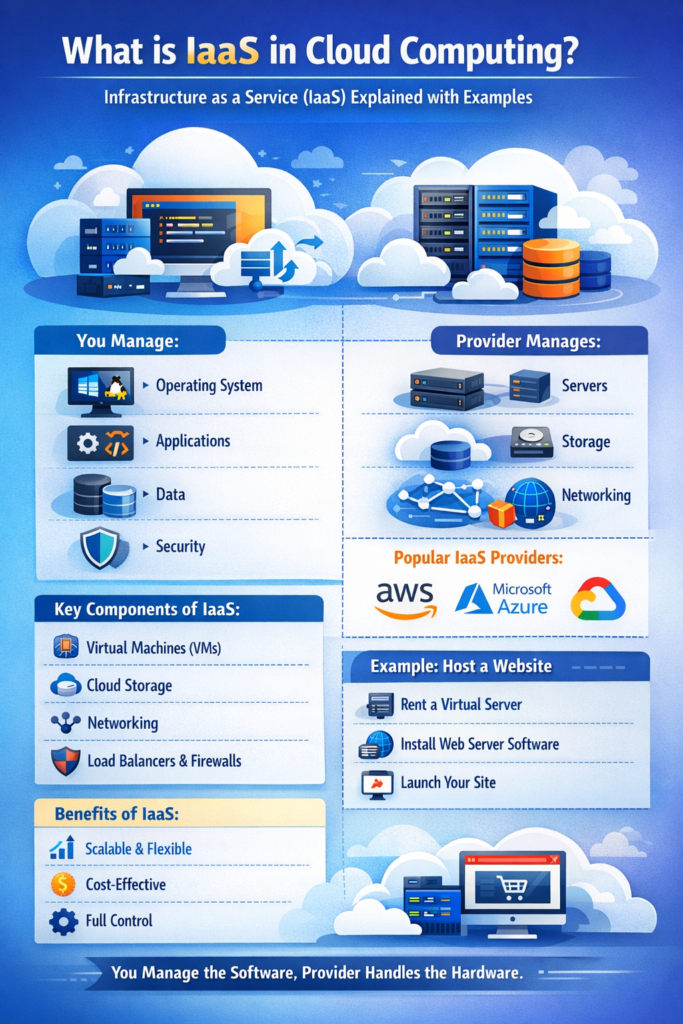
What Is IaaS in Simple Terms?
IaaS is a cloud service model where you get access to servers, storage, and networking, while you manage the software and applications.
Simple Explanation
Think of IaaS as renting a computer online:
-
The cloud provider gives you the hardware
-
You install and manage everything else
Key Components of IaaS
IaaS is made up of essential infrastructure elements that are delivered virtually.
Main Components
-
Virtual Machines (VMs)
-
Storage (Hard drives in the cloud)
-
Networking (Internet connectivity, IP addresses)
-
Load Balancers and Firewalls
These components work together to provide a complete infrastructure environment.
How IaaS Works
IaaS works by delivering virtual infrastructure through the internet using virtualization technology.
Step-by-Step Working
-
You sign up with a cloud provider (like AWS or Azure)
-
You create a virtual server (VM)
-
You install an operating system
-
You deploy applications and manage data
The cloud provider handles the physical hardware, while you control the virtual environment.
Real-Life Examples of IaaS
IaaS is widely used in real-world scenarios for hosting, development, and storage.
Popular IaaS Providers
-
Amazon Web Services (AWS EC2)
-
Microsoft Azure Virtual Machines
-
Google Compute Engine
Practical Example
A startup wants to launch a website:
-
Instead of buying servers, it uses IaaS
-
Rents a virtual machine
-
Installs web server software
-
Hosts the website
This reduces cost and setup time.
What You Manage in IaaS
In IaaS, the user has maximum control over the system.
User Responsibilities
-
Operating System
-
Applications
-
Data
-
Security configurations
Provider Responsibilities
-
Physical servers
-
Networking hardware
-
Data centers
Advantages of IaaS
IaaS offers flexibility and control, making it ideal for many use cases.
Key Benefits
-
High scalability
-
Full control over environment
-
Cost-effective (pay-as-you-go)
-
No need to buy hardware
Disadvantages of IaaS
While powerful, IaaS also comes with some challenges.
Limitations
-
Requires technical knowledge
-
More management responsibility
-
Security depends on user configuration
When Should You Use IaaS?
IaaS is suitable when you need control and flexibility.
Best Use Cases
-
Hosting websites and applications
-
Running enterprise software
-
Testing and development environments
-
Backup and disaster recovery
Real-World Scenario
Understanding IaaS becomes easier with real-life applications.
Example: E-commerce Website
An online store uses IaaS to:
-
Host its website on virtual servers
-
Scale during sales traffic
-
Store customer data securely
This ensures performance and reliability.
Why IaaS Is Important for Students
IaaS is an essential concept for students studying IT and cloud computing.
Learning Benefits
-
Helps understand infrastructure management
-
Builds practical cloud skills
-
Useful for projects and labs
Conclusion
IaaS is a powerful cloud service model that provides virtual infrastructure with maximum control.
-
You manage software and data
-
Provider manages hardware
-
Ideal for developers and businesses needing flexibility
Understanding IaaS is the first step toward mastering cloud computing.