












Introduction to Virtualization in Cloud Computing
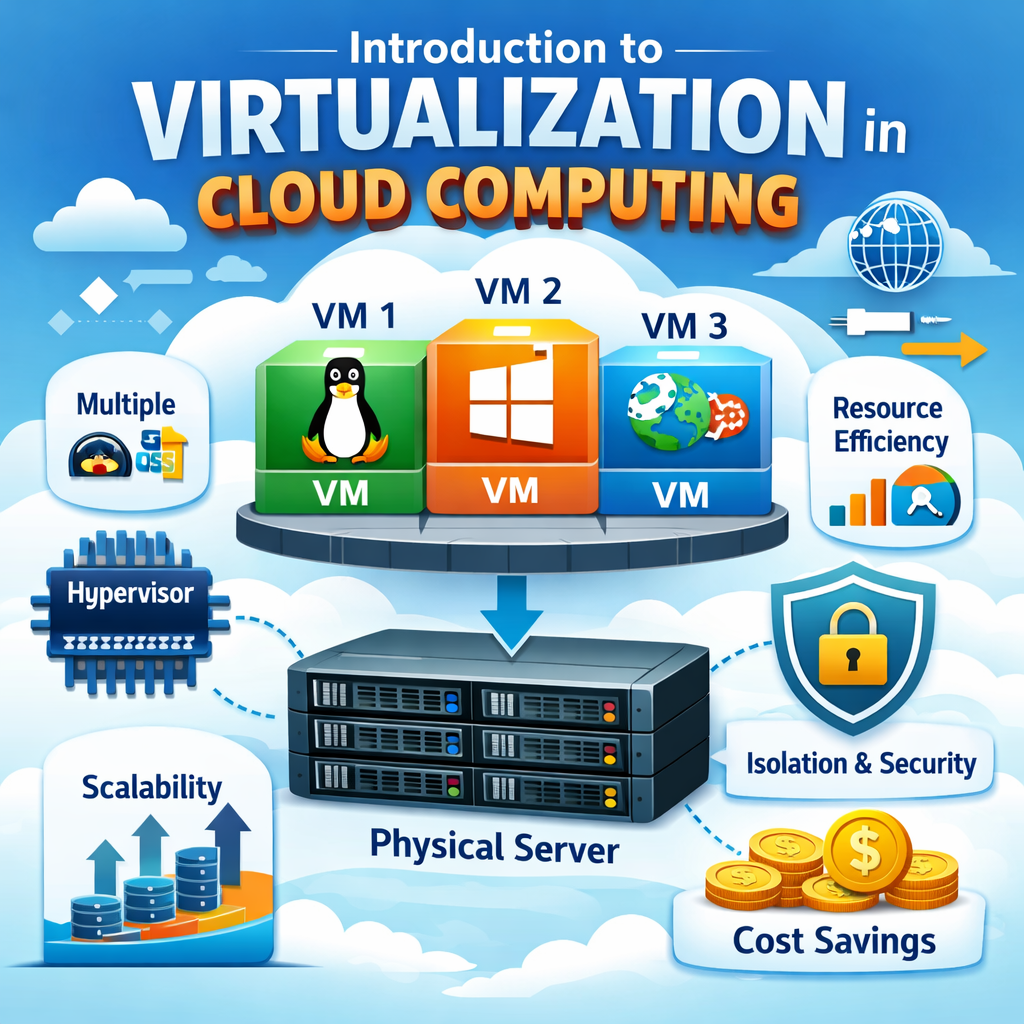
Virtualization is a core technology in cloud computing that allows multiple virtual systems to run on a single physical machine. It helps improve resource usage, flexibility, and scalability in cloud environments.
What is Virtualization?
Virtualization is the process of creating virtual versions of physical resources such as servers, storage, and networks, allowing better flexibility and efficient usage of hardware.
- Resource Abstraction: Separates software from physical hardware, enabling flexible system management.
- Multiple Systems: Allows multiple operating systems to run on a single physical machine.
- Efficient Usage: Maximizes hardware utilization by sharing resources across systems.
What is Virtualization in Cloud Computing?
In cloud computing, virtualization enables providers to deliver computing resources as virtual services over the internet, making cloud systems scalable and efficient.
- On-Demand Resources: Users can create and use virtual machines instantly when needed.
- Scalable Infrastructure: Resources can easily grow or shrink based on demand.
- Cost Efficiency: Reduces the need for physical hardware and lowers operational costs.
How Virtualization Works
Virtualization works through a software layer that manages virtual environments on physical hardware, enabling multiple systems to run simultaneously.
Step-by-Step Process
This process explains how virtualization operates in cloud environments.
- Physical Hardware: A server with CPU, RAM, and storage acts as the base system.
- Hypervisor Layer: Software that creates and manages virtual machines on the hardware.
- Virtual Machines (VMs): Multiple virtual systems run independently on the same machine.
- Resource Allocation: Each VM is assigned specific resources like CPU, memory, and storage.
Key Components of Virtualization
Virtualization relies on several important components that work together to create, manage, and operate virtual environments efficiently.
1. Hypervisor
The hypervisor is a core software layer that enables virtualization by creating and managing virtual machines.
- Resource Management: Allocates CPU, memory, and storage to virtual machines.
- Communication Control: Manages interaction between hardware and virtual machines.
- Isolation: Ensures each virtual machine operates independently and securely.
2. Virtual Machines (VMs)
Virtual machines are software-based systems that function like real computers within a virtualized environment.
- Independent Systems: Each VM runs its own operating system and applications.
- Isolated Environment: Operates separately from other VMs on the same hardware.
- Flexible Deployment: Can be created, modified, or removed easily.
3. Virtual Storage
Virtual storage is a data storage system that operates in a virtual environment instead of physical disks.
- Centralized Storage: Combines multiple storage devices into one system.
- Scalability: Storage capacity can be increased or decreased easily.
- Efficient Management: Simplifies data handling and backup processes.
4. Virtual Network
A virtual network is a network created within a virtual environment to enable communication.
- VM Connectivity: Connects virtual machines with each other and external systems.
- Flexible Configuration: Network settings can be customized easily.
- Secure Communication: Supports controlled and protected data transfer.
These components work together to provide a flexible, scalable, and efficient virtualization environment, forming the foundation of cloud computing systems.
Types of Virtualization
Different types of virtualization are used based on specific resources and use cases, enabling efficient and flexible cloud environments.
1. Server Virtualization
Server virtualization divides a single physical server into multiple virtual servers, improving resource utilization.
- Efficient Resource Usage: Maximizes hardware utilization by running multiple systems.
- Cost Reduction: Reduces the need for additional physical servers.
- Improved Performance Management: Enables better workload distribution.
2. Storage Virtualization
Storage virtualization combines multiple physical storage devices into a single virtual storage system.
- Centralized Storage: Manages data from multiple sources in one place.
- Scalability: Storage can be expanded easily as data grows.
- Simplified Management: Makes data handling and backup easier.
3. Network Virtualization
Network virtualization creates virtual networks that operate independently of physical hardware.
- Flexible Networking: Easily configure and manage network resources.
- Improved Performance: Optimizes traffic flow and reduces congestion.
- Enhanced Security: Isolates network environments for better protection.
4. Desktop Virtualization
Desktop virtualization allows users to access their desktop environment remotely from any device.
- Remote Access: Users can work from anywhere.
- Centralized Management: IT teams manage desktops from a central location.
- Device Independence: Access desktops from laptops, tablets, or smartphones.
5. Application Virtualization
Application virtualization enables applications to run in isolated environments without direct installation on devices.
- Improved Compatibility: Applications run without conflicts with the system.
- Enhanced Security: Isolation reduces risk of system impact.
- Easy Deployment: Applications can be deployed quickly without installation.
These types of virtualization help organizations optimize resources, improve flexibility, and enhance performance, making them essential for modern cloud computing environments.
Importance of Virtualization in Cloud Computing
Virtualization is a core technology that enables efficient delivery of cloud services, making systems scalable, flexible, and cost-effective.
- Resource Optimization: Maximizes hardware usage by running multiple systems on a single machine.
- Scalability: Resources can be increased or decreased easily based on demand.
- Flexibility: Supports different operating systems, applications, and workloads.
- Cost Reduction: Reduces the need for physical infrastructure and lowers operational costs.
Benefits of Virtualization
Virtualization provides several advantages that improve performance and management in cloud environments.
- Better Utilization: Multiple virtual machines share one physical system efficiently.
- High Availability: Systems remain active even during failures using backup and failover mechanisms.
- Easy Management: Simplifies monitoring, deployment, and system administration.
- Disaster Recovery: Enables quick backup and recovery of data and applications.
Challenges of Virtualization
Despite its benefits, virtualization also comes with some challenges that need proper management.
- Performance Overhead: Virtual systems may have slight delays compared to physical machines.
- Security Risks: Shared environments can introduce vulnerabilities if not secured properly.
- Complex Management: Requires careful configuration, monitoring, and skilled management.
Real-World Example
This example shows how virtualization is used in real cloud environments.
- Multiple Customers: A cloud provider hosts different users on a single physical server.
- Separate Virtual Machines: Each customer gets an isolated virtual machine.
- Shared but Secure Resources: Hardware is shared, but data and applications remain isolated.
This approach ensures efficient, scalable, and secure cloud service delivery.
Conclusion
Virtualization in cloud computing is a fundamental technology that enables efficient resource utilization, scalability, and flexibility. It allows cloud providers to deliver powerful and reliable services while reducing costs, improving performance, and supporting modern applications.