












Cloud Computing
The National Institute of Standards and Technology (NIST) defines cloud computing as
“Cloud computing is a model for enabling ubiquitous, convenient, on-demand network access to a shared pool of configurable computing resources (for example, networks, servers, storage, applications, and services) that can be rapidly provisioned and released with minimal management effort or service provider interaction.”
In simple words, we can say
“Cloud computing is a virtualization-based technology to run various applications through an internet connection.”
Virtualization-based technology means various virtual machines are created on a single physical machine to run multiple applications simultaneously.
One more definition
Cloud computing delivers computing services (i.e., servers, storage, databases, networking, tools, and software) over the internet.
Cloud Providers
Popular cloud providers in the world and their popularity under.
- AWS
- Microsoft Azure
- Google cloud platform
- Ali Baba etc.
Let’s see the lT industry without the arrival of the cloud.
Hosting Services Without Cloud
In 1990, when any company needed to publish an application or service on the Internet, the owner had to
- Build its infrastructure (i.e., storage, processing, networking, etc.) to run the application.
- Hire expert staff for storage, server processing, power, and networking.
- Manage room temperature for resources (i.e., need for AC)
Drawbacks
If a business fails after establishing a complete setup, it wastes all resources because most resources become useless and can’t be resold.
- Scaling up or down of resources leads toward the wastage of older resources in most cases.
- Resources are handled physically if any technical issue happens in the resources setup.
There was no concept of virtualization in hosting services without the cloud. Applications run on physical servers using an operating system.
Arrival of Virtualization
With the arrival of virtualization (still, there was no concept of a cloud), a physical machine’s capacity can be distributed among many users virtually.
- But still, a problem with virtualization is that if any technical issue happens in the resource setup, then resources are handled physically, not virtually.
Arrival of Cloud
In 1961, a computer scientist, John, proposed that computer resources would one day be a public utility. His dream came true in the 1990s; in 1999, Salesforce.com started delivering applications, and later on, Amazon, Google platforms, and others also came into the picture.
Cloud is nothing, but it adds some valuable attributes to conventional methods, which are given under
All resource setup infrastructure is provided globally, which can be easily accessible through the internet by the administrator.
- So, If any technical issue happens in the resources setup, then resources can handled virtually.
Another significant advantage of the cloud is that various consumers share resources according to their needs. (Method pay as you go).
| In simple words, we can say that the cloud is a virtualized form of resources that are globally consumed and managed through the internet. |
Benefits Of Cloud
With the help of virtualization in the cloud, a single physical server can be distributed into many virtual servers to fulfill the demands of various consumers.
Let say,
- In the conventional method, if it needs to have 10 OS to run various applications, then 10 physical servers are required, but
- In the cloud, a single physical server can be virtualized into 10 virtual servers to satisfy 10 independent OS for their tasks.
In this way
- The cost of infrastructure is reduced
- The cost of maintenance is reduced
- Resources released if the business doesn’t successful
Overall, almost all problems and risks that we faced before the cloud were resolved in the cloud.
Basic Characteristics of Cloud
- On-demand self-service: As you request any service, it responds immediately (i.e. Gmail, Messenger)
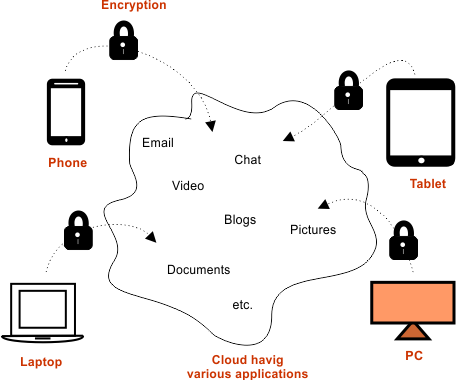
- Broad network Access: Any device interface can access services (i.e., mobile, PC, tablet, etc.)
- Resource pooling: Creating Virtual machines or combining more than two physical servers
- Rapid Elasticity: Scaling of resources is effortless, either replacing or adding more.
- Measured usage: The measurement of cloud services, which is used in billing services, is done very effectively. Cloud is perfect because it facilitates “pay as you go.”