












Key Features of Platform as a Service (PaaS)
Platform as a Service (PaaS) is a cloud computing model that provides a complete development and deployment environment in the cloud. It allows developers to build, run, and manage applications without worrying about infrastructure. Understanding the key features of Platform as a Service (PaaS) helps improve development speed, reduce complexity, and enhance productivity.
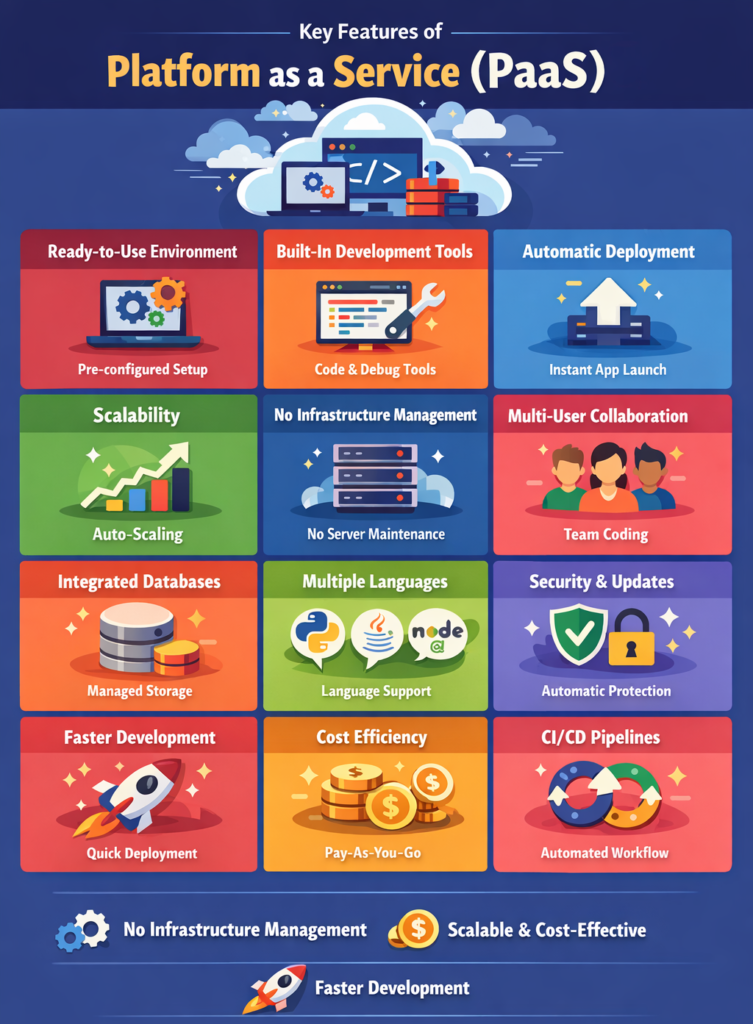
Let us explain each key feature of Platform as a Service (PaaS) in detail.
1. Ready-to-Use Development Environment
PaaS provides a pre-configured environment where developers can start coding immediately without setting up hardware or software.
How It Works
- Development tools are already installed: Developers get access to essential tools instantly, eliminating manual installation time.
- Frameworks and libraries are pre-configured: Popular frameworks are ready to use, helping developers start projects quickly.
- No manual setup required: The platform handles all configurations, saving time and effort.
Example
A student can start building a web app on Heroku without installing servers or databases.
2. Built-in Development Tools
PaaS platforms include integrated tools that help developers build, test, and deploy applications efficiently.
Tools Included
- Code editors: Developers can write and edit code directly within the platform environment.
- Debugging tools: Helps identify and fix errors quickly during development.
- Version control integration: Allows tracking changes in code and managing different versions efficiently.
Example
Developers can write and test code directly within the cloud platform.
3. Automatic Deployment
PaaS allows applications to be deployed automatically with minimal effort.
How It Works
- Upload code to the platform: Developers simply upload their application code to the cloud.
- Platform handles deployment: The system automatically configures and runs the application.
- Application becomes live instantly: The app is available to users without manual setup.
Example
A developer uploads code, and the application is automatically hosted online.
4. Scalability
PaaS platforms automatically scale applications based on user demand.
Benefits
- Handles high traffic: Applications can support a large number of users without performance issues.
- Adjusts resources dynamically: Resources increase or decrease automatically based on usage.
- Ensures smooth performance: Maintains consistent speed and reliability even during peak usage.
Example
An app gains more users, and the platform automatically increases resources.
5. No Infrastructure Management
PaaS removes the need to manage servers, storage, and networking.
What Provider Manages
- Hardware: Physical servers and equipment are fully managed by the provider.
- Operating system: OS installation, updates, and maintenance are handled automatically.
- Runtime environment: The platform ensures the application runs smoothly without user intervention.
Example
Developers focus only on coding while the platform handles everything else.
6. Multi-User Collaboration
PaaS supports collaboration among multiple developers working on the same project.
Benefits
- Team collaboration: Multiple users can work together on the same application easily.
- Real-time updates: Changes are instantly visible to all team members.
- Shared development environment: Everyone works in the same environment, reducing compatibility issues.
Example
A team of developers works together on a cloud-based project.
7. Integrated Database Services
PaaS includes built-in database management systems for storing and managing data.
Features
- Easy database setup: Databases can be created quickly without complex configurations.
- Automatic backups: Data is regularly saved to prevent loss in case of failure.
- Data management tools: Provides tools to organize, query, and manage data efficiently.
Example
A developer connects a database to an app without manual configuration.
8. Support for Multiple Programming Languages
PaaS platforms support various programming languages and frameworks.
Examples
- Python: Widely used for web development, data science, and automation tasks.
- Java: Popular for enterprise-level applications and backend systems.
- Node.js: Ideal for building fast and scalable web applications.
- PHP: Commonly used for creating dynamic websites and web applications.
Benefit
Developers can choose the language that best suits their project.
9. Security and Updates Managed by Provider
PaaS providers handle system updates and security patches automatically.
Security Features
- Regular updates: Ensures the platform stays secure and up-to-date with latest improvements.
- Data protection: Protects user data using encryption and security protocols.
- Access control: Restricts unauthorized access through authentication mechanisms.
Example
Developers do not need to worry about updating the operating system.
10. Faster Development and Time-to-Market
PaaS speeds up the development process by reducing setup time and automating tasks.
Benefits
- Quick development: Developers can start coding immediately without delays.
- Faster deployment: Applications can be launched quickly with minimal effort.
- Reduced project time: Overall development cycle becomes shorter and more efficient.
Example
A startup launches its application faster using PaaS tools.
11. Cost Efficiency
PaaS reduces costs by eliminating the need for hardware and maintenance.
Benefits
- Pay only for usage: Users are charged based on the resources they consume.
- Lower operational costs: No need for IT staff to manage infrastructure.
- No infrastructure investment: Eliminates the cost of purchasing physical hardware.
Example
A small business uses PaaS instead of building its own IT infrastructure.
12. Continuous Integration and Continuous Deployment (CI/CD)
PaaS supports automated development pipelines for faster and more reliable releases.
Features
- Automated testing: Code is tested automatically to detect errors early.
- Continuous deployment: Updates are deployed automatically without manual intervention.
- Version control integration: Tracks code changes and ensures smooth updates.
Example
Code changes are automatically tested and deployed without manual effort.
Why These Features Matter
Understanding these features helps users choose the right platform and improve efficiency.
For Students
- Simplifies learning development
- Useful for projects and assignments
For Developers
- Speeds up coding and deployment
- Reduces workload
For Businesses
- Improves productivity
- Reduces costs
- Enables faster innovation
Conclusion
Platform as a Service (PaaS) offers powerful features that simplify application development and deployment.
- No infrastructure management
- Faster development
- Scalable and cost-effective
These features make PaaS an ideal choice for developers, students, and businesses building modern applications.