












Cloud Architecture Basics Explained
Cloud architecture is the design and structure of cloud systems that allows applications, data, and services to work together efficiently. It acts as a blueprint for building scalable, secure, and high-performance cloud environments.
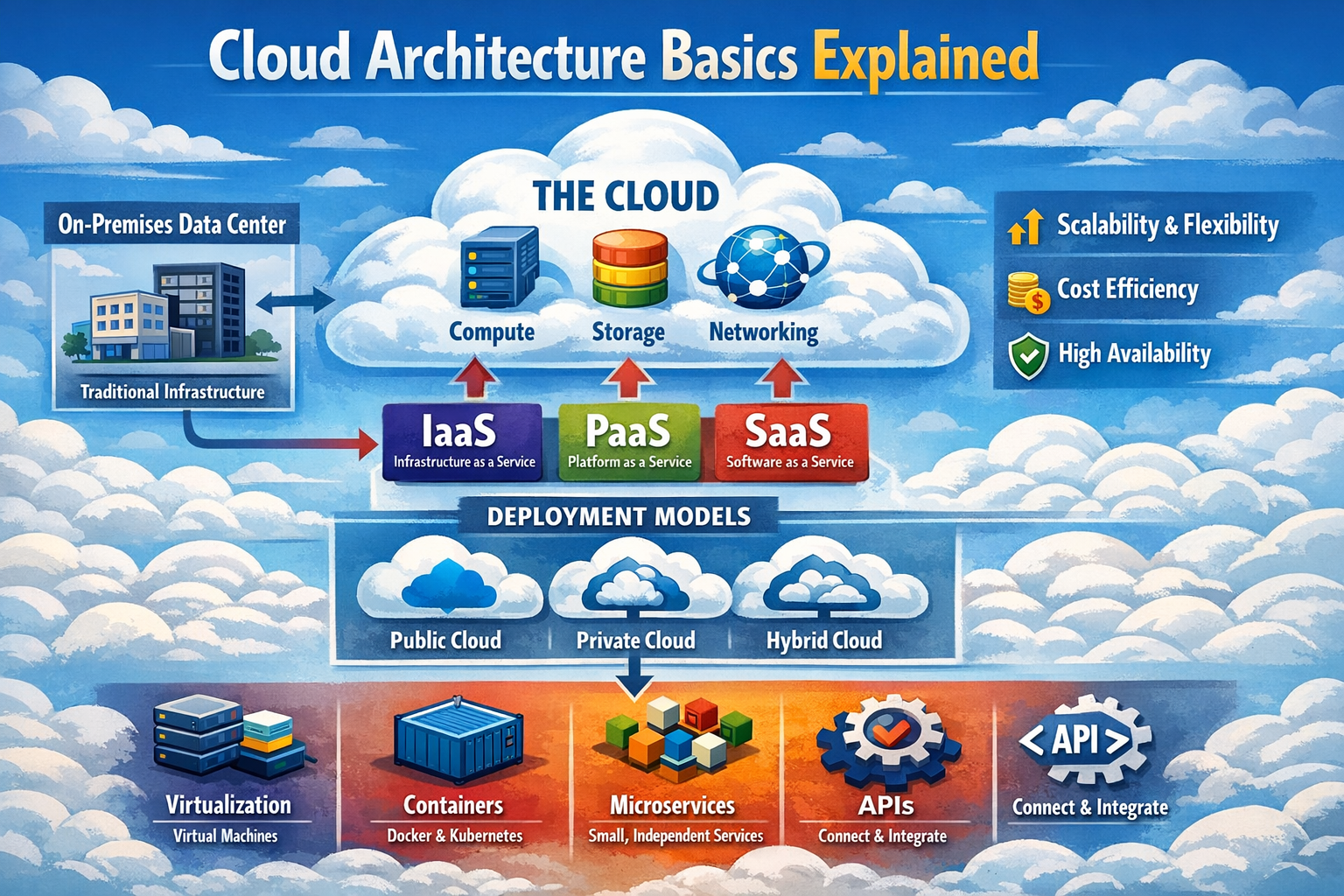
What is Cloud Architecture?
Cloud architecture defines how different cloud components are organized, structured, and interact to deliver cloud services efficiently. It acts as a blueprint that shows how front-end and back-end systems work together to provide reliable and scalable cloud solutions.
Key Concepts of Cloud Architecture
Cloud architecture ensures that all cloud resources are properly arranged and connected. Here are some key points.
- Structured Design: Organizes servers, storage, networking, and services in a systematic way for smooth operation.
- Service Delivery: Ensures applications and services are delivered efficiently to users over the internet.
- System Integration: Connects different cloud components so they work together as a unified system.
- Resource Management: Manages computing resources dynamically based on demand.
- Automation Support: Enables automated provisioning, scaling, and monitoring of cloud services.
Why Cloud Architecture is Important
Cloud architecture plays a critical role in building systems that are efficient, scalable, and secure. Here are some key points.
- Scalability: Supports business growth by allowing systems to expand or reduce resources easily.
- High Performance: Ensures fast processing and quick response times for applications.
- Security: Protects data, applications, and infrastructure from threats.
- Cost Efficiency: Optimizes resource usage to reduce unnecessary expenses.
- Reliability: Provides stable and continuous service with minimal downtime.
- Flexibility: Allows organizations to adapt quickly to changing business needs.
Basic Components of Cloud Architecture
Cloud architecture consists of multiple components that work together to deliver services effectively.
1. Front-End Platform
The front-end is the user-facing side of cloud architecture where interaction between users and cloud systems takes place. Here are some key points of the front-end platform.
- User Interface: The visual layer such as web pages or mobile apps through which users interact with cloud services.
- Client Devices: Devices like laptops, smartphones, and tablets used to access cloud applications.
- Browser or App Access: Users connect to cloud services through web browsers or dedicated applications.
- User Experience: Ensures smooth, fast, and responsive interaction for users.
2. Back-End Platform
The back-end is responsible for processing, storage, and system management in cloud architecture. It handles all operations behind the scenes. Here are some key points of the back-end platform.
- Servers: Process user requests and run applications efficiently.
- Storage Systems: Store data securely and ensure availability when needed.
- Databases: Manage structured data and support application operations.
- Networking: Connect different components and enable communication between systems.
- Virtualization: Allows multiple virtual machines to run on a single physical server.
- Management Software: Controls resource allocation, monitoring, and system performance.
Networking in Cloud Architecture
Networking is a core component of cloud architecture that enables communication between users, applications, and cloud infrastructure. It ensures that data flows smoothly, securely, and efficiently across different parts of the cloud system. Here are some key points of networking in cloud architecture.
- Internet Connectivity: Connects users to cloud services through the internet, enabling access from anywhere in the world.
- Load Balancers: Distribute incoming traffic across multiple servers to prevent overload and ensure high availability.
- Firewalls: Protect cloud systems by filtering incoming and outgoing traffic based on security rules.
- Virtual Networks: Create isolated network environments within the cloud to improve security and organization.
- Routing and Switching: Direct data packets efficiently between servers, storage, and users.
- Content Delivery Optimization: Uses distributed networks to deliver data faster and reduce latency.
Virtualization Layer
The virtualization layer enables efficient use of physical resources by creating multiple virtual systems on a single hardware platform. It is a fundamental technology that powers cloud computing. Here are some key points of the virtualization layer.
- Virtual Machines (VMs): Software-based systems that act like physical computers and run operating systems and applications.
- Hypervisor: A software layer that manages and controls virtual machines, allocating resources like CPU, memory, and storage.
- Resource Abstraction: Separates physical hardware from software, allowing flexible and efficient resource usage.
- Isolation: Each virtual machine operates independently, ensuring security and stability.
- Scalability Support: Virtual systems can be created, modified, or removed quickly based on demand.
- Efficient Resource Utilization: Maximizes hardware usage by running multiple workloads on a single physical server.
Layers of Cloud Architecture
Cloud architecture is divided into layers to simplify management, improve scalability, and organize services effectively. Each layer provides a specific level of functionality.
1. Infrastructure Layer (IaaS)
This is the foundation layer of cloud architecture that provides basic computing resources. Here are some key points of the infrastructure layer.
- Compute Resources: Provides virtual machines, servers, and processing power.
- Storage Services: Offers scalable storage for data and applications.
- Networking Components: Includes virtual networks, IP management, and connectivity services.
- User Control: Users manage operating systems, applications, and configurations.
- Flexible Deployment: Allows custom setups for different workloads.
2. Platform Layer (PaaS)
This layer provides development tools and environments, allowing developers to build and deploy applications without managing infrastructure. Here are some key points of the platform layer.
- Development Environment: Provides frameworks, tools, and runtime environments for coding and testing.
- Managed Infrastructure: Eliminates the need to handle servers, storage, and networking.
- Application Deployment: Simplifies deployment and scaling of applications.
- Integration Services: Supports APIs and services for connecting applications.
- Faster Development Cycle: Enables quick development and updates of applications.
3. Application Layer (SaaS)
This layer delivers ready-to-use software applications over the internet. Users can access these applications without installation or maintenance. Here are some key points of the application layer.
- Web-Based Applications: Accessible through browsers or apps without installation.
- User-Friendly Access: Simple interfaces designed for end-users.
- Automatic Updates: Software is updated automatically by the provider.
- Subscription Model: Users pay based on usage or subscription plans.
- No Maintenance Required: Providers handle all backend operations and updates.
How Cloud Architecture Works
Cloud architecture follows a structured process to handle user requests efficiently and deliver results quickly. Here are the key steps involved.
- User Request: A user sends a request through a web browser or application interface.
- Data Transfer: The request travels through the network to reach cloud servers.
- Authentication and Security Check: The system verifies user identity and permissions before processing.
- Processing: Cloud servers handle the request using allocated computing resources.
- Data Retrieval: Required data is fetched from storage systems or databases.
- Load Balancing: Requests are distributed across servers to maintain performance and avoid overload.
- Response Delivery: The processed result is sent back to the user’s device quickly and efficiently.
Real-World Example
This example explains how cloud architecture works in a real-life scenario when a user interacts with a cloud-based application.
- User Access: A user opens a website or application hosted on the cloud using a browser or mobile app.
- Request Transmission: The request is sent through the internet to the cloud infrastructure where services are hosted.
- Load Balancer Selection: A load balancer intelligently selects the most suitable server based on current traffic and availability.
- Server Processing: The selected server processes the request by executing the required application logic.
- Data Retrieval: The system fetches required data from databases or storage systems within the cloud.
- Response Generation: The server prepares the output based on processed data and application logic.
- Response Delivery: The final response is sent back to the user instantly, ensuring a smooth and fast experience.
Benefits of Cloud Architecture
Cloud architecture provides several advantages that make modern applications efficient, scalable, and cost-effective. Here are some key points of cloud architecture benefits.
- Flexibility: Users can access applications and services from anywhere using any internet-connected device.
- Scalability: Systems can easily handle growth by increasing or decreasing resources based on demand.
- Cost Savings: Reduces the need for physical infrastructure, lowering operational and maintenance costs.
- High Performance: Optimized systems ensure fast processing and quick response times.
- Reliability: Built-in redundancy and failover systems ensure continuous availability of services.
- Security: Protects data and applications using advanced security mechanisms and access controls.
- Efficient Resource Utilization: Resources are used dynamically, avoiding waste and improving efficiency.
Limitations of Cloud Architecture
Cloud architecture also has certain limitations that organizations must consider while designing and managing cloud-based systems. These challenges can impact performance, security, cost, and overall system control if not handled properly. Here are some key points of cloud architecture limitations.
- Dependency on Internet: Cloud services require a stable internet connection, and any disruption can affect access to applications and data.
- Security Risks: Despite strong security measures, cloud systems may still face risks such as cyberattacks, data breaches, and unauthorized access.
- Limited Control: Users have less control over infrastructure in some cloud models, especially in public cloud environments.
- Downtime and Service Outages: Cloud providers may experience outages that can temporarily disrupt services.
- Data Privacy Concerns: Storing sensitive data on external servers can raise privacy and compliance issues.
- Vendor Lock-In: Switching between cloud providers can be difficult due to compatibility issues and migration complexity.
- Cost Management Complexity: While cloud can reduce costs, improper usage or scaling can lead to unexpected expenses.
- Performance Variability: Shared resources in some cloud environments may cause fluctuations in performance.
- Complex Architecture Management: Designing and managing cloud architecture can be complex and requires skilled professionals.
- Compliance Challenges: Meeting regulatory requirements can be difficult depending on data location and cloud provider policies.
Conclusion
Cloud architecture is the foundation of cloud computing that connects all components such as networking, servers, storage, and applications into a well-organized system. It ensures efficient communication, fast processing, and reliable service delivery for users across the globe. By supporting scalability, flexibility, security, and cost optimization, cloud architecture enables modern applications to handle dynamic workloads and growing user demands. In real-world environments, it powers everything from simple websites to complex enterprise systems, making it an essential concept for understanding how cloud computing operates effectively.