












Common Examples of SaaS Applications
Software as a Service (SaaS) is widely used in everyday life for communication, productivity, entertainment, and business operations. These applications run on cloud servers and can be accessed through a web browser without installation. Understanding common examples of SaaS applications helps students and professionals connect theory with real-world usage.
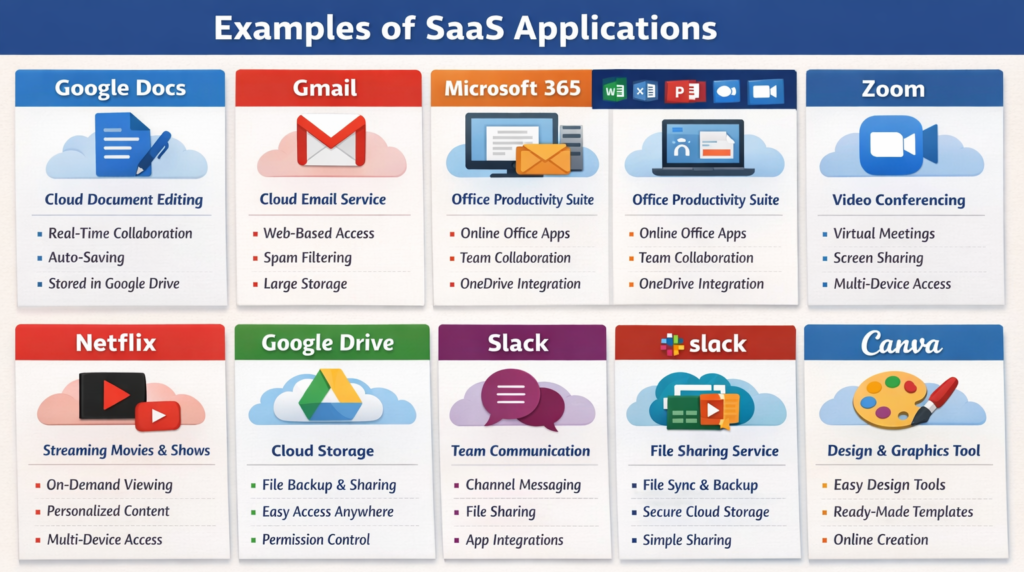
Let us explore some common examples of SaaS applications in detail.
1. Google Docs
Google Docs is a cloud-based document editing tool that allows users to create, edit, and share documents online.
Key Features
- Real-time editing: Multiple users can work on the same document simultaneously.
- Auto-saving: Changes are saved automatically without manual effort.
- Cloud storage integration: Documents are stored in Google Drive for easy access.
Example
Students can collaborate on assignments and edit documents together in real time.
2. Gmail
Gmail is a widely used cloud-based email service provided by Google.
Key Features
- Web-based access: Emails can be accessed from any device with internet.
- Spam filtering: Automatically filters unwanted emails.
- Large storage capacity: Allows storing thousands of emails securely.
Example
Users can send and receive emails from anywhere without installing software.
3. Microsoft 365
Microsoft 365 is a SaaS suite that includes Word, Excel, PowerPoint, and other productivity tools.
Key Features
- Cloud-based applications: Access office tools online.
- Collaboration tools: Share and edit documents with others.
- Integration: Works with OneDrive and Teams.
Example
Businesses use Microsoft 365 for document creation and team collaboration.
4. Zoom
Zoom is a cloud-based video conferencing platform used for meetings, classes, and webinars.
Key Features
- Video conferencing: Supports virtual meetings with multiple participants.
- Screen sharing: Allows sharing presentations and screens.
- Recording feature: Meetings can be recorded for later use.
Example
Students attend online classes and meetings through Zoom.
5. Netflix
Netflix is a SaaS platform that provides online streaming of movies and TV shows.
Key Features
- On-demand streaming: Watch content anytime without downloading.
- Personalized recommendations: Suggests content based on user preferences.
- Multi-device access: Works on phones, TVs, and laptops.
Example
Users watch movies and series online without storing files locally.
6. Google Drive
Google Drive is a cloud storage service that allows users to store, share, and manage files online.
Key Features
- Cloud storage: Stores files securely in the cloud.
- File sharing: Easily share files with others.
- Access control: Manage permissions for different users.
Example
Students upload and share assignments with teachers using Google Drive.
7. Slack
Slack is a cloud-based communication platform used by teams for collaboration.
Key Features
- Team messaging: Enables communication through channels.
- File sharing: Share documents and files easily.
- Integration: Connects with tools like Google Drive and Zoom.
Example
Companies use Slack for internal communication and project discussions.
8. Dropbox
Dropbox is a SaaS-based file hosting and sharing service.
Key Features
- File synchronization: Keeps files updated across devices.
- Cloud storage: Stores files securely online.
- Easy sharing: Share files using links.
Example
Users store and access files from different devices seamlessly.
9. Salesforce
Salesforce is a cloud-based Customer Relationship Management (CRM) platform.
Key Features
- Customer data management: Stores and manages customer information.
- Sales tracking: Helps track leads and sales activities.
- Automation tools: Automates business processes.
Example
Businesses use Salesforce to manage customer relationships and sales operations.
10. Canva
Canva is a cloud-based design tool used to create graphics, presentations, and social media content.
Key Features
- Drag-and-drop design: Easy-to-use interface for beginners.
- Templates: Ready-made designs for quick creation.
- Online access: No need to install design software.
Example
Students create presentations and social media posts using Canva.
FAQs: Common Examples of SaaS Applications
Here are the top frequently asked questions about SaaS applications, which are given below
1. What are SaaS applications?
SaaS (Software as a Service) applications are cloud-based software that run on the internet instead of being installed on a local device. Users can access them through a web browser from anywhere.
2. What are some common examples of SaaS applications?
Popular SaaS applications include Google Docs, Gmail, Microsoft 365, Zoom, Netflix, Google Drive, Slack, Dropbox, Salesforce, and Canva. These tools are widely used for productivity, communication, storage, and entertainment.
3. Why are SaaS applications so popular?
SaaS applications are popular because they are easy to use, require no installation, and can be accessed from anywhere. They also support real-time collaboration and automatic updates.
4. Can SaaS applications be used on multiple devices?
Yes, SaaS applications can be accessed on multiple devices such as laptops, smartphones, and tablets. All you need is an internet connection and a web browser.
5. Are SaaS applications free to use?
Some SaaS applications offer free versions with limited features, while others require a subscription. Paid plans usually provide advanced features and more storage.
6. How do SaaS applications help in collaboration?
SaaS tools allow multiple users to work on the same project at the same time. Features like real-time editing, file sharing, and communication improve teamwork and productivity.
7. Do SaaS applications require installation?
No, SaaS applications do not require installation. They run directly in a web browser, saving device storage and setup time.
8. Is data safe in SaaS applications?
Most SaaS providers use strong security measures like encryption and backups. However, users should still follow best practices like strong passwords and access control.
9. Which SaaS applications are best for students?
Students commonly use tools like Google Docs, Google Drive, Canva, Zoom, and Gmail for assignments, communication, and learning.
10. Which SaaS applications are used in businesses?
Businesses use SaaS tools like Microsoft 365, Slack, Salesforce, and Dropbox for communication, document management, and customer relationship management.
Conclusion
Common SaaS applications like Google Docs, Gmail, Zoom, and Netflix are part of everyday digital life.
- Easy to use and accessible
- No installation required
- Supports collaboration and productivity
Learning these examples helps students and professionals understand how SaaS works in real-world scenarios.