












Binary Number System
The Binary Number System is the most fundamental concept in computer science and digital electronics. It is the basis of all modern computing systems where every type of data is represented using only two digits, 0 and 1.
- The term binary derives from a Latin root meaning “two,” referring to the two digits used in this number system. Each digit is called a bit
- The binary number system represents and stores digital data, including text, images, and other information, using combinations of 0s and 1s. This system plays a key role in converting human-readable data into machine-readable form.
- In computer science, binary 0 and 1 represent states such as OFF and ON, FALSE and TRUE, or LOW and HIGH in digital circuits.
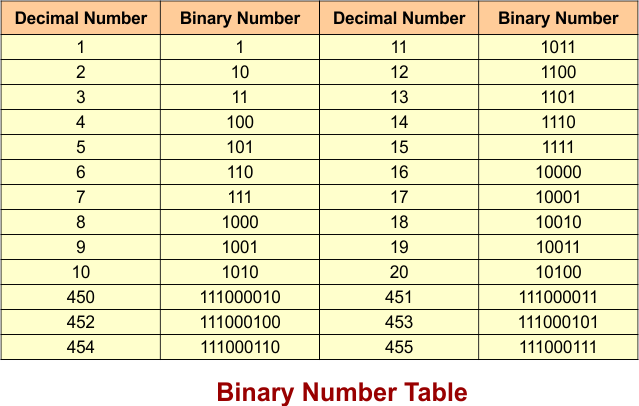
The following table shows the binary equivalents of various decimal numbers
Structure of Binary Number System
The structure of the binary number system is based on positional values, where each position represents a power of 2 starting from the rightmost digit. The value of a binary number increases as we move from right to left. The following diagram explains the process
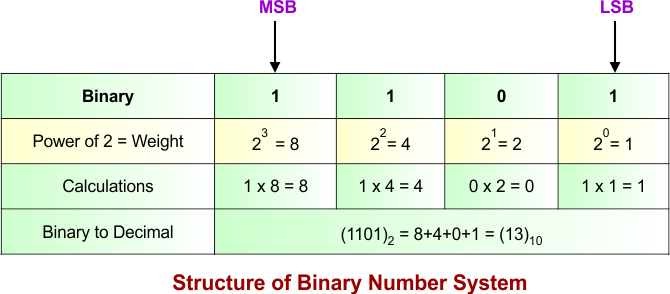
In the above diagram
- The rightmost digit (MSB – most significant bit) represents 2⁰
- The next digit represents 2¹
- Followed by 2², 2³, and so on
- Used for conversion and calculations
Binary Arithmetic Operations
Binary arithmetic consists of four basic operations: addition, subtraction, multiplication, and division. These operations use only the digits 0 and 1.
Let’s explain all these binary arithmetic operations
1. Binary Addition
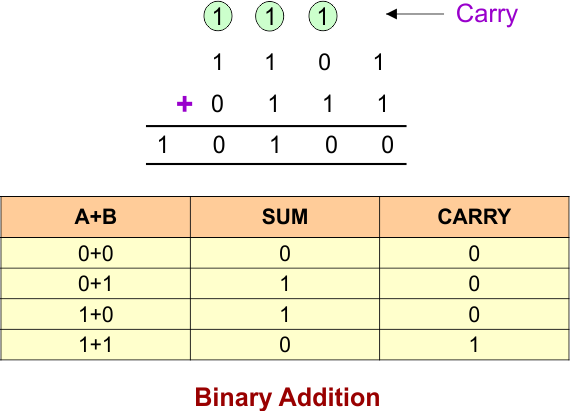
Binary addition is the process of adding binary numbers using specific rules. The following diagram shows the binary addition rules and a simple example
2. Binary Subtraction
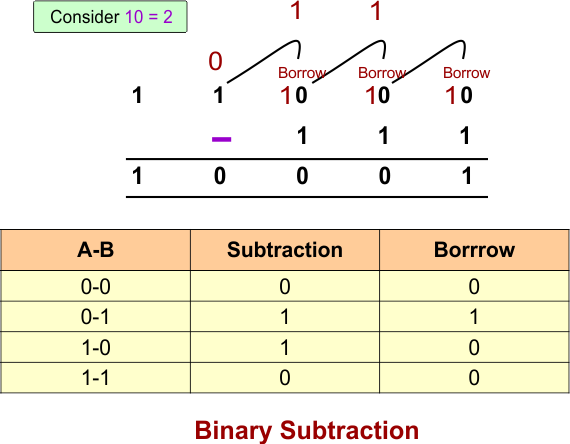
Binary subtraction is the process of subtracting one binary number from another using borrowing when necessary. The following diagram shows the binary subtraction rules and a simple example
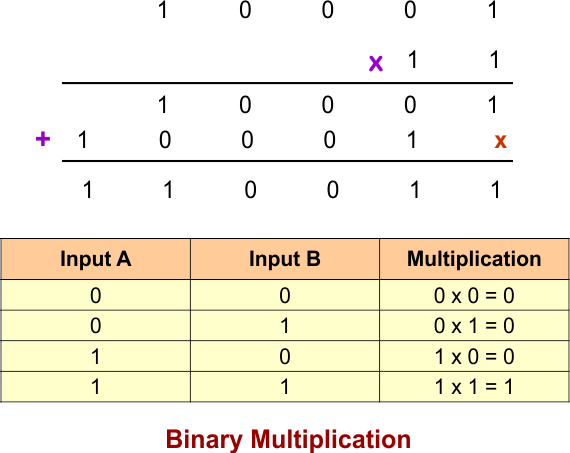
3. Binary Multiplication
Binary multiplication is the process of multiplying binary numbers using the basic rules of multiplication. The following diagram shows the binary multiplication rules and a simple example
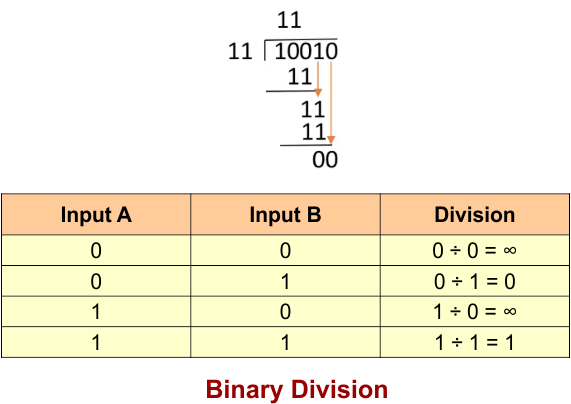
4. Binary Division
Binary division is the process of dividing one binary number by another using steps similar to decimal division. The following diagram shows the binary division rules and a simple example
Number System Conversions with Binary
Number system conversions involving binary are essential in computer science. Since computers use binary internally but humans use decimal, conversions help bridge this gap. Binary also interacts with octal and hexadecimal systems for efficient data representation.
These conversions are widely used in programming, digital electronics, and computer architecture.
1. Binary to Decimal Conversion
Binary to decimal conversion is the process of converting base-2 numbers into base-10 format using positional weights of 2.
Example 01: The following diagram explains the Binary-to-decimal conversion process using the positional value method, where Multiply each binary digit by its corresponding power of 2, starting from (2^0) on the right. Add all the results to get the decimal number.
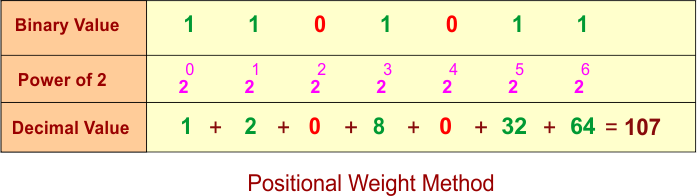
The above diagram shows that 1101011 in binary is equal to 107 in decimal.
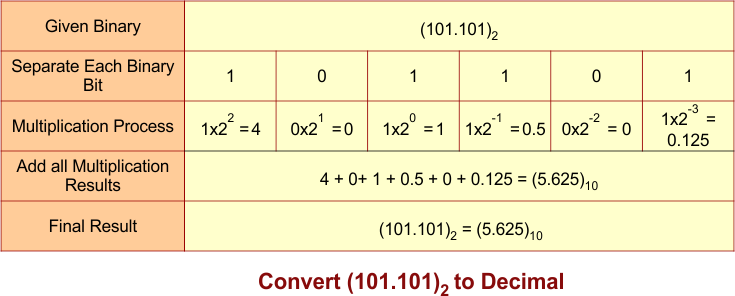
Example 02: The following diagram explains the Binary-to-decimal conversion process with a fraction
2. Decimal to Binary Conversion
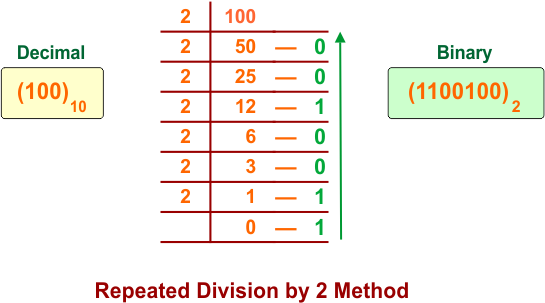
Decimal to binary conversion transforms base-10 numbers into binary using repeated division by 2.
Example 01: The following diagram explains the Binary-to-decimal conversion process using the repeated division by 2 method, in which you divide the decimal number by 2 repeatedly and record each remainder. Read the remainders from bottom to top to get the binary number. The following diagram explains the decimal-to-binary conversion
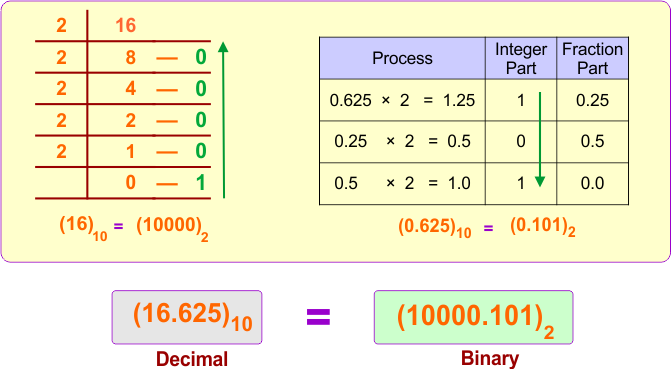
Example 02: The following diagram explains the Decimal-to-binary conversion process with a fraction
3. Binary to Octal Conversion
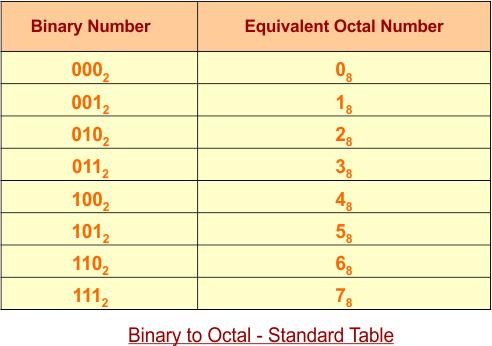
Binary to octal conversion is performed by grouping binary digits into sets of three from right to left. The following diagram shows the standard table of the Binary-to-octal conversion process
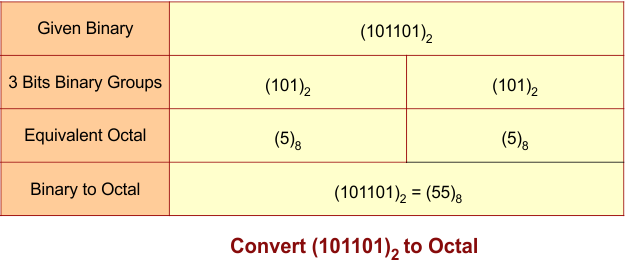
Example 01: The following diagram explains the Binary-to-octal conversion process
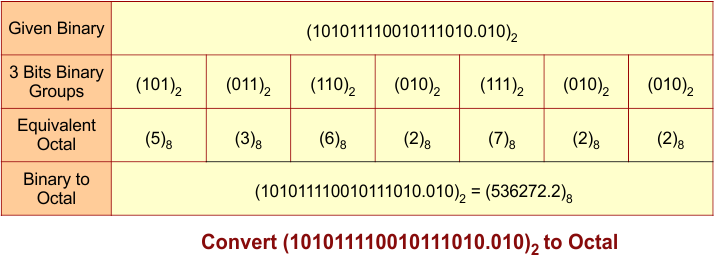
Example 02: The following diagram explains the Binary-to-octal conversion process with a fraction
4. Octal to Binary Conversion
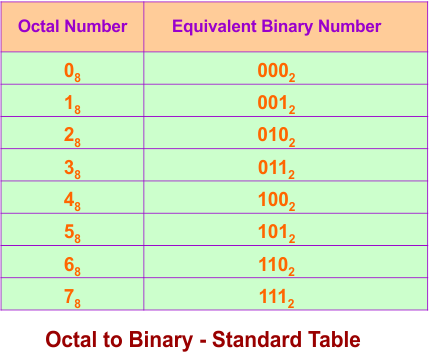
Octal to binary conversion replaces each octal digit with its equivalent 3-bit binary form. The following diagram shows the standard table of the Octal-to-Binary conversion process
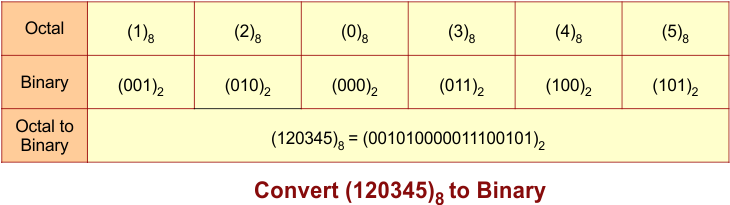
Example 01: The following diagram explains the Octal-to-Binary conversion process
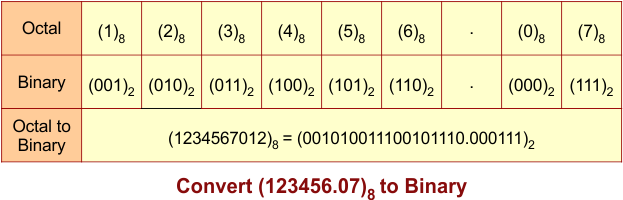
Example 02: The following diagram explains the Octal-to-Binary conversion process with fraction
5. Binary to Hexadecimal Conversion
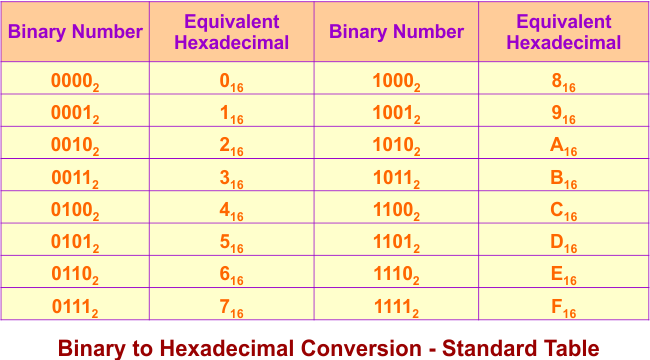
Binary to hexadecimal conversion groups binary digits into sets of four from right to left. The following diagram shows the standard table of the Binary-to-Hexadecimal conversion process
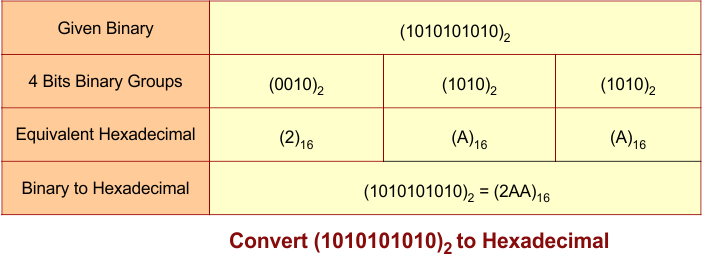
Example 01: The following diagram explains the Binary-to-Hexadecimal conversion process
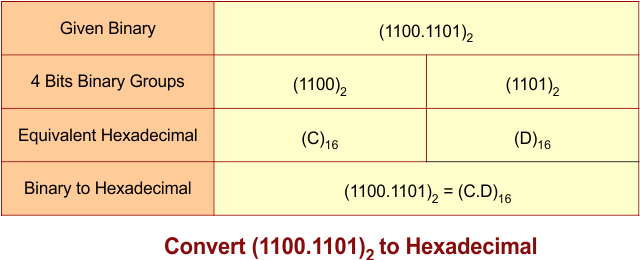
Example 02: The following diagram explains the Binary-to-Hexadecimal conversion process with a fraction
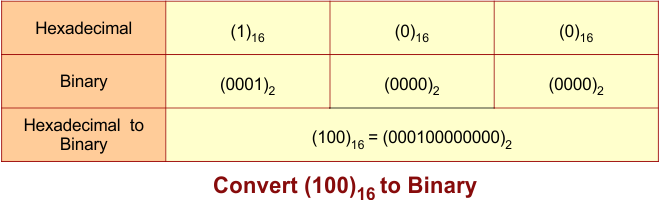
6. Hexadecimal to Binary Conversion
Hexadecimal to binary conversion converts each hexadecimal digit into a 4-bit binary equivalent. The following diagram explains the hexadecimal -to-binary conversion process
Binary Number Representation
Binary number representation is the method of storing numbers using 0s and 1s. Computers use different binary representations to handle positive numbers, negative numbers, and fractions.
Unsigned Binary Numbers
Unsigned binary numbers represent only zero and positive numbers. All bits are used to represent the number’s value.
Example: In 4-bit binary, 1010 represents 10 in decimal.
Signed Binary Numbers
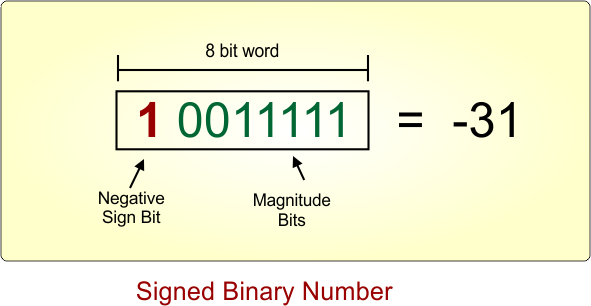
Signed binary numbers represent both positive and negative numbers. In common signed representations, the leftmost bit indicates the sign
0for positive1for negative.
Example: The following diagram shows an 8-bit signed representation of -31
One’s Complement
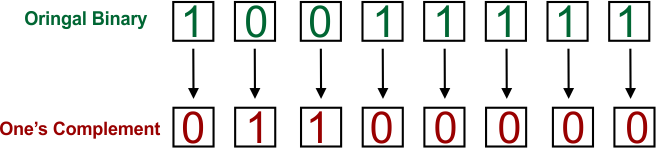
One’s complement is a method of representing negative binary numbers by changing every 0 to 1 and every 1 to 0 in the positive number’s binary representation.
Two’s Complement
Two’s complement represents negative binary numbers by first inverting all the bits and then adding 1 to the result. It is widely used by computers because it simplifies arithmetic operations.
Example:
- Positive 5:
00000101 Invert the bits:11111010Add 1:11111011
Therefore, negative 5 is 11111011 in 8-bit two’s complement.
Binary Fractions
Binary fractions represent numbers with a fractional part using binary digits (0 and 1). Each position after the binary point represents a negative power of 2, such as 1/2, 1/4, and 1/8.
Example: 0.101 in binary equals 0.625 in decimal because (1 × 1/2) + (0 × 1/4) + (1 × 1/8) = 0.625.
Binary Number Range
The binary number range is the minimum and maximum values that can be represented using a specific number of bits. The range depends on the number of bits and whether the number is unsigned or signed.
For n bits:
- Unsigned range: 0 to 2ⁿ − 1
- Signed (two’s complement) range: −2ⁿ⁻¹ to 2ⁿ⁻¹ − 1
Example using 4 bits:
- Unsigned: 0 to 15
- Signed (two’s complement): −8 to 7
Applications of Binary Number System
The binary number system is used in almost every field of computer science and technology. It plays a central role in data processing and communication systems.
Common applications include:
- Computer programming and software development
- Digital electronics and circuit design
- Memory storage and data representation
- Networking and communication systems
- Cybersecurity and encryption techniques
Advantages of Binary Number System
Binary system is widely used because of its simplicity and compatibility with digital systems. It makes computation efficient and reliable.
Key advantages include:
- Simple implementation in hardware
- Fast processing capability
- High reliability in computation
- Easy integration with digital circuits
Limitations of Binary Number System
Although binary is powerful, it also has some limitations in terms of human readability and usability.
Key limitations include:
- Difficult for humans to read large binary numbers
- Long representations of values
- Requires conversion for human understanding
- Not suitable for manual calculations
Conclusion
The Binary Number System is the foundation of modern computing. It connects seamlessly with decimal, octal, and hexadecimal systems through essential conversions and enables efficient processing of all digital data.
Mastering binary is essential for students in computer science because it builds the base for advanced topics such as programming, digital logic design, operating systems, and computer architecture.