












Binary to Decimal Conversion Examples
Binary to decimal conversion is a fundamental concept in computer science, digital electronics, and mathematics. It helps students understand how computers interpret binary data and convert it into human-readable numbers. This topic is essential for beginners and advanced learners alike, as it builds a strong foundation in number systems.
In this article, we will discuss binary to decimal conversion examples and some examples of the fractional part as well. Let’s start
What is Binary to Decimal Conversion?
Binary to decimal conversion is the process of converting a base-2 number into its equivalent base-10 number. It involves multiplying each binary digit by powers of 2 and summing the results. The detailed explanation with examples is given below using different types of binary numbers.
Steps for Binary to Decimal Conversion
Binary to decimal conversion follows a simple mathematical approach using positional values. Each digit in a binary number has a weight based on powers of 2. The step-by-step method is explained below in examples.
1. Binary to Decimal Conversion of Integer Numbers
This method focuses on converting whole binary numbers into decimal form. It is the most basic and widely used conversion technique.
- Write the binary number
- Assign powers of 2 starting from the right (2⁰, 2¹, 2², …)
- Multiply each digit with its corresponding power
- Add all the results
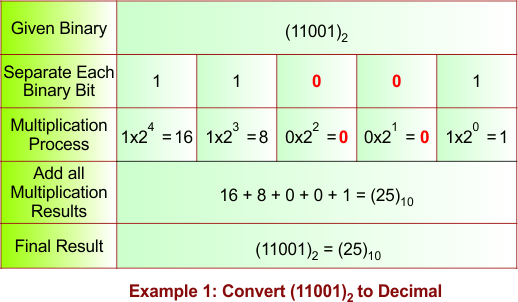
Example 1: Convert (11001)₂ to Decimal
Solution:
The following diagram shows the conversion of the binary number (11001)₂ into its equivalent decimal number.
Description:
To convert (11001)₂ into decimal, multiply each binary digit by its corresponding power of 2, starting from the rightmost digit (2⁰).
(11001)₂ = 1×2⁴ + 1×2³ + 0×2² + 0×2¹ + 1×2⁰
(11001)₂ = 16 + 8 + 0 + 0 + 1
(11001)₂ = (25)₁₀
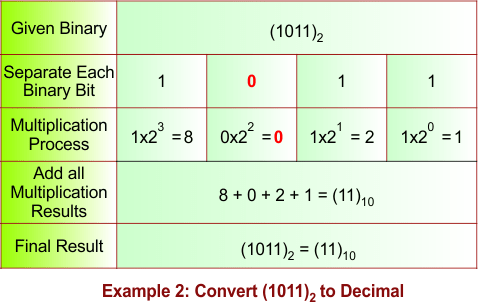
Example 2: Convert (1011)₂ to Decimal
Solution:
The following diagram shows the conversion of the binary number (1011)₂ into its equivalent decimal number.
Description:
(1011)₂ = 1×2³ + 0×2² + 1×2¹ + 1×2⁰
= 8 + 0 + 2 + 1
= (11)₁₀
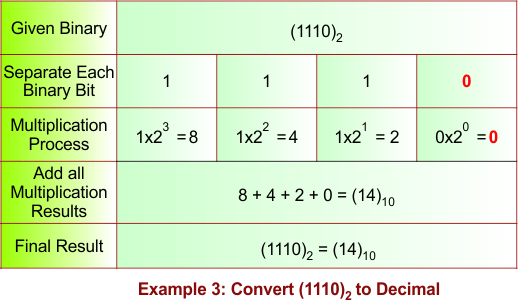
Example 3: Convert (1110)₂ to Decimal
Solution:
The following diagram shows the conversion of the binary number (1110)₂ into its equivalent decimal number.
Description:
(1110)₂ = 1×2³ + 1×2² + 1×2¹ + 0×2⁰
= 8 + 4 + 2 + 0
= (14)₁₀
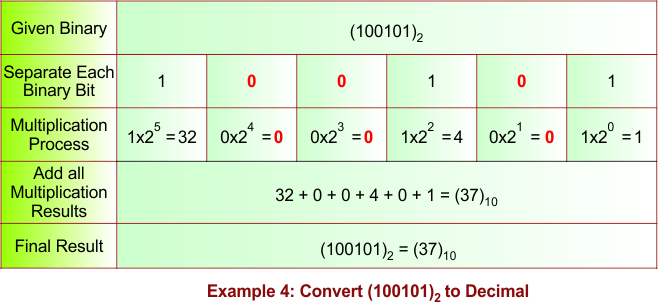
Example 4: Convert (100101)₂ to Decimal
Solution:
The following diagram shows the conversion of the binary number (100101)₂ into its equivalent decimal number.
Description:
(100101)₂ = 1×2⁵ + 0×2⁴ + 0×2³ + 1×2² + 0×2¹ + 1×2⁰
= 32 + 0 + 0 + 4 + 0 + 1
= (37)₁₀
Example 5: Convert (110110)₂ to Decimal
Solution:
The following diagram shows the conversion of the binary number (110110)₂ into its equivalent decimal number.
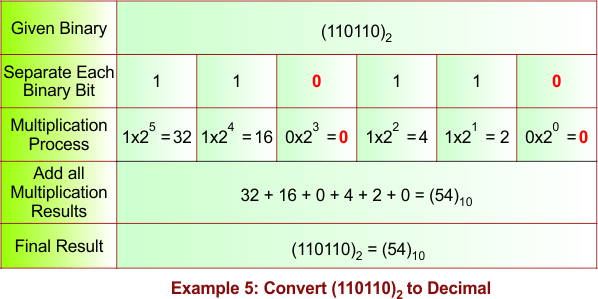
Description:
(110110)₂ = 1×2⁵ + 1×2⁴ + 0×2³ + 1×2² + 1×2¹ + 0×2⁰
= 32 + 16 + 0 + 4 + 2 + 0
= (54)₁₀
Example 6: Convert (1010111)₂ to Decimal
Solution:
The following diagram shows the conversion of the binary number (1010111)₂ into its equivalent decimal number.
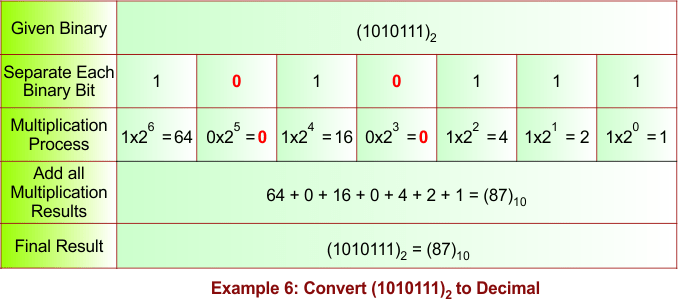
Description:
(1010111)₂ = 1×2⁶ + 0×2⁵ + 1×2⁴ + 0×2³ + 1×2² + 1×2¹ + 1×2⁰
= 64 + 0 + 16 + 0 + 4 + 2 + 1
= (87)₁₀
Example 7: Convert (1111000)₂ to Decimal
Solution:
The following diagram shows the conversion of the binary number (1111000)₂ into its equivalent decimal number.
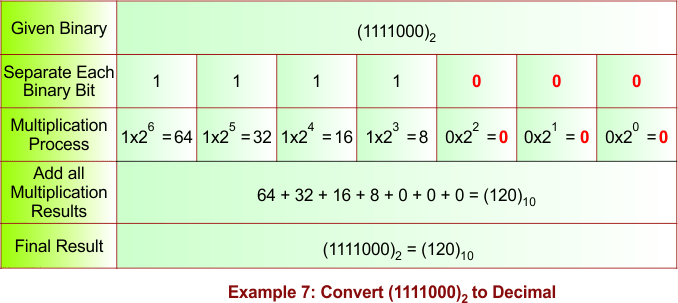
Description:
(1111000)₂ = 1×2⁶ + 1×2⁵ + 1×2⁴ + 1×2³ + 0×2² + 0×2¹ + 0×2⁰
= 64 + 32 + 16 + 8 + 0 + 0 + 0
= (120)₁₀
Example 8: Convert (1000001)₂ to Decimal
Solution:
The following diagram shows the conversion of the binary number (1000001)₂ into its equivalent decimal number.
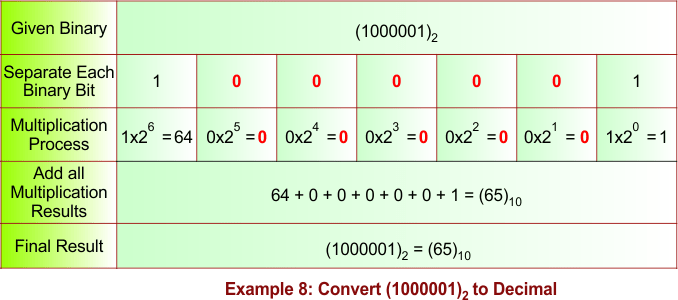
Description:
(1000001)₂ = 1×2⁶ + 0×2⁵ + 0×2⁴ + 0×2³ + 0×2² + 0×2¹ + 1×2⁰
= 64 + 0 + 0 + 0 + 0 + 0 + 1
= (65)₁₀
Example 9: Convert (11010101)₂ to Decimal
Solution:
The following diagram shows the conversion of the binary number (11010101)₂ into its equivalent decimal number.
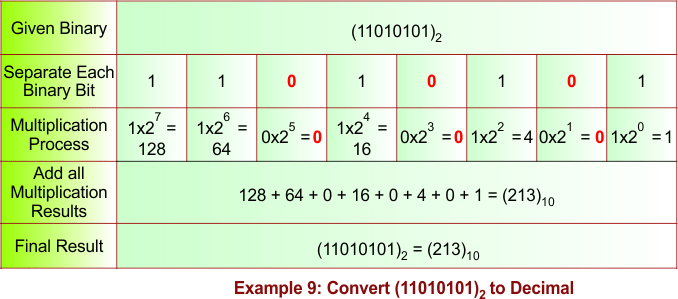
Description:
(11010101)₂ = 1×2⁷ + 1×2⁶ + 0×2⁵ + 1×2⁴ + 0×2³ + 1×2² + 0×2¹ + 1×2⁰
= 128 + 64 + 0 + 16 + 0 + 4 + 0 + 1
= (213)₁₀
Example 10: Convert (10111010)₂ to Decimal
Solution:
The following diagram shows the conversion of the binary number (10111010)₂ into its equivalent decimal number.
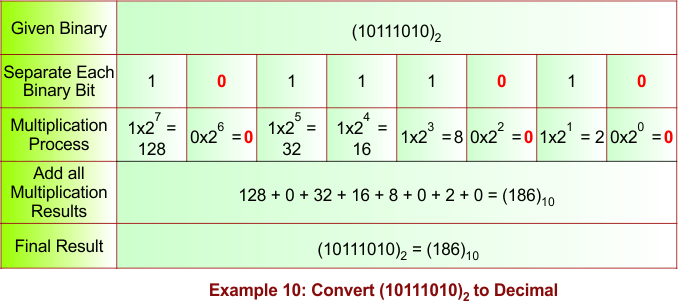
Description:
(10111010)₂ = 1×2⁷ + 0×2⁶ + 1×2⁵ + 1×2⁴ + 1×2³ + 0×2² + 1×2¹ + 0×2⁰
= 128 + 0 + 32 + 16 + 8 + 0 + 2 + 0
= (186)₁₀
Example 11: Convert (11111111)₂ to Decimal
Solution:
The following diagram shows the conversion of the binary number (11111111)₂ into its equivalent decimal number.
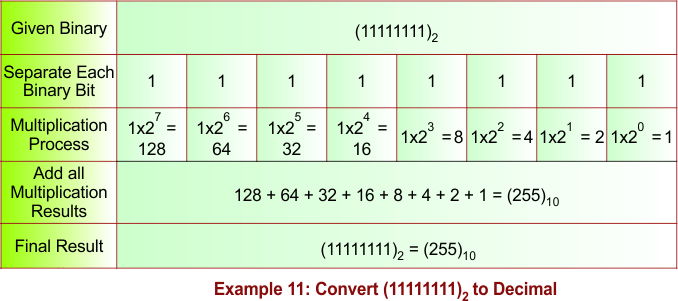
Description:
(11111111)₂ = 1×2⁷ + 1×2⁶ + 1×2⁵ + 1×2⁴ + 1×2³ + 1×2² + 1×2¹ + 1×2⁰
= 128 + 64 + 32 + 16 + 8 + 4 + 2 + 1
= (255)₁₀
Example 12: Convert (100110011)₂ to Decimal
Solution:
The following diagram shows the conversion of the binary number (100110011)₂ into its equivalent decimal number.
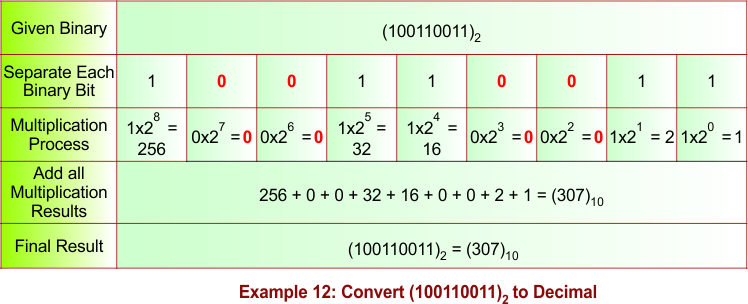
Description:
(100110011)₂ = 1×2⁸ + 0×2⁷ + 0×2⁶ + 1×2⁵ + 1×2⁴ + 0×2³ + 0×2² + 1×2¹ + 1×2⁰
= 256 + 0 + 0 + 32 + 16 + 0 + 0 + 2 + 1
= (307)₁₀
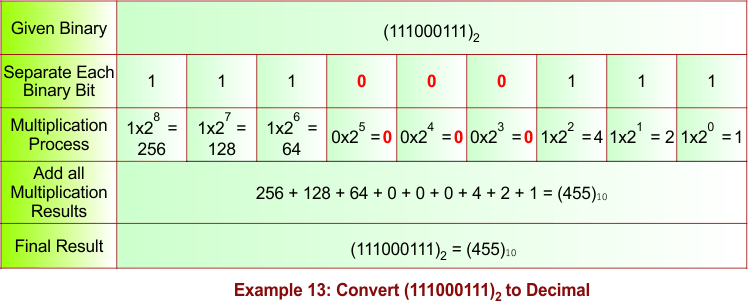
Example 13: Convert (111000111)₂ to Decimal
Solution:
The following diagram shows the conversion of the binary number (111000111)₂ into its equivalent decimal number.
Description:
(111000111)₂ = 1×2⁸ + 1×2⁷ + 1×2⁶ + 0×2⁵ + 0×2⁴ + 0×2³ + 1×2² + 1×2¹ + 1×2⁰
= 256 + 128 + 64 + 0 + 0 + 0 + 4 + 2 + 1
= (455)₁₀
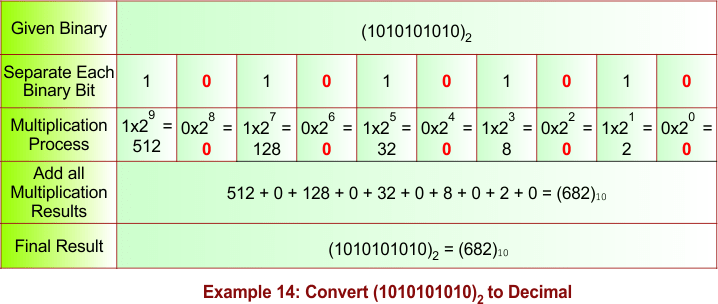
Example 14: Convert (1010101010)₂ to Decimal
Solution:
The following diagram shows the conversion of the binary number (1010101010)₂ into its equivalent decimal number.
Description:
(1010101010)₂ = 1×2⁹ + 0×2⁸ + 1×2⁷ + 0×2⁶ + 1×2⁵ + 0×2⁴ + 1×2³ + 0×2² + 1×2¹ + 0×2⁰
= 512 + 0 + 128 + 0 + 32 + 0 + 8 + 0 + 2 + 0
= (682)₁₀
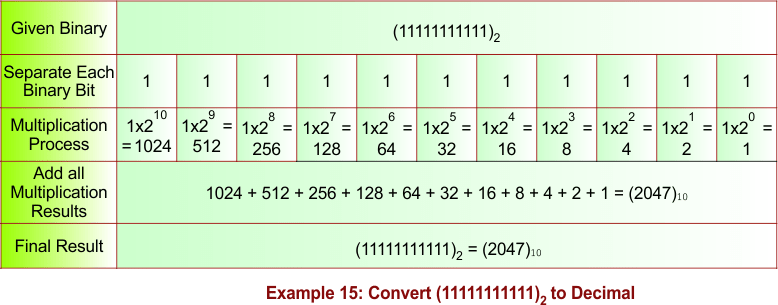
Example 15: Convert (11111111111)₂ to Decimal
Solution:
The following diagram shows the conversion of the binary number (11111111111)₂ into its equivalent decimal number.
Description:
(11111111111)₂ = 1×2¹⁰ + 1×2⁹ + 1×2⁸ + 1×2⁷ + 1×2⁶ + 1×2⁵ + 1×2⁴ + 1×2³ + 1×2² + 1×2¹ + 1×2⁰
= 1024 + 512 + 256 + 128 + 64 + 32 + 16 + 8 + 4 + 2 + 1
= (2047)₁₀
2. Binary to Decimal Conversion of Fractional Numbers
Binary fractions can also be converted into decimal by using negative powers of 2. This method is important for handling precise values in computing.
- Start from the first digit after the decimal point
- Use powers like 2⁻¹, 2⁻², 2⁻³, …
- Multiply and add the values
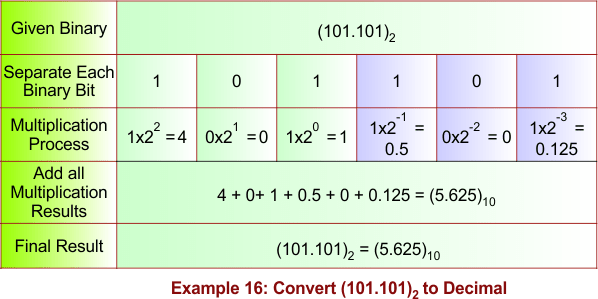
Example 16 : Convert (101.101)₂ to Decimal
Solution:
The following diagram shows the conversion of the binary number (101.101)₂ into its equivalent decimal number.
Description:
To convert a fractional binary number into decimal, convert the integer part using powers of 2 (2⁰, 2¹, …) and the fractional part using negative powers of 2 (2⁻¹, 2⁻², …).
(101.101)₂ = 1×2² + 0×2¹ + 1×2⁰ + 1×2⁻¹ + 0×2⁻² + 1×2⁻³
= 4 + 0 + 1 + 0.5 + 0 + 0.125
= (5.625)₁₀
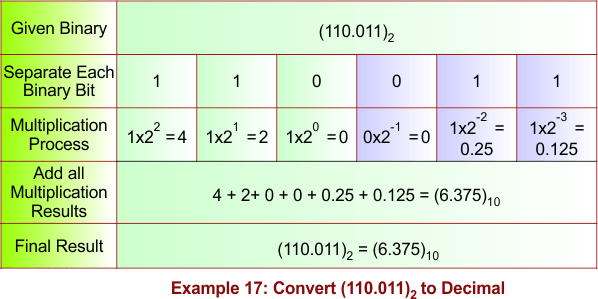
Example 17: Convert (110.011)₂ to Decimal
Solution:
The following diagram shows the conversion of the binary number (110.011)₂ into its equivalent decimal number.
Description:
(110.011)₂ = 1×2² + 1×2¹ + 0×2⁰ + 0×2⁻¹ + 1×2⁻² + 1×2⁻³
= 4 + 2 + 0 + 0 + 0.25 + 0.125
= (6.375)₁₀
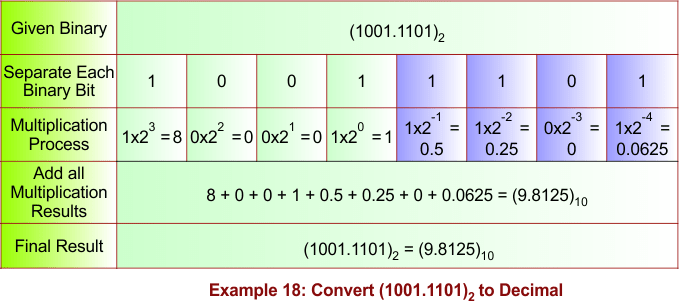
Example 18: Convert (1001.1101)₂ to Decimal
Solution:
The following diagram shows the conversion of the binary number (1001.1101)₂ into its equivalent decimal number.
Description:
(1001.1101)₂ = 1×2³ + 0×2² + 0×2¹ + 1×2⁰ + 1×2⁻¹ + 1×2⁻² + 0×2⁻³ + 1×2⁻⁴
= 8 + 0 + 0 + 1 + 0.5 + 0.25 + 0 + 0.0625
= (9.8125)₁₀
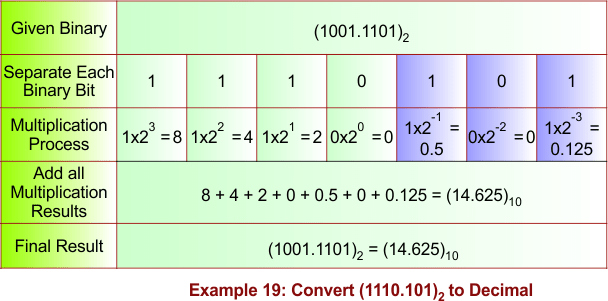
Example 19: Convert (1110.101)₂ to Decimal
Solution:
The following diagram shows the conversion of the binary number (1110.101)₂ into its equivalent decimal number.
Description:
(1110.101)₂ = 1×2³ + 1×2² + 1×2¹ + 0×2⁰ + 1×2⁻¹ + 0×2⁻² + 1×2⁻³
= 8 + 4 + 2 + 0 + 0.5 + 0 + 0.125
= (14.625)₁₀
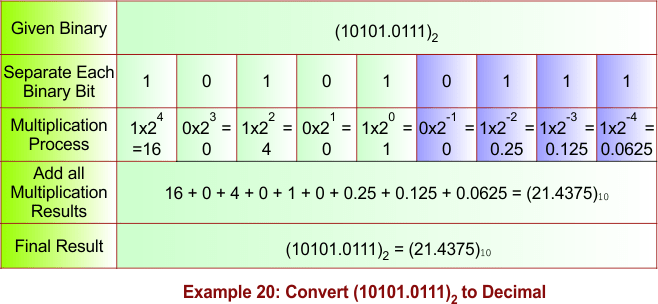
Example 20: Convert (10101.0111)₂ to Decimal
Solution:
The following diagram shows the conversion of the binary number (10101.0111)₂ into its equivalent decimal number.
Description:
(10101.0111)₂ = 1×2⁴ + 0×2³ + 1×2² + 0×2¹ + 1×2⁰ + 0×2⁻¹ + 1×2⁻² + 1×2⁻³ + 1×2⁻⁴
= 16 + 0 + 4 + 0 + 1 + 0 + 0.25 + 0.125 + 0.0625
= (21.4375)₁₀
Shortcut Method for Binary to Decimal Conversion
The shortcut method helps students quickly convert binary numbers by directly identifying place values without writing full tables. This method is useful in exams and quick calculations.
1. Using Positional Weights Directly
Instead of writing full tables, students can mentally calculate values using known powers of 2.
Example: Convert (100101)₂ to Decimal
- Positions: 2⁵, 2⁴, 2³, 2², 2¹, 2⁰
- = 1×32 + 0×16 + 0×8 + 1×4 + 0×2 + 1×1
- = 32 + 4 + 1
- = (37)₁₀
Practice Examples of Binary to Decimal Conversion
Practice examples help reinforce understanding and improve problem-solving speed. A variety of examples are provided below for better learning.
1. Example Set for Integer Numbers
These examples focus on converting binary integers into decimal values.
- (111)₂ = 1×4 + 1×2 + 1×1 = (7)₁₀
- (1000)₂ = 1×8 = (8)₁₀
- (101010)₂ = 32 + 8 + 2 = (42)₁₀
2. Example Set for Fractional Numbers
These examples improve understanding of binary fractions and precision calculations.
- (0.110)₂ = 0.5 + 0.25 = (0.75)₁₀
- (0.001)₂ = (0.125)₁₀
- (0.111)₂ = 0.5 + 0.25 + 0.125 = (0.875)₁₀
3. Example Set for Mixed Numbers
These examples combine both integer and fractional conversions for complete understanding.
- (10.1)₂ = 2 + 0.5 = (2.5)₁₀
- (111.01)₂ = 7 + 0.25 = (7.25)₁₀
- (1001.11)₂ = 9 + 0.75 = (9.75)₁₀
Common Mistakes in Binary to Decimal Conversion
Understanding common mistakes helps students avoid errors and improve accuracy. These points are essential during exams and assignments.
1. Incorrect Power Assignment
Students often assign wrong powers of 2, especially when counting from left instead of right.
- Always start from 2⁰ at the rightmost digit
2. Ignoring Fractional Powers
Many learners forget to use negative powers for fractional parts.
- Use 2⁻¹, 2⁻², etc., after the decimal point
3. Calculation Errors
Simple addition mistakes can lead to wrong answers.
- Double-check calculations carefully
Applications of Binary to Decimal Conversion
Binary to decimal conversion is widely used in real-world computing and digital systems. Understanding its applications makes the concept more meaningful.
1. Computer Systems and Programming
Binary numbers are used internally in computers, while decimal is used for display.
- Helps in debugging and understanding memory values
2. Digital Electronics
Used in circuits, logic gates, and embedded systems.
- Essential for engineers and electronics students
3. Data Representation
Used in encoding, networking, and data processing.
- Important for IT and computer science fields
Conclusion
Binary to decimal conversion is a core concept that bridges the gap between machine-level data and human understanding. By mastering integer, fractional, and mixed conversions, students can confidently solve problems in computer science and mathematics. Regular practice with examples and understanding common mistakes ensures accuracy and speed, making this topic easy and practical to apply.