












Decimal to Binary Conversion Examples
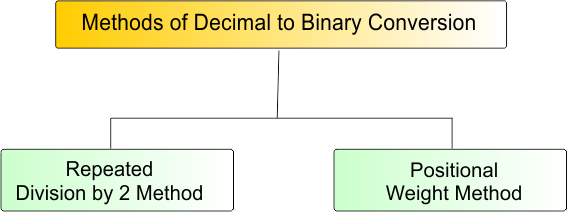
1. Repeated Division by 2 Method
This is the most common and fundamental method used to convert decimal numbers into binary form. It involves dividing the number repeatedly by 2 and recording remainders.
Algorithm for Repeated Division by 2 Method
This algorithm clearly defines each step to ensure accuracy and avoid common mistakes during conversion.
- Step 1: Start with the given decimal number N
- Step 2: Divide by 2
- Step 3: Record the remainder (it will always be 0 or 1)
- Step 4: Update the quotient obtained from the division
- Step 5: Repeat Steps 2 to 4 until N=0
- Step 6: Write all recorded remainders in reverse order (from last to first)
- Step 7: The resulting sequence is the binary equivalent
The following diagram explains the entire algorithm of decimal to binary conversion
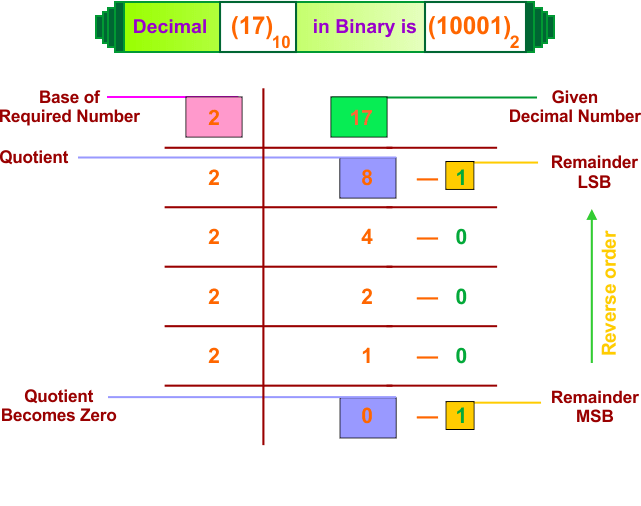
Here are the top 15 examples of Decimal to Binary conversions using the repeated by 2 method
Example 1: Convert Decimal (6)₁₀ to Binary
Solution:
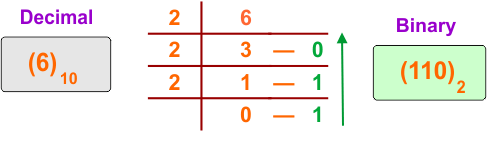
The following diagram shows the conversion of the decimal number (6)₁₀ into its equivalent binary
Description:
6 is divided by 2, and the quotient is 3 with a remainder of 0.
3 is divided by 2, and the quotient is 1 with a remainder of 1.
1 is divided by 2, and the quotient is 0 with a remainder of 1.
Now, we write all remainders from bottom to top to get the final binary number. The binary representation of the decimal number (6)₁₀ is (110)₂.
Example 2: Convert Decimal (16)₁₀ to Binary
Solution:
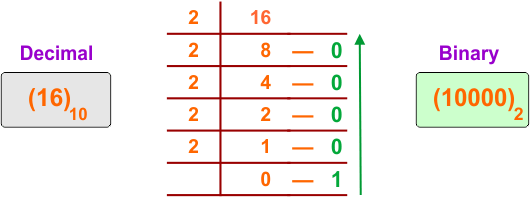
The following diagram shows the conversion of the decimal number (16)₁₀ into its equivalent binary
Description:
16 is divided by 2, and the quotient is 8 with a remainder of 0.
8 is divided by 2, and the quotient is 4 with a remainder of 0.
4 is divided by 2, and the quotient is 2 with a remainder of 0.
2 is divided by 2, and the quotient is 1 with a remainder of 0.
1 is divided by 2, and the quotient is 0 with a remainder of 1.
Now, we write all remainders from bottom to top. The binary representation of the decimal number (16)₁₀ is (10000)₂.
Example 3: Convert Decimal (25)₁₀ to Binary
Solution:
The following diagram shows the conversion of the decimal number (25)₁₀ into its equivalent binary
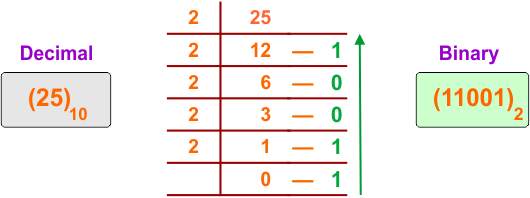
Description:
25 is divided by 2, and the quotient is 12 with a remainder of 1.
12 is divided by 2, and the quotient is 6 with a remainder of 0.
6 is divided by 2, and the quotient is 3 with a remainder of 0.
3 is divided by 2, and the quotient is 1 with a remainder of 1.
1 is divided by 2, and the quotient is 0 with a remainder of 1.
Now, we write all remainders from bottom to top. The binary representation of the decimal number (25)₁₀ is (11001)₂.
Example 4: Convert Decimal (42)₁₀ to Binary
Solution:
The following diagram shows the conversion of the decimal number (42)₁₀ into its equivalent binary
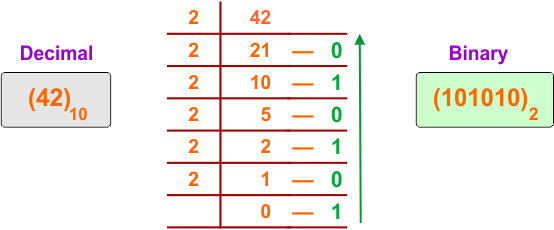
Description:
42 is divided by 2, and the quotient is 21 with a remainder of 0.
21 is divided by 2, and the quotient is 10 with a remainder of 1.
10 is divided by 2, and the quotient is 5 with a remainder of 0.
5 is divided by 2, and the quotient is 2 with a remainder of 1.
2 is divided by 2, and the quotient is 1 with a remainder of 0.
1 is divided by 2, and the quotient is 0 with a remainder of 1.
Now, we write all remainders from bottom to top. The binary representation of the decimal number (42)₁₀ is (101010)₂.
Example 5: Convert Decimal (58)₁₀ to Binary
Solution:
The following diagram shows the conversion of the decimal number (58)₁₀ into its equivalent binary
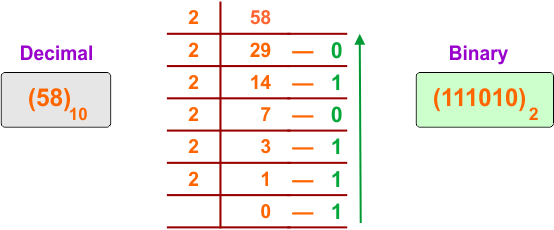
Description:
58 is divided by 2, and the quotient is 29 with a remainder of 0.
29 is divided by 2, and the quotient is 14 with a remainder of 1.
14 is divided by 2, and the quotient is 7 with a remainder of 0.
7 is divided by 2, and the quotient is 3 with a remainder of 1.
3 is divided by 2, and the quotient is 1 with a remainder of 1.
1 is divided by 2, and the quotient is 0 with a remainder of 1.
Now, we write all remainders from bottom to top. The binary representation of the decimal number (58)₁₀ is (111010)₂.
Example 6: Convert Decimal (100)₁₀ to Binary
Solution:
The following diagram shows the conversion of the decimal number (100)₁₀ into its equivalent binary
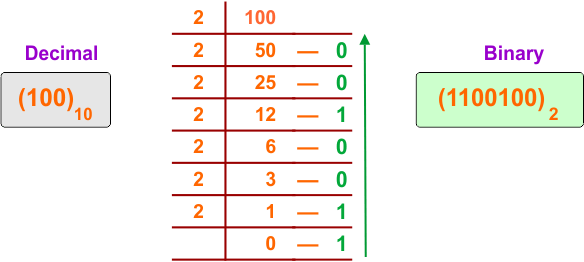
Description:
100 is divided by 2, and the quotient is 50 with a remainder of 0.
50 is divided by 2, and the quotient is 25 with a remainder of 0.
25 is divided by 2, and the quotient is 12 with a remainder of 1.
12 is divided by 2, and the quotient is 6 with a remainder of 0.
6 is divided by 2, and the quotient is 3 with a remainder of 0.
3 is divided by 2, and the quotient is 1 with a remainder of 1.
1 is divided by 2, and the quotient is 0 with a remainder of 1.
Now, we write all remainders from bottom to top. The binary representation of the decimal number (100)₁₀ is (1100100)₂.
Example 7: Convert Decimal (156)₁₀ to Binary
Solution:
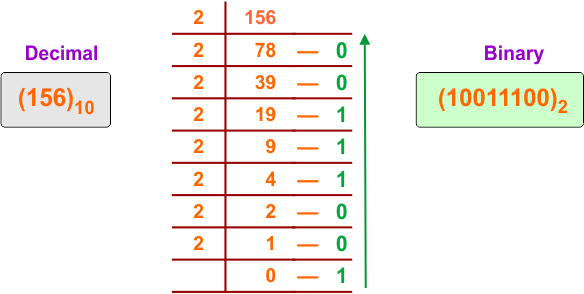
The following diagram shows the conversion of the decimal number (156)₁₀ into its equivalent binary
Description:
156 is divided by 2, and the quotient is 78 with a remainder of 0.
78 is divided by 2, and the quotient is 39 with a remainder of 0.
39 is divided by 2, and the quotient is 19 with a remainder of 1.
19 is divided by 2, and the quotient is 9 with a remainder of 1.
9 is divided by 2, and the quotient is 4 with a remainder of 1.
4 is divided by 2, and the quotient is 2 with a remainder of 0.
2 is divided by 2, and the quotient is 1 with a remainder of 0.
1 is divided by 2, and the quotient is 0 with a remainder of 1.
Now, we write all remainders from bottom to top. The binary representation of the decimal number (156)₁₀ is (10011100)₂.
Example 8: Convert Decimal (200)₁₀ to Binary
Solution:
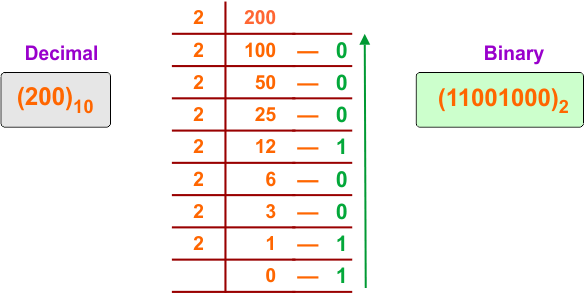
The following diagram shows the conversion of the decimal number (200)₁₀ into its equivalent binary
Description:
200 is divided by 2, and the quotient is 100 with a remainder of 0.
100 is divided by 2, and the quotient is 50 with a remainder of 0.
50 is divided by 2, and the quotient is 25 with a remainder of 0.
25 is divided by 2, and the quotient is 12 with a remainder of 1.
12 is divided by 2, and the quotient is 6 with a remainder of 0.
6 is divided by 2, and the quotient is 3 with a remainder of 0.
3 is divided by 2, and the quotient is 1 with a remainder of 1.
1 is divided by 2, and the quotient is 0 with a remainder of 1.
Now, we write all remainders from bottom to top. The binary representation of the decimal number (200)₁₀ is (11001000)₂.
Example 9: Convert Decimal (255)₁₀ to Binary
Solution:
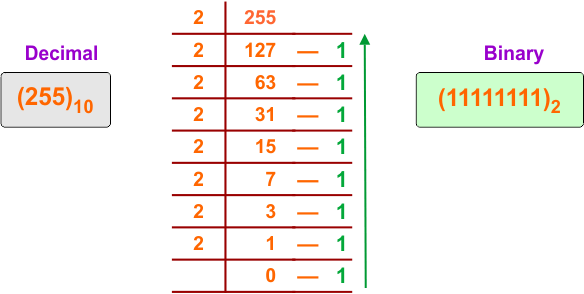
The following diagram shows the conversion of the decimal number (255)₁₀ into its equivalent binary
Description:
255 is divided by 2, and the quotient is 127 with a remainder of 1.
127 is divided by 2, and the quotient is 63 with a remainder of 1.
63 is divided by 2, and the quotient is 31 with a remainder of 1.
31 is divided by 2, and the quotient is 15 with a remainder of 1.
15 is divided by 2, and the quotient is 7 with a remainder of 1.
7 is divided by 2, and the quotient is 3 with a remainder of 1.
3 is divided by 2, and the quotient is 1 with a remainder of 1.
1 is divided by 2, and the quotient is 0 with a remainder of 1.
Now, we write all remainders from bottom to top. The binary representation of the decimal number (255)₁₀ is (11111111)₂.
Example 10: Convert Decimal (1024)₁₀ to Binary
Solution:
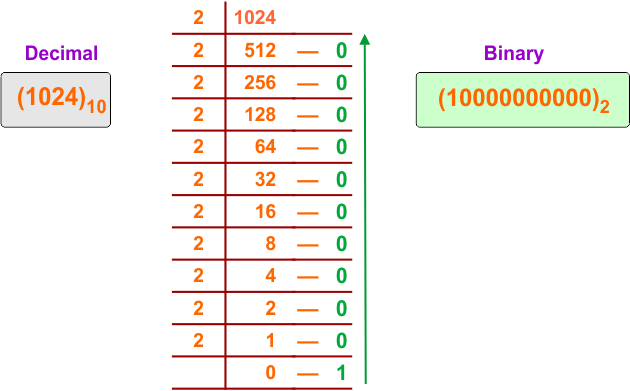
The following diagram shows the conversion of the decimal number (1024)₁₀ into its equivalent binary
Description:
1024 is divided by 2, and the quotient is 512 with a remainder of 0.
512 is divided by 2, and the quotient is 256 with a remainder of 0.
256 is divided by 2, and the quotient is 128 with a remainder of 0.
128 is divided by 2, and the quotient is 64 with a remainder of 0.
64 is divided by 2, and the quotient is 32 with a remainder of 0.
32 is divided by 2, and the quotient is 16 with a remainder of 0.
16 is divided by 2, and the quotient is 8 with a remainder of 0.
8 is divided by 2, and the quotient is 4 with a remainder of 0.
4 is divided by 2, and the quotient is 2 with a remainder of 0.
2 is divided by 2, and the quotient is 1 with a remainder of 0.
1 is divided by 2, and the quotient is 0 with a remainder of 1.
Now, we write all remainders from bottom to top. The binary representation of the decimal number (1150)₁₀ is (10000000000)₂.
Example 11: Convert Decimal (1150)₁₀ to Binary
Solution:
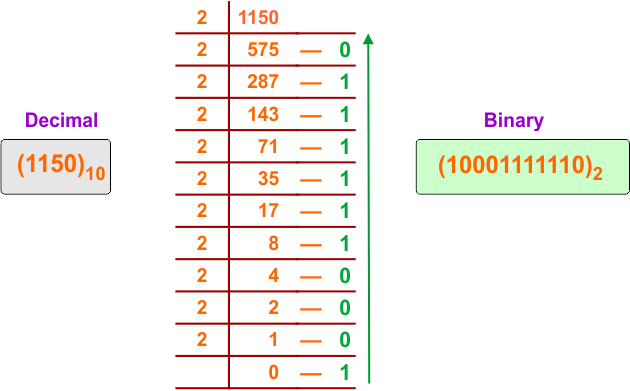
The following diagram shows the conversion of the decimal number (1150)₁₀ into its equivalent binary
Description:
1150 is divided by 2, and the quotient is 575 with a remainder of 0.
575 is divided by 2, and the quotient is 287 with a remainder of 1.
287 is divided by 2, and the quotient is 143 with a remainder of 1.
143 is divided by 2, and the quotient is 71 with a remainder of 1.
71 is divided by 2, and the quotient is 35 with a remainder of 1.
35 is divided by 2, and the quotient is 17 with a remainder of 1.
17 is divided by 2, and the quotient is 8 with a remainder of 1.
8 is divided by 2, and the quotient is 4 with a remainder of 0.
4 is divided by 2, and the quotient is 2 with a remainder of 0.
2 is divided by 2, and the quotient is 1 with a remainder of 0.
1 is divided by 2, and the quotient is 0 with a remainder of 1.
Now, we write all remainders from bottom to top. The binary representation of the decimal number (1150)₁₀ is (10001111110)₂.
Example 12: Convert Decimal (11234)₁₀ to Binary
Solution:
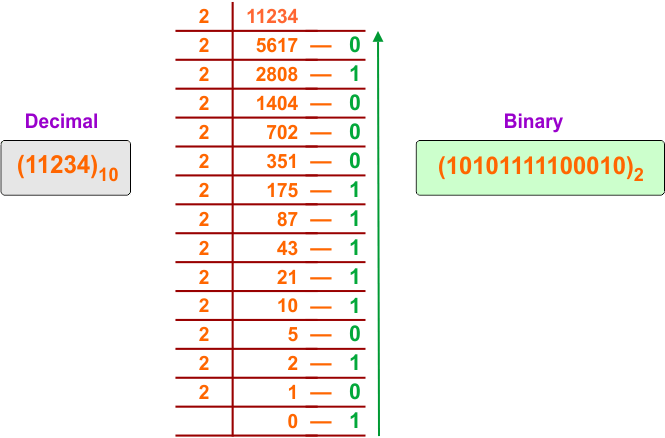
The following diagram shows the conversion of the decimal number (11234)₁₀ into its equivalent binary
Description:
11234 is divided by 2, and the quotient is 5617 with a remainder of 0.
5617 is divided by 2, and the quotient is 2808 with a remainder of 1.
2808 is divided by 2, and the quotient is 1404 with a remainder of 0.
1404 is divided by 2, and the quotient is 702 with a remainder of 0.
702 is divided by 2, and the quotient is 351 with a remainder of 0.
351 is divided by 2, and the quotient is 175 with a remainder of 1.
175 is divided by 2, and the quotient is 87 with a remainder of 1.
87 is divided by 2, and the quotient is 43 with a remainder of 1.
43 is divided by 2, and the quotient is 21 with a remainder of 1.
21 is divided by 2, and the quotient is 10 with a remainder of 1.
10 is divided by 2, and the quotient is 5 with a remainder of 0.
5 is divided by 2, and the quotient is 2 with a remainder of 1.
2 is divided by 2, and the quotient is 1 with a remainder of 0.
1 is divided by 2, and the quotient is 0 with a remainder of 1.
Now, we write all remainders from bottom to top.
The binary representation of the decimal number (11234)₁₀ is (10101111100010)₂.
Example 13: Convert Decimal (55890)₁₀ to Binary
Solution:
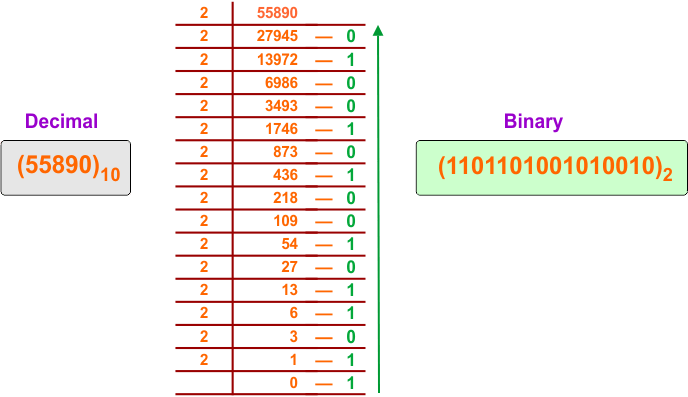
The following diagram shows the conversion of the decimal number (55890)₁₀ into its equivalent binary
Description:
55890 is divided by 2, and the quotient is 27945 with a remainder of 0.
27945 is divided by 2, and the quotient is 13972 with a remainder of 1.
13972 is divided by 2, and the quotient is 6986 with a remainder of 0.
6986 is divided by 2, and the quotient is 3493 with a remainder of 0.
3493 is divided by 2, and the quotient is 1746 with a remainder of 1.
1746 is divided by 2, and the quotient is 873 with a remainder of 0.
873 is divided by 2, and the quotient is 436 with a remainder of 1.
436 is divided by 2, and the quotient is 218 with a remainder of 0.
218 is divided by 2, and the quotient is 109 with a remainder of 0.
109 is divided by 2, and the quotient is 54 with a remainder of 1.
54 is divided by 2, and the quotient is 27 with a remainder of 0.
27 is divided by 2, and the quotient is 13 with a remainder of 1.
13 is divided by 2, and the quotient is 6 with a remainder of 1.
6 is divided by 2, and the quotient is 3 with a remainder of 0.
3 is divided by 2, and the quotient is 1 with a remainder of 1.
1 is divided by 2, and the quotient is 0 with a remainder of 1.
Now, we write all remainders from bottom to top. The binary representation of the decimal number (55890)₁₀ is (1101101001010010)₂.
Example 14: Convert Decimal (881123)₁₀ to Binary
Solution:
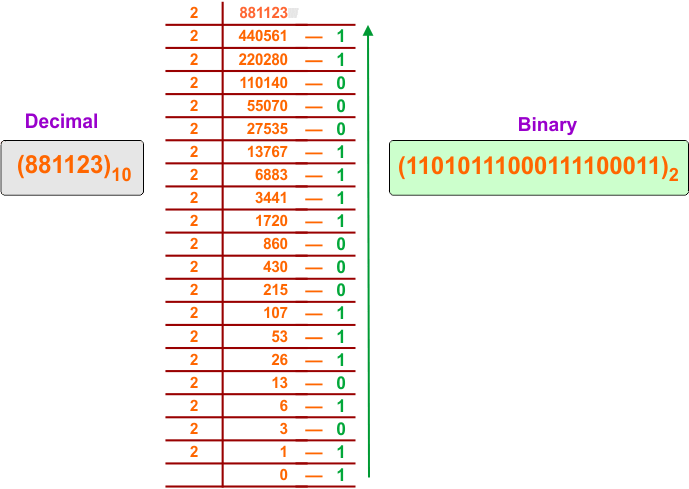
The following diagram shows the conversion of the decimal number (881123)₁₀ into its equivalent binary
Description:
881123 is divided by 2, and the quotient is 440561 with a remainder of 1.
440561 is divided by 2, and the quotient is 220280 with a remainder of 1.
220280 is divided by 2, and the quotient is 110140 with a remainder of 0.
110140 is divided by 2, and the quotient is 55070 with a remainder of 0.
55070 is divided by 2, and the quotient is 27535 with a remainder of 0.
27535 is divided by 2, and the quotient is 13767 with a remainder of 1.
13767 is divided by 2, and the quotient is 6883 with a remainder of 1.
6883 is divided by 2, and the quotient is 3441 with a remainder of 1.
3441 is divided by 2, and the quotient is 1720 with a remainder of 1.
1720 is divided by 2, and the quotient is 860 with a remainder of 0.
860 is divided by 2, and the quotient is 430 with a remainder of 0.
430 is divided by 2, and the quotient is 215 with a remainder of 0.
215 is divided by 2, and the quotient is 107 with a remainder of 1.
107 is divided by 2, and the quotient is 53 with a remainder of 1.
53 is divided by 2, and the quotient is 26 with a remainder of 1.
26 is divided by 2, and the quotient is 13 with a remainder of 0.
13 is divided by 2, and the quotient is 6 with a remainder of 1.
6 is divided by 2, and the quotient is 3 with a remainder of 0.
3 is divided by 2, and the quotient is 1 with a remainder of 1.
1 is divided by 2, and the quotient is 0 with a remainder of 1.
Now, we write all remainders from bottom to top. The binary representation of the decimal number (881123)₁₀ is (11010111000111100011)₂.
Fractional Decimal to Binary Conversion
Decimal fractions (numbers with decimal points) require a different method involving multiplication. This is crucial for representing real numbers in computing.
A list of fractional conversion steps and examples is given below.
Algorithm for Multiplication by 2 Method (Fractional Part)
This method converts decimal fractions into binary by repeatedly multiplying by 2 and extracting integer parts.
- Step 1: Take the decimal fractional number (for example, 0.x)
- Step 2: Multiply the fractional number by 2
- Step 3: Note the integer part of the result (either 0 or 1)
- Step 4: Keep only the fractional part of the result
- Step 5: Repeat Steps 2 to 4 with the new fractional part
- Step 6: Continue the process until the fractional part becomes 0, or the required precision (number of bits mostly 3,4 bits only) is achieved.
- Step 7: Write all the recorded integer parts in the same order to get the binary fraction
This method is widely used for floating-point number conversion.
Example 01: Convert (0.625)₁₀ to Binary
Solution:
The following diagram shows the conversion of the decimal number (0.625)₁₀ into its equivalent binary
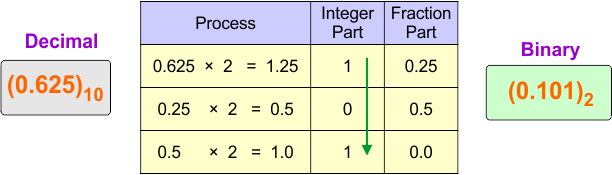
Description:
0.625 is multiplied by 2 and the result is 1.25, so the integer part is 1
0.25 is multiplied by 2 and the result is 0.5, so the integer part is 0
0.5 is multiplied by 2 and the result is 1.0, so the integer part is 1
Binary fraction = 0.101₂
Example 02: Convert (0.375)₁₀ to Binary
Solution:
The following diagram shows the conversion of the decimal number (0.375)₁₀ into its equivalent binary
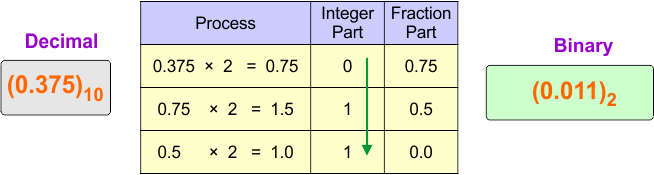
Description:
0.375 is multiplied by 2 and the result is 0.75, so the integer part is 0
0.75 is multiplied by 2 and the result is 1.5, so the integer part is 1
0.5 is multiplied by 2 and the result is 1.0, so the integer part is 1
Binary fraction = 0.011₂
Example 03: Convert (0.8125)₁₀ to Binary
Solution:
The following diagram shows the conversion of the decimal number (0.8125)₁₀ into its equivalent binary
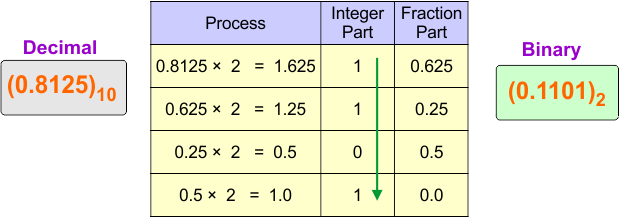
Description:
0.8125 is multiplied by 2 and the result is 1.625, so the integer part is 1
0.625 is multiplied by 2 and the result is 1.25, so the integer part is 1
0.25 is multiplied by 2 and the result is 0.5, so the integer part is 0
0.5 is multiplied by 2 and the result is 1.0, so the integer part is 1
Binary fraction = 0.1101₂
Example 04: Convert (0.1)₁₀ to Binary (Approximate)
Solution:
The following diagram shows the conversion of the decimal number (0.1)₁₀ into its equivalent binary
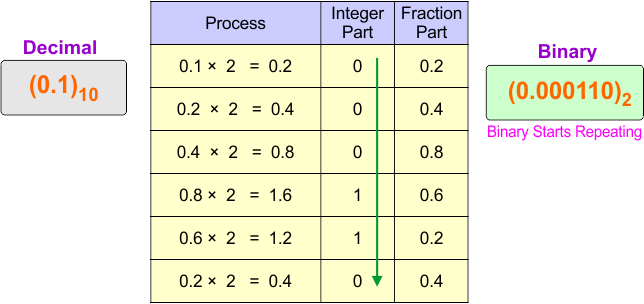
Description:
0.1 is multiplied by 2 and the result is 0.2, so the integer part is 0
0.2 is multiplied by 2 and the result is 0.4, so the integer part is 0
0.4 is multiplied by 2 and the result is 0.8, so the integer part is 0
0.8 is multiplied by 2 and the result is 1.6, so the integer part is 1
0.6 is multiplied by 2 and the result is 1.2, so the integer part is 1
0.2 is multiplied by 2 and the result is 0.4, so the integer part is 0
(Binary starts repeating)
Binary fraction ≈ (0.000110)2
Example 05: Convert (0.45)₁₀ to Binary (Approximate up to 4 bits)
Solution:
The following diagram shows the conversion of the decimal number (0.45)₁₀ into its equivalent binary
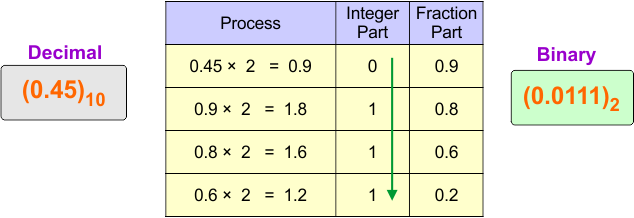
Description:
0.45 is multiplied by 2 and the result is 0.9, so the integer part is 0
0.9 is multiplied by 2 and the result is 1.8, so the integer part is 1
0.8 is multiplied by 2 and the result is 1.6, so the integer part is 1
0.6 is multiplied by 2 and the result is 1.2, so the integer part is 1
Binary fraction ≈ 0.0111₂
Example 06: Convert (16.625)₁₀ to Binary
Solution:
The following diagram shows the conversion of the decimal number (16.625)₁₀ into its equivalent binary
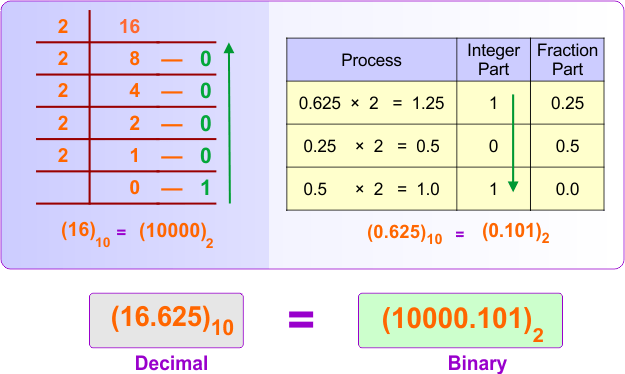
Integer Part Description:
16 is divided by 2, and the quotient is 8 with a remainder of 0.
8 is divided by 2, and the quotient is 4 with a remainder of 0.
4 is divided by 2, and the quotient is 2 with a remainder of 0.
2 is divided by 2, and the quotient is 1 with a remainder of 0.
1 is divided by 2, and the quotient is 0 with a remainder of 1.
Now, we write all remainders from bottom to top. The binary representation of the decimal number (16)₁₀ is (10000)₂.
Fraction Part Description:
0.625 is multiplied by 2 and the result is 1.25, so the integer part is 1
0.25 is multiplied by 2 and the result is 0.5, so the integer part is 0
0.5 is multiplied by 2 and the result is 1.0, so the integer part is 1
Binary fraction = 0.101₂
Final Answer:
(16.625)₁₀ = (10000.101)₂
Example 07: Convert (25.375)₁₀ to Binary
Solution:
The following diagram shows the conversion of the decimal number (25.375)₁₀ into its equivalent binary
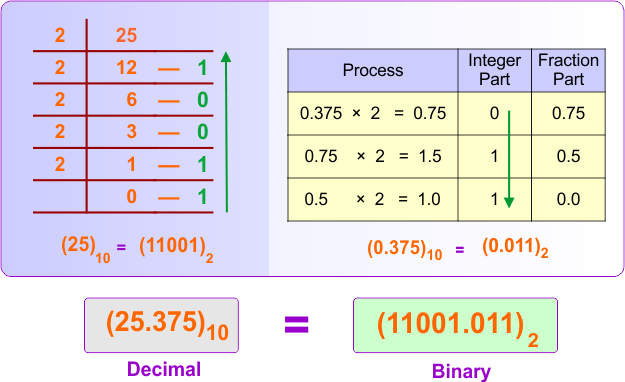
Integer Part Description:
25 is divided by 2 and the quotient is 12 with a remainder of 1
12 is divided by 2 and the quotient is 6 with a remainder of 0
6 is divided by 2 and the quotient is 3 with a remainder of 0
3 is divided by 2 and the quotient is 1 with a remainder of 1
1 is divided by 2 and the quotient is 0 with a remainder of 1
Binary integer part = 11001₂
Fraction Part Description:
0.375 is multiplied by 2 and the result is 0.75, so the integer part is 0
0.75 is multiplied by 2 and the result is 1.5, so the integer part is 1
0.5 is multiplied by 2 and the result is 1.0, so the integer part is 1
Binary fraction = 0.011₂
Final Answer:
(25.375)₁₀ = (11001.011)₂
Example 08: Convert (56.8125)₁₀ to Binary
Solution:
The following diagram shows the conversion of the decimal number (56.8125)₁₀ into its equivalent binary
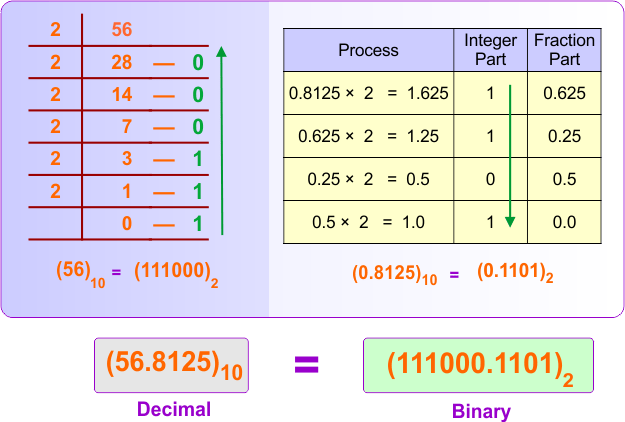
Integer Part Description:
56 is divided by 2 and the quotient is 28 with a remainder of 0
28 is divided by 2 and the quotient is 14 with a remainder of 0
14 is divided by 2 and the quotient is 7 with a remainder of 0
7 is divided by 2 and the quotient is 3 with a remainder of 1
3 is divided by 2 and the quotient is 1 with a remainder of 1
1 is divided by 2 and the quotient is 0 with a remainder of 1
Binary integer part = 111000₂
Fraction Part Description:
0.8125 is multiplied by 2 and the result is 1.625, so the integer part is 1
0.625 is multiplied by 2 and the result is 1.25, so the integer part is 1
0.25 is multiplied by 2 and the result is 0.5, so the integer part is 0
0.5 is multiplied by 2 and the result is 1.0, so the integer part is 1
Binary fraction = 0.1101₂
Final Answer:
(56.8125)₁₀ = (111000.1101)₂
Example 09: Convert (100.1)₁₀ to Binary (Approximate)
Solution:
The following diagram shows the conversion of the decimal number (100.1)₁₀ into its equivalent binary
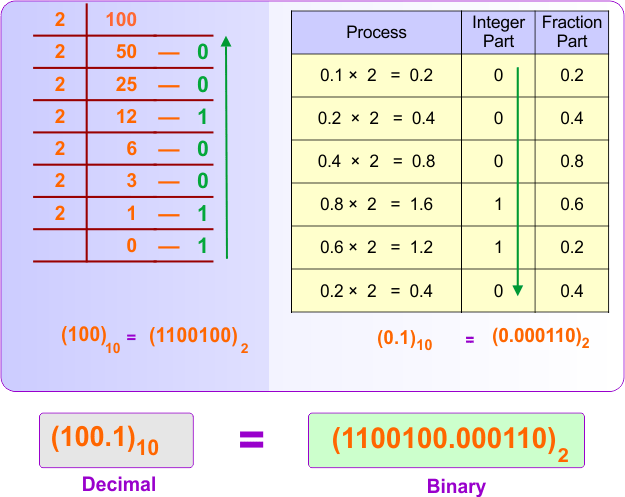
Integer Part Description:
100 is divided by 2 and the quotient is 50 with a remainder of 0
50 is divided by 2 and the quotient is 25 with a remainder of 0
25 is divided by 2 and the quotient is 12 with a remainder of 1
12 is divided by 2 and the quotient is 6 with a remainder of 0
6 is divided by 2 and the quotient is 3 with a remainder of 0
3 is divided by 2 and the quotient is 1 with a remainder of 1
1 is divided by 2 and the quotient is 0 with a remainder of 1
Binary integer part = 1100100₂
Fraction Part Description:
0.1 is multiplied by 2 and the result is 0.2, so the integer part is 0
0.2 is multiplied by 2 and the result is 0.4, so the integer part is 0
0.4 is multiplied by 2 and the result is 0.8, so the integer part is 0
0.8 is multiplied by 2 and the result is 1.6, so the integer part is 1
0.6 is multiplied by 2 and the result is 1.2, so the integer part is 1
0.2 is multiplied by 2 and the result is 0.4, so the integer part is 0
(Binary starts repeating)
Binary fraction ≈ 0.000110₂
Final Answer:
(100.1)₁₀ ≈ (1100100.000110)₂
Example 10: Convert (255.45)₁₀ to Binary (Approximate up to 4 bits)
Solution:
The following diagram shows the conversion of the decimal number (255.45)₁₀ into its equivalent binary
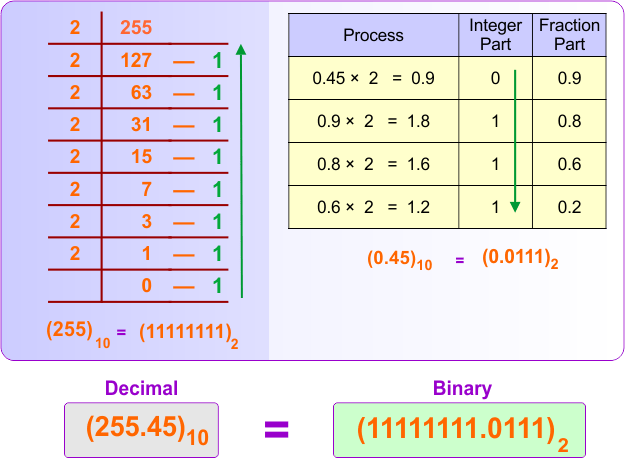
Integer Part Description:
255 is divided by 2 and the quotient is 127 with a remainder of 1
127 is divided by 2 and the quotient is 63 with a remainder of 1
63 is divided by 2 and the quotient is 31 with a remainder of 1
31 is divided by 2 and the quotient is 15 with a remainder of 1
15 is divided by 2 and the quotient is 7 with a remainder of 1
7 is divided by 2 and the quotient is 3 with a remainder of 1
3 is divided by 2 and the quotient is 1 with a remainder of 1
1 is divided by 2 and the quotient is 0 with a remainder of 1
Binary integer part = 11111111₂
Fraction Part Description:
0.45 is multiplied by 2 and the result is 0.9, so the integer part is 0
0.9 is multiplied by 2 and the result is 1.8, so the integer part is 1
0.8 is multiplied by 2 and the result is 1.6, so the integer part is 1
0.6 is multiplied by 2 and the result is 1.2, so the integer part is 1
Binary fraction ≈ 0.0111₂
Final Answer:
(255.45)₁₀ ≈ (11111111.0111)₂
This method is essential for representing real-world numerical data in binary systems.
Decimal to Binary Conversion Examples for Quick Practice
Practicing different decimal values improves speed and accuracy in conversions. A list of decimal to binary examples is given below.
| Decimal | Binary | Decimal | Binary | Decimal | Binary | Decimal | Binary |
|---|---|---|---|---|---|---|---|
| 0 | 0 | 25 | 11001 | 50 | 110010 | 75 | 1001011 |
| 1 | 1 | 26 | 11010 | 51 | 110011 | 76 | 1001100 |
| 2 | 10 | 27 | 11011 | 52 | 110100 | 77 | 1001101 |
| 3 | 11 | 28 | 11100 | 53 | 110101 | 78 | 1001110 |
| 4 | 100 | 29 | 11101 | 54 | 110110 | 79 | 1001111 |
| 5 | 101 | 30 | 11110 | 55 | 110111 | 80 | 1010000 |
| 6 | 110 | 31 | 11111 | 56 | 111000 | 81 | 1010001 |
| 7 | 111 | 32 | 100000 | 57 | 111001 | 82 | 1010010 |
| 8 | 1000 | 33 | 100001 | 58 | 111010 | 83 | 1010011 |
| 9 | 1001 | 34 | 100010 | 59 | 111011 | 84 | 1010100 |
| 10 | 1010 | 35 | 100011 | 60 | 111100 | 85 | 1010101 |
| 11 | 1011 | 36 | 100100 | 61 | 111101 | 86 | 1010110 |
| 12 | 1100 | 37 | 100101 | 62 | 111110 | 87 | 1010111 |
| 13 | 1101 | 38 | 100110 | 63 | 111111 | 88 | 1011000 |
| 14 | 1110 | 39 | 100111 | 64 | 1000000 | 89 | 1011001 |
| 15 | 1111 | 40 | 101000 | 65 | 1000001 | 90 | 1011010 |
| 16 | 10000 | 41 | 101001 | 66 | 1000010 | 91 | 1011011 |
| 17 | 10001 | 42 | 101010 | 67 | 1000011 | 92 | 1011100 |
| 18 | 10010 | 43 | 101011 | 68 | 1000100 | 93 | 1011101 |
| 19 | 10011 | 44 | 101100 | 69 | 1000101 | 94 | 1011110 |
| 20 | 10100 | 45 | 101101 | 70 | 1000110 | 95 | 1011111 |
| 21 | 10101 | 46 | 101110 | 71 | 1000111 | 96 | 1100000 |
| 22 | 10110 | 47 | 101111 | 72 | 1001000 | 97 | 1100001 |
| 23 | 10111 | 48 | 110000 | 73 | 1001001 | 98 | 1100010 |
| 24 | 11000 | 49 | 110001 | 74 | 1001010 | 99 | 1100011 |
2. Positional Weight (Sum of Powers of 2) Method
The Positional Weight Method (also known as the Sum of Powers of 2) is a technique used to convert decimal numbers into binary (Base-2) by breaking the decimal value down into a sum of unique powers of 2.
Algorithm for Positional Weight (Sum of Powers of 2) Method
This structured algorithm helps students accurately convert decimal numbers using powers of 2.
Step 1. Identify the Powers of 2
| …….. | 64 | 32 | 16 | 8 | 4 | 2 | 1 |
Step 2. Compare and Subtract
Step 2.1:
Compare the decimal number to the largest power of 2 in your list.
Step 2.2:
If the power of 2 is less than or equal to the number:
- Place a 1 in that position.
- Subtract the power of 2 from the decimal number.
Otherwise, if the power of 2 is greater than the number:
- Place a 0 in that position.
- Move to the next smaller power of 2.
Repeat until you reach 20
Step 3: Assemble the bits to get the result of the conversion from decimal to binary
Option Step 4: (Verification Result): If you add the positional values (powers of 2) where the binary bit is 1, you will always get the original decimal number.
Example 01: Convert (107)₁₀ to Binary
Step 1. Identify the Powers of 2
The given decimal number is 107, the largest power of 2 we can take is 2⁶ = 64 (since 2⁷ = 128 exceeds 107). So we list the powers of 2 in descending order, starting from 2⁶ to 2⁰
| 26 | 25 | 24 | 23 | 22 | 21 | 20 |
| 64 | 32 | 16 | 8 | 4 | 2 | 1 |
Step 2. Compare and Subtract
By using step 2 in the algorithm
- For 2^6 = 64
- 64 ≤ 107 → True, Use it. Write 1. Remainder: 107 − 64 = 43
- 2^5 = 32:
- 32 ≤ 43 → True, Use it. Write 1. Remainder: 43 − 32 = 11
- 2^4 =16:
- 16 ≤ 11 → False, Skip it. Write 0. Remainder remains the same as already: 11
- 2^3 = 8:
- 8 ≤ 11 → Use it. Write 1. Remainder: 11 − 8 = 3
- 2^2 = 4:
- 4 ≤ 3 → False, Skip it. Write 0. Remainder remains the same as already: 3
- 2^1 = 2:
- 2 ≤ 3 → Use it. Write 1. Remainder: 3 − 2 = 1
- 2^0 = 1:
- 1 ≤ 1 → Use it. Write 1. Remainder: 0
Step 3: Assemble the Bits
The binary representation is formed by the bits recorded in each step: 1101011
Final Answer:
(107)₁₀ = (1101011)₂
Verification:
| Binary | 1 | 1 | 0 | 1 | 0 | 1 | 1 |
|---|---|---|---|---|---|---|---|
| Power | 64 | 32 | 16 | 8 | 4 | 2 | 1 |
64+32+8+2+1 =107