












Components of Cloud Computing (Frontend vs Backend)
Cloud computing is made up of two main components: the frontend and the backend. These components work together to deliver cloud services efficiently to users.
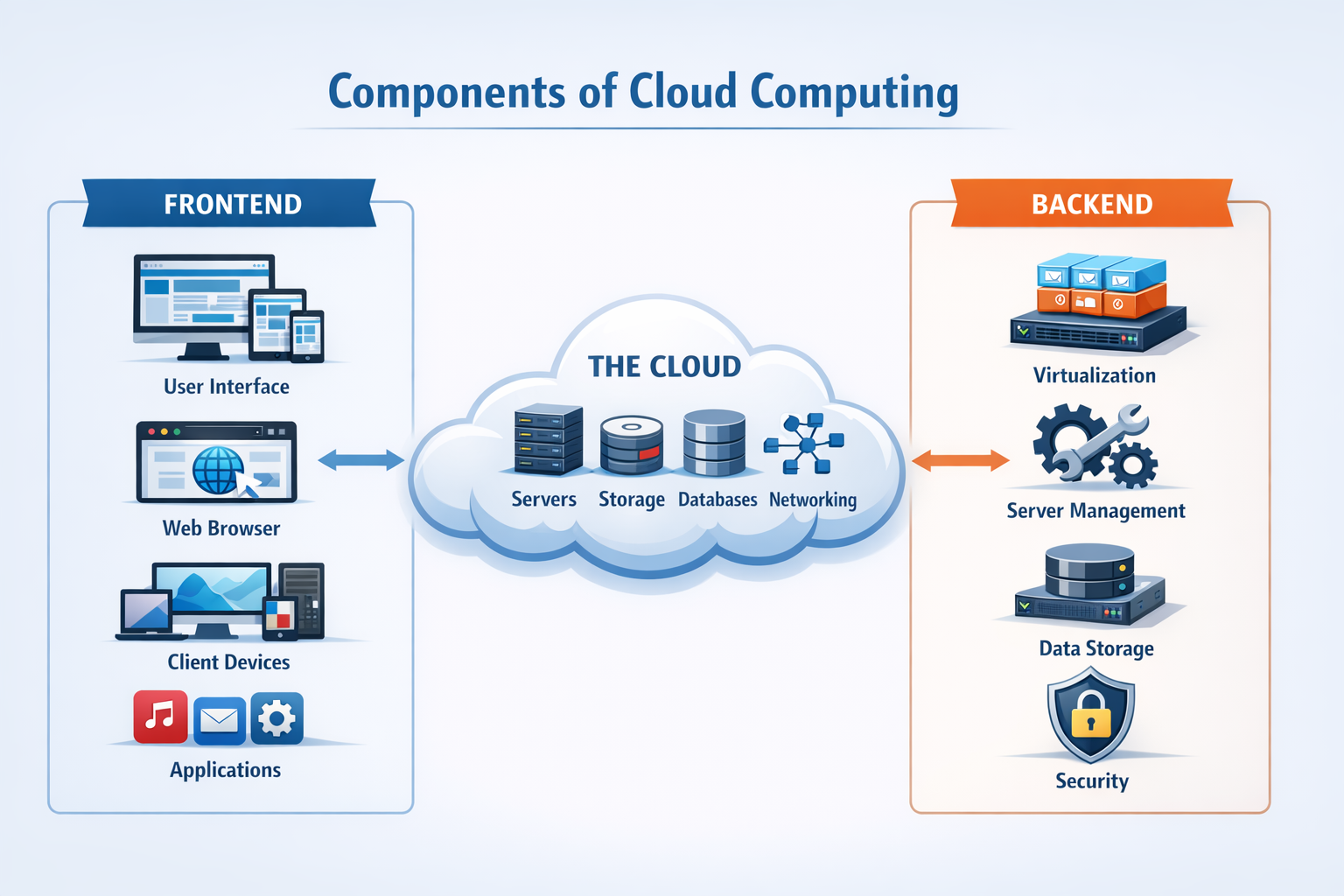
What are the Components of Cloud Computing?
Cloud computing components refer to the parts that make up a cloud system and enable it to function.
- Frontend: The user-facing side of the cloud
- Backend: The system that processes data and manages operations
Why Frontend and Backend are Important
Both frontend and backend are essential for delivering smooth and reliable cloud services.
- User Interaction: Frontend allows users to access services
- Processing Power: Backend handles all operations
- System Integration: Both work together for efficiency
Frontend (Client Side)
The frontend is the part of cloud computing that users interact with directly. It includes interfaces and devices used to access cloud services.
Key Elements of Frontend
- User Interface (UI): The visual part such as websites or apps
- Client Devices: Laptops, smartphones, tablets
- Browsers/Apps: Tools used to access cloud services
Functions of Frontend
- Displays data and information to users
- Sends user requests to the backend
- Provides a smooth user experience
Example
When you open a cloud-based app like an online document editor, the screen you see is the frontend.
Backend (Server Side)
The backend is the part of cloud computing that handles processing, storage, and system management.
Key Elements of Backend
- Servers: Process requests and run applications
- Storage Systems: Store data and files
- Databases: Manage structured data
- Networking: Connect systems and users
- Virtualization: Create virtual environments
Functions of Backend
- Processes user requests
- Stores and retrieves data
- Manages system performance and security
Example
When you save a document online, the backend stores and manages that data in the cloud.
How Frontend and Backend Work Together
Frontend and backend work together to deliver cloud services smoothly.
Step-by-Step Process
- User interacts with frontend through an app or browser
- Frontend sends request to backend
- Backend processes the request
- Data is retrieved from storage
- Backend sends response to frontend
- Frontend displays the result to user
Key Differences Between Frontend and Backend
This comparison helps in understanding their roles clearly.
| Feature | Frontend | Backend |
|---|---|---|
| Role | User interaction | Processing and management |
| Location | User device | Cloud servers |
| Function | Display and input | Data processing and storage |
| Visibility | Visible to users | Hidden from users |
Deep Concepts in Frontend and Backend
Understanding these concepts gives deeper insight into cloud systems.
Client-Server Model
Frontend acts as the client and backend acts as the server.
The client sends requests, and the server responds.
Data Flow
Data moves between frontend and backend through networks.
Efficient data flow ensures fast performance.
API Communication
APIs enable communication between frontend and backend.
They define how requests and responses are handled.
Scalability
Backend systems scale to handle more users.
Frontend remains simple while backend grows.
Benefits of This Architecture
Separating frontend and backend provides many advantages.
- Better Performance: Efficient processing and response
- Scalability: Backend can handle growth
- Flexibility: Easy to update frontend or backend separately
- Improved User Experience: Smooth interaction
Real-World Example
When you use an online storage service:
- You upload a file using the frontend
- Backend processes and stores the file
- When you open it, backend retrieves data
- Frontend displays it instantly
Conclusion
Frontend and backend are the two main components of cloud computing that work together to deliver services. The frontend handles user interaction, while the backend manages processing and data, ensuring a smooth and efficient cloud experience.