












What Are Cloud Deployment Models? Beginner Guide
Cloud deployment models define how cloud services are set up, managed, and accessed by users. They help organizations decide where their data is stored, who can access it, and how secure the system is. Understanding cloud deployment models is important for students, developers, and businesses to choose the right cloud environment.
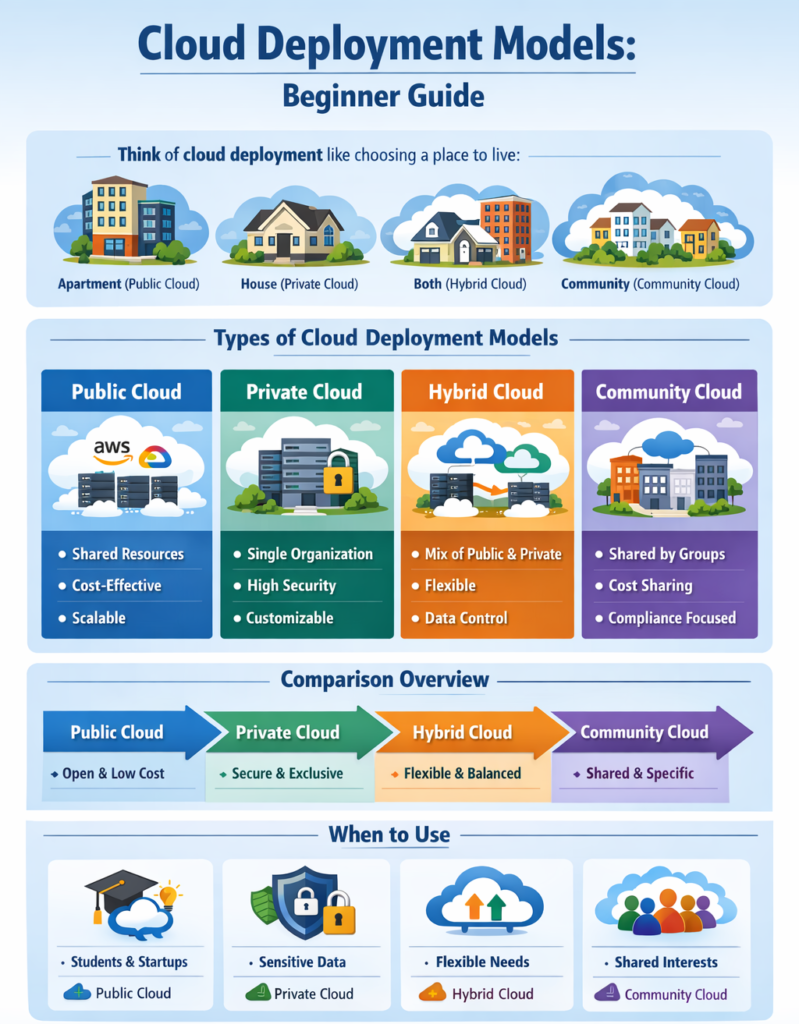
Types of Cloud Deployment Models
Think of cloud deployment like choosing a place to live, where each option offers a different level of privacy and sharing. This comparison makes it easier to understand how cloud environments work in real life.
- Public Cloud: Public cloud is a shared environment where services are available to multiple users over the internet.It is managed by third-party providers and designed for easy access and scalability.
- Private Cloud: Private cloud is a dedicated environment used by a single organization only.It provides better control, security, and customization for specific business needs.
- Hybrid Cloud: Hybrid cloud combines both public and private cloud environments into one system.
It allows organizations to use secure private resources and scalable public resources together. - Community Cloud: Community cloud is shared by multiple organizations with similar goals or requirements.It is designed to meet common standards such as security, compliance, or industry needs.
Let’s explain four main types of cloud deployment models:
1. Public Cloud
Public cloud is a cloud environment where services are delivered over the internet and shared among multiple users (multi-tenant model). The infrastructure is owned and managed by third-party cloud providers.
Key Features
- Shared Infrastructure: Multiple users use the same servers and resources
- Cost-Effective: No need to buy or maintain hardware
- High Scalability: Resources can scale up or down instantly
- Pay-as-You-Go: Users pay only for what they use
- Fully Managed: Provider handles maintenance, updates, and security
Example: Platforms like Google Cloud, AWS, and Microsoft Azure provide public cloud services used globally.
Real-World Example: A startup hosts its website on AWS without buying physical servers.
2. Private Cloud
Private cloud is a cloud environment dedicated to a single organization, offering greater control, security, and customization.
Key Features
- Single-Tenant Environment: Only one organization uses the infrastructure
- High Security and Privacy: Ideal for sensitive data
- Full Control: Organization manages configurations and policies
- Customization: Infrastructure can be tailored to specific needs
- Compliance Support: Meets strict regulatory requirements
Example: A bank or healthcare organization uses a private cloud to protect confidential data.
Real-World Example: A hospital stores patient records in a private cloud to ensure data privacy and compliance.
3. Hybrid Cloud
Hybrid cloud combines public cloud and private cloud, allowing data and applications to move between them.
Key Features
- Flexibility: Use private cloud for sensitive data and public cloud for general workloads
- Scalability (Cloud Bursting): Expand to public cloud during high demand
- Better Cost Management: Optimize cost by balancing resources
- Improved Performance: Run workloads in the most suitable environment
- Data Control: Keep critical operations secure while using public cloud benefits
Example: A company keeps confidential data in a private cloud but runs its website on a public cloud.
Real-World Example: An e-commerce website uses private cloud for payment processing and public cloud during sale traffic spikes.
4. Community Cloud
Community cloud is a cloud environment shared by multiple organizations with similar requirements, such as security, compliance, or industry standards.
Key Features
- Shared Infrastructure: Used by organizations with common goals
- Cost Sharing: Infrastructure cost is divided among participants
- Industry-Specific Compliance: Designed for specific regulations (e.g., healthcare, government)
- Collaboration: Enables secure data sharing between organizations
- Managed Access: Only authorized members can use the cloud
Example: Government agencies or research institutions share a community cloud for collaboration.
Real-World Example: Multiple universities use a community cloud to share research data securely.
Differences Between Cloud Deployment Models
Each cloud deployment model varies in access, cost, control, security, and usage. The table below offers a clear and straightforward comparison. Here is a Comparison Table of Cloud Deployment Models.
| Feature | Public Cloud | Private Cloud | Hybrid Cloud | Community Cloud |
|---|---|---|---|---|
| Access | Open to anyone over the internet | Restricted to a single organization | Combination of public + private access | Shared among specific organizations |
| Ownership | Third-party provider | Single organization | Both (provider + organization) | Multiple organizations |
| Cost | Low (pay-as-you-go) | High (setup + maintenance cost) | Medium (balanced cost) | Shared cost among members |
| Security | Moderate | Very high | High (controlled environment) | High (industry-specific standards) |
| Control | Limited control | Full control | Partial control | Shared control |
| Scalability | Very high | Limited | High | Moderate |
| Flexibility | High | Low | Very high | Moderate |
| Management | Managed by provider | Managed by organization | Shared management | Joint management |
| Best For | Startups, apps, testing | Banks, healthcare, government | E-commerce, enterprises, growing businesses | Research, education, government groups |
| Example Use | Hosting websites, SaaS apps | Storing sensitive data | Mixing secure data + scalable apps | Shared research platforms |
When to Use Each Cloud Deployment Model
Choosing the right cloud deployment model depends on factors like cost, security, scalability, control, and business requirements. Each model is suitable for different use cases.
1. Use Public Cloud When
Public cloud is best when you need low cost, fast setup, and high scalability without managing infrastructure.
Best Use Cases
- Low Budget Projects: No need to invest in hardware or maintenance
- Startups and Students: Easy to begin with minimal resources
- Scalable Applications: Websites or apps with changing traffic
- Testing and Development: Quickly deploy and test applications
- Global Access Needs: Services available from anywhere
Example
A startup launches a website using cloud hosting to handle growing users without buying servers.
2. Use Private Cloud When
Private cloud is ideal when security, control, and data privacy are critical.
Best Use Cases
- Sensitive Data Handling: Healthcare, banking, government systems
- Strict Compliance Requirements: Legal and regulatory standards
- Enterprise-Level Security: Full control over infrastructure
- Customized Environments: Tailored systems for specific needs
- Internal Business Applications: Used only within the organization
Example
A bank stores customer financial data in a private cloud to ensure maximum security and control.
3. Use Hybrid Cloud When
Hybrid cloud is suitable when you need a balance of security, flexibility, and scalability.
Best Use Cases
- Mixed Workloads: Sensitive + non-sensitive data
- Scalable Systems with Security Needs: Keep critical data private, scale apps publicly
- Seasonal Traffic (Cloud Bursting): Handle peak loads using public cloud
- Gradual Cloud Migration: Move from on-premise to cloud step-by-step
- Disaster Recovery Solutions: Backup data across environments
Example
An e-commerce website stores payment data in a private cloud but uses a public cloud during sales for high traffic.
4. Use Community Cloud When
Community cloud is best when multiple organizations share similar requirements and regulations.
Best Use Cases
- Industry Collaboration: Healthcare, education, and government sectors
- Shared Compliance Needs: Same legal or security standards
- Cost Sharing Between Organizations: Reduce infrastructure cost
- Joint Projects and Research: Data sharing between institutions
- Controlled Access Environment: Limited to specific organizations
Example
Several universities share a community cloud to collaborate on research projects securely.
Real-World Scenario: Healthcare System Using Cloud Deployment Models
Cloud deployment models are widely used in healthcare to ensure data security, system performance, and flexibility. Hospitals and healthcare organizations use a hybrid cloud approach by combining private and public clouds.
i. Private Cloud for Patient Data
Hospitals store sensitive patient information such as medical records, reports, and history in a private cloud.
Why Private Cloud is Used
- High Security: Patient data is confidential and must be protected
- Data Privacy: Only authorized doctors and staff can access records
- Regulatory Compliance: Meets healthcare laws and standards
- Full Control: Organization manages how data is stored and accessed
Example
A hospital stores patient records, lab results, and medical history in a private cloud to keep them safe and secure.
ii. Public Cloud for Applications
Healthcare organizations use public cloud for non-sensitive applications like websites, mobile apps, and appointment systems.
Why Public Cloud is Used
- Cost Efficiency: No need to invest in expensive infrastructure
- Easy Access: Patients can book appointments from anywhere
- Scalability: Handles large number of users (especially during emergencies)
- Fast Deployment: Applications can be launched quickly
Example
A hospital website or mobile app runs on public cloud where patients can check reports, book appointments, or contact doctors.
iii. Hybrid Cloud for Flexibility
Healthcare systems combine both private and public cloud to create a hybrid cloud environment.
Why Hybrid Cloud is Used
- Best of Both Worlds: Security of private cloud + scalability of public cloud
- Data Control: Sensitive data stays private, general services go public
- Workload Balance: Critical operations remain secure, heavy traffic handled by public cloud
- Improved Performance: Faster response during peak demand
Example
During a health emergency (like a pandemic), patient data stays in a private cloud, but appointment systems and online services scale using the public cloud.
Conclusion
Cloud deployment models define how cloud systems are organized and accessed.
-
Public cloud is cost-effective
-
Private cloud is secure
-
Hybrid cloud is flexible
-
Community cloud is collaborative
Understanding these models helps users choose the best cloud solution for their needs.