












Server and Its Types
A server is a powerful computer or system that provides resources, services, or data to other computers (clients) over a network. It plays a critical role in modern computing environments, including cloud computing, web applications, and enterprise systems.
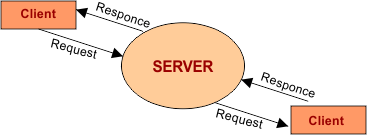
What is a Server?
A server is a system designed to store, process, and manage network data, allowing multiple users or devices to access shared resources efficiently. Below is the list of key concepts related to servers.
-
Definition: A server responds to client requests by delivering services or data over a network.
-
Purpose: It ensures centralized control, resource sharing, and efficient communication between devices.
-
Examples: Web servers, database servers, and file servers used in daily applications.
How Does a Server Work?
A server works on a client-server model, where it receives requests and sends responses accordingly. Below is the list of working steps of a server system.
1. Client Request
A client (user device) sends a request to the server through a network using protocols like HTTP or FTP.
-
Example: Opening a website sends a request to a web server.
2. Processing the Request
The server processes the request using software and hardware resources.
-
Example: Fetching data from a database or executing an application.
3. Sending Response
After processing, the server sends the required data or result back to the client.
-
Example: Displaying a webpage in your browser.
Types of Servers
Servers are classified based on the services they provide. Below is the list of major types of servers used in modern computing.

1. Web Server
A web server is used to host websites and deliver web pages to users over the internet.
-
Function: Handles HTTP/HTTPS requests
-
Example: Hosting websites like blogs and e-commerce platforms
-
Popular Software: Apache, Nginx
2. File Server
A file server stores and manages files, allowing users to access and share them over a network.
-
Function: Centralized file storage
-
Use Case: Office networks for document sharing
-
Benefit: Easy data management and backup
3. Database Server
A database server stores and manages databases, providing data to applications when needed.
-
Function: Handles database queries
-
Example: MySQL, Oracle databases
-
Use Case: Banking systems, websites
4. Application Server
An application server provides a platform for running applications and business logic.
-
Function: Executes application programs
-
Use Case: Enterprise software systems
-
Benefit: Improves application performance
5. Mail Server
A mail server manages email communication by sending, receiving, and storing emails.
-
Function: Handles SMTP, POP3, IMAP protocols
-
Example: Gmail servers
-
Use Case: Corporate email systems
6. Proxy Server
A proxy server acts as an intermediary between clients and other servers.
-
Function: Filters requests and improves security
-
Use Case: Internet browsing and content filtering
-
Benefit: Enhances privacy and performance
7. FTP Server
An FTP server is used to transfer files between computers over a network.
-
Function: Supports file upload/download
-
Use Case: Website file management
-
Protocol: File Transfer Protocol (FTP)
8. DNS Server
A DNS server translates domain names into IP addresses, enabling users to access websites easily.
-
Function: Domain name resolution
-
Example: Converting google.com to an IP address
-
Importance: Backbone of internet navigation
Comparison of Server Types
The following table shows the key differences between common server types:
| Server Type | Main Function | Example Use Case | Protocol Used |
|---|---|---|---|
| Web Server | Hosts websites | Browsing web pages | HTTP/HTTPS |
| File Server | Stores files | Office file sharing | SMB, NFS |
| Database Server | Manages databases | Banking systems | SQL |
| Mail Server | Handles emails | Sending/receiving emails | SMTP, POP3, IMAP |
| FTP Server | Transfers files | Website uploads | FTP |
| DNS Server | Resolves domain names | Internet navigation | DNS Protocol |
| Proxy Server | Acts as intermediary | Secure browsing | HTTP/HTTPS |
| Application Server | Runs applications | Enterprise systems | Various |
Characteristics of a Server
Servers have unique features that make them reliable and efficient. Below is the list of important server characteristics.
1. High Performance
Servers are designed with powerful processors and large memory to handle multiple requests efficiently.
-
Benefit: Faster response time
-
Example: Handling thousands of users simultaneously
2. Reliability
Servers operate continuously with minimal downtime to ensure availability.
-
Feature: Backup systems and redundancy
-
Example: Cloud servers with failover systems
3. Scalability
Servers can be scaled up or down based on demand.
-
Feature: Add more resources when needed
-
Example: Cloud platforms scaling during traffic spikes
4. Security
Servers include advanced security features to protect data and services.
-
Feature: Firewalls, encryption, authentication
-
Example: Secure login systems
5. Centralized Management
Servers provide centralized control over resources and users.
-
Benefit: Easy administration
-
Example: Managing all company files from one location
Advantages of Using Servers
Servers provide multiple benefits in modern computing environments. Below is the list of key advantages.
-
Resource Sharing: Multiple users can access shared data and applications
-
Improved Performance: Efficient handling of large workloads
-
Data Security: Centralized security measures
-
Backup and Recovery: Easy data backup and restoration
-
Remote Access: Access data from anywhere via the internet
Disadvantages of Servers
Despite many benefits, servers also have some limitations. Below is the list of common disadvantages.
-
High Cost: Expensive hardware and maintenance
-
Complex Setup: Requires technical expertise
-
Security Risks: Vulnerable if not properly secured
-
Downtime Issues: Server failure can affect multiple users
Real-World Examples of Servers
Servers are widely used in everyday life and modern technology systems. Below is the list of real-world applications.
-
Web Browsing: Websites hosted on web servers
-
Email Systems: Mail servers managing communication
-
Cloud Storage: File servers storing user data
-
Online Banking: Database servers handling transactions
-
Streaming Services: Application servers delivering content
Conclusion
A server is the backbone of modern networking and computing, enabling efficient communication, data sharing, and service delivery. Understanding different types of servers helps students and professionals choose the right solution for specific applications, whether in cloud computing, enterprise systems, or everyday internet usage.