












IaaS vs PaaS vs SaaS Differences Explained Clearly
Cloud service models, which are IaaS, PaaS, and SaaS, define how cloud services are delivered and how responsibilities are shared. Understanding their differences helps you choose the right model for your needs.
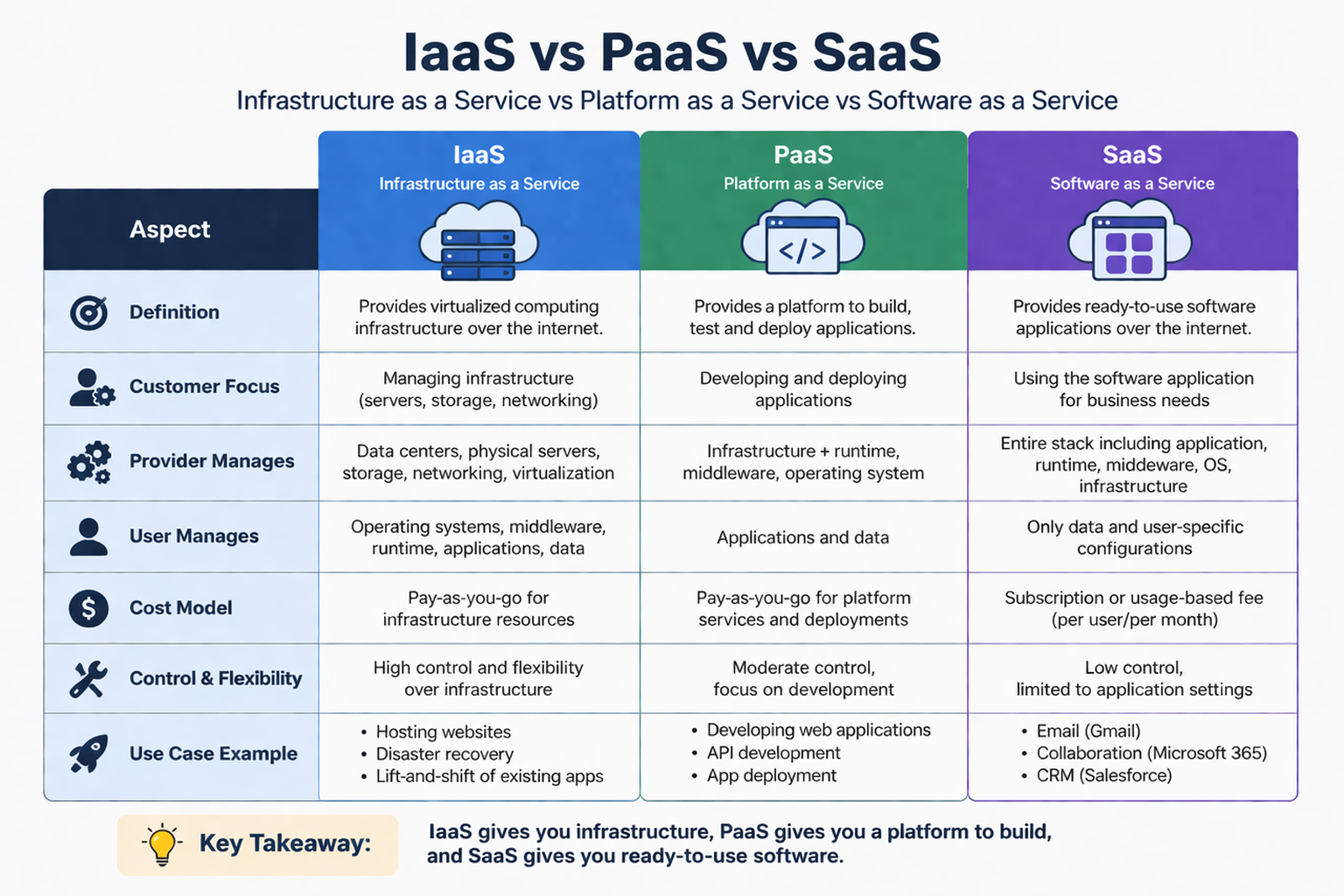
What is IaaS, PaaS, and SaaS?
These three models represent different levels of control, management, and convenience in cloud computing.
- IaaS (Infrastructure as a Service): Provides basic infrastructure like servers, storage, and networking.
- PaaS (Platform as a Service): Provides a platform to build and deploy applications.
- SaaS (Software as a Service): Provides ready-to-use software over the internet.
In simple words:
- IaaS = You manage most things
- PaaS = You manage only apps
- SaaS = You just use the software
Key Differences Between IaaS, PaaS, and SaaS
Understanding the differences between IaaS, PaaS, and SaaS helps you choose the right cloud service model. Each model offers a different level of control, responsibility, flexibility, and ease of use.
1. Level of Control
This defines how much control you have over the system, including infrastructure, operating system, and applications. Different models provide different levels of control depending on user needs.
Key Points
- IaaS: Full control over operating system, applications, and configurations
- PaaS: Control limited to applications and data
- SaaS: No control over system or infrastructure
2. Management Responsibility
This explains who is responsible for managing different components like servers, OS, and applications. Responsibility decreases as you move from IaaS to SaaS.
Key Points
- IaaS: User manages OS, applications, data, and security
- PaaS: User manages only applications and data
- SaaS: Provider manages everything
3. Ease of Use
This shows how easy it is to start using the service without technical setup. Higher-level services are generally easier to use.
Key Points
- IaaS: Complex and requires technical knowledge
- PaaS: Easier, mainly designed for developers
- SaaS: Very easy, no installation or setup needed
4. Flexibility
This defines how much customization and control you have over the environment. Lower-level services provide more flexibility.
Key Points
- IaaS: Highly customizable environment
- PaaS: Moderate flexibility with some limitations
- SaaS: Limited customization options
5. Deployment Speed
This shows how quickly you can start using the service or deploy applications. Managed services reduce setup time significantly.
Key Points
- IaaS: Slower due to setup and configuration
- PaaS: Faster with pre-built tools and environments
- SaaS: Instant access through web browser
6. Cost Structure
This explains how pricing is calculated for each cloud service model. Costs depend on usage, services, and level of management provided.
Key Points
- IaaS: Pay for infrastructure resources used
- PaaS: Pay for platform and development services
- SaaS: Subscription-based pricing (monthly/yearly)
Real-World Examples of IaaS, PaaS, and SaaS
These real-world examples help you understand how cloud service models are used in practical situations. They connect theoretical concepts with real applications used by businesses, developers, and everyday users.
1. IaaS Examples
IaaS provides virtual infrastructure such as servers, storage, and networking, allowing users to build and manage their own systems.
It is mainly used when full control over the environment is required.
Key Points
- AWS EC2: Provides virtual servers to run applications
- Azure Virtual Machines: Allows creation and management of virtual machines
- Google Compute Engine: Offers scalable computing resources
Used For
- Hosting websites and applications
- Running custom software environments
- Managing virtual servers and storage
2. PaaS Examples
PaaS provides a ready-to-use platform for developers to build, test, and deploy applications without managing infrastructure.
It simplifies development by handling backend processes like servers and runtime environments.
Key Points
- Google App Engine: Platform for building and deploying web apps
- Azure App Services: Supports app development with built-in tools
- Heroku: Easy deployment platform for developers
Used For
- Application development and deployment
- Building APIs and web applications
- Faster development with minimal setup
3. SaaS Examples
SaaS delivers fully functional applications over the internet that users can access without installation.
It is designed for everyday use with maximum simplicity and accessibility.
Key Points
- Google Docs: Online document editing and collaboration
- Gmail: Web-based email service
- Zoom: Video conferencing and communication tool
Used For
- Communication and collaboration
- Document creation and sharing
- Business and personal productivity
Comparison of IaaS, PaaS, and SaaS
This table provides a quick and clear overview of the key differences between IaaS, PaaS, and SaaS. It helps you easily compare control, management, usability, and best use cases for each model.
| Feature | IaaS (Infrastructure as a Service) | PaaS (Platform as a Service) | SaaS (Software as a Service) |
|---|---|---|---|
| Control Level | High (full control over OS and apps) | Medium (control over apps only) | Low (no control over system) |
| Management | User manages most components | Shared between user and provider | Provider manages everything |
| Ease of Use | Complex (requires technical skills) | Moderate (developer-friendly) | Very easy (ready-to-use) |
| Setup Time | Slow (manual setup required) | Medium (pre-configured environment) | Instant (access via browser) |
| Flexibility | Highly flexible and customizable | Moderate flexibility | Limited customization |
| Cost Model | Pay for infrastructure usage | Pay for platform and services | Subscription-based pricing |
| Best For | IT teams, system administrators | Developers and application builders | End users and businesses |
| Examples | AWS EC2, Google Compute Engine | Google App Engine, Heroku | Gmail, Google Docs, Microsoft 365 |
When to Use Each Model
Choosing the right cloud service model depends on your technical skills, project requirements, and level of control needed.
Each model is designed for different users, from developers to end users.
Use IaaS When
IaaS is best when you need full control over infrastructure, operating systems, and configurations.
It is suitable for advanced users who want to build and manage systems from the ground up.
Key Points
- You need custom configurations and environments
- You are building complex or large-scale applications
- You want full control over servers and networking
- You have technical expertise to manage systems
Use PaaS When
PaaS is ideal when you want to focus on application development without handling infrastructure management.
It provides ready-to-use tools and environments for faster coding and deployment.
Key Points
- You want to focus mainly on coding and development
- You don’t want to manage servers or infrastructure
- You need faster application deployment
- You are building web apps or APIs
Use SaaS When
SaaS is perfect when you need ready-to-use software without any setup or maintenance.
It is designed for users who want simplicity and quick access to applications.
Key Points
- You need ready-to-use applications
- You want zero maintenance and automatic updates
- You prefer access through a web browser
- You are using software for daily tasks (email, documents, meetings)
Conclusion
IaaS, PaaS, and SaaS are the core cloud service models, each offering a different balance of control and convenience. Understanding their differences helps you choose the right solution for building efficient and scalable cloud systems.