












What Is SaaS in Cloud Computing? Explained Simply
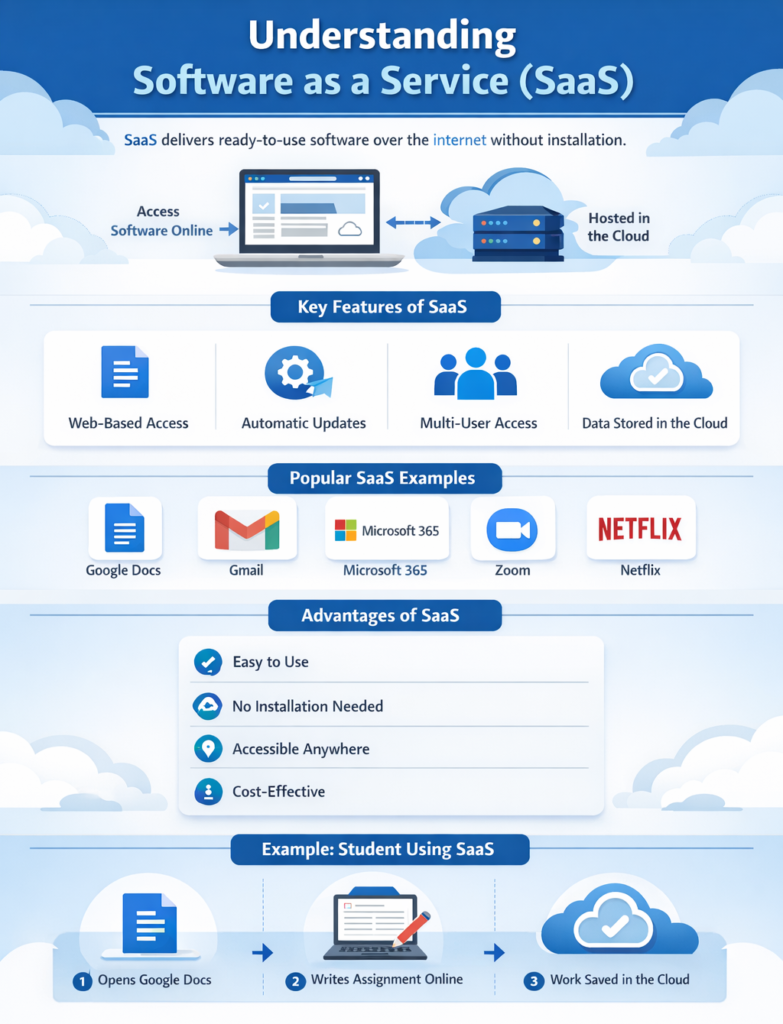
Software as a Service (SaaS) is a cloud computing model that delivers ready-to-use software applications over the internet. Instead of installing software on your computer, you can access it through a web browser. Understanding SaaS helps students and beginners use modern applications easily without worrying about setup or maintenance.
What Is SaaS in Simple Terms?
SaaS is a cloud service where software is hosted online and users access it through the internet without installing anything.
Simple Explanation
Think of SaaS like using an app online:
-
The software runs on cloud servers: Applications are hosted remotely, so your device does not handle heavy processing.
-
You just log in and use it: Users access the software through accounts without complex setup.
-
No installation or updates needed: All updates are handled automatically by the provider.
How SaaS Works
SaaS works by hosting applications on cloud servers and delivering them to users through the internet.
Step-by-Step Working
-
User opens the application in a browser: Access is simple and does not require installation on the device.
-
Logs into their account: Authentication ensures secure and personalized access.
-
Uses the software online: All features are available directly through the internet.
-
Data is stored and managed in the cloud: Information is saved remotely and accessible anytime.
Key Characteristics of SaaS
SaaS has unique features that make it user-friendly and widely used.
Main Characteristics
-
Web-based access: Applications run in browsers, allowing access from any device with internet.
-
Centralized hosting: Software is managed on cloud servers, ensuring consistency and reliability.
-
Automatic updates: Providers update software regularly without user intervention.
-
Multi-user access: Multiple users can use the same application simultaneously from different locations.
Real-Life Examples of SaaS
SaaS is used in everyday life by students, businesses, and individuals.
Popular SaaS Applications
-
Google Docs: Allows users to create and edit documents online with real-time collaboration.
-
Gmail: Provides email services accessible from anywhere via the internet.
-
Microsoft 365: Offers cloud-based office tools like Word, Excel, and PowerPoint.
-
Zoom: Enables online meetings and video conferencing easily.
-
Netflix: Streams movies and shows without downloading files locally.
Practical Example
A student uses Google Docs:
-
Opens it in a browser: No need to install software on the computer.
-
Writes assignments: Can work on documents from any device.
-
Work is saved automatically: Changes are stored instantly in the cloud.
No need to install any software.
What You Manage in SaaS
In SaaS, users have very limited responsibilities.
User Responsibilities
-
Using the application: Users focus only on utilizing features for their tasks.
-
Managing account settings: Includes passwords, preferences, and user profiles.
Provider Responsibilities
-
Infrastructure: Manages servers, storage, and networking systems.
-
Software updates: Keeps the application updated with new features and fixes.
-
Security: Ensures data protection and system safety.
-
Data storage: Stores and manages user data in cloud servers.
Advantages of SaaS
SaaS is popular because it is simple and convenient to use.
Key Benefits
-
Easy to use: Simple interfaces make it accessible even for beginners.
-
No installation required: Users can start using software instantly through a browser.
-
Accessible from anywhere: Can be used on any device with internet connectivity.
-
Cost-effective: Eliminates the need for expensive hardware and maintenance.
Disadvantages of SaaS
SaaS also has some limitations.
Limitations
-
Limited customization: Users have fewer options to modify software features.
-
Requires internet connection: Cannot function properly without stable internet access.
-
Less control over software: Users depend on the provider for updates and changes.
When Should You Use SaaS?
SaaS is ideal for everyday applications and business tools.
Best Use Cases
-
Email services: Used for communication and messaging over the internet.
-
Document editing: Enables creating and sharing files online easily.
-
Online meetings: Supports remote collaboration and communication.
-
Streaming services: Allows users to watch content without downloading.
Real-World Scenario
SaaS is widely used in education and business.
Example: Online Learning
Students use SaaS tools like:
-
Google Classroom: Manages assignments, classes, and communication online.
-
Zoom: Enables virtual classes and meetings.
-
Microsoft Teams: Supports collaboration, chat, and file sharing.
These tools make learning accessible from anywhere.
Why SaaS Is Important for Students
SaaS plays a major role in modern education and daily tasks.
Learning Benefits
-
Easy access to tools: Students can use software anytime without installation.
-
No technical setup required: Reduces complexity for beginners.
-
Supports remote learning: Enables studying and collaboration from anywhere.
Conclusion
SaaS is the simplest cloud service model that allows users to access software online without managing infrastructure.
-
No installation needed: Software is accessed directly through the internet.
-
Fully managed by provider: All technical aspects are handled by the service provider.
-
Easy and accessible: Suitable for beginners, students, and businesses.
Understanding SaaS helps students and beginners use cloud-based tools effectively in real life.