












Super Key in DBMS
A Super Key in DBMS is a set of one or more attributes (columns) in a table that can uniquely identify a tuple (record) in that table by its attribute or combination of attributes.
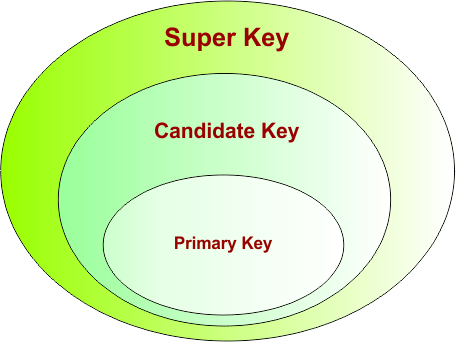
Here are key points about Super Key in DBMS:
- The super set of any candidate key is a super key (i.e., a candidate key is always a subset of a super key).
- More than one candidate key can exist for a super key.
- Every candidate key is a super key, but not every super key is a candidate key.
- Super keys can include unnecessary attributes beyond what is needed for uniqueness.
- They play a crucial role in ensuring data integrity and are used in relational database design.
Key Characteristics of Super Key in DBMS
Here are the key characteristics of a super key in DBMS
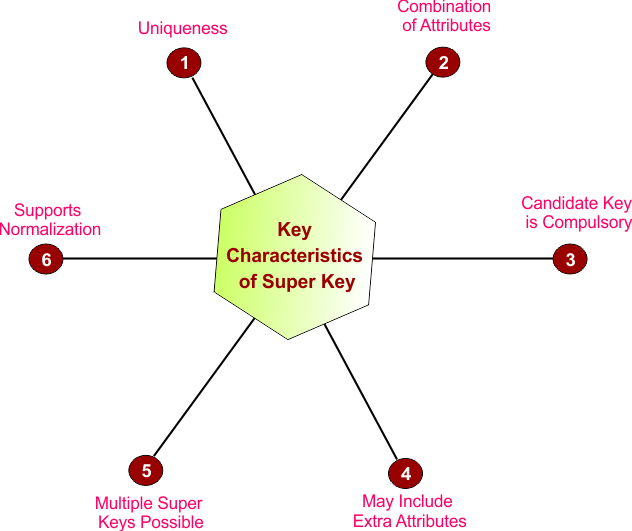
1. Uniqueness
A super key uniquely identifies each tuple (row) in a table. No two rows can have the same values for the attributes included in the super key.
Example: If ID is unique, then {ID} is a super key.
2. Combination of Attributes
A super key can contain one attribute or multiple attributes together. The combined values must uniquely identify each row.
Example: {ID, Name} can be a super key if ID alone is unique.
3. Candidate Key is Compulsory
Every super key must contain at least one candidate key because a candidate key is the minimum attribute set required to uniquely identify a tuple. Without including a candidate key, uniqueness cannot be guaranteed. We can also say that candidate key is always a subset of a super key
Example: If {ID} is a candidate key, then {ID} and {ID, Name} can be super keys, but {Name} alone cannot be a super key if it is not unique.
4. May Include Extra Attributes
A super key can have additional attributes that are not required for uniqueness. These extra attributes make the key non-minimal.
Example: {ID, Salary} is a super key if ID alone is enough to identify rows.
5. Multiple Super Keys Possible
A single relation can have many super keys because different attribute combinations may uniquely identify tuples.
Example: {ID}, {ID, Name}, and {ID, Email} can all be super keys.
6. Supports Normalization
Super keys help determine functional dependencies, which are used in normalization to reduce redundancy and improve database design.
Example: Knowing {ID} → Name, Salary helps during normalization.
Now we will see various examples of super key calculations over the given candidate keys and attributes
How to find Super keys in DBMS
The method for finding super keys in DBMS depends on the number of candidate keys present in the relation.
- If the relation has only one candidate key, use the Single Candidate Key Formula (given in categoy 1)
- If the relation has multiple candidate keys (given in categoy 2), use the Inclusion–Exclusion Principle to avoid counting duplicate super keys.
Therefore, finding super keys can be divided into the following categories.
Category – 1: Finding Super Key in DBMS Using a Single Candidate Key
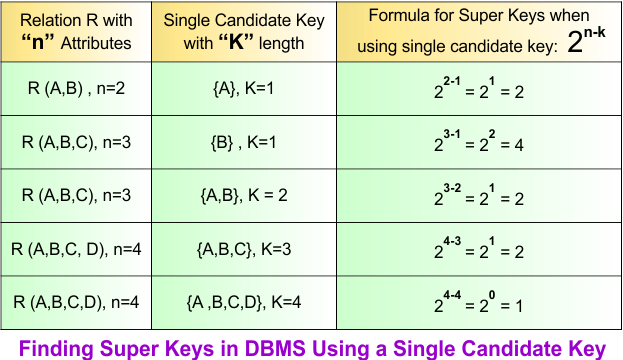
Finding the super keys in DBMS depends on how many candidate keys exist in the relation (R). If the relation (R) has “n” attributes and only a single candidate key, then superkeys can be calculated using the following formula
- Super keys = 2n-k
where
- “n” represents all the attributes in the relation
- “k” represents the length of the candidate key
The following diagram gives some examples for finding superkeys when a relation R with “n” attributes and the candidate key with “k” length is given
Let’s explain some examples of finding super keys over single candidate key of length “K”
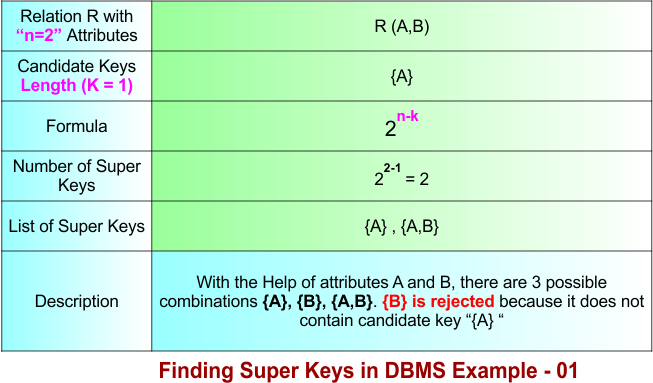
Finding Super Key in DBMS Example 1:
Suppose
- A relation R(A, B) represents a table with two attributes. Therefore, n=2.
- There is a single candidate key, which is {A}, whose length is 1. Therefore, K =1
Using the diagram below, calculate all super keys from the given data.
 Finding Super Key in DBMS Example 2:
Suppose
- A relation R(A, B, C) represents a table with three attributes. Therefore, n=3.
- There is a single candidate key which {A}, whose length is 1. Therefore, K =1
Using the diagram below, calculate all super keys from the given data.
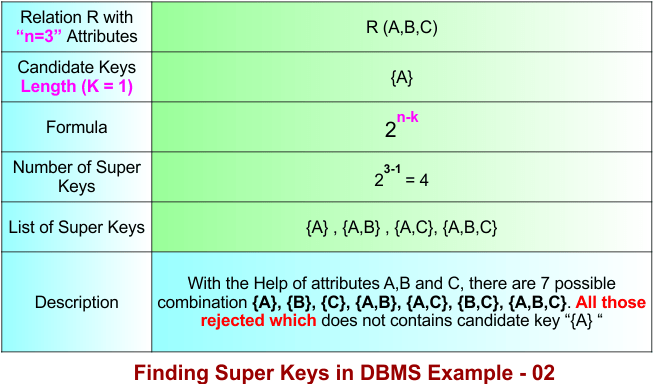
Finding Super Key in DBMS Example 3:
Suppose
- A relation R(A, B, C, D) represents a table with four attributes. Therefore, n=4.
- There is a single candidate key which {A}, whose length is 1. Therefore, K =1
Using the diagram below, calculate all super keys from the given data.
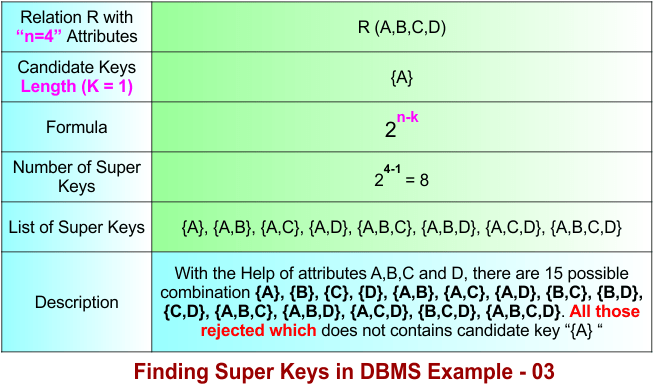
Finding Super Key in DBMS Example 4:
Suppose
- A relation R(A, B, C) represents a table with three attributes. Therefore, n=3.
- There is a single candidate key which {A,B}, whose length is 2. Therefore, K =2
Using the diagram below, calculate all super keys from the given data.
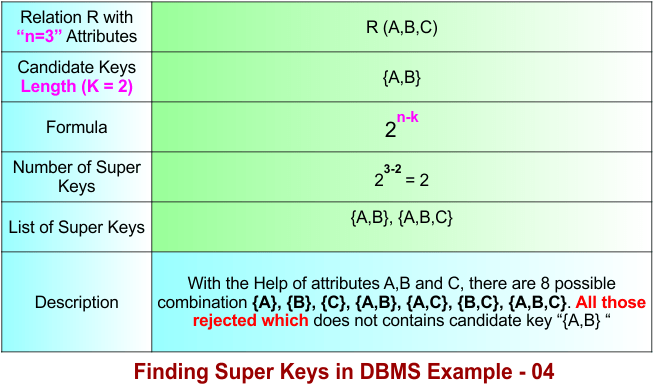
Finding Super Key in DBMS Example 5:
Suppose
- A relation R(A, B, C, D, E) represents a table with five attributes. Therefore, n=5.
- There is a single candidate key which {A,B,C}, whose length is 3. Therefore, K =3
Using the diagram below, calculate all super keys from the given data.
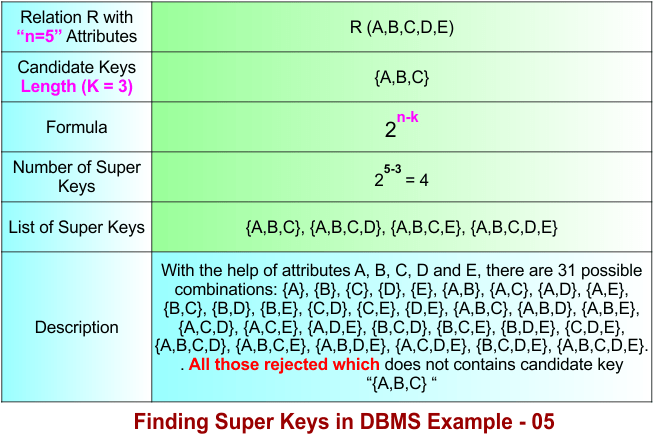
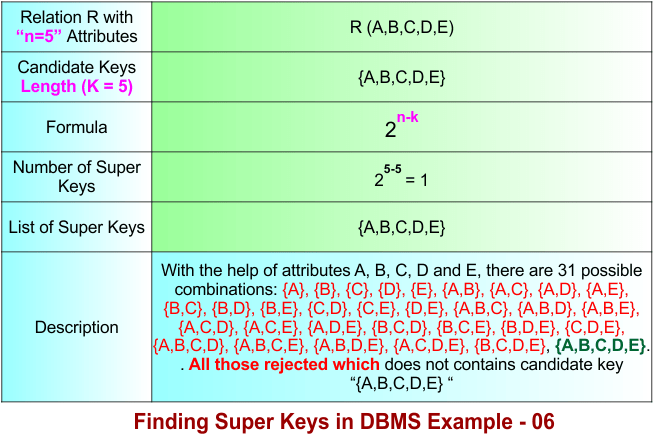
Finding Super Key in DBMS Example 6:
Suppose
- A relation R(A, B, C, D, E) represents a table with three attributes. Therefore, n=5.
- There is a single candidate key which {A,B,C,D,E}, whose length is 5. Therefore, K =5
Using the diagram below, calculate all super keys from the given data.
Category – 2: Finding Super Key in DBMS Using a Multiple Candidate Keys, each of Same Length
When a relation contains several candidate keys. Each candidate key can generate many superkeys. If we add super keys produced by each candidate key, some super keys may appear in more than one group. Therefore, duplicates occur. The Inclusion–Exclusion Principle removes these duplicate counts. So we use the Inclusion–Exclusion Principle to find the super keys when
- Relation with n attributes is given, i.e., R(a,b,c,d)
- and some candidate keys are given of the same or various lengths
|
According to the Inclusion–Exclusion Principle
Simply, we can write as well
So, we can say that Odd-numbered groups are added (+), and even-numbered groups are subtracted (−). Let’s discuss some examples where multiple candidate keys exist. |
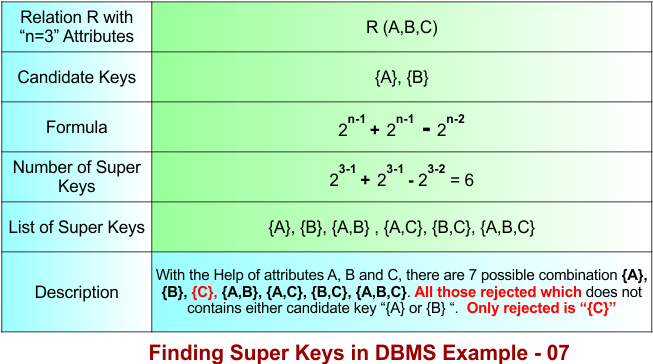
Finding Super Key in DBMS – Example 7
To calculate the super keys of example 7, the following data is given
- A relation R(A, B, C) represents a table with three attributes. Therefore, n=3.
- There are two candidate keys {A}, {B}, each of length 1.
Using the diagram below, calculate all super keys from the given data.
Let’s explain the above example 7 in the following steps
Step 01: Understanding the Formula
The formula is divided into two different parts based on the number of candidate keys combined.
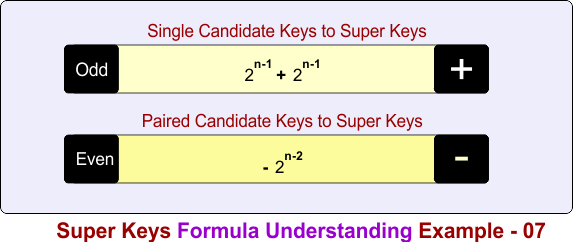
In the above diagram
Part 1: Count super keys formed from single candidate keys
- + 2n-1 + 2n-1
Part 2: Subtract super keys formed from pair candidate-key overlaps
- − 2n-2
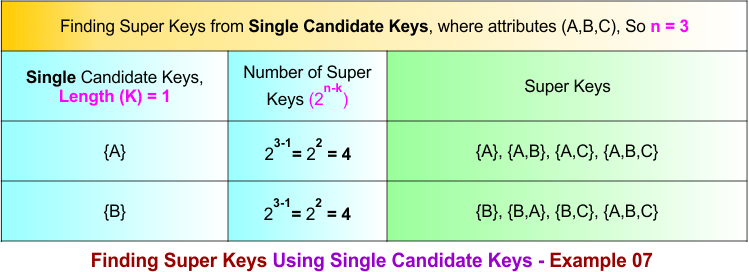
Step 02: Single Candidate Keys to Super Keys
- For the candidate key {A}, every super key must contain A. After fixing A, the remaining attributes B and C can be added in different combinations. Therefore, {A} generates (23-1 = 4) super keys: {A}, {A,B}, {A,C}, {A,B,C}.
- For the candidate key {B}, every super key must contain B. After fixing B, the remaining attributes A and C can be added in different combinations. Therefore, {B} generates (23-1=4) super keys: {B}, {A,B}, {B,C}, {A,B,C}.
Note: Some super keys like {A,B} and {A,B,C} appear in both candidate key lists of {A} and {B}. So, they are counted twice. To fix this, we will subtract them once in the next step when we use the pair candidate key {A,B}.
Step 03: Single to Pair Candidate Keys Conversions Process
If there are K single candidate keys, then Pair candidate keys are formed by choosing 2 candidate keys at a time
Formula:
Total pair candidate keys C(K,2) = K(K − 1) / 2!
As Total single candiate keys in example 07 are 2, so put K=2 in formula
Total pair candidate keys = 2(2-1) / 2 = 1
Total pair candidate keys = 1
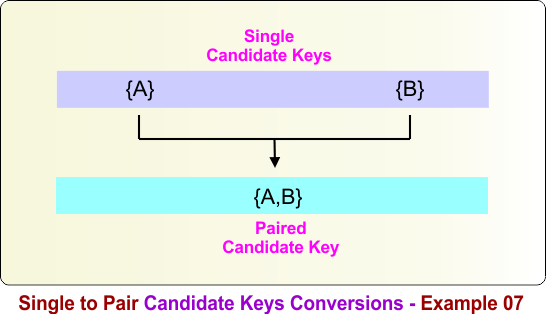
To form a pair candidate key from the single candidate keys {A} and {B}, combine both keys into one set: {A} ∪ {B} = {A,B} . The following diagram illustrates this process.
Step 04: Pair Candidate Keys to Super Keys
The candidate key {A} generates some super keys, and the candidate key {B} also generates some super keys. Some of these super keys are the same because they contain both A and B. Therefore, these common super keys are counted twice.
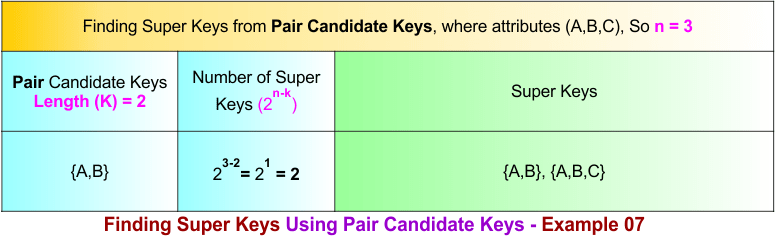
To find these common super keys, combine {A} and {B} to form pair candidate key {A,B} which generates (23-2 =2 ) common super keys as given below
- {A, B}
- {A, B, C}
Since these two super keys appear in both the {A} list and the {B} list, they must be subtracted once to get the correct total number of super keys.
Summary of Finding Super Key – Example 07
How we calculate the total number of super keys in example 07, the process is given below
- Count super keys formed from single candidate keys = 2⁽³⁻¹⁾ + 2⁽³⁻¹⁾ = 4 + 4 = 8
- Subtract super keys formed from pair candidate-key overlaps = − 2⁽³⁻²⁾ = −2
Total super keys = 8 − 2 = 6
Finding Super Key in DBMS – Example 8
To calculate the super keys of example 8, the following data is given
- A relation R(A, B, C, D) represents a table with four attributes. Therefore, n=4.
- There are three candidate keys {A}, {B}, and {C}, each of length 1.
Using the diagram below, calculate all super keys from the given data.
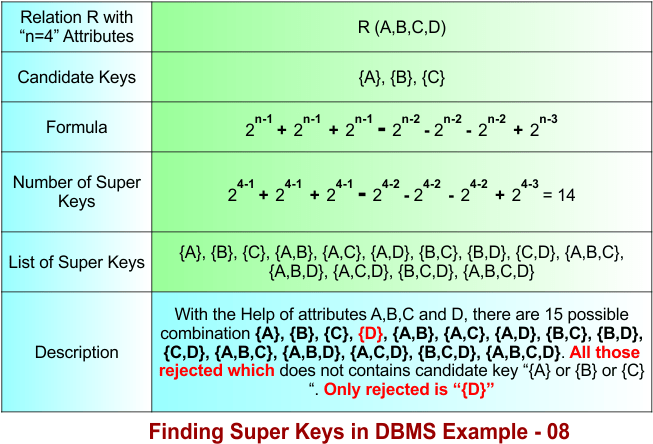
Let’s explain the above example 8 in the following steps
Step 01: Understanding the Formula
The formula is divided into three different parts based on the number of candidate keys combined.
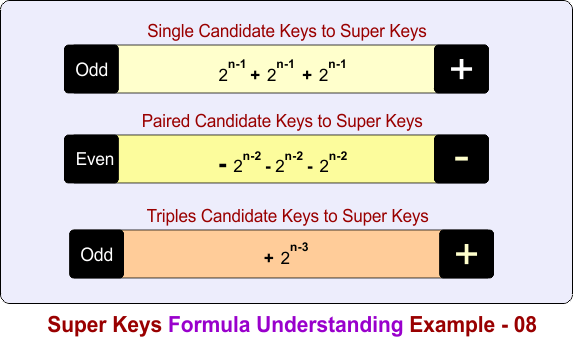
In the above diagram
Part 1: Count super keys formed from single candidate keys
- + 2n-1 + 2n-1 + 2n-1
Part 2: Subtract super keys formed from pair candidate-key overlaps
- − 2n-2 − 2n-2 − 2n-2
Part 3: Add super keys formed from triple candidate-key overlaps
- + 2n-3
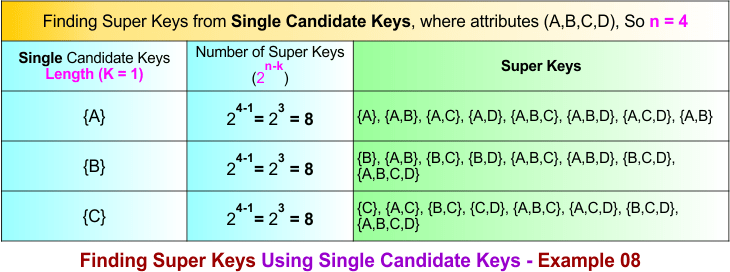
Step 02: Single Candidate Keys to Super Keys
For candidate key {A}: All super keys must contain A
- {A}, {A,B}, {A,C}, {A,D}, {A,B,C}, {A,B,D}, {A,C,D}, {A,B,C,D}
For candidate key {B}: All super keys must contain B
- {B}, {A,B}, {B,C}, {B,D}, {A,B,C}, {A,B,D}, {B,C,D}, {A,B,C,D}
For candidate key {C}: All super keys must contain C
- {C}, {A,C}, {B,C}, {C,D}, {A,B,C}, {A,C,D}, {B,C,D}, {A,B,C,D}
Step 03: Single to Pair Candidate Keys Conversions Process
If there are K single candidate keys, then Pair candidate keys are formed by choosing 2 candidate keys at a time
Formula:
Total pair candidate keys C(K,2) = K(K − 1) / 2!
As Total single candiate keys in example 08 are 3, so put K=3 in formula
Total pair candidate keys = 3(3-1) / 2 = 3
Total pair candidate keys = 3
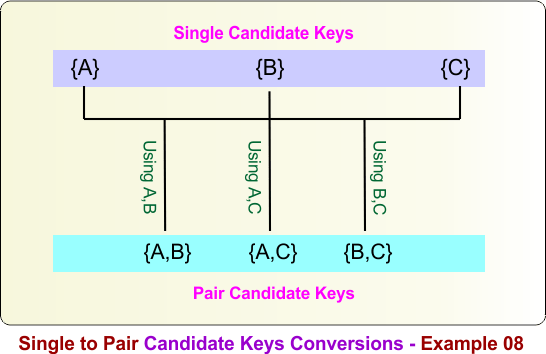
Pair candidate keys are formed by combining any two single candidate keys. For the single candidate keys {A}, {B}, and {C}, the pair candidate keys are obtained as follows:
{A} ∪ {B} = {A,B}
{A} ∪ {C} = {A,C}
{B} ∪ {C} = {B,C}
Therefore, the pair candidate keys are {A,B}, {A,C}, and {B,C}. The following diagram illustrates this process.
Step 04: Pair Candidate Keys to Super Keys
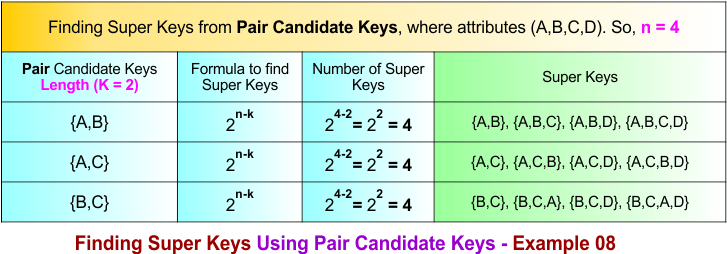
The following diagram shows all super keys formed over the paired candidate keys, which are {A,B}, {A,C}, and {B,C}.
Step 05: Single to Triple Candidate Keys Conversions Process
If there are K single candidate keys, then triple candidate keys are formed by choosing 3 candidate keys at a time
Formula:
Total pair candidate keys C(K,3) = K(K − 1)(K-2) / 3!
As Total single candiate keys in example 08 are 3, so put K=3 and 3! = 6 in formula
Total triple candidate keys = 3(3-1)(3-2) / 6 = 1
Total triple candidate keys = 1
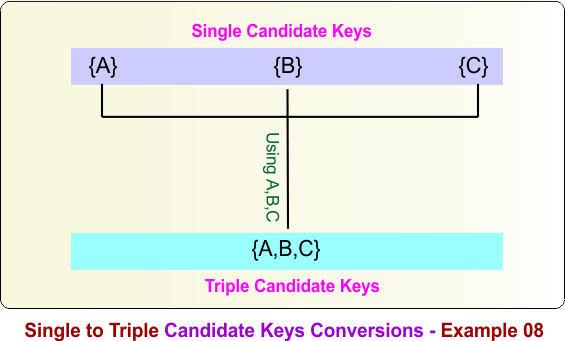
Triple candidate keys are formed by combining all three single candidate keys. For the single candidate keys {A}, {B}, and {C}, the triple candidate key is obtained as follows:
{A} ∪ {B} ∪ {C} = {A,B,C}
Therefore, the triple candidate key formed from the single candidate keys {A}, {B}, and {C} is {A,B,C}. The following diagram illustrates this process.
Step 06: Triple Candidate Keys to Super Keys
The following diagram shows all super keys formed over the triple candidate keys, which is {A,B,C}. it is called triple because it involves three candidate keys, i.e., {A}, {B}, and {C}.
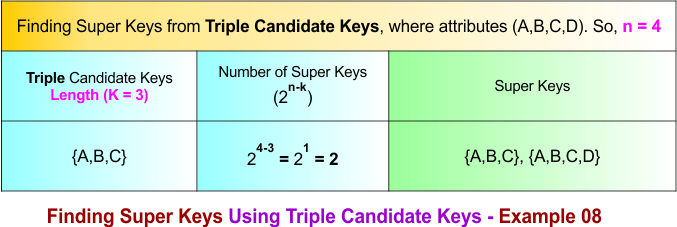
Summary of Finding Super Key – Example 08
How we calculate the total number of super keys in example 08, the process is given below
- Count super keys formed from single candidate keys = 2⁽⁴⁻¹⁾ + 2⁽⁴⁻¹⁾ + 2⁽⁴⁻¹⁾ = 8 + 8 + 8 = 24
- Subtract super keys formed from pair candidate-key = − 2⁽⁴⁻²⁾ − 2⁽⁴⁻²⁾ − 2⁽⁴⁻²⁾ = – 4 – 4 – 4 = -12
- Add super keys formed from triple candidate-key = + 2⁽⁴⁻³⁾ = +2
Total super keys = 24 -12+2 = 14
Finding Super in DBMS Key – Example 9
To calculate the super keys of example 9, the following data is given
- A relation R(A, B, C, D, E) represents a table with five attributes. Therefore, n=5.
- There are four candidate keys {A}, {B}, {C}, {D}, each of length 1.
Using the diagram below, calculate all super keys from the given data.
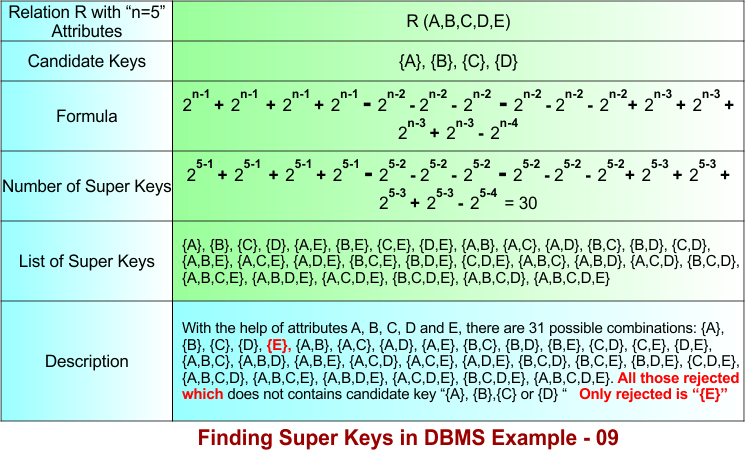
Let’s explain the above example 9 in the following steps
Step 01: Understanding the Formula
The formula is divided into four different parts based on the number of candidate keys combined.
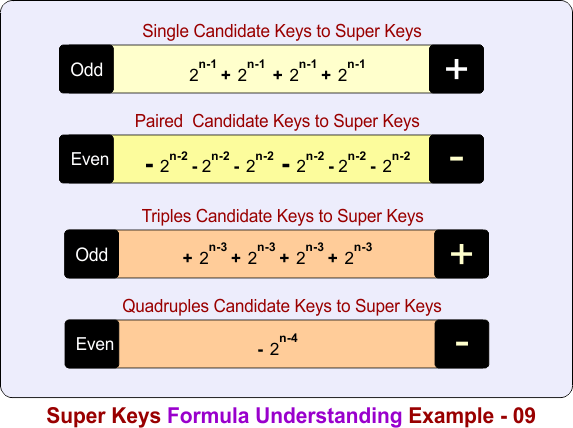
In the above diagram
Part 1: Count super keys formed from single candidate keys
- + 2n-1 + 2n-1 + 2n-1 + 2n-1
Part 2: Subtract super keys formed from pair candidate-key overlaps
- − 2n-2 − 2n-2 − 2n-2 − 2n-2 − 2n-2 − 2n-2
Part 3: Add super keys formed from triple candidate-key overlaps
- + 2n-3 + 2n-3 + 2n-3 + 2n-3
Part 4: Subtract super keys formed from quadruple candidate-key overlap
- − 2n-4
Step 02: Single Candidate Keys to Super Keys
The single candidate keys are {A}, {B}, {C}, and {D}. The number of super keys over single candidate keys is given in the following diagram
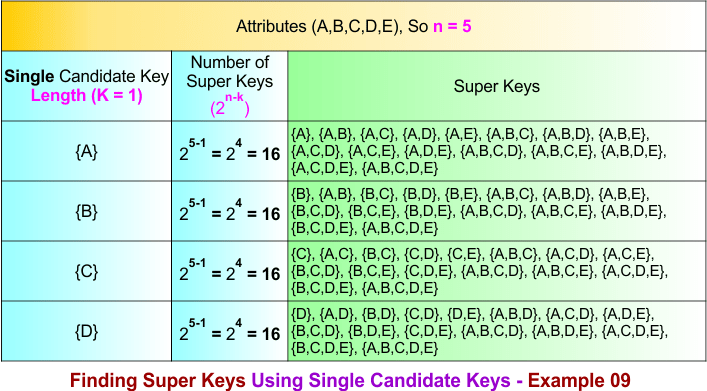
Step 03: Single to Pair Candidate Keys Conversions Process
If there are K single candidate keys, then Pair candidate keys are formed by choosing 2 candidate keys at a time
Formula:
Total pair candidate keys C(K,2) = K(K − 1) / 2!
As Total single candiate keys in example 09 are 4, so put K=4 in formula
Total pair candidate keys = 4(4-1) / 2 = 6
Total pair candidate keys = 6
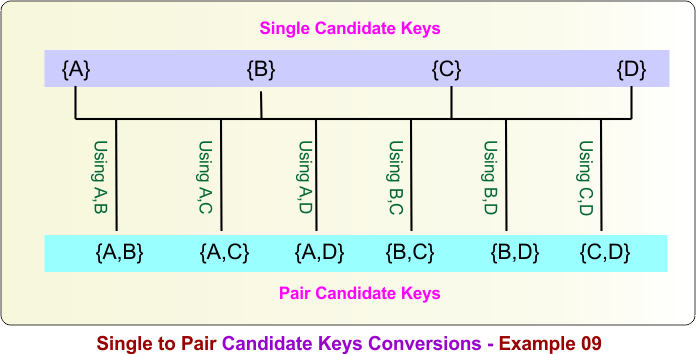
Pair candidate keys are formed by combining any two single candidate keys. For the single candidate keys {A}, {B}, {C}, and {D}, the pair candidate keys are obtained as follows:
{A} ∪ {B} = {A,B}
{A} ∪ {C} = {A,C}
{A} ∪ {D} = {A,D}
{B} ∪ {C} = {B,C}
{B} ∪ {D} = {B,D}
{C} ∪ {D} = {C,D}
Therefore, the pair candidate keys are {A,B}, {A,C}, {A,D}, {B,C}, {B,D}, and {C,D}. The following diagram illustrates this process.
Step 04: Pair Candidate Keys to Super Keys
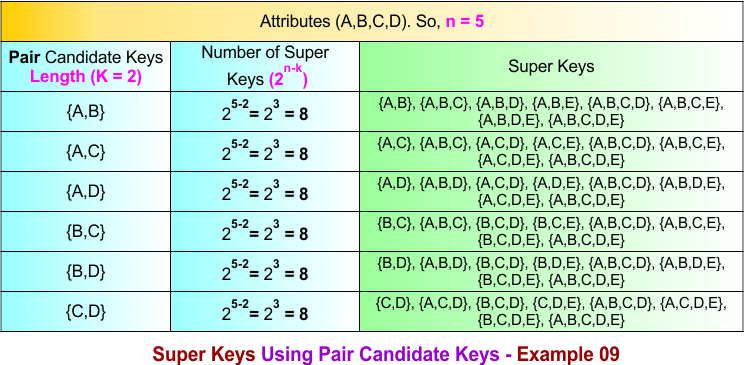
The following diagram shows all super keys formed over the paired candidate keys, which are {A,B}, {A,C}, {A,D}, {B,C}, {B,D}, and {C,D}.
Step 05: Single to Triple Candidate Keys Conversions Process
If there are K single candidate keys, then triple candidate keys are formed by choosing 3 candidate keys at a time
Formula:
Total pair candidate keys C(K,3) = K(K − 1)(K-2) / 3!
As Total single candiate keys in example 09 are 4, so put K=4 and 3! = 6 in formula
Total triple candidate keys = 4(4-1)(4-2) / 6 = 8
Total triple candidate keys = 4
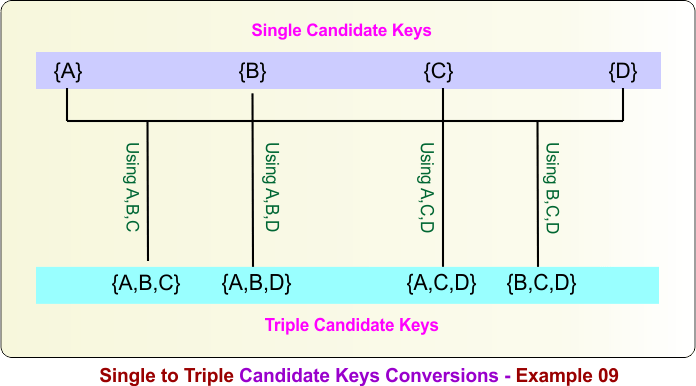
Triple candidate keys are formed by combining any three single candidate keys. For the single candidate keys {A}, {B}, {C}, and {D}, the triple candidate keys are obtained as follows:
- {A} ∪ {B} ∪ {C} = {A,B,C}
- {A} ∪ {B} ∪ {D} = {A,B,D}
- {A} ∪ {C} ∪ {D} = {A,C,D}
- {B} ∪ {C} ∪ {D} = {B,C,D}
Therefore, the triple candidate keys are {A,B,C}, {A,B,D}, {A,C,D}, and {B,C,D}. The following diagram illustrates this process.
Step 06: Triple Candidate Keys to Super Keys
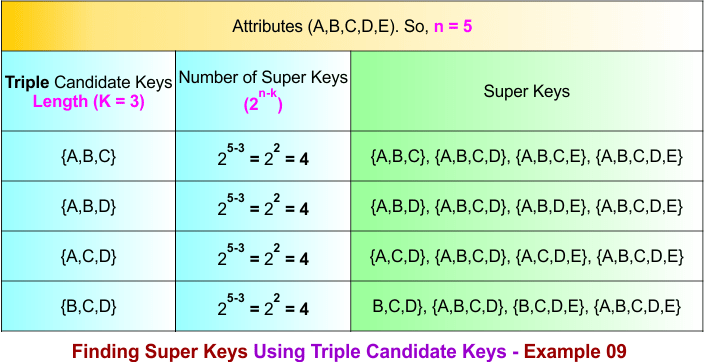
The following diagram shows all super keys formed over the triple candidate keys, which are {A,B,C}, {A,B,D}, {A,C,D}, and {B,C,D}.
Step 07: Single to Quadruple Candidate Keys Conversions Process
If there are K single candidate keys, then quadruple candidate keys are formed by choosing 4 candidate keys at a time
Formula:
Total pair candidate keys C(K,4) = K(K − 1)(K-2)(K-3) / 3!
As Total single candiate keys in example 09 are 4, so put K=4 and 4! = 24 in formula
Total triple candidate keys = 4(4-1)(4-2)(4-3) / 24 = 1
Total triple candidate keys = 1
Quadruples candidate keys are formed by combining any four single candidate keys. For the single candidate keys {A}, {B}, {C}, and {D}, the quadruples candidate key is obtained as follows:
{A} ∪ {B} ∪ {C} ∪ {D} = {A,B,C,D}
Therefore, the quadruples candidate key formed from {A}, {B}, {C}, and {D} is {A,B,C,D}. The following diagram illustrates this process.
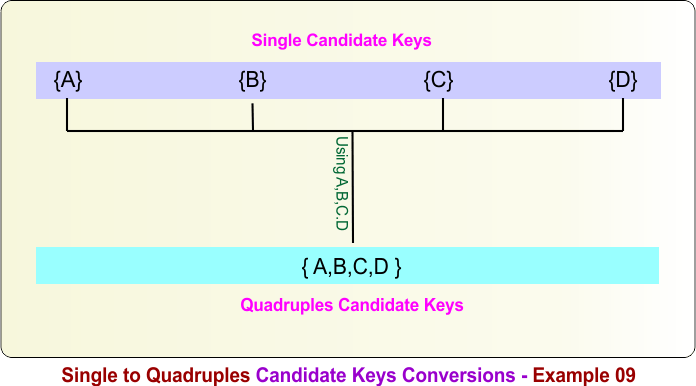
Step 08: Finding Super Keys Using Quadruple Candidate Keys in Example 09
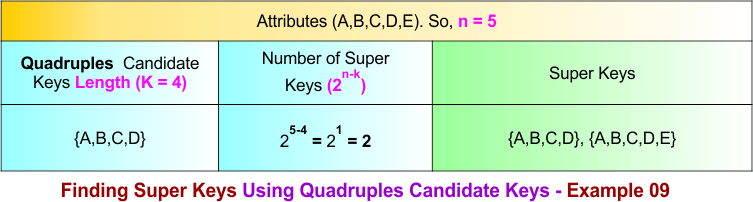
Summary of Finding Super Key – Example 09
How we calculate the total number of super keys in example 09, the process is given below
- Count super keys formed from single candidate keys = 2⁽⁵⁻¹⁾ + 2⁽⁵⁻¹⁾ + 2⁽⁵⁻¹⁾ + 2⁽⁵⁻¹⁾ = 16 + 16 + 16 + 16 = 64
- Subtract super keys formed from pair candidate-key overlaps = − 2⁽⁵⁻²⁾ − 2⁽⁵⁻²⁾ − 2⁽⁵⁻²⁾ − 2⁽⁵⁻²⁾ − 2⁽⁵⁻²⁾ − 2⁽⁵⁻²⁾ = − 8 − 8 − 8 − 8 − 8 − 8 = −48
- Add super keys formed from triple candidate-key overlaps = + 2⁽⁵⁻³⁾ + 2⁽⁵⁻³⁾ + 2⁽⁵⁻³⁾ + 2⁽⁵⁻³⁾ = +4 +4 +4 +4 = +16
- Subtract super keys formed from quadruple candidate-key overlaps = − 2⁽⁵⁻⁴⁾ = −2
Total super keys = 64 − 48 + 16 − 2 = 30
Finding Super Key in DBMS – Example 10
To calculate the super keys of example 10, the following data is given
- A relation R(A, B, C, D, E) represents a table with five attributes. Therefore, n=5.
- There are five candidate keys {A}, {B}, {C}, {D}, {E} each of length 1.
Using the diagram below, calculate all super keys from the given data.
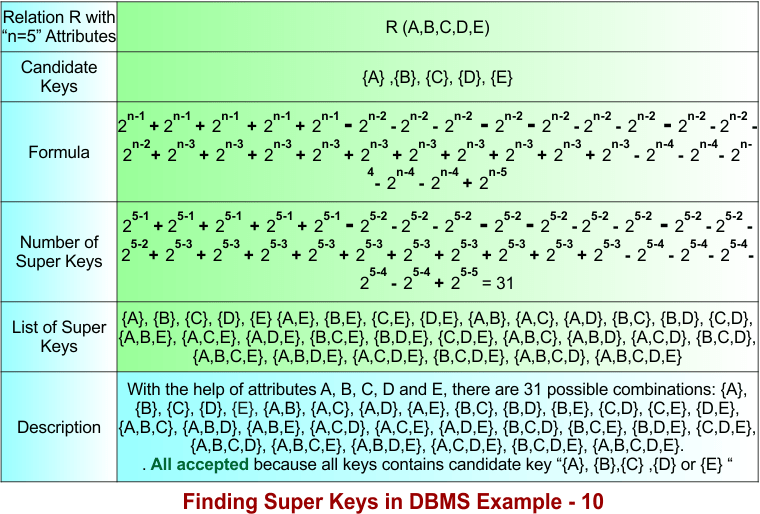
Let’s explain the above example 10 in the following steps
Step 01: Understanding the Formula
The formula is divided into five different parts based on the number of candidate keys combined.
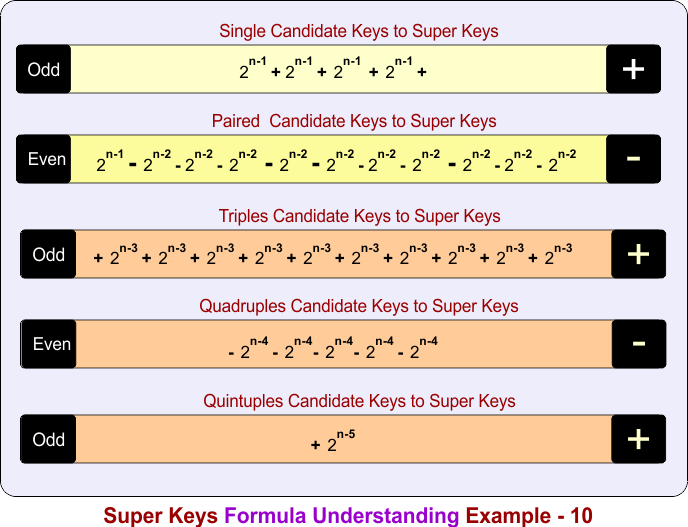
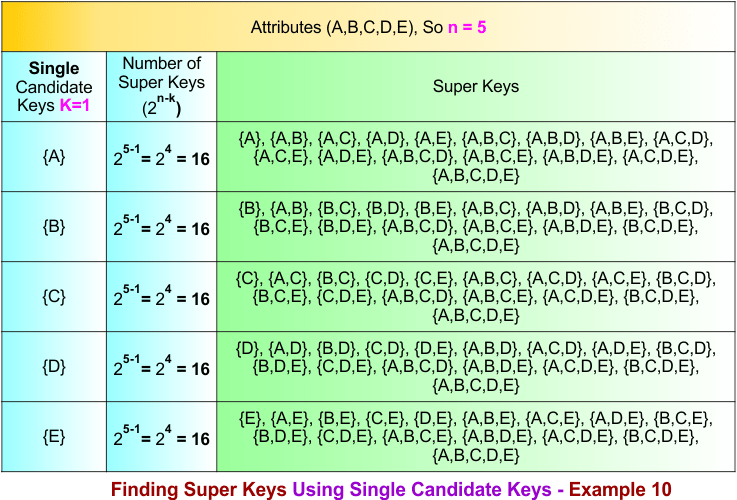
Step 02: Single Candidate Keys to Super Keys
The single candidate keys are {A}, {B}, {C}, {D} and {E}. The number of super keys over single candidate keys is given in the following diagram
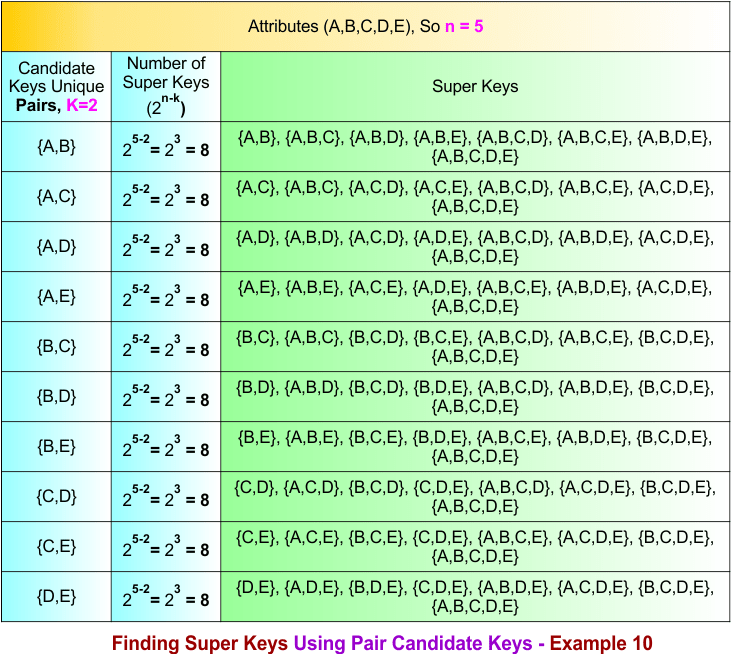
Step 04: Pair Candidate Keys to Super Keys
The following diagram shows all super keys formed over the paired candidate keys
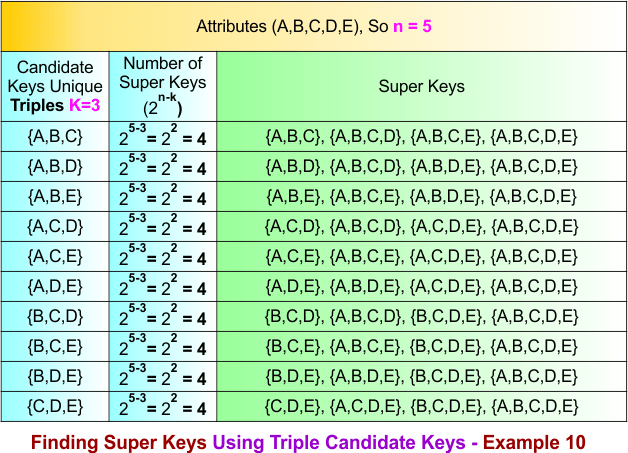
Step 06: Triple Candidate Keys to Super Keys
The following diagram shows all super keys formed over the triple candidate keys.
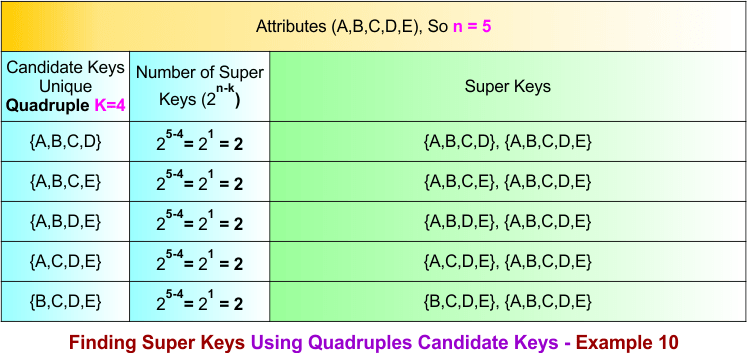
Step 08: Quadruples Candidate Keys to Super Keys
Step 10: Quintuples Candidate Keys to Super Keys
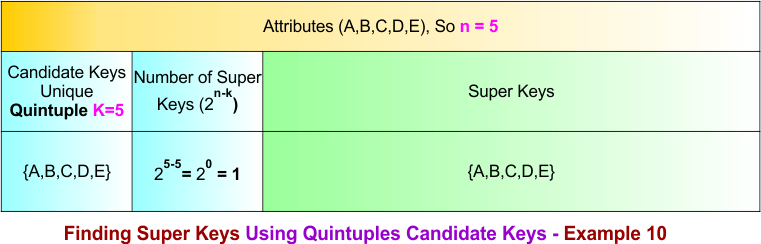
Summary of Finding Super Key – Example 10
How we calculate the total number of super keys in example 10, the process is given below
- Count super keys formed from single candidate keys = 2⁽⁵⁻¹⁾ + 2⁽⁵⁻¹⁾ + 2⁽⁵⁻¹⁾ + 2⁽⁵⁻¹⁾ + 2⁽⁵⁻¹⁾
= 16 + 16 + 16 + 16 + 16 = 80 - Subtract super keys formed from pair candidate-key overlaps = − 2⁽⁵⁻²⁾ − 2⁽⁵⁻²⁾ − 2⁽⁵⁻²⁾ − 2⁽⁵⁻²⁾ − 2⁽⁵⁻²⁾ − 2⁽⁵⁻²⁾ − 2⁽⁵⁻²⁾ − 2⁽⁵⁻²⁾ − 2⁽⁵⁻²⁾ − 2⁽⁵⁻²⁾
= − 8 − 8 − 8 − 8 − 8 − 8 − 8 − 8 − 8 − 8 = −80 - Add super keys formed from triple candidate-key overlaps = + 2⁽⁵⁻³⁾ + 2⁽⁵⁻³⁾ + 2⁽⁵⁻³⁾ + 2⁽⁵⁻³⁾ + 2⁽⁵⁻³⁾ + 2⁽⁵⁻³⁾ + 2⁽⁵⁻³⁾ + 2⁽⁵⁻³⁾ + 2⁽⁵⁻³⁾ + 2⁽⁵⁻³⁾
= +4 +4 +4 +4 +4 +4 +4 +4 +4 +4 = +40 - Subtract super keys formed from quadruple candidate-key overlaps = − 2⁽⁵⁻⁴⁾ − 2⁽⁵⁻⁴⁾ − 2⁽⁵⁻⁴⁾ − 2⁽⁵⁻⁴⁾ − 2⁽⁵⁻⁴⁾
= −2 −2 −2 −2 −2 = −10 - Add super keys formed from quintuple candidate-key overlaps = + 2⁽⁵⁻⁵⁾
= +1
Total super keys = 80 − 80 + 40 − 10 + 1 = 31
Category – 3: Finding Super Key in DBMS Using Multiple Candidate Keys, having various lengths
When a relation has multiple candidate keys of the same or different sizes, each candidate key can still generate many super keys. However, since some super keys may be common in more than one candidate key group, duplicate counting can happen.
To remove this problem, we use the Inclusion–Exclusion Principle, which helps us count each super key only once by adding and subtracting overlapping cases.
Finding Super Key in DBMS – Example 12
To calculate the super keys of example 12, the following data is given
- A relation R(A, B, C) represents a table with three attributes. Therefore, n=3.
- There are two candidate keys: {A} and {B, C}, where the length of {A} is 1 and length of {B,C} is 2
Using the diagram below, calculate all super keys from the given data.
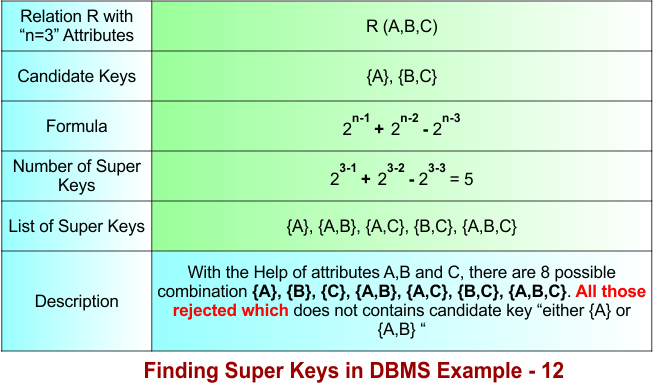
Let’s explain the above example 12 in the following steps
Step 01: Understanding the Formula
The formula is divided into two different parts based on the number of candidate keys combined.
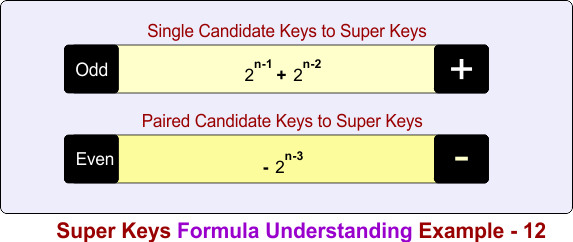
In the above diagram
Part 1: Count super keys formed from single candidate keys
- + 2n-1 + 2n-2
Part 2: Subtract super keys formed from pair candidate-key overlaps
- − 2n-3
Step 02: Single Candidate Keys to Super Keys
The single candidate keys are {A} and {B, C}. The number of super keys over single candidate keys is given in the following diagram
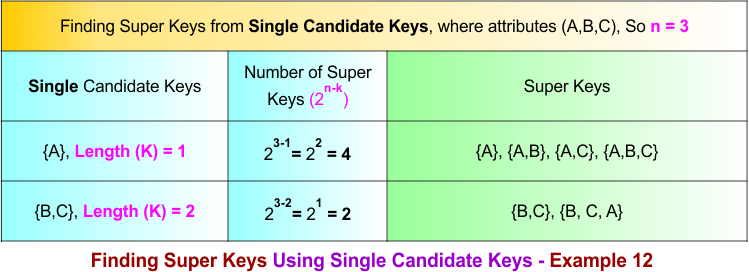
Step 03: Single to Pair Candidate Keys Conversions Process
If there are K single candidate keys, then Pair candidate keys are formed by choosing 2 candidate keys at a time
Formula:
Total pair candidate keys C(K,2) = K(K − 1) / 2!
As Total single candiate keys in example 12 are 2, so put K=2 in formula
Total pair candidate keys = 2(2-1) / 2 = 1
Total pair candidate keys = 1
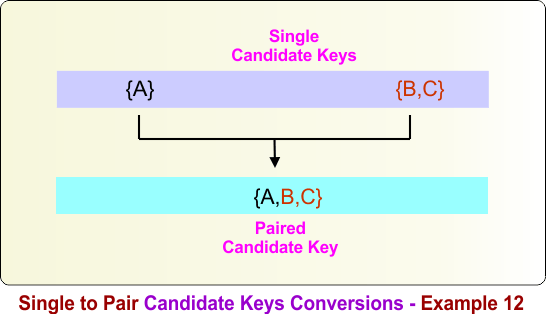
Pair candidate keys are formed by combining the given candidate keys. For the candidate keys {A} and {B,C}, the pair candidate key is obtained as follows:
{A} ∪ {B,C} = {A,B,C}
Therefore, the pair candidate key formed from {A} and {B,C} is {A,B,C}. The following diagram illustrates this process.
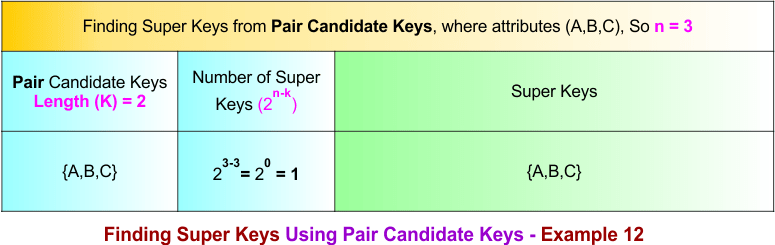
Step 04: Pair Candidate Keys to Super Keys
The following diagram shows all super keys formed over the paired candidate keys, which is {A,B,C}.
Summary of Finding Super Key – Example 12
How we calculate the total number of super keys in example 12, the process is given below
- Count super keys formed from single candidate keys = 2⁽³⁻¹⁾ + 2⁽³⁻²⁾
= 4 + 2 = 6 - Subtract super keys formed from pair candidate-key overlaps = − 2⁽³⁻³⁾
= −1
Total super keys = 6 − 1 = 5
Finding Super Key in DBMS – Example 13
To calculate the super keys of example 13, the following data is given
- A relation R(A, B, C, D) represents a table with four attributes. Therefore, n=4.
- There are two candidate keys: {A} and {B, C}, where the length of {A} is 1 and length of {B,C} is 2
Using the diagram below, calculate all super keys from the given data.
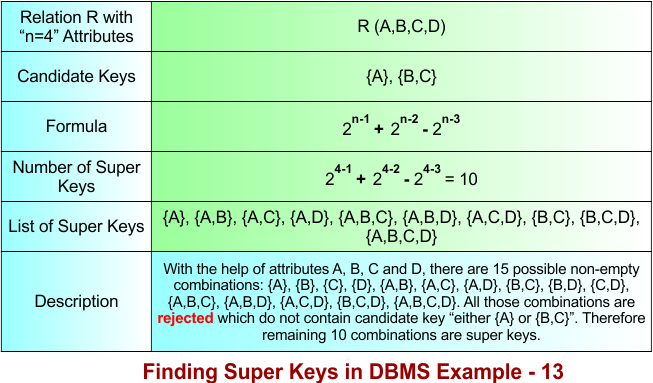
Let’s explain the above example 13 in the following steps
Step 01: Understanding the Formula
The formula is divided into two different parts based on the number of candidate keys combined.
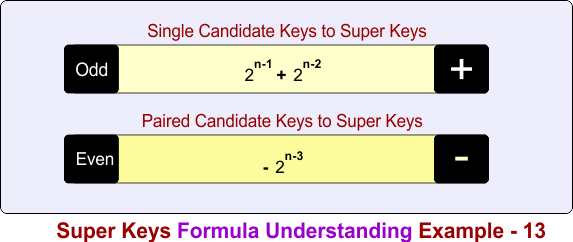
In the above diagram
Part 1: Count super keys formed from single candidate keys
- + 2n-1 + 2n-2
Part 2: Subtract super keys formed from pair candidate-key overlaps
- − 2n-3
Step 02: Single Candidate Keys to Super Keys
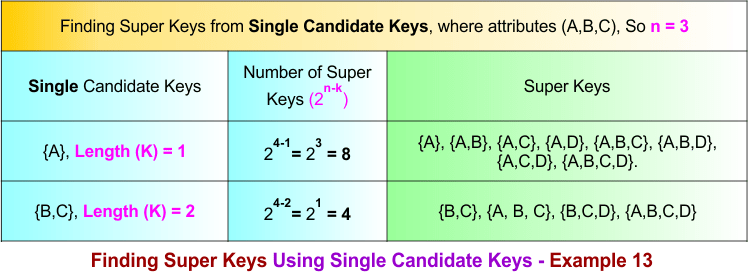
The single candidate keys are {A} and {B, C}. The number of super keys over single candidate keys is given in the following diagram
Step 03: Single to Pair Candidate Keys Conversions Process
If there are K single candidate keys, then Pair candidate keys are formed by choosing 2 candidate keys at a time
Formula:
Total pair candidate keys C(K,2) = K(K − 1) / 2!
As Total single candiate keys in example 13 are 2, so put K=2 in formula
Total pair candidate keys = 2(2-1) / 2 = 1
Total pair candidate keys = 1
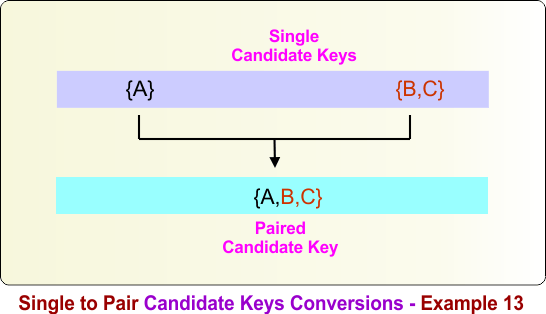
Pair candidate keys are formed by combining the given candidate keys. For the candidate keys {A} and {B,C}, the pair candidate key is obtained as follows:
{A} ∪ {B,C} = {A,B,C}
Therefore, combining the candidate keys {A} and {B,C} produces the pair candidate key {A,B,C}. The following diagram illustrates this process.
Step 04: Pair Candidate Keys to Super Keys
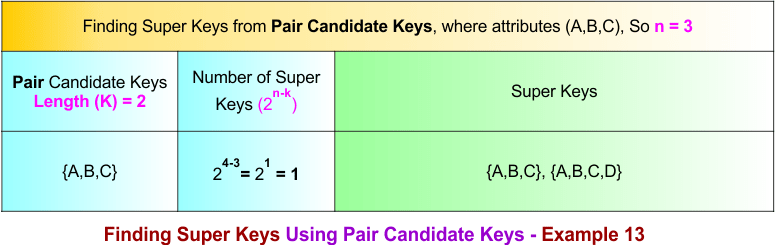
The following diagram shows all super keys formed over the paired candidate keys, which is {A,B,C}.
Summary of Finding Super Key – Example 13
How we calculate the total number of super keys in example 13, the process is given below
- Count super keys formed from single candidate keys = 2⁽⁴⁻¹⁾ + 2⁽⁴⁻²⁾
= 8 + 4 = 12 - Subtract super keys formed from pair candidate-key overlaps = − 2⁽⁴⁻³⁾
= −2
Total super keys = 12 − 2 = 10
Finding Super Key in DBMS – Example 14
To calculate the super keys of example 14, the following data is given
- A relation R(A, B, C, D) represents a table with four attributes. Therefore, n=4.
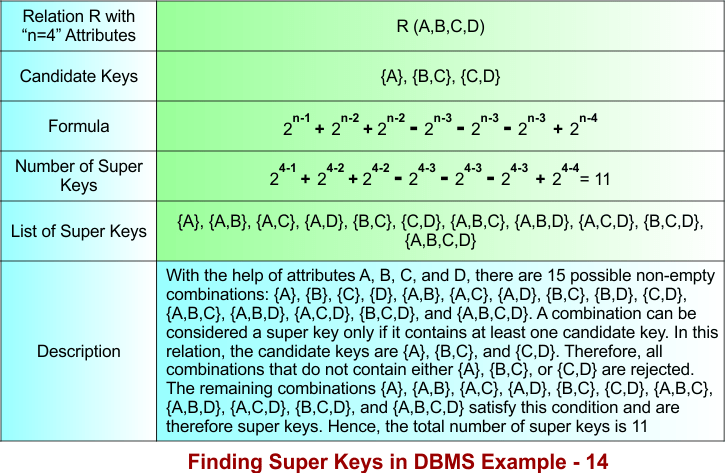
- There are three candidate keys: {A}, {B, C}, and {C, D}. The candidate key {A} contains one attribute (length 1), while the candidate keys {B, C} and {C, D} each contain two attributes (length 2).
Using the diagram below, calculate all super keys from the given data.
Let’s explain the above example 14 in the following steps
Step 01: Understanding the Formula
The formula is divided into three different parts based on the number of candidate keys combined.
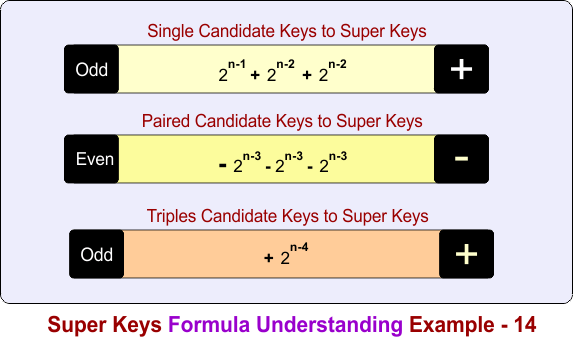
In the above diagram
Part 1: Count super keys formed from single candidate keys
- + 2n-1 + 2n-2 + 2n-2
Part 2: Subtract super keys formed from pair candidate-key overlaps
- − 2n-3 − 2n-3 − 2n-3
Part 3: Add super keys formed from triple candidate-key overlaps
- + 2n-4
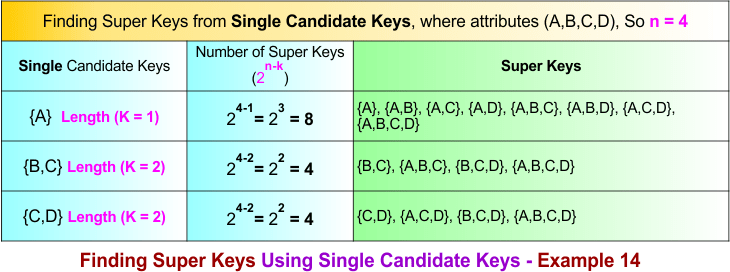
Step 02: Single Candidate Keys to Super Keys
The single candidate keys are {A}, {B, C}, and {C, D}. The number of super keys over single candidate keys is given in the following diagram
Step 03: Single to Pair Candidate Keys Conversions Process
If there are K single candidate keys, then Pair candidate keys are formed by choosing 2 candidate keys at a time
Formula:
Total pair candidate keys C(K,2) = K(K − 1) / 2!
As Total single candiate keys in example 14 are 3, so put K=3 in formula
Total pair candidate keys = 3(3-1) / 2 = 3
Total pair candidate keys = 3
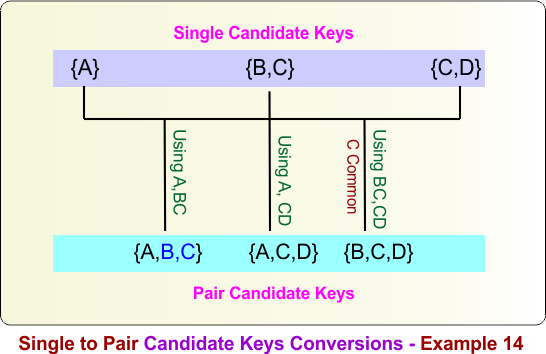
Pair candidate keys are formed by combining any two candidate keys. For the candidate keys {A}, {B,C}, and {C,D}, the pair candidate keys are obtained as follows:
{A} ∪ {B,C} = {A,B,C}
{A} ∪ {C,D} = {A,C,D}
{B,C} ∪ {C,D} = {B,C,D}
Therefore, the pair candidate keys are {A,B,C}, {A,C,D}, and {B,C,D}. The following diagram illustrates this process.
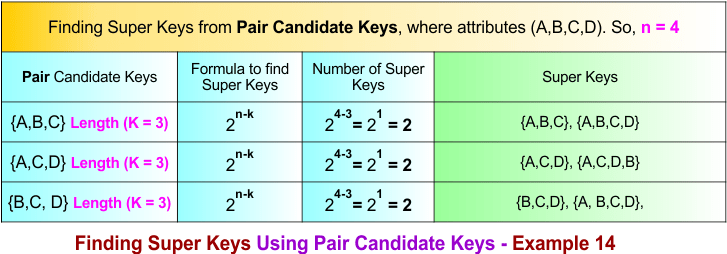
Step 04: Pair Candidate Keys to Super Keys
The following diagram shows all super keys formed over the paired candidate keys, which are {A,B,C}, {A,C,D}, and {B,C,D}.
Step 05: Single to Triple Candidate Keys Conversions Process
If there are K single candidate keys, then triple candidate keys are formed by choosing 3 candidate keys at a time
Formula:
Total pair candidate keys C(K,3) = K(K − 1)(K-2) / 3!
As Total single candiate keys in example 14 are 3, so put K=3 and 3! = 6 in formula
Total triple candidate keys = 3(3-1)(3-2) / 6 = 1
Total triple candidate keys = 1
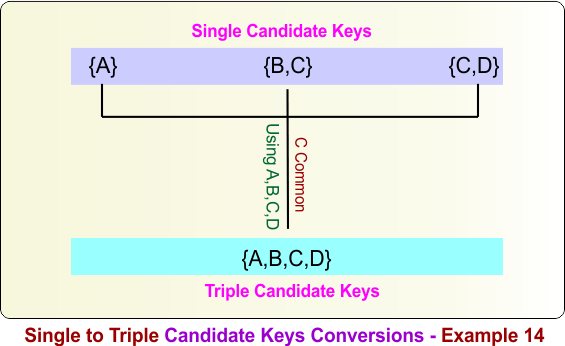
Triple candidate keys are formed by combining any three single candidate keys. For the single candidate keys {A}, {B,C}, and {C,D}, the triple candidate key is obtained as follows:
{A} ∪ {B,C} ∪ {C,D} = {A,B,C,D}
Therefore, the triple candidate key formed from {A}, {B,C}, and {C,D} is {A,B,C,D}. The following diagram illustrates this process.
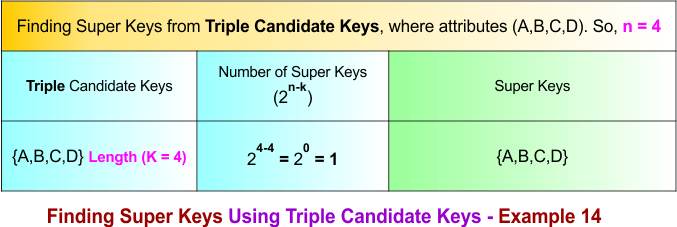
Step 06: Triple Candidate Keys to Super Keys
The following diagram shows all super keys formed over the triple candidate keys, which is {A,B,C,D}.
Summary of Finding Super Key – Example 14
How we calculate the total number of super keys in example 14, the process is given below
- Count super keys formed from single candidate keys = 2⁽⁴⁻¹⁾ + 2⁽⁴⁻²⁾ + 2⁽⁴⁻²⁾
= 8 + 4 + 4 = 16 - Subtract super keys formed from pair candidate-key overlaps = − 2⁽⁴⁻³⁾ − 2⁽⁴⁻³⁾ − 2⁽⁴⁻3⁾
= −2 −2 −2 = −6 - Add super keys formed from triple candidate-key overlaps = + 2⁽⁴⁻⁴⁾
= +1
Total super keys = 16 − 6 + 1 = 11
Finding Super Key in DBMS – Example 15
To calculate the super keys of example 15, the following data is given
- A relation R(A, B, C, D) represents a table with four attributes. Therefore, n=4.
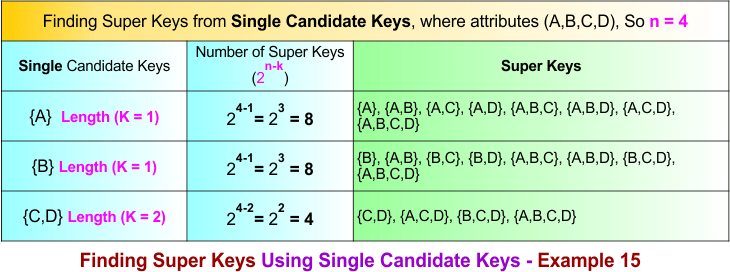
- There are three candidate keys: {A}, {B}, and {C, D}. The candidate keys {A} and {B} contain one attribute (length 1), while the candidate key {C, D} contains two attributes (length 2).
Using the diagram below, calculate all super keys from the given data.
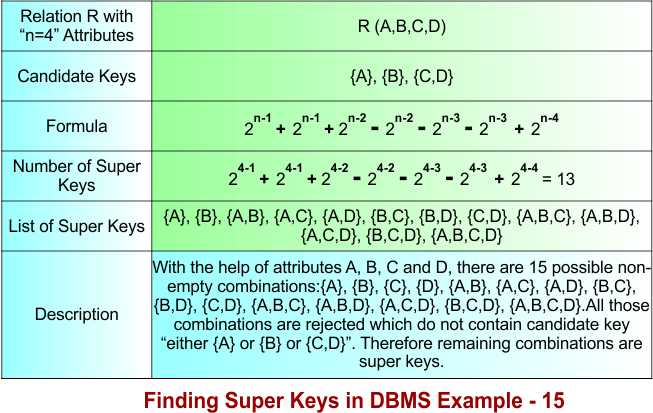
Let’s explain the above example 15 in the following steps
Step 01: Understanding the Formula
The formula is divided into three different parts based on the number of candidate keys combined.
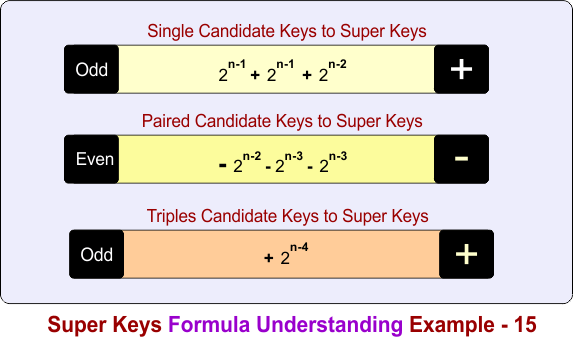
In the above diagram
Part 1: Count super keys formed from single candidate keys
- + 2n-1 + 2n-1 + 2n-2
Part 2: Subtract super keys formed from pair candidate-key overlaps
- − 2n-2 − 2n-3 − 2n-3
Part 3: Add super keys formed from triple candidate-key overlaps
- + 2n-4
Step 02: Single Candidate Keys to Super Keys
The single candidate keys are {A}, {B}, and {C, D}. The number of super keys over single candidate keys is given in the following diagram
Step 03: Single to Pair Candidate Keys Conversions Process
If there are K single candidate keys, then Pair candidate keys are formed by choosing 2 candidate keys at a time
Formula:
Total pair candidate keys C(K,2) = K(K − 1) / 2!
As Total single candiate keys in example 15 are 3, so put K=3 in formula
Total pair candidate keys = 3(3-1) / 2 = 3
Total pair candidate keys = 3
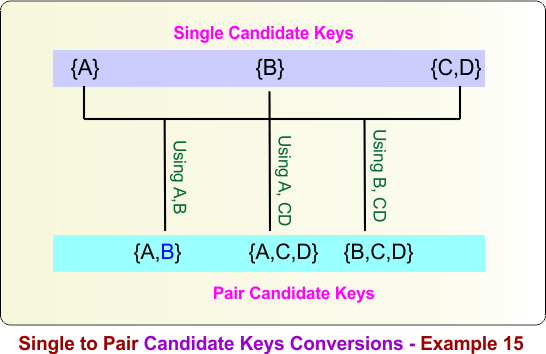
Pair candidate keys are formed by combining any two candidate keys. For the candidate keys {A}, {B}, and {C,D}, the pair candidate keys are obtained as follows:
{A} ∪ {B} = {A,B}
{A} ∪ {C,D} = {A,C,D}
{B} ∪ {C,D} = {B,C,D}
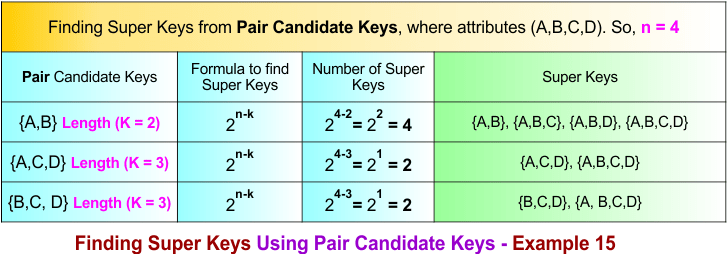
Therefore, the pair candidate keys are {A,B}, {A,C,D}, and {B,C,D}. The following diagram illustrates this process.
Step 04: Pair Candidate Keys to Super Keys
The following diagram shows all super keys formed over the paired candidate keys, which are {A,B}, {A,C,D}, and {B,C,D}.
Step 05: Single to Triple Candidate Keys Conversions Process
If there are K single candidate keys, then triple candidate keys are formed by choosing 3 candidate keys at a time
Formula:
Total pair candidate keys C(K,3) = K(K − 1)(K-2) / 3!
As Total single candiate keys in example 15 are 3, so put K=3 and 3! = 6 in formula
Total triple candidate keys = 3(3-1)(3-2) / 6 = 1
Total triple candidate keys = 1
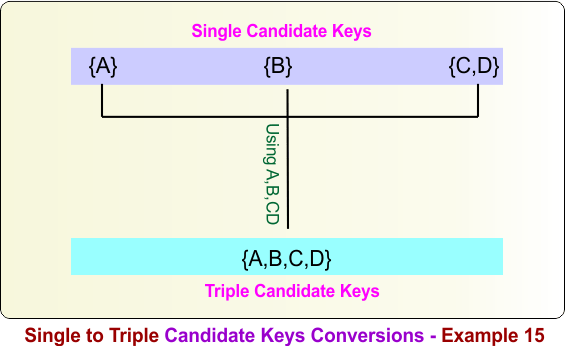
Triple candidate keys are formed by combining any three single candidate keys. For the single candidate keys {A}, {B}, and {C,D}, the triple candidate key is obtained as follows:
{A} ∪ {B} ∪ {C,D} = {A,B,C,D}
Therefore, the triple candidate key formed from {A}, {B}, and {C,D} is {A,B,C,D}. The following diagram illustrates this process.
Step 06: Triple Candidate Keys to Super Keys
The following diagram shows all super keys formed over the triple candidate keys, which are {A,B,C,D}.
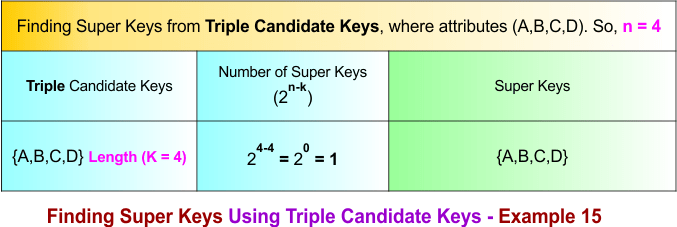
Summary of Finding Super Key – Example 15
How we calculate the total number of super keys in example 15, the process is given below
- Count super keys formed from single candidate keys = 2⁽⁴⁻¹⁾ + 2⁽⁴⁻¹⁾ + 2⁽⁴⁻²⁾ = 8 + 8 + 4 = 20
- Subtract super keys formed from pair candidate-key overlaps = − 2⁽⁴⁻²⁾ − 2⁽⁴⁻³⁾ − 2⁽⁴⁻³⁾ = −4 −2 −2 = −8
- Add super keys formed from triple candidate-key overlaps = + 2⁽⁴⁻⁴⁾ = +1
Total super keys = 20 − 8 + 1 = 13
Finding Super Key in DBMS – Example 16
To calculate the super keys of example 16, the following data is given
- A relation R(A, B, C, D) represents a table with four attributes. Therefore, n=4.
- There are three candidate keys: {A,B}, {B, C}, and {C, D}. Each candidate key contains two attributes (length k= 2).
Using the diagram below, calculate all super keys from the given data.
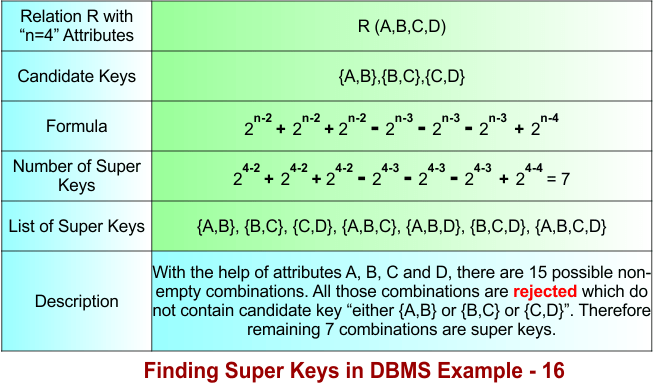
Let’s explain the above example 16 in the following steps
Step 01: Understanding the Formula
The formula is divided into three different parts based on the number of candidate keys combined.
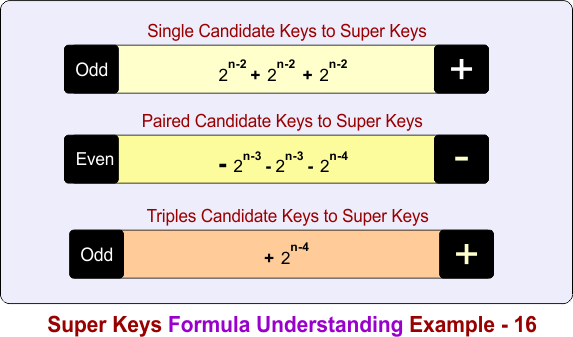
In the above diagram
Part 1: Count super keys formed from single candidate keys
- + 2n-2 + 2n-2 + 2n-2
Part 2: Subtract super keys formed from pair candidate-key overlaps
- − 2n-3 − 2n-3 − 2n-4
Part 3: Add super keys formed from triple candidate-key overlaps
- + 2n-4
Step 02: Single Candidate Keys to Super Keys
The single candidate keys are {A}, {B, C}, and {C, D}. The number of super keys over single candidate keys is given in the following diagram
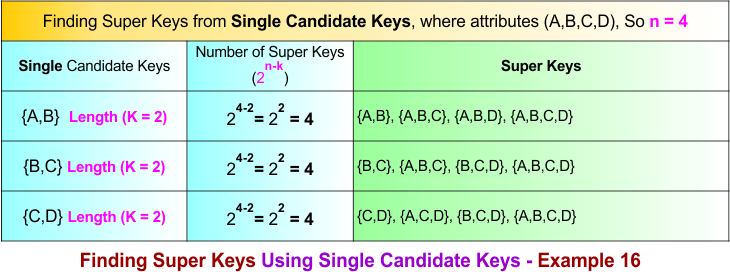
Step 03: Single to Pair Candidate Keys Conversions Process
If there are K single candidate keys, then Pair candidate keys are formed by choosing 2 candidate keys at a time
Formula:
Total pair candidate keys C(K,2) = K(K − 1) / 2!
As Total single candiate keys in example 16 are 3, so put K=3 in formula
Total pair candidate keys = 3(3-1) / 2 = 3
Total pair candidate keys = 3
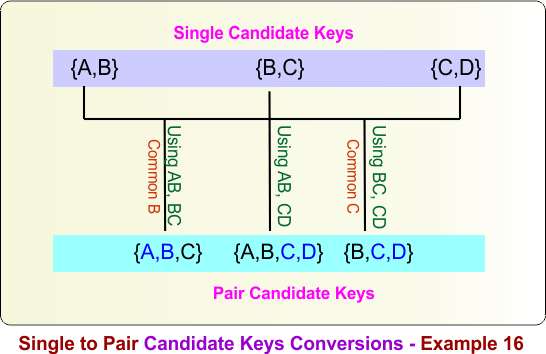
Pair candidate keys are formed by combining any two candidate keys. For the candidate keys {A,B}, {B,C}, and {C,D}, the pair candidate keys are obtained as follows:
{A,B} ∪ {B,C} = {A,B,C}
{A,B} ∪ {C,D} = {A,B,C,D}
{B,C} ∪ {C,D} = {B,C,D}
Therefore, the pair candidate keys are {A,B,C}, {A,B,C,D}, and {B,C,D}. The following diagram illustrates this process.
Step 04: Super Keys Using Pair Candidate Keys
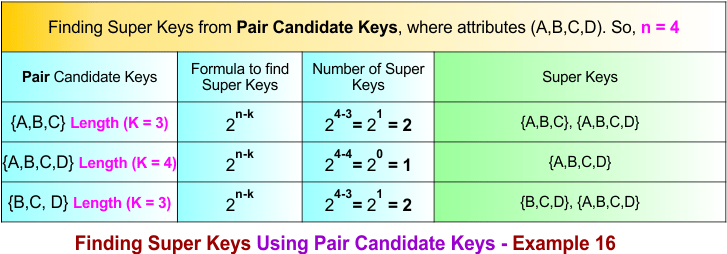
The following diagram shows all super keys formed over the paired candidate keys, which are {A,B,C}, {A,B,C,D}, and {B,C,D}.
Step 05: Single to Triple Candidate Keys Conversions Process
If there are K single candidate keys, then triple candidate keys are formed by choosing 3 candidate keys at a time
Formula:
Total pair candidate keys C(K,3) = K(K − 1)(K-2) / 3!
As Total single candiate keys in example 16 are 3, so put K=3 and 3! = 6 in formula
Total triple candidate keys = 3(3-1)(3-2) / 6 = 1
Total triple candidate keys = 1
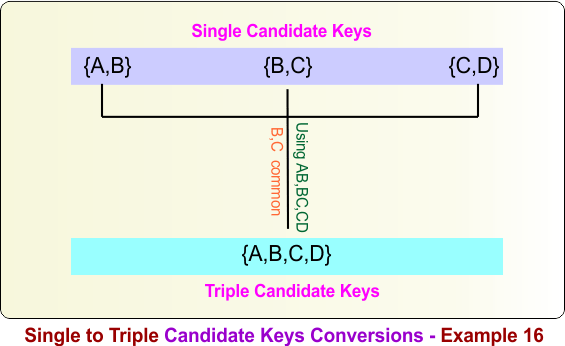
Triple candidate keys are formed by combining any three single candidate keys. For the single candidate keys {A,B}, {B,C}, and {C,D}, the triple candidate key is obtained as follows:
{A,B} ∪ {B,C} ∪ {C,D} = {A,B,C,D}
Therefore, the triple candidate key formed from {A,B}, {B,C}, and {C,D} is {A,B,C,D}. The following diagram illustrates this process.
Step 06: Triple Candidate Keys to Super Keys
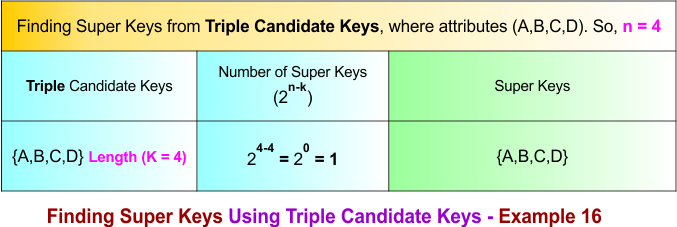
The following diagram shows all super keys formed over the triple candidate keys, which is {A,B,C,D}
Summary of Finding Super Key – Example 16
How we calculate the total number of super keys in example 16, the process is given below
- Count super keys formed from single candidate keys = 2⁽⁴⁻²⁾ + 2⁽⁴⁻²⁾ + 2⁽⁴⁻²⁾
= 4 + 4 + 4 = 12 - Subtract super keys formed from pair candidate-key overlaps = − 2⁽⁴⁻³⁾ − 2⁽⁴⁻³⁾ − 2⁽⁴⁻³⁾
= −2 −2 −2 = −6 - Add super keys formed from triple candidate-key overlaps = + 2⁽⁴⁻⁴⁾
= +1
Total super keys = 12 − 6 + 1 = 7
Finding Super Key in DBMS – Example 17
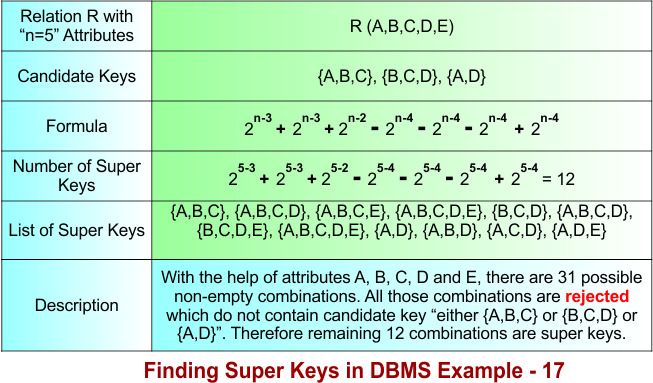
To calculate the super keys of example 17, the following data is given
- A relation R(A, B, C, D, E) represents a table with four attributes. Therefore, n=5.
- There are three candidate keys: {A, B, C}, {B, C, D}, and {A, D}. The candidate key {A, B, C} contains three attributes (length 3), the candidate key {B, C, D} contains three attributes (length 3), and the candidate key {A, D} contains two attributes (length 2).
Using the diagram below, calculate all super keys from the given data.
Let’s explain the above example 17 in the following steps
Step 01: Understanding the Formula
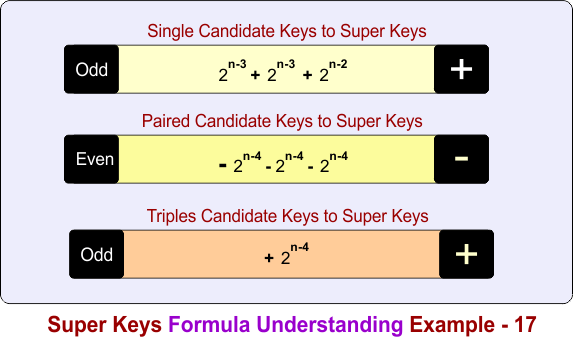
The formula is divided into three different parts based on the number of candidate keys combined.
In the above diagram
Part 1: Count super keys formed from single candidate keys
- + 2n-3 + 2n-3 + 2n-2
Part 2: Subtract super keys formed from pair candidate-key overlaps
- − 2n-4 − 2n-4 − 2n-4
Part 3: Add super keys formed from triple candidate-key overlaps
- + 2n-4
Step 02: Single Candidate Keys to Super Keys
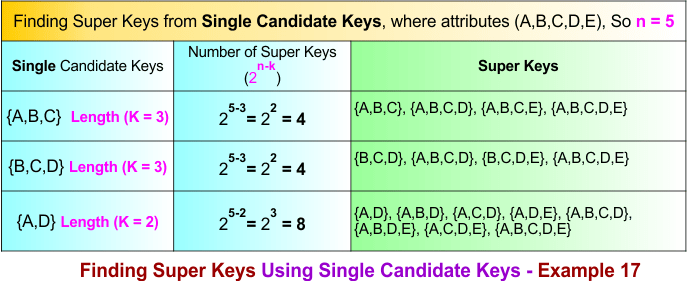
The single candidate keys are {A, B, C}, {B, C, D}, and {A, D}. The number of super keys over single candidate keys is given in the following diagram
Step 03: Single to Pair Candidate Keys Conversions Process
If there are K single candidate keys, then Pair candidate keys are formed by choosing 2 candidate keys at a time
Formula:
Total pair candidate keys C(K,2) = K(K − 1) / 2!
As Total single candiate keys in example 17 are 3, so put K=3 in formula
Total pair candidate keys = 3(3-1) / 2 = 3
Total pair candidate keys = 3
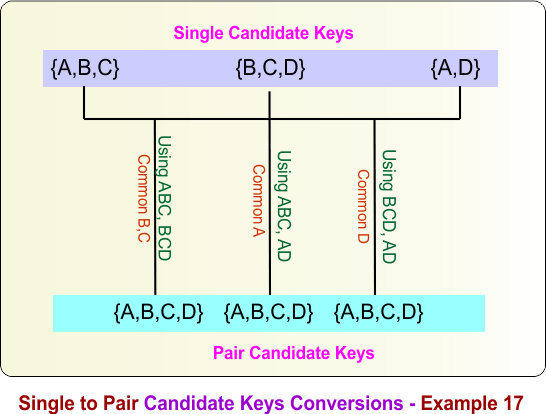
Pair candidate keys are formed by combining any two candidate keys. For the candidate keys {A,B,C}, {B,C,D}, and {A,D}, the pair candidate keys are:
{A,B,C} ∪ {B,C,D} = {A,B,C,D}
{A,B,C} ∪ {A,D} = {A,B,C,D}
{B,C,D} ∪ {A,D} = {A,B,C,D}
Therefore, all pair combinations produce the same pair candidate key {A,B,C,D}. The following diagram illustrates this process.
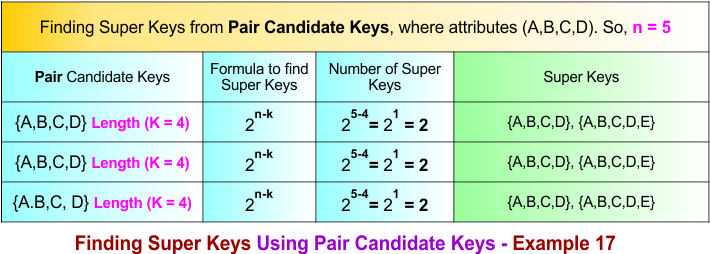
Step 04: Pair Candidate Keys to Super Keys
The following diagram shows all super keys formed over the paired candidate keys, which are {A,B,C,D}, {A,B,C,D}, and {A,B,C,D}.
Step 05: Single to Triple Candidate Keys Conversions Process
If there are K single candidate keys, then triple candidate keys are formed by choosing 3 candidate keys at a time
Formula:
Total pair candidate keys C(K,3) = K(K − 1)(K-2) / 3!
As Total single candiate keys in example 17 are 3, so put K=3 and 3! = 6 in formula
Total triple candidate keys = 3(3-1)(3-2) / 6 = 1
Total triple candidate keys = 1
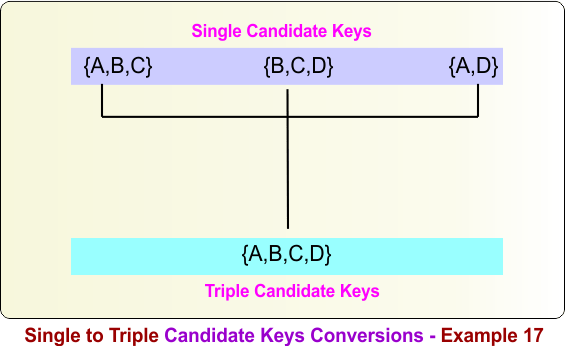
Triple candidate keys are formed by combining any three single candidate keys. For the single candidate keys {A,B,C}, {B,C,D}, and {A,D}, the triple candidate key is obtained as follows:
{A,B,C} ∪ {B,C,D} ∪ {A,D} = {A,B,C,D}
Therefore, the triple candidate key formed from {A,B,C}, {B,C,D}, and {A,D} is {A,B,C,D}. The following diagram illustrates this process.
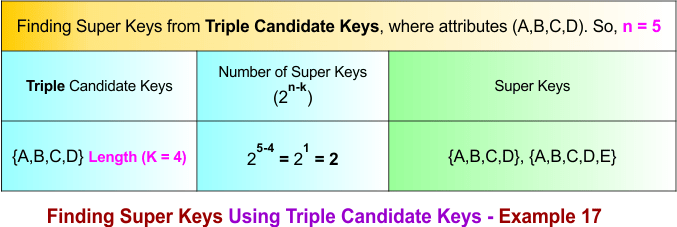
Step 06: Triple Candidate Keys to Super Keys
The following diagram shows all super keys formed over the triple candidate keys, which is {A,B,C,D}.
Summary of Finding Super Key – Example 17
How we calculate the total number of super keys in example 17, the process is given below
- Count super keys formed from single candidate keys = 2⁽⁵⁻³⁾ + 2⁽⁵⁻³⁾ + 2⁽⁵⁻²⁾
= 4 + 4 + 8 = 16 - Subtract super keys formed from pair candidate-key overlaps = − 2⁽⁵⁻⁴⁾ − 2⁽⁵⁻⁴⁾ − 2⁽⁵⁻⁴⁾
= −2 −2 −2 = −6 - Add super keys formed from triple candidate-key overlaps = + 2⁽⁵⁻4⁾
= +2
Total super keys = 16 − 6 + 2 = 12
Finding Super Key in DBMS – Example 18
To calculate the super keys of example 18, the following data is given
- A relation R(A, B, C, D, E) represents a table with five attributes. Therefore, n=5.
- There are two candidate keys: {A, B, C, D} and {C, D, E}. The candidate key {A, B, C, D} contains four attributes (length 4) and the candidate key {C, D, E} contains three attributes (length 3).
Using the diagram below, calculate all super keys from the given data.
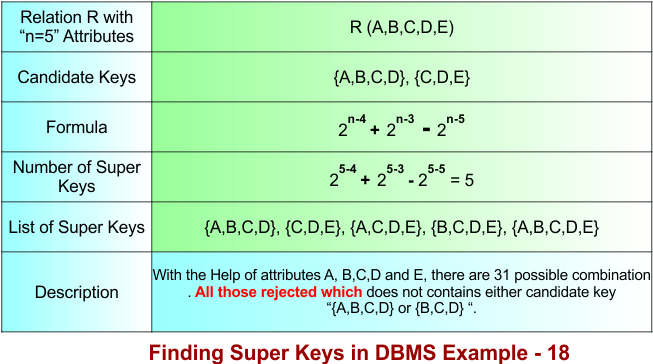
Let’s explain the above example 18 in the following steps
Step 01: Understanding the Formula
The formula is divided into two different parts based on the number of candidate keys combined.
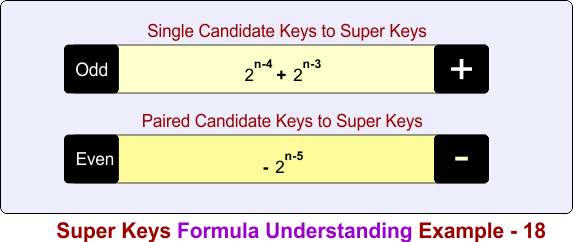
In the above diagram
Part 1: Count super keys formed from single candidate keys
- 2n-4 + 2n-3
Part 2: Subtract super keys formed from pair candidate-key overlaps
− 2n-5
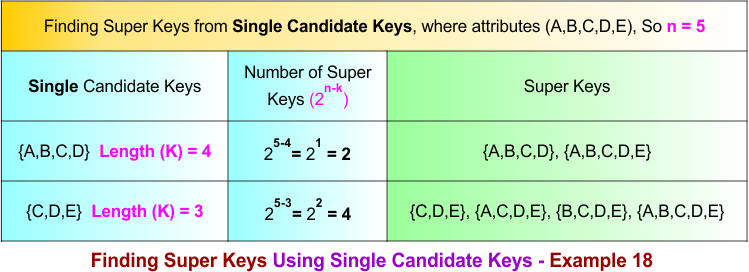
Step 02: Single Candidate Keys to Super Keys
The single candidate keys are {A, B, C, D} and {C, D, E}. The number of super keys over these single candidate keys is given in the following diagram.
Step 03: Single to Pair Candidate Keys Conversions Process
If there are K single candidate keys, then Pair candidate keys are formed by choosing 2 candidate keys at a time
Formula:
Total pair candidate keys C(K,2) = K(K − 1) / 2!
As Total single candiate keys in example 18 are 2, so put K=2 in formula
Total pair candidate keys = 2(2-1) / 2 = 1
Total pair candidate keys = 1
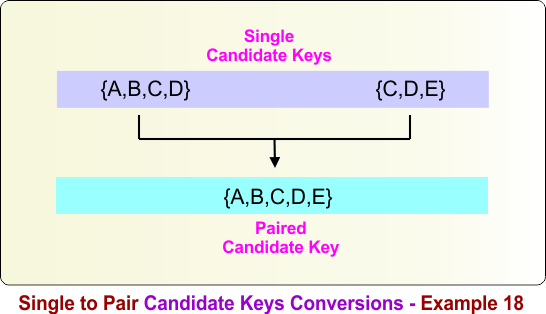
Pair candidate keys are formed by combining any two candidate keys. For the candidate keys {A,B,C,D} and {C,D,E}, the pair candidate key is:
{A,B,C,D} ∪ {C,D,E} = {A,B,C,D,E}
Therefore, the pair candidate key is {A,B,C,D,E}. The following diagram illustrates this process.
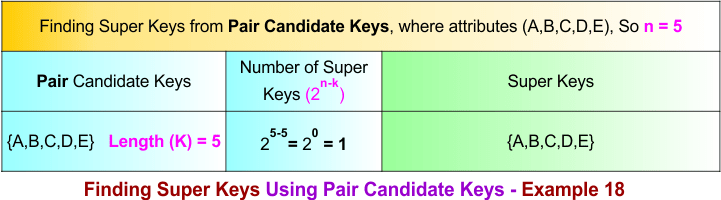
Step 04: Pair Candidate Keys to Super Keys
The following diagram shows all super keys formed over the paired candidate key, which is {A,B,C,D,E}.
Summary of Finding Super Key – Example 18
How we calculate the total number of super keys in example 18, the process is given below
- Count super keys formed from single candidate keys = 2⁽⁵⁻⁴⁾ + 2⁽⁵⁻³⁾
= 2 + 4 = 6 - Subtract super keys formed from pair candidate-key overlaps = − 2⁽⁵⁻⁵⁾
= −1
Total super keys = 6 − 1 = 5
Finding Super Key in DBMS – Example 19
To calculate the super keys of example 19, the following data is given.
- A relation R(A, B, C, D, E) represents a table with five attributes. Therefore, n = 5.
- There are two candidate keys: {A, B, C, D} and {E}. The candidate key {A, B, C, D} contains four attributes (length 4), and the candidate key {E} contains one attribute (length 1).
Using the diagram below, calculate all super keys from the given data.
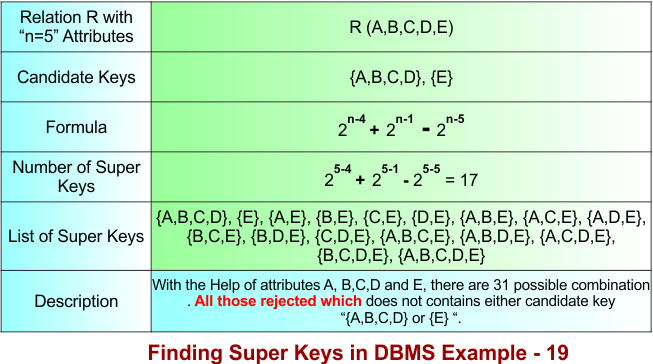
Let’s explain the above example 19 in the following steps
Step 01: Understanding the Formula
The formula is divided into two different parts based on the number of candidate keys combined.
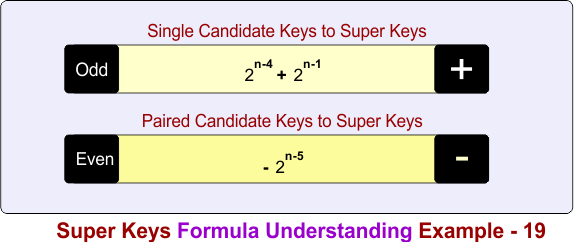
In the above diagram
Part 1: Count super keys formed from single candidate keys
- 2n-4 + 2n-1
Part 2: Subtract super keys formed from pair candidate-key overlaps
- − 2n-5
Step 02: Single Candidate Keys to Super Keys
The single candidate keys are {A, B, C, D} and {E}. The number of super keys over these single candidate keys is given in the following diagram.
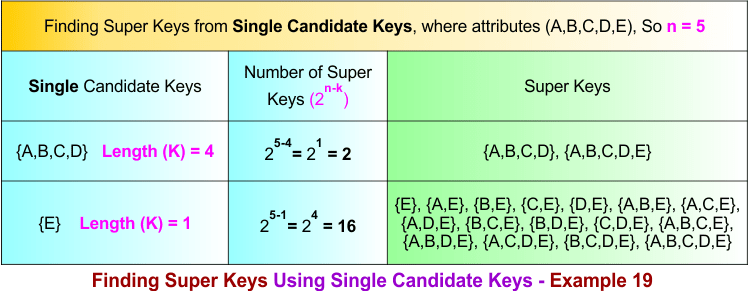
Step 03: Single to Pair Candidate Keys Conversions Process
If there are K single candidate keys, then Pair candidate keys are formed by choosing 2 candidate keys at a time
Formula:
Total pair candidate keys C(K,2) = K(K − 1) / 2!
As Total single candiate keys in example 19 are 2, so put K=2 in formula
Total pair candidate keys = 2(2-1) / 2 = 1
Total pair candidate keys = 1
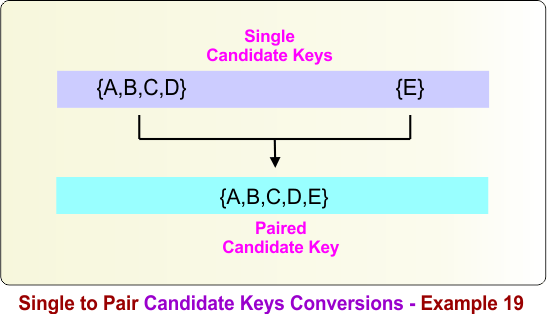
Pair candidate keys are formed by combining any two candidate keys. For the candidate keys {A,B,C,D} and {E}, the pair candidate key is:
{A,B,C,D} ∪ {E} = {A,B,C,D,E}
Therefore, the pair candidate key is {A,B,C,D,E}. The following diagram illustrates this process.
Step 04: Pair Candidate Keys to Super Keys
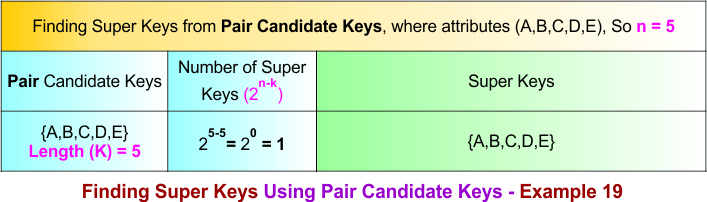
The following diagram shows all super keys formed over the paired candidate key, which is {A,B,C,D,E}.
Summary of Finding Super Key – Example 19
How we calculate the total number of super keys in example 19, the process is given below
- Count super keys formed from single candidate keys = 2⁽⁵⁻⁴⁾ + 2⁽⁵⁻¹⁾
= 2 + 16 = 18 - Subtract super keys formed from pair candidate-key overlaps = − 2⁽⁵⁻⁵⁾
= −1
Total super keys = 18 − 1 = 17
Finding Super Key in DBMS – Example 20
To calculate the super keys of example 20, the following data is given.
- A relation R(A, B, C, D, E, F) represents a table with six attributes. Therefore, n = 6.
- There are two candidate keys: {A, B, C, D} and {E, F}. The candidate key {A, B, C, D} contains four attributes (length 4), and the candidate key {E, F} contains two attributes (length 2).
Using the diagram below, calculate all super keys from the given data.
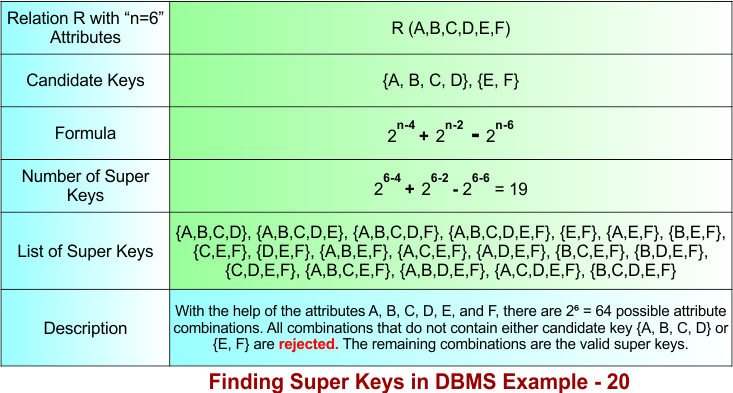
Let’s explain the above example 20 in the following steps
Step 01: Understanding the Formula
The formula is divided into two different parts based on the number of candidate keys combined.
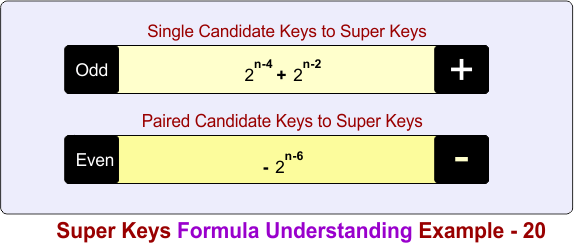
In the above diagram
Part 1: Count super keys formed from single candidate keys
- 2n-4 + 2n-2
Part 2: Subtract super keys formed from pair candidate-key overlaps
− 2n-6
Step 02: Single Candidate Keys to Super Keys
The single candidate keys are {A, B, C, D} and {E, F}. The number of super keys over these single candidate keys is given in the following diagram.
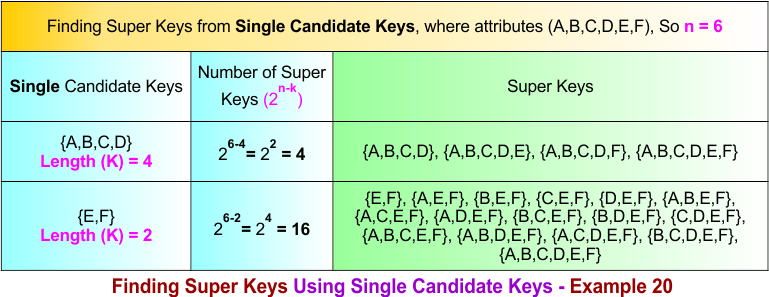
Step 03: Single to Pair Candidate Keys Conversions Process
If there are K single candidate keys, then Pair candidate keys are formed by choosing 2 candidate keys at a time
Formula:
Total pair candidate keys C(K,2) = K(K − 1) / 2!
As Total single candiate keys in example 20 are 2, so put K=2 in formula
Total pair candidate keys = 2(2-1) / 2 = 1
Total pair candidate keys = 1
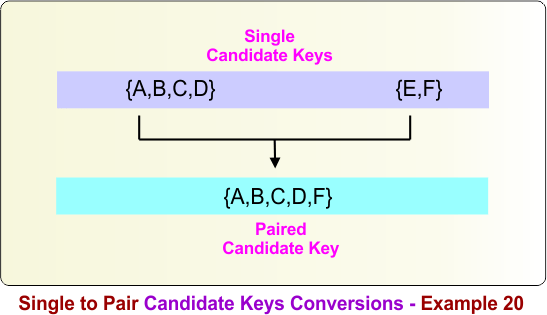
Pair candidate keys are formed by combining any two candidate keys. For the candidate keys {A,B,C,D} and {E,F}, the pair candidate key is:
{A,B,C,D} ∪ {E,F} = {A,B,C,D,E,F}
Therefore, the pair candidate key is {A,B,C,D,E,F}. The following diagram illustrates this process.
Step 04: Pair Candidate Keys to Super Keys
The following diagram shows all super keys formed over the paired candidate key, which is {A,B,C,D,E,F}.
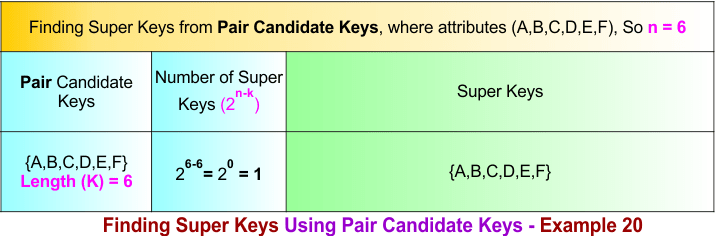
Summary of Finding Super Key – Example 20
How we calculate the total number of super keys in example 20, the process is given below
- Count super keys formed from single candidate keys = 2⁽⁶⁻⁴⁾ + 2⁽⁶⁻²⁾
= 4 + 16 = 20 - Subtract super keys formed from pair candidate-key overlaps = − 2⁽⁶⁻⁶⁾
= −1
Total super keys = 20 − 1 = 19
Finding Super Key in DBMS – Example 21
To calculate the super keys of example 21, the following data is given.
- A relation R(A, B, C, D, E, F) represents a table with six attributes. Therefore, n = 6.
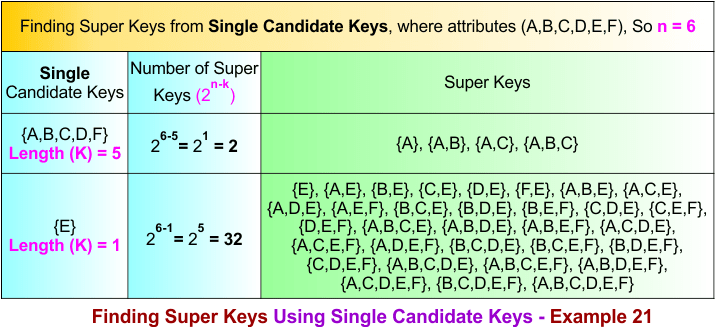
- There are two candidate keys: {A, B, C, D, F} and {E}. The candidate key {A, B, C, D, F} contains five attributes (length 5), and the candidate key {E} contains one attribute (length 1).
Using the diagram below, calculate all super keys from the given data.
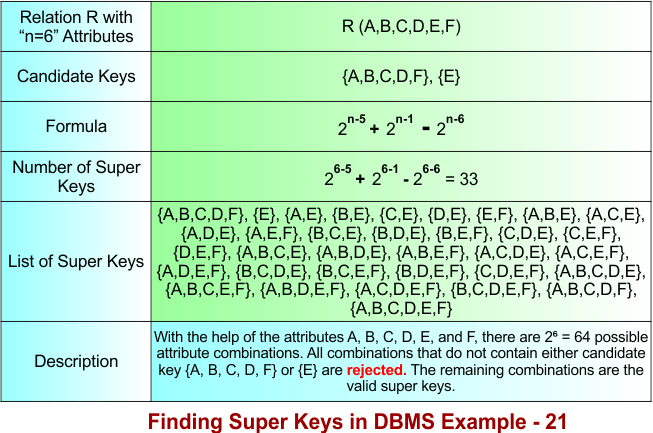
Let’s explain the above example 21 in the following steps
Step 01: Understanding the Formula
The formula is divided into two different parts based on the number of candidate keys combined.
In the above diagram
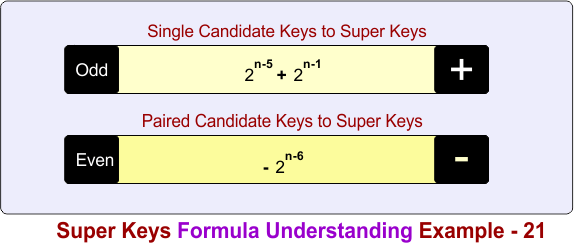
Part 1: Count super keys formed from single candidate keys
- 2n-5 + 2n-1
Part 2: Subtract super keys formed from pair candidate-key overlaps
− 2n-6
Step 02: Single Candidate Keys to Super Keys
The single candidate keys are {A, B, C, D, F} and {E}. The number of super keys over these single candidate keys is given in the following diagram.
Step 03: Single to Pair Candidate Keys Conversions Process
If there are K single candidate keys, then Pair candidate keys are formed by choosing 2 candidate keys at a time
Formula:
Total pair candidate keys C(K,2) = K(K − 1) / 2!
As Total single candiate keys in example 21 are 2, so put K=2 in formula
Total pair candidate keys = 2(2-1) / 2 = 1
Total pair candidate keys = 1
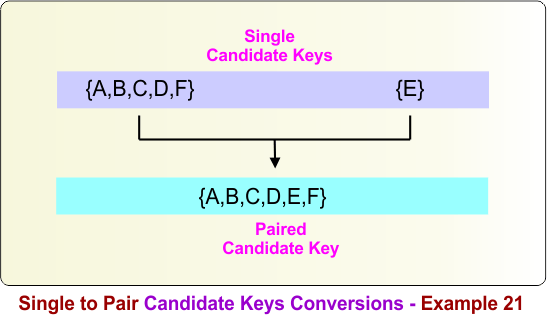
Pair candidate keys are formed by combining any two candidate keys. For the candidate keys {A,B,C,D,F} and {E}, the pair candidate key is:
{A,B,C,D,F} ∪ {E} = {A,B,C,D,E,F}
Therefore, the pair candidate key is {A,B,C,D,E,F}. The following diagram illustrates this process.
Step 04: Pair Candidate Keys to Super Keys
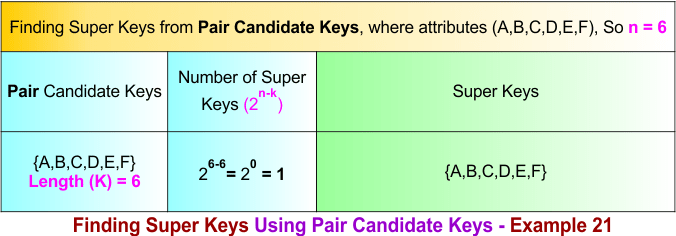
The following diagram shows all super keys formed over the paired candidate key, which is {A,B,C,D,E,F}.
Summary of Finding Super Key – Example 21
How we calculate the total number of super keys in example 21, the process is given below
- Count super keys formed from single candidate keys = 2⁽⁶⁻⁵⁾ + 2⁽⁶⁻¹⁾
= 2 + 32 = 34 - Subtract super keys formed from pair candidate-key overlaps = − 2⁽⁶⁻⁶⁾
= −1
Total super keys = 34 − 1 = 33
Finding Super Key in DBMS – Example 22
To calculate the super keys of example 22, the following data is given.
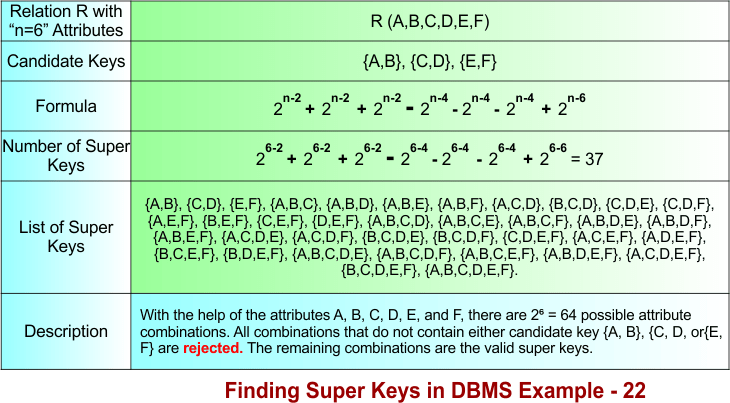
- A relation R(A, B, C, D, E, F) represents a table with six attributes. Therefore, n = 6.
- There are three candidate keys: {A, B}, {C, D}, and {E, F}. Each candidate key contains two attributes (length 2).
Using the diagram below, calculate all super keys from the given data.
Let’s explain the above example 22 in the following steps
Step 01: Understanding the Formula
The formula is divided into three different parts based on the number of candidate keys combined.
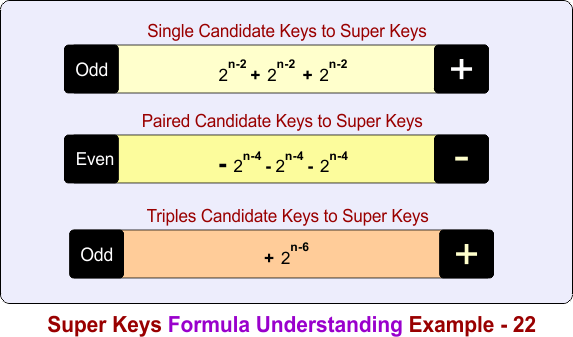
In the above diagram
Part 1: Count super keys formed from single candidate keys
- 2n-2 + 2n-2 + 2n-2
Part 2: Subtract super keys formed from pair candidate-key overlaps
− 2n-4 − 2n-4 − 2n-4
Part 3: Add super keys formed from triple candidate-key overlaps
- 2n-6
Step 02: Single Candidate Keys to Super Keys
The single candidate keys are {A, B}, {C, D}, and {E, F}. The number of super keys over these single candidate keys is given in the following diagram.
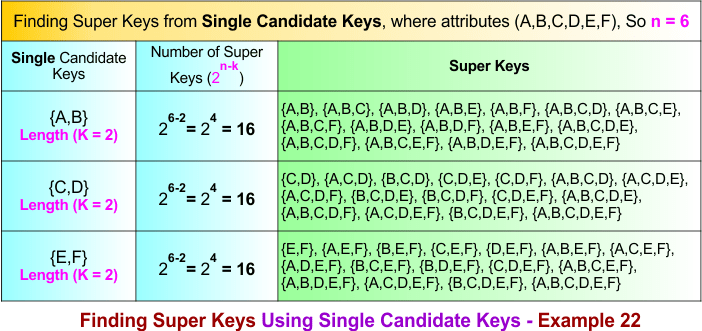
Step 03: Single to Pair Candidate Keys Conversions Process
If there are K single candidate keys, then Pair candidate keys are formed by choosing 2 candidate keys at a time
Formula:
Total pair candidate keys C(K,2) = K(K − 1) / 2!
As Total single candiate keys in example 22 are 3, so put K=3 in formula
Total pair candidate keys = 3(3-1) / 2 = 1
Total pair candidate keys = 3
Pair candidate keys are formed by combining any two candidate keys. For the candidate keys {A,B}, {C,D}, and {E,F}, the pair candidate keys are:
{A,B} ∪ {C,D} = {A,B,C,D}
{A,B} ∪ {E,F} = {A,B,E,F}
{C,D} ∪ {E,F} = {C,D,E,F}
The following diagram illustrates this process.
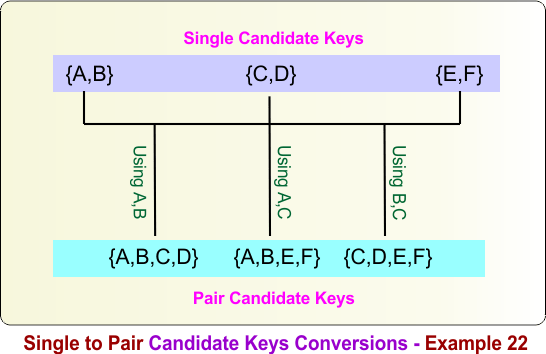
Step 04: Pair Candidate Keys to Super Keys
The following diagram shows all super keys formed over the paired candidate keys, which are {A,B,C,D}, {A,B,E,F}, and {C,D,E,F}.
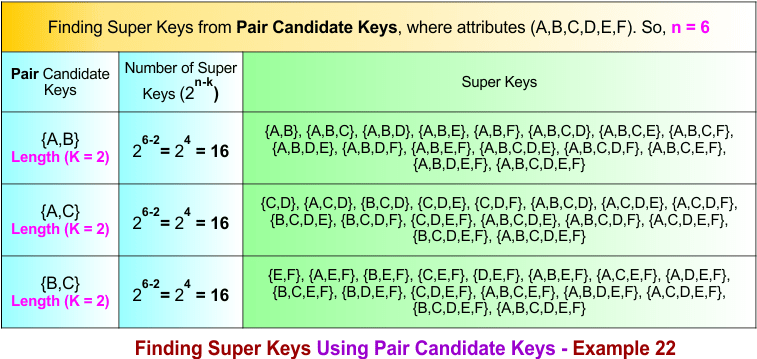
Step 05: Single to Triple Candidate Keys Conversions Process
If there are K single candidate keys, then triple candidate keys are formed by choosing 3 candidate keys at a time
Formula:
Total pair candidate keys C(K,3) = K(K − 1)(K-2) / 3!
As Total single candiate keys in example 22 are 3, so put K=3 and 3! = 6 in formula
Total triple candidate keys = 3(3-1)(3-2) / 6 = 1
Total triple candidate keys = 1
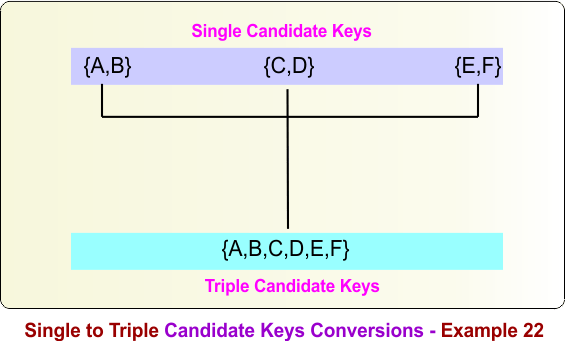
Triple candidate keys are formed by combining any three single candidate keys. For the single candidate keys {A,B}, {C,D}, and {E,F}, the triple candidate key is:
{A,B} ∪ {C,D} ∪ {E,F} = {A,B,C,D,E,F}
The following diagram illustrates this process.
Step 06: Triple Candidate Keys to Super Keys
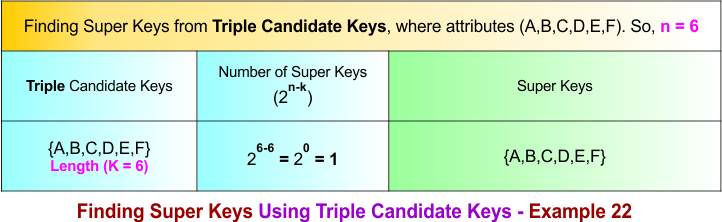
The following diagram shows all super keys formed over the triple candidate key, which is {A,B,C,D,E,F}.
Summary of Finding Super Key – Example 22
- How we calculate the total number of super keys in example 22, the process is given below
- Count super keys formed from single candidate keys = 2⁽⁶⁻²⁾ + 2⁽⁶⁻²⁾ + 2⁽⁶⁻²⁾
= 16 + 16 + 16 = 48 - Subtract super keys formed from pair candidate-key overlaps = − 2⁽⁶⁻⁴⁾ − 2⁽⁶⁻⁴⁾ − 2⁽⁶⁻⁴⁾
= −4 −4 −4 = −12 - Add super keys formed from triple candidate-key overlaps = + 2⁽⁶⁻⁶⁾
= +1
Total super keys = 48 − 12 + 1 = 37
Finding Super Key in DBMS – Example 23
To calculate the super keys of example 23, the following data is given.
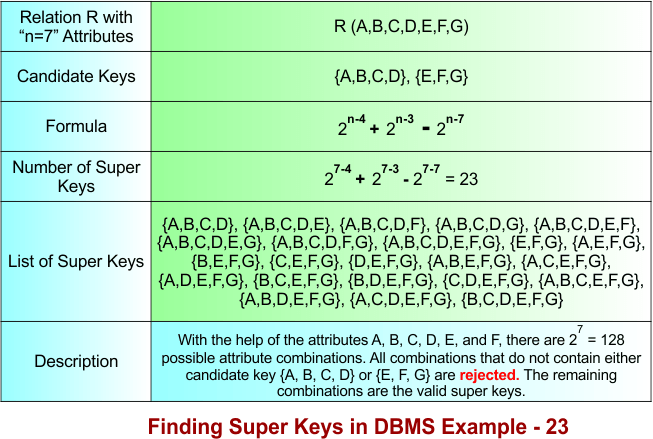
- A relation R(A, B, C, D, E, F, G) represents a table with seven attributes. Therefore, n = 7.
- There are two candidate keys: {A, B, C, D} and {E, F, G}. The candidate key {A, B, C, D} contains four attributes (length 4), and the candidate key {E, F, G} contains three attributes (length 3).
Using the diagram below, calculate all super keys from the given data.
Let’s explain the above example 23 in the following steps
Step 01: Understanding the Formula
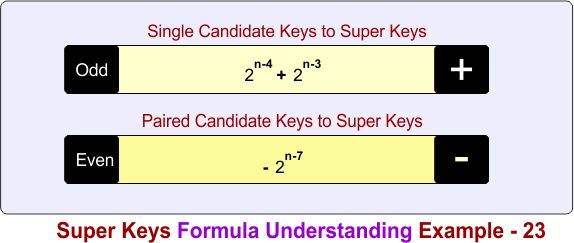
The formula is divided into two different parts based on the number of candidate keys combined.
In the above diagram
Part 1: Count super keys formed from single candidate keys
- 2n-4 + 2n-3
Part 2: Subtract super keys formed from pair candidate-key overlaps
− 2n-7
Step 02: Single Candidate Keys to Super Keys
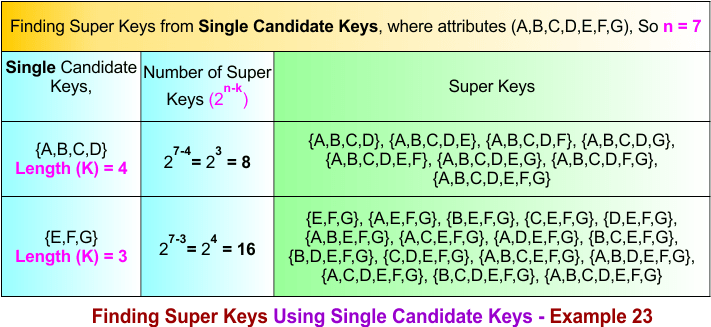
The single candidate keys are {A, B, C, D} and {E, F, G}. The number of super keys over these single candidate keys is given in the following diagram.
Step 03: Single to Pair Candidate Keys Conversions Process
If there are K single candidate keys, then Pair candidate keys are formed by choosing 2 candidate keys at a time
Formula:
Total pair candidate keys C(K,2) = K(K − 1) / 2!
As Total single candiate keys in example 23 are 2, so put K=2 in formula
Total pair candidate keys = 2(2-1) / 2 = 1
Total pair candidate keys = 1
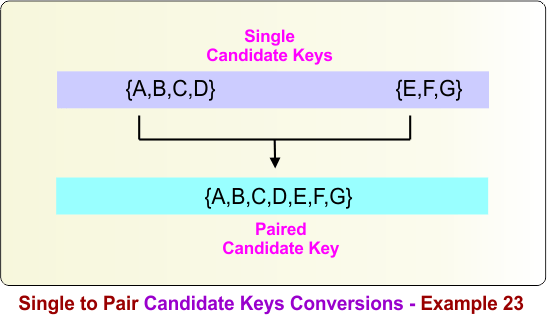
Pair candidate keys are formed by combining any two candidate keys. For the candidate keys {A,B,C,D} and {E,F,G}, the pair candidate key is:
{A,B,C,D} ∪ {E,F,G} = {A,B,C,D,E,F,G}
Therefore, the pair candidate key is {A,B,C,D,E,F,G}. The following diagram illustrates this process.
Step 04: Pair Candidate Keys to Super Keys
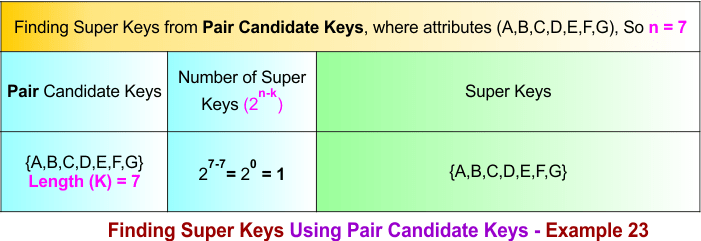
The following diagram shows all super keys formed over the paired candidate key, which is {A,B,C,D,E,F,G}.
Summary of Finding Super Key – Example 23
How we calculate the total number of super keys in example 23, the process is given below
- Count super keys formed from single candidate keys = 2⁽⁷⁻⁴⁾ + 2⁽⁷⁻³⁾
= 8 + 16 = 24 - Subtract super keys formed from pair candidate-key overlaps = − 2⁽⁷⁻⁷⁾
= −1
Total super keys = 24 − 1 = 23
Finding Super Key in DBMS – Example 24
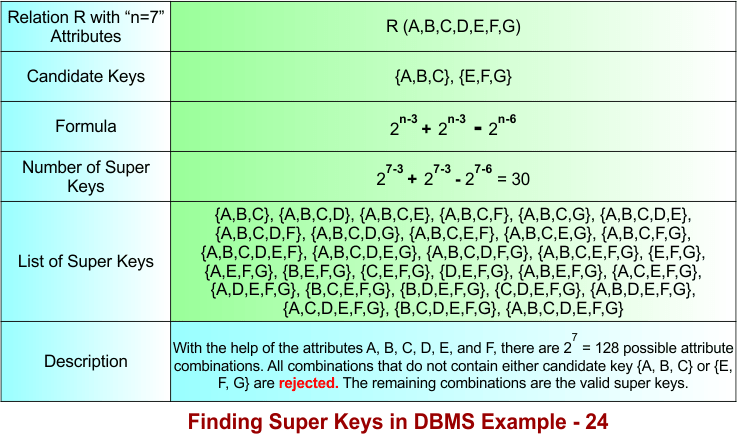
To calculate the super keys of example 24, the following data is given.
- A relation R(A, B, C, D, E, F, G) represents a table with seven attributes. Therefore, n = 7.
- There are two candidate keys: {A, B, C} and {E, F, G}. Each candidate key contains three attributes (length 3).
Using the diagram below, calculate all super keys from the given data.
Let’s explain the above example 24 in the following steps
Step 01: Understanding the Formula
The formula is divided into two different parts based on the number of candidate keys combined.
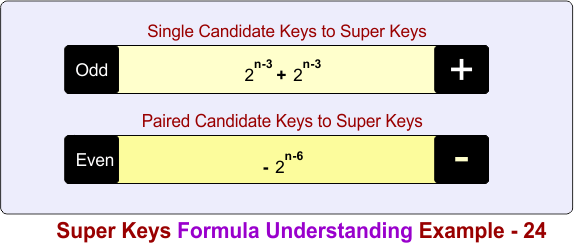
In the above diagram
Part 1: Count super keys formed from single candidate keys
- 2n-3 + 2n-3
Part 2: Subtract super keys formed from pair candidate-key overlaps
− 2n-6
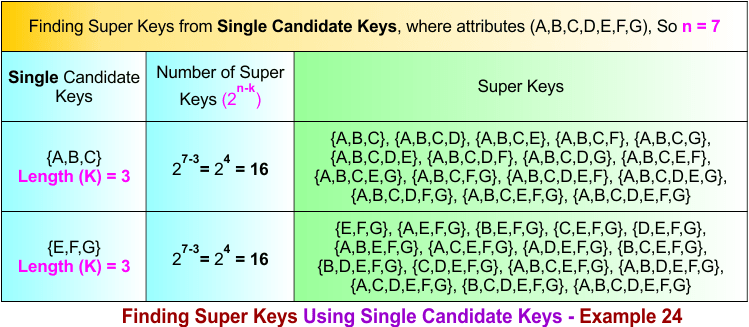
Step 02: Single Candidate Keys to Super Keys
The single candidate keys are {A, B, C} and {E, F, G}. The number of super keys over these single candidate keys is given in the following diagram.
Step 03: Single to Pair Candidate Keys Conversions Process
If there are K single candidate keys, then Pair candidate keys are formed by choosing 2 candidate keys at a time
Formula:
Total pair candidate keys C(K,2) = K(K − 1) / 2!
As Total single candiate keys in example 24 are 2, so put K=2 in formula
Total pair candidate keys = 2(2-1) / 2 = 1
Total pair candidate keys = 1
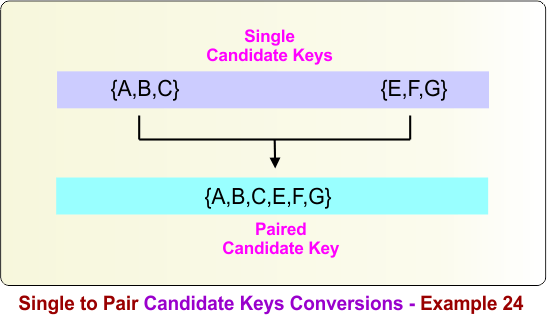
Pair candidate keys are formed by combining any two candidate keys. For the candidate keys {A,B,C} and {E,F,G}, the pair candidate key is:
{A,B,C} ∪ {E,F,G} = {A,B,C,E,F,G}
Therefore, the pair candidate key is {A,B,C,E,F,G}. The following diagram illustrates this process.
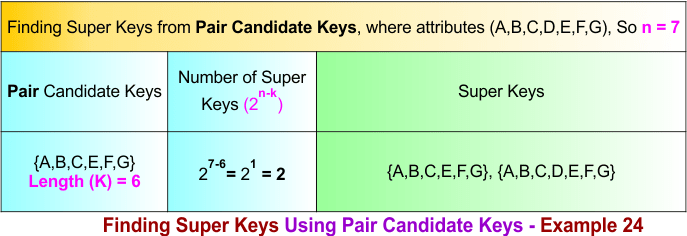
Step 04: Pair Candidate Keys to Super Keys
The following diagram shows all super keys formed over the paired candidate key, which is {A,B,C,E,F,G}.
Summary of Finding Super Key – Example 24
How we calculate the total number of super keys in example 24, the process is given below
- Count super keys formed from single candidate keys = 2⁽⁷⁻³⁾ + 2⁽⁷⁻³⁾
= 16 + 16 = 32 - Subtract super keys formed from pair candidate-key overlaps = − 2⁽⁷⁻⁶⁾
= −2
Total super keys = 32 − 2 = 30
Finding Super Key in DBMS – Example 25
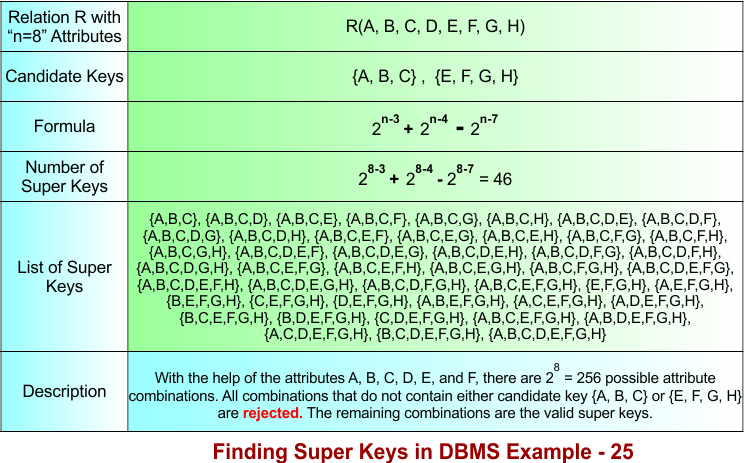
To calculate the super keys of example 25, the following data is given.
- A relation R(A, B, C, D, E, F, G, H) represents a table with eight attributes. Therefore, n = 8.
- There are two candidate keys: {A, B, C} and {E, F, G, H}. The candidate key {A, B, C} contains three attributes (length 3), and the candidate key {E, F, G, H} contains four attributes (length 4).
Using the diagram below, calculate all super keys from the given data.
Let’s explain the above example 25 in the following steps
Step 01: Understanding the Formula
The formula is divided into two different parts based on the number of candidate keys combined.
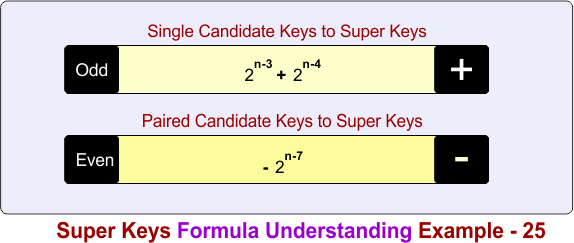
In the above diagram
Part 1: Count super keys formed from single candidate keys
- 2n-3 + 2n-4
Part 2: Subtract super keys formed from pair candidate-key overlaps
− 2n-7
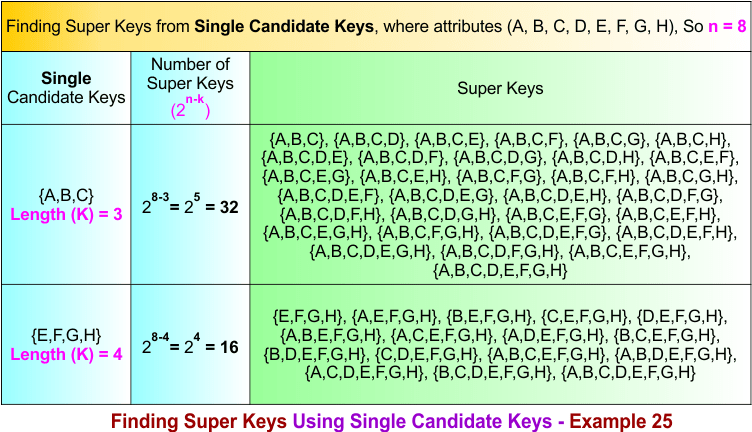
Step 02: Single Candidate Keys to Super Keys
The single candidate keys are {A, B, C} and {E, F, G, H}. The number of super keys over these single candidate keys is given in the following diagram.
Step 03: Single to Pair Candidate Keys Conversions Process
If there are K single candidate keys, then Pair candidate keys are formed by choosing 2 candidate keys at a time
Formula:
Total pair candidate keys C(K,2) = K(K − 1) / 2!
As Total single candiate keys in example 25 are 2, so put K=2 in formula
Total pair candidate keys = 2(2-1) / 2 = 1
Total pair candidate keys = 1
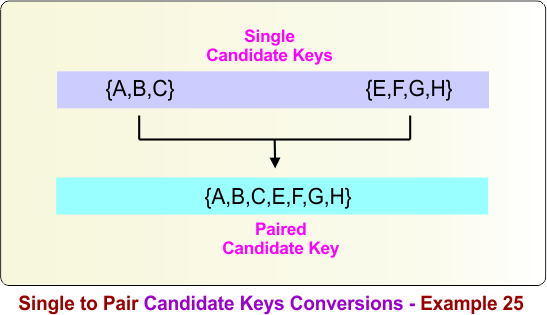
Pair candidate keys are formed by combining any two candidate keys. For the candidate keys {A,B,C} and {E,F,G,H}, the pair candidate key is:
{A,B,C} ∪ {E,F,G,H} = {A,B,C,E,F,G,H}
Therefore, the pair candidate key is {A,B,C,E,F,G,H}. The following diagram illustrates this process.
Step 04: Pair Candidate Keys to Super Keys
The following diagram shows all super keys formed over the paired candidate key, which is {A,B,C,E,F,G,H}.
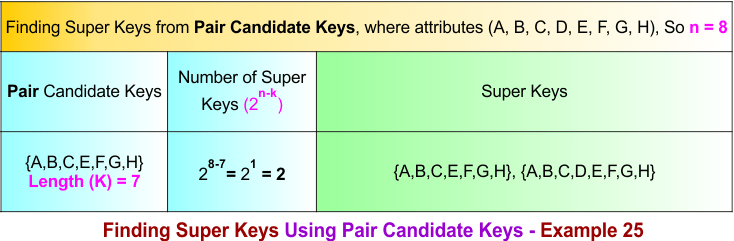
Summary of Finding Super Key – Example 25
How we calculate the total number of super keys in example 25, the process is given below
- Count super keys formed from single candidate keys = 2⁽⁸⁻³⁾ + 2⁽⁸⁻⁴⁾
= 32 + 16 = 48 - Subtract super keys formed from pair candidate-key overlaps = − 2⁽⁸⁻⁷⁾
= −2
Total super keys = 48 − 2 = 46
Finding Super Key in DBMS – Example 26
To calculate the super keys of example 26, the following data is given.
- A relation R(A, B, C, D, E, F, G, H) represents a table with eight attributes. Therefore, n = 8.
- There are three candidate keys: {A, B, C, D, E}, {E, F}, and {F, G, H}. The candidate key {A, B, C, D, E} contains five attributes (length 5), {E, F} contains two attributes (length 2), and {F, G, H} contains three attributes (length 3).
Using the diagram below, calculate all super keys from the given data.
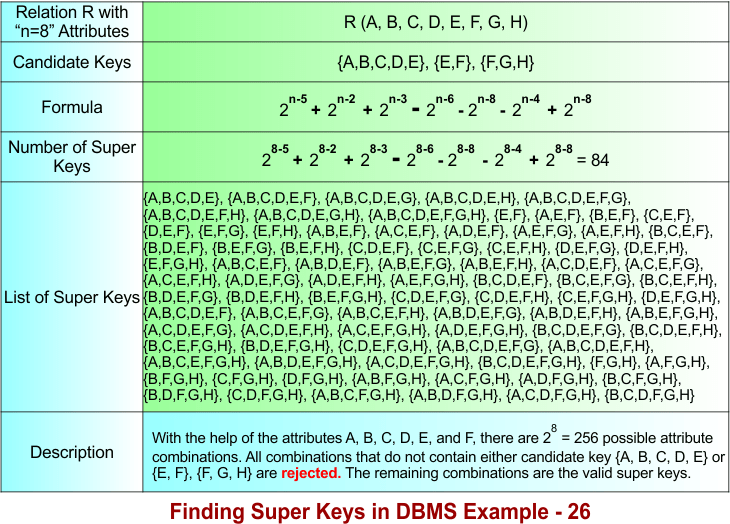
Let’s explain the above example 26 in the following steps
Step 01: Understanding the Formula
The formula is divided into three different parts based on the number of candidate keys combined.
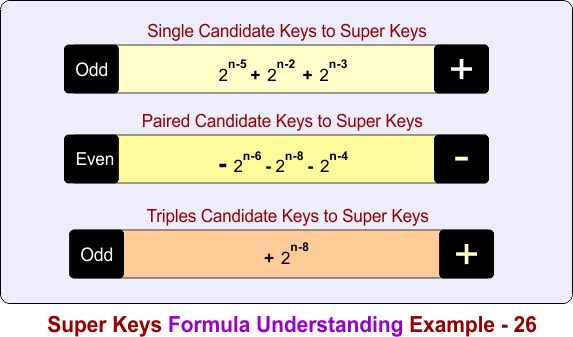
In the above diagram
Part 1: Count super keys formed from single candidate keys
- 2n-5 + 2n-2 + 2n-3
Part 2: Subtract super keys formed from pair candidate-key overlaps
− 2n-6 − 2n-8 − 2n-6
Part 3: Add super keys formed from triple candidate-key overlaps
- 2n-8
Step 02: Single Candidate Keys to Super Keys
The single candidate keys are {A, B, C, D, E}, {E, F}, and {F, G, H}. The number of super keys over these single candidate keys is given in the following diagram.
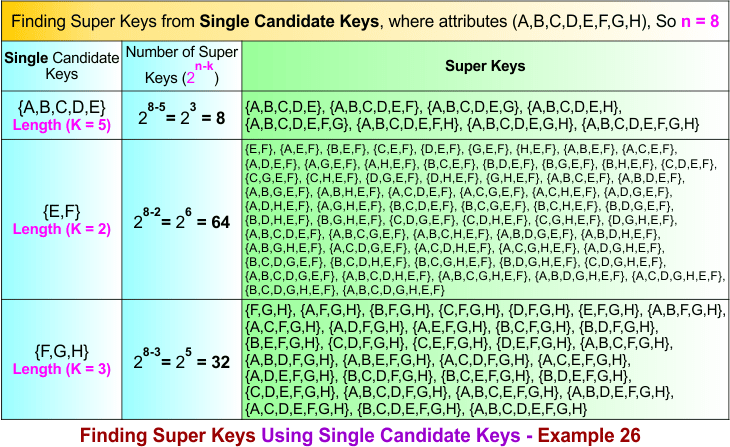
Step 03: Single to Pair Candidate Keys Conversions Process
If there are K single candidate keys, then Pair candidate keys are formed by choosing 2 candidate keys at a time
Formula:
Total pair candidate keys C(K,2) = K(K − 1) / 2!
As Total single candiate keys in example 26 are 3, so put K=3 in formula
Total pair candidate keys = 3(3-1) / 2 = 1
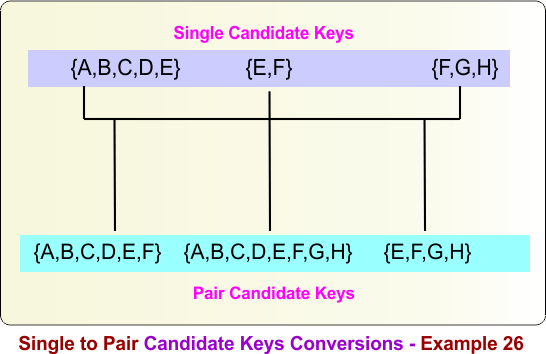
Total pair candidate keys = 3
Pair candidate keys are formed by combining any two candidate keys. For the candidate keys {A,B,C,D,E}, {E,F}, and {F,G,H}, the pair candidate keys are:
{A,B,C,D,E} ∪ {E,F} = {A,B,C,D,E,F}
{A,B,C,D,E} ∪ {F,G,H} = {A,B,C,D,E,F,G,H}
{E,F} ∪ {F,G,H} = {E,F,G,H}
The following diagram illustrates this process.
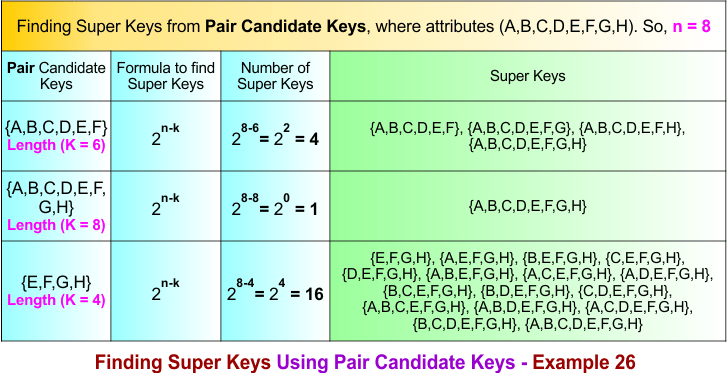
Step 04: Pair Candidate Keys to Super Keys
The following diagram shows all super keys formed over the paired candidate keys, which are {A,B,C,D,E,F}, {A,B,C,D,E,F,G,H}, and {E,F,G,H}.
Step 05: Single to Triple Candidate Keys Conversions Process
If there are K single candidate keys, then triple candidate keys are formed by choosing 3 candidate keys at a time
Formula:
Total pair candidate keys C(K,3) = K(K − 1)(K-2) / 3!
As Total single candiate keys in example 26 are 3, so put K=3 and 3! = 6 in formula
Total triple candidate keys = 3(3-1)(3-2) / 6 = 1
Total triple candidate keys = 1
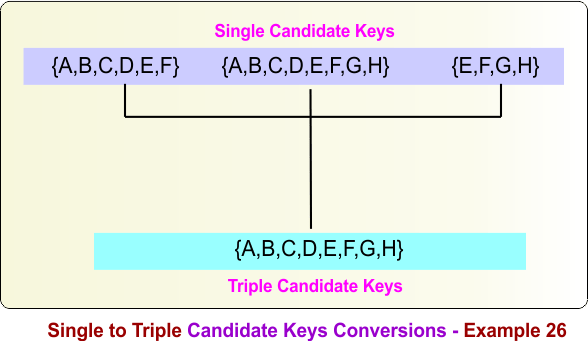
Triple candidate keys are formed by combining any three single candidate keys. For the single candidate keys {A,B,C,D,E}, {E,F}, and {F,G,H}, the triple candidate key is:
{A,B,C,D,E} ∪ {E,F} ∪ {F,G,H} = {A,B,C,D,E,F,G,H}
The following diagram illustrates this process.
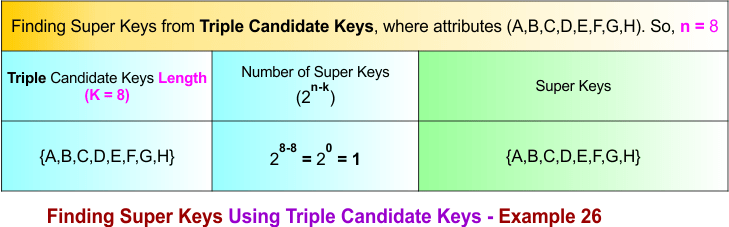
Step 06: Triple Candidate Keys to Super Keys
The following diagram shows all super keys formed over the triple candidate key, which is {A,B,C,D,E,F,G,H}.
Summary of Finding Super Key – Example 26
How we calculate the total number of super keys in example 26, the process is given below
- Count super keys formed from single candidate keys = 2⁽⁸⁻⁵⁾ + 2⁽⁸⁻²⁾ + 2⁽⁸⁻³⁾
= 8 + 64 + 32 = 104 - Subtract super keys formed from pair candidate-key overlaps = − 2⁽⁸⁻6⁾ − 2⁽⁸⁻8⁾ − 2⁽⁸⁻4⁾
= −4 −1 −16 = −21 - Add super keys formed from triple candidate-key overlaps = + 2⁽⁸⁻⁸⁾
= +1
Total super keys = 104 − 21 + 1 = 84
Finding Super Key in DBMS – Example 27
To calculate the super keys of example 27, the following data is given.
- A relation R(A, B, C, D, E, F, G, H) represents a table with eight attributes. Therefore, n = 8.
- There are four candidate keys: {A, B}, {C, D, E}, {E, F}, and {F, G, H}. The candidate key {A, B} contains two attributes (length 2), {C, D, E} contains three attributes (length 3), {E, F} contains two attributes (length 2), and {F, G, H} contains three attributes (length 3).
Using the diagram below, calculate all super keys from the given data.
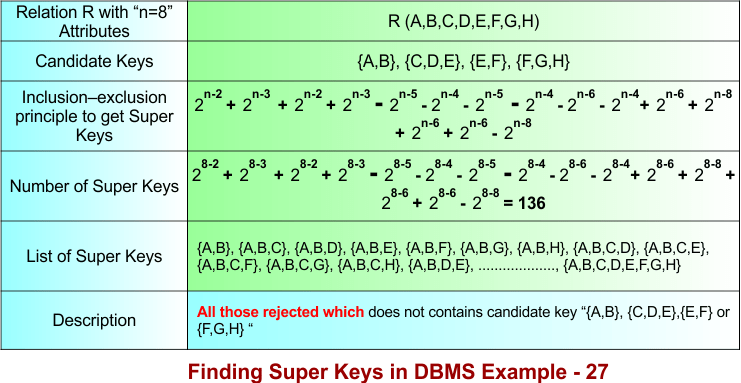
Let’s explain the above example 27 in the following steps
Step 01: Understanding the Formula
The formula is divided into four different parts based on the number of candidate keys combined.
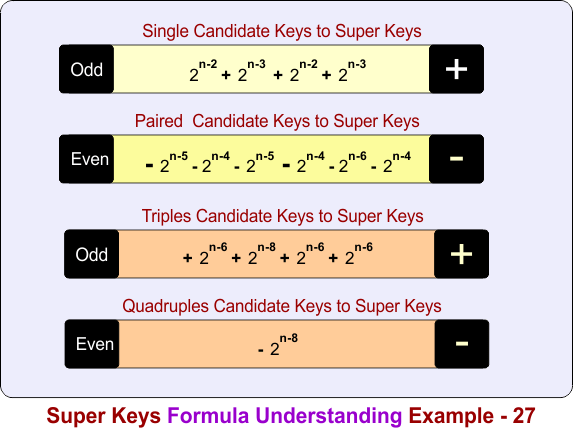
In the above diagram
Part 1: Count super keys formed from single candidate keys
- 2n-2 + 2n-3 + 2n-2 + 2n-3
Part 2: Subtract super keys formed from pair candidate-key overlaps
− 2n-5 − 2n-4 − 2n-5 − 2n-4 − 2n-6 − 2n-4
Part 3: Add super keys formed from triple candidate-key overlaps
- 2n-6 + 2n-8 + 2n-6 + 2n-6
Part 4: Subtract super keys formed from quadruple candidate-key overlaps
− 2n-8
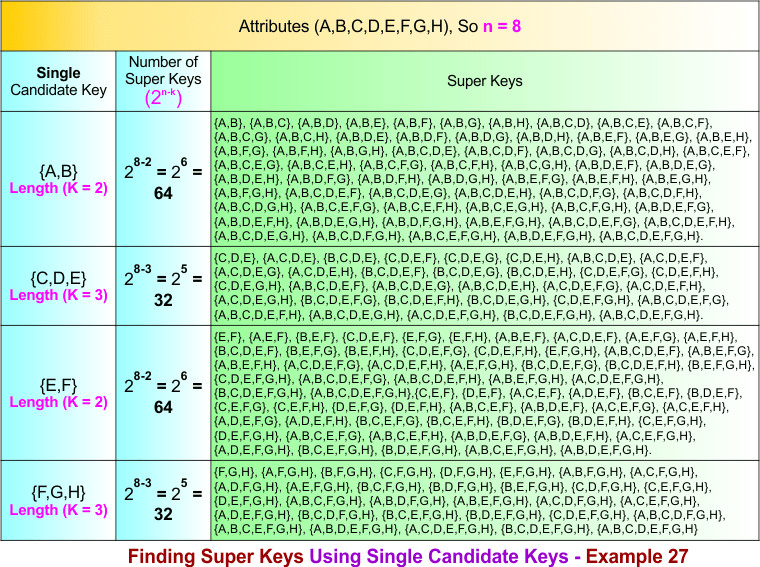
Step 02: Single Candidate Keys to Super Keys
The single candidate keys are {A, B}, {C, D, E}, {E, F}, and {F, G, H}. The number of super keys over these single candidate keys is given in the following diagram.
Step 03: Single to Pair Candidate Keys Conversions Process
If there are K single candidate keys, then Pair candidate keys are formed by choosing 2 candidate keys at a time
Formula:
Total pair candidate keys C(K,2) = K(K − 1) / 2!
As Total single candiate keys in example 27 are 4, so put K=4 in formula
Total pair candidate keys = 4(4-1) / 2 = 6
Total pair candidate keys = 6
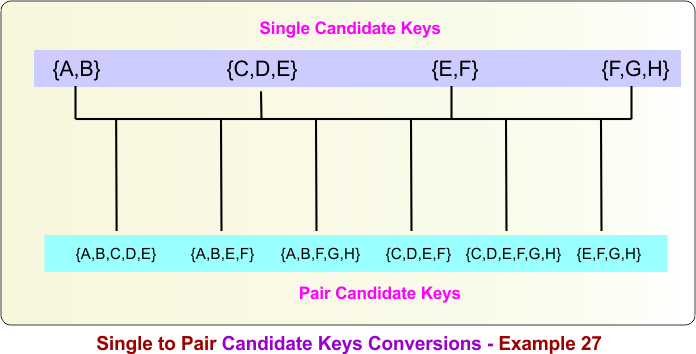
Pair candidate keys are formed by combining any two candidate keys. For the candidate keys {A,B}, {C,D,E}, {E,F}, and {F,G,H}, the pair candidate keys are:
- {A,B} ∪ {C,D,E} = {A,B,C,D,E}
- {A,B} ∪ {E,F} = {A,B,E,F}
- {A,B} ∪ {F,G,H} = {A,B,F,G,H}
- {C,D,E} ∪ {E,F} = {C,D,E,F}
- {C,D,E} ∪ {F,G,H} = {C,D,E,F,G,H}
- {E,F} ∪ {F,G,H} = {E,F,G,H}
The following diagram illustrates this process.
Step 04: Pair Candidate Keys to Super Keys
The following diagram shows all super keys formed over the paired candidate keys, which are: {A,B,C,D,E}, {A,B,E,F}, {A,B,F,G,H}, {C,D,E,F}, {C,D,E,F,G,H}, and {E,F,G,H}.
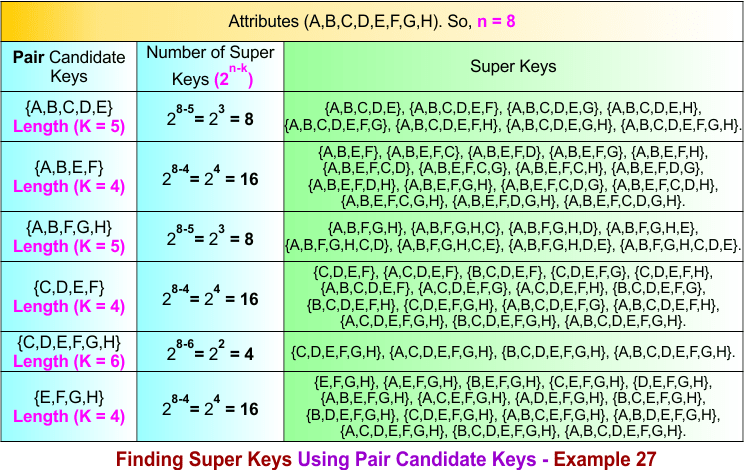
Step 05: Single to Triple Candidate Keys Conversions Process
If there are K single candidate keys, then triple candidate keys are formed by choosing 3 candidate keys at a time
Formula:
Total pair candidate keys C(K,3) = K(K − 1)(K-2) / 3!
As Total single candiate keys in example 27 are 4, so put K=4 and 3! = 6 in formula
Total triple candidate keys = 4(4-1)(4-2) / 6 = 8
Total triple candidate keys = 4
Triple candidate keys are formed by combining any three single candidate keys. For the single candidate keys {A,B}, {C,D,E}, {E,F}, and {F,G,H}, the triple candidate keys are:
- {A,B} ∪ {C,D,E} ∪ {E,F} = {A,B,C,D,E,F}
- {A,B} ∪ {C,D,E} ∪ {F,G,H} = {A,B,C,D,E,F,G,H}
- {A,B} ∪ {E,F} ∪ {F,G,H} = {A,B,E,F,G,H}
- {C,D,E} ∪ {E,F} ∪ {F,G,H} = {C,D,E,F,G,H}
The following diagram illustrates this process.
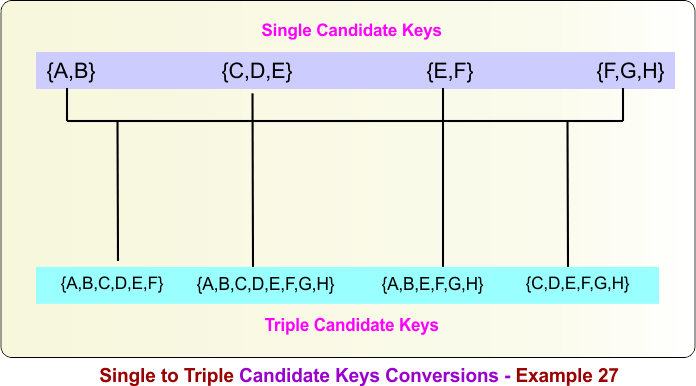
Step 06: Triple Candidate Keys to Super Keys
The following diagram shows all super keys formed over the triple candidate keys, which are: {A,B,C,D,E,F}, {A,B,C,D,E,F,G,H}, {A,B,E,F,G,H}, and {C,D,E,F,G,H}.
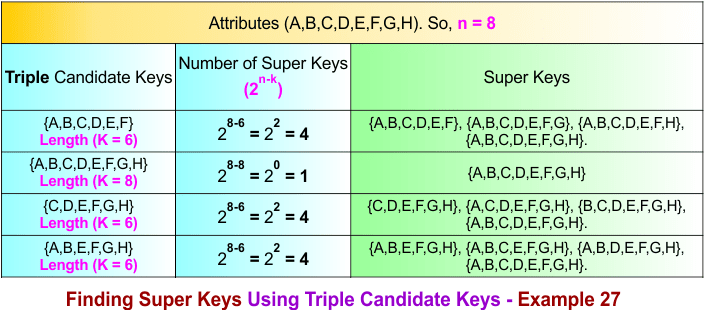
Step 07: Single to Quadruple Candidate Keys Conversions Process
If there are K single candidate keys, then quadruple candidate keys are formed by choosing 4 candidate keys at a time
Formula:
Total pair candidate keys C(K,4) = K(K − 1)(K-2)(K-3) / 3!
As Total single candiate keys in example 27 are 4, so put K=4 and 4! = 24 in formula
Total triple candidate keys = 4(4-1)(4-2)(4-3) / 24 = 1
Total triple candidate keys = 1
Quadruple candidate keys are formed by combining all four candidate keys. For the candidate keys {A,B}, {C,D,E}, {E,F}, and {F,G,H}, the quadruple candidate key is:
{A,B} ∪ {C,D,E} ∪ {E,F} ∪ {F,G,H} = {A,B,C,D,E,F,G,H}
The following diagram illustrates this process.
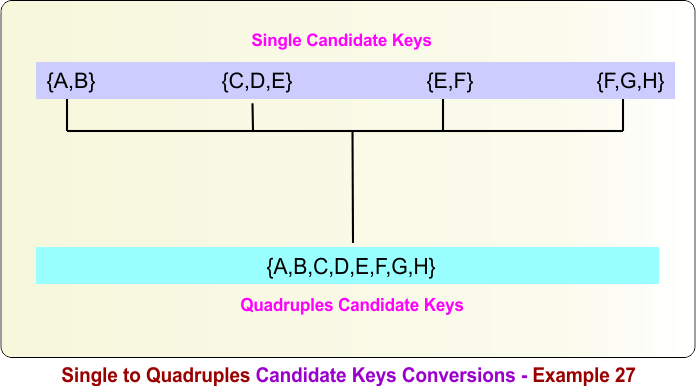
Step 08: Quadruple Candidate Keys to Super Keys
The following diagram shows all super keys formed over the quadruple candidate key, which is {A,B,C,D,E,F,G,H}.
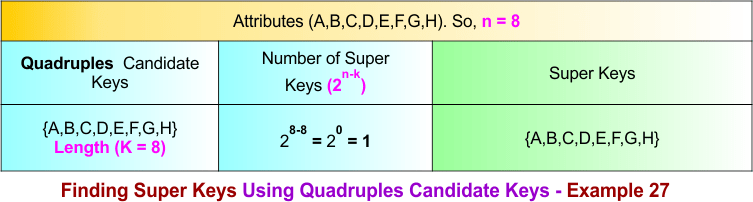
Summary of Finding Super Key – Example 27
How we calculate the total number of super keys in example 27, the process is given below
- Count super keys formed from single candidate keys = 2⁽⁸⁻2⁾ + 2⁽⁸⁻3⁾ + 2⁽⁸⁻2⁾ + 2⁽⁸⁻3⁾
= 64 + 32 + 64 + 32 = 192 - Subtract super keys formed from pair candidate-key overlaps = − 2⁽⁸⁻5⁾ − 2⁽⁸⁻4⁾ − 2⁽⁸⁻5⁾ − 2⁽⁸⁻4⁾ − 2⁽⁸⁻6⁾ − 2⁽⁸⁻4⁾
= – 8 −16 −8 – 16 – 4 – 16 = − 68 - Add super keys formed from triple candidate-key overlaps = + 2⁽⁸⁻6⁾ + 2⁽⁸⁻8⁾ + 2⁽⁸⁻6⁾ + 2⁽⁸⁻6⁾
= + 4 + 1 + 4 + 4 = 13 - Add super keys formed from quadruples candidate-key overlaps = + 2⁽⁸⁻⁸⁾
= – 1
Total super keys = 192 − 68 + 13 – 1 = 136
Finding Super Key in DBMS – Example 28
To calculate the super keys of example 28, the following data is given.
- A relation R(A, B, C, D, E, F, G, H, I) represents a table with nine attributes. Therefore, n = 9.
- There are six candidate keys: {A}, {B}, {C, D, E}, {E, F}, {F, G, H}, and {I}. The candidate keys {A}, {B}, and {I} each contain one attribute (length 1), {E, F} contains two attributes (length 2), and {C, D, E} and {F, G, H} each contain three attributes (length 3).
Using the diagram below, calculate all super keys from the given data.
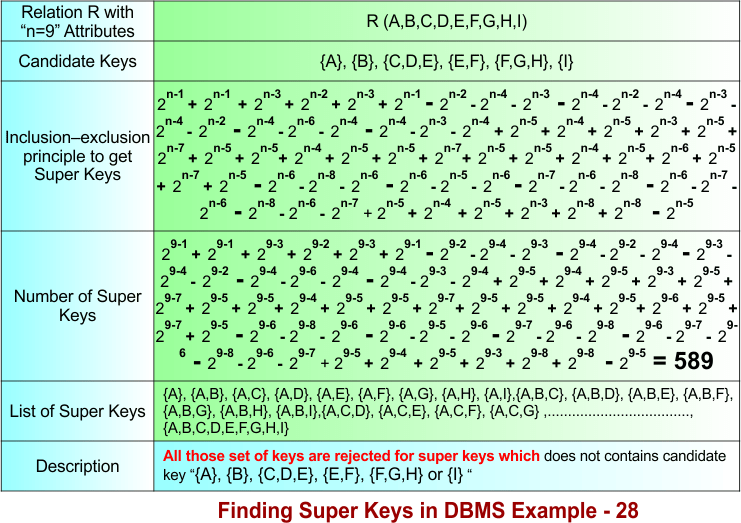
Let’s explain the above example 28 in the following steps
Step 01: Understanding the Formula
The formula is divided into six different parts based on the number of candidate keys combined.
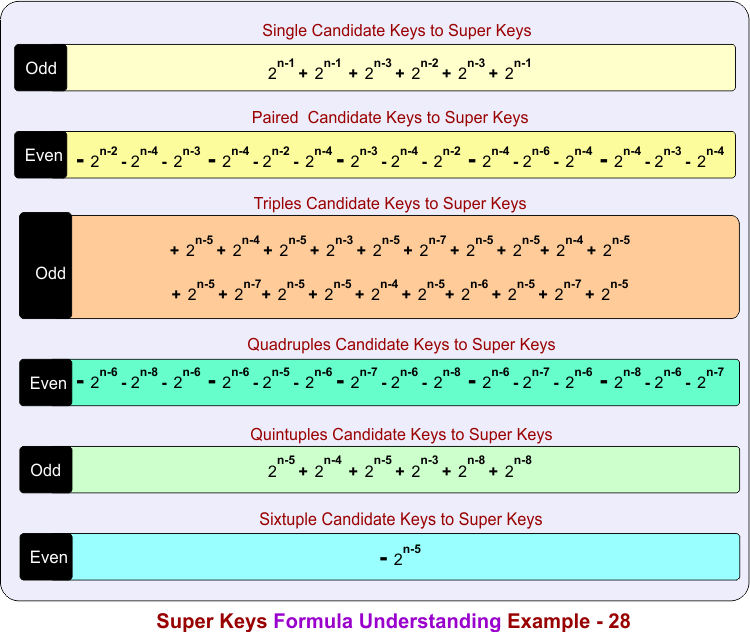
In the above diagram
Part 1: Count super keys formed from single candidate keys
- + 2n-1 + 2n-1 + 2n-3 + 2n-2 + 2n-3 + 2n-1
Part 2: Subtract super keys formed from pair candidate-key overlaps
- − 2n-2 − 2n-4 − 2n-3 − 2n-4 − 2n-2 − 2n-4− 2n-3 − 2n-4 − 2n-2 − 2n-4 − 2n-6 − 2n-4− 2n-4 − 2n-3 − 2n-4
Part 3: Add super keys formed from triple candidate-key overlaps
- + 2n-5 + 2n-4 + 2n-5 + 2n-3 + 2n-5 + 2n-7 + 2n-5 + 2n-5 + 2n-4 + 2n-5 + 2n-5 + 2n-7 + 2n-5 + 2n-5 + 2n-4 + 2n-5 + 2n-6 + 2n-5 + 2n-7 + 2n-5
Part 4: Subtract super keys formed from quadruple candidate-key overlaps
- − 2n-6 − 2n-8 − 2n-6 − 2n-6 − 2n-5 − 2n-6− 2n-7 − 2n-6 − 2n-8 − 2n-6 − 2n-7 − 2n-6− 2n-8 − 2n-6 − 2n-7
Part 5: Add super keys formed from quintuple candidate-key overlaps
- + 2n-5 + 2n-4 + 2n-5 + 2n-3 + 2n-8 + 2n-8
Part 6: Subtract super keys formed from sixtuple candidate-key overlaps
− 2n-5
Step 02: Single Candidate Keys to Super Keys
The single candidate keys are {A}, {B}, {C, D, E}, {E, F}, {F, G, H}, and {I} . The number of super keys over these single candidate keys is given in the following diagram.
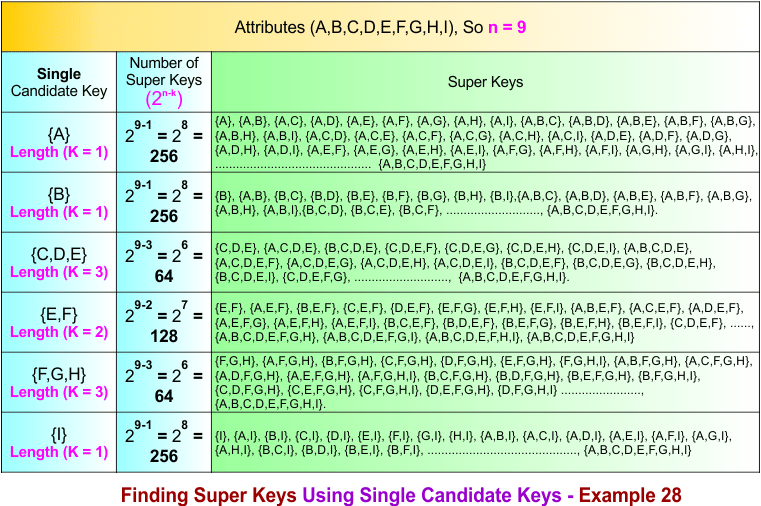
Step 03: Single to Pair Candidate Keys Conversions Process
If there are K single candidate keys, then Pair candidate keys are formed by choosing 2 candidate keys at a time
Formula:
Total pair candidate keys C(K,2) = K(K − 1) / 2!
As Total single candiate keys in example 28 are 6, so put K=6 in formula
Total pair candidate keys = 6(6-1) / 2 = 15
Total pair candidate keys = 15
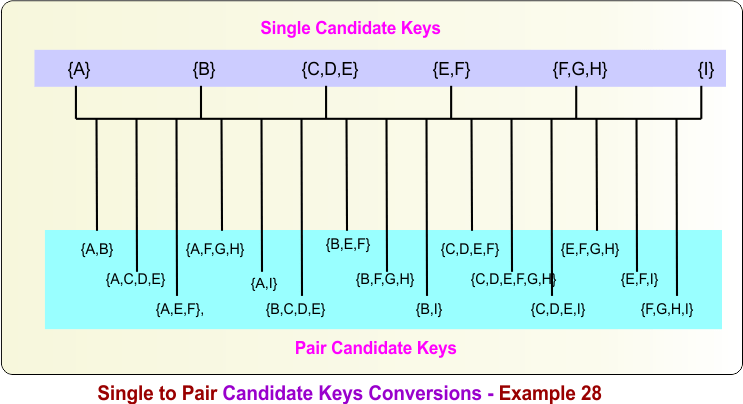
Pair candidate keys are formed by combining any two candidate keys. For the candidate keys {A}, {B}, {C,D,E}, {E,F}, {F,G,H}, and {I}, the pair candidate keys are:
- {A} ∪ {B} = {A,B}
- {A} ∪ {C,D,E} = {A,C,D,E}
- {A} ∪ {E,F} = {A,E,F}
- {A} ∪ {F,G,H} = {A,F,G,H}
- {A} ∪ {I} = {A,I}
- {B} ∪ {C,D,E} = {B,C,D,E}
- {B} ∪ {E,F} = {B,E,F}
- {B} ∪ {F,G,H} = {B,F,G,H}
- {B} ∪ {I} = {B,I}
- {C,D,E} ∪ {E,F} = {C,D,E,F}
- {C,D,E} ∪ {F,G,H} = {C,D,E,F,G,H}
- {C,D,E} ∪ {I} = {C,D,E,I}
- {E,F} ∪ {F,G,H} = {E,F,G,H}
- {E,F} ∪ {I} = {E,F,I}
- {F,G,H} ∪ {I} = {F,G,H,I}
The following diagram illustrates this process.
Step 04: Pair Candidate Keys to Super Keys
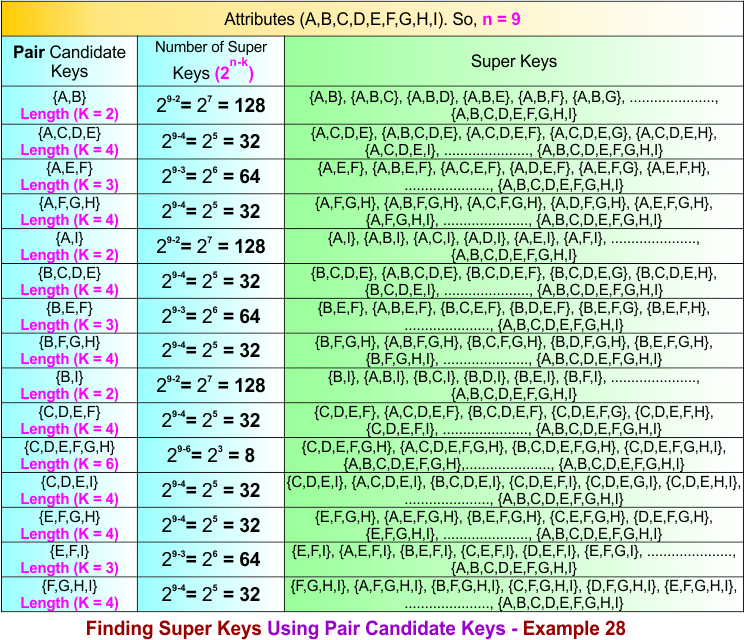
The pair candidate keys are {A,B}, {A,C,D,E}, {A,E,F}, {A,F,G,H}, {A,I}, {B,C,D,E}, {B,E,F}, {B,F,G,H}, {B,I}, {C,D,E,F}, {C,D,E,F,G,H}, {C,D,E,I}, {E,F,G,H}, {E,F,I}, and {F,G,H,I}. The number of super keys over these pair candidate keys is given in the following diagram.
Step 05: Single to Triple Candidate Keys Conversions Process
If there are K single candidate keys, then Pair candidate keys are formed by choosing 3 candidate keys at a time
Formula:
Total pair candidate keys C(K,3) = K(K − 1)(K − 2) / 3!
As Total single candiate keys in example 28 are 6, so put K=6 in formula
Total pair candidate keys = 6(6-1)(6-2) / 6 = 20
Total pair candidate keys = 20
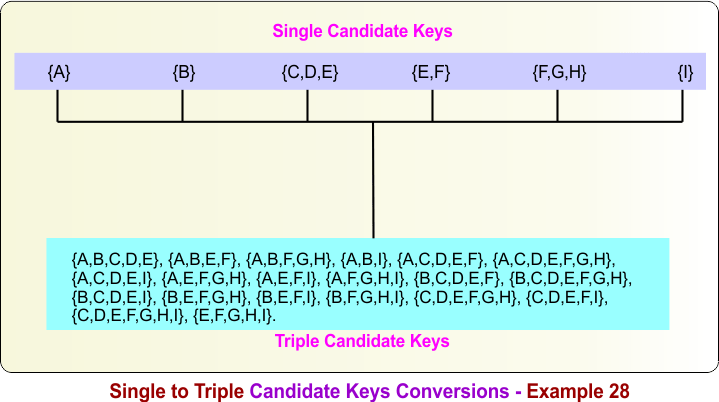
Triple candidate keys are formed by combining any three candidate keys. For the candidate keys {A}, {B}, {C,D,E}, {E,F}, {F,G,H}, and {I}, the triple candidate keys are:
- {A} ∪ {B} ∪ {C,D,E} = {A,B,C,D,E}
- {A} ∪ {B} ∪ {E,F} = {A,B,E,F}
- {A} ∪ {B} ∪ {F,G,H} = {A,B,F,G,H}
- {A} ∪ {B} ∪ {I} = {A,B,I}
- {A} ∪ {C,D,E} ∪ {E,F} = {A,C,D,E,F}
- {A} ∪ {C,D,E} ∪ {F,G,H} = {A,C,D,E,F,G,H}
- {A} ∪ {C,D,E} ∪ {I} = {A,C,D,E,I}
- {A} ∪ {E,F} ∪ {F,G,H} = {A,E,F,G,H}
- {A} ∪ {E,F} ∪ {I} = {A,E,F,I}
- {A} ∪ {F,G,H} ∪ {I} = {A,F,G,H,I}
- {B} ∪ {C,D,E} ∪ {E,F} = {B,C,D,E,F}
- {B} ∪ {C,D,E} ∪ {F,G,H} = {B,C,D,E,F,G,H}
- {B} ∪ {C,D,E} ∪ {I} = {B,C,D,E,I}
- {B} ∪ {E,F} ∪ {F,G,H} = {B,E,F,G,H}
- {B} ∪ {E,F} ∪ {I} = {B,E,F,I}
- {B} ∪ {F,G,H} ∪ {I} = {B,F,G,H,I}
- {C,D,E} ∪ {E,F} ∪ {F,G,H} = {C,D,E,F,G,H}
- {C,D,E} ∪ {E,F} ∪ {I} = {C,D,E,F,I}
- {C,D,E} ∪ {F,G,H} ∪ {I} = {C,D,E,F,G,H,I}
- {E,F} ∪ {F,G,H} ∪ {I} = {E,F,G,H,I}
The following diagram illustrates this process.
Step 06: Triple Candidate Keys to Super Keys
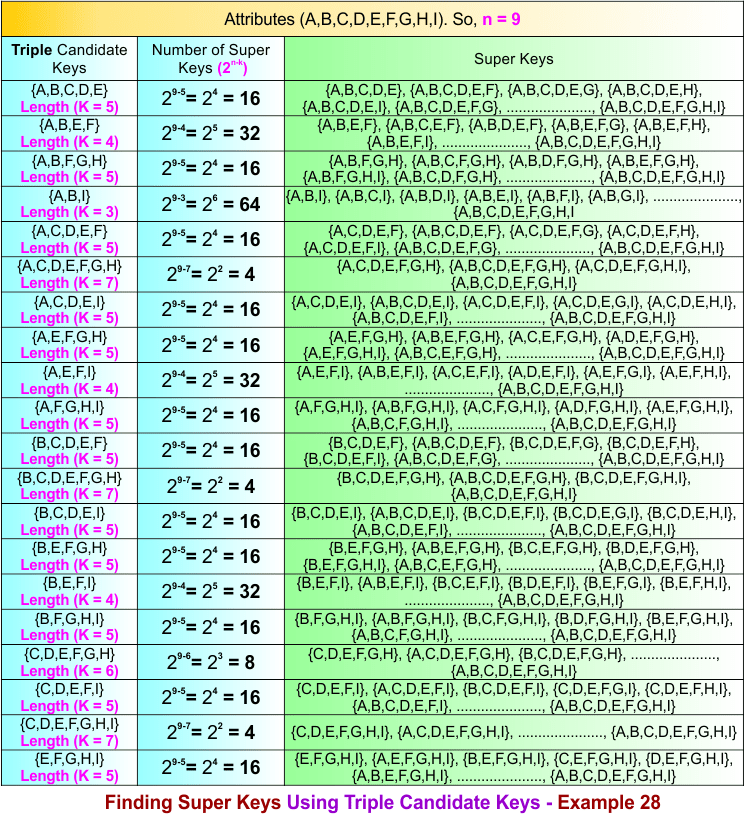
The triple candidate keys are {A,B,C,D,E}, {A,B,E,F}, {A,B,F,G,H}, {A,B,I}, {A,C,D,E,F}, {A,C,D,E,F,G,H}, {A,C,D,E,I}, {A,E,F,G,H}, {A,E,F,I}, {A,F,G,H,I}, {B,C,D,E,F}, {B,C,D,E,F,G,H}, {B,C,D,E,I}, {B,E,F,G,H}, {B,E,F,I}, {B,F,G,H,I}, {C,D,E,F,G,H}, {C,D,E,F,I}, {C,D,E,F,G,H,I}, and {E,F,G,H,I}. The number of super keys over these triple candidate keys is given in the following diagram.
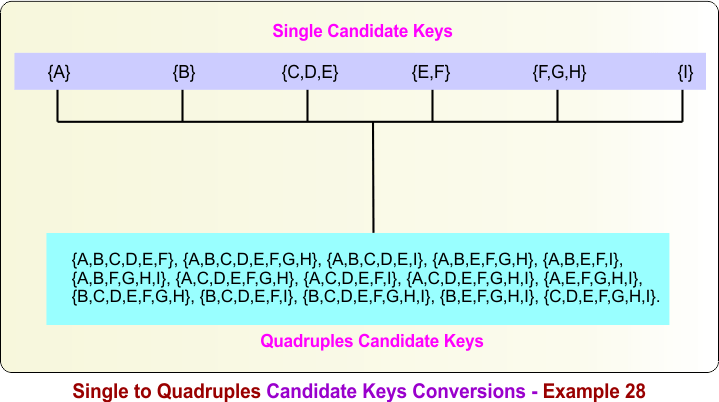
Step 07: Single to Quadruples Candidate Keys Conversions Process
If there are K single candidate keys, then Pair candidate keys are formed by choosing 2 candidate keys at a time
Formula:
Total pair candidate keys C(K,4) = K(K − 1)(K – 2) (K – 3) / 4!
As Total single candiate keys in example 28 are 6, so put K=6 in formula
Total pair candidate keys = 6(6-1)(6-2)(6-3) / 24 = 15
Total pair candidate keys = 15
Quadruple candidate keys are formed by combining any four candidate keys. For the candidate keys {A}, {B}, {C,D,E}, {E,F}, {F,G,H}, and {I}, the quadruple candidate keys are:
- {A} ∪ {B} ∪ {C,D,E} ∪ {E,F} = {A,B,C,D,E,F}
- {A} ∪ {B} ∪ {C,D,E} ∪ {F,G,H} = {A,B,C,D,E,F,G,H}
- {A} ∪ {B} ∪ {C,D,E} ∪ {I} = {A,B,C,D,E,I}
- {A} ∪ {B} ∪ {E,F} ∪ {F,G,H} = {A,B,E,F,G,H}
- {A} ∪ {B} ∪ {E,F} ∪ {I} = {A,B,E,F,I}
- {A} ∪ {B} ∪ {F,G,H} ∪ {I} = {A,B,F,G,H,I}
- {A} ∪ {C,D,E} ∪ {E,F} ∪ {F,G,H} = {A,C,D,E,F,G,H}
- {A} ∪ {C,D,E} ∪ {E,F} ∪ {I} = {A,C,D,E,F,I}
- {A} ∪ {C,D,E} ∪ {F,G,H} ∪ {I} = {A,C,D,E,F,G,H,I}
- {A} ∪ {E,F} ∪ {F,G,H} ∪ {I} = {A,E,F,G,H,I}
- {B} ∪ {C,D,E} ∪ {E,F} ∪ {F,G,H} = {B,C,D,E,F,G,H}
- {B} ∪ {C,D,E} ∪ {E,F} ∪ {I} = {B,C,D,E,F,I}
- {B} ∪ {C,D,E} ∪ {F,G,H} ∪ {I} = {B,C,D,E,F,G,H,I}
- {B} ∪ {E,F} ∪ {F,G,H} ∪ {I} = {B,E,F,G,H,I}
- {C,D,E} ∪ {E,F} ∪ {F,G,H} ∪ {I} = {C,D,E,F,G,H,I}
The following diagram illustrates this process.
Step 08: Quadruples Candidate Keys to Super Keys
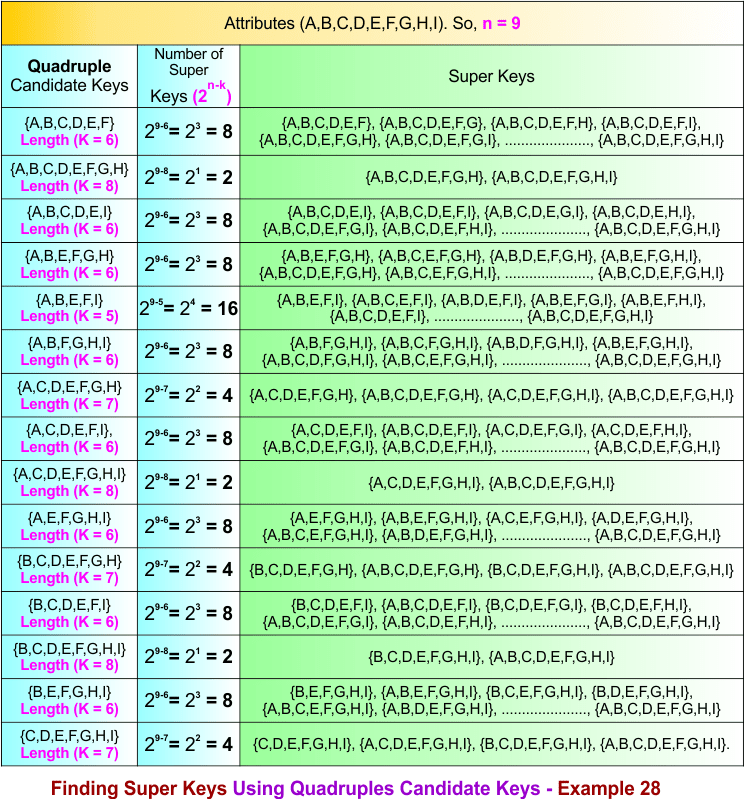
The quadruple candidate keys are {A,B,C,D,E,F}, {A,B,C,D,E,F,G,H}, {A,B,C,D,E,I}, {A,B,E,F,G,H}, {A,B,E,F,I}, {A,B,F,G,H,I}, {A,C,D,E,F,G,H}, {A,C,D,E,F,I}, {A,C,D,E,F,G,H,I}, {A,E,F,G,H,I}, {B,C,D,E,F,G,H}, {B,C,D,E,F,I}, {B,C,D,E,F,G,H,I}, {B,E,F,G,H,I}, and {C,D,E,F,G,H,I}. The number of super keys over these quadruple candidate keys is given in the following diagram.
Step 09: Single to Quintuples Candidate Keys Conversions Process
If there are K single candidate keys, then Pair candidate keys are formed by choosing 2 candidate keys at a time
Formula:
Total pair candidate keys C(K,5) = K(K − 1)(K – 2) (K – 3) (K-4) / 5!
As Total single candiate keys in example 28 are 6, so put K=6 in formula
Total pair candidate keys = 6(6-1)(6-2)(6-3)(6-4) / 120 = 6
Total pair candidate keys = 6
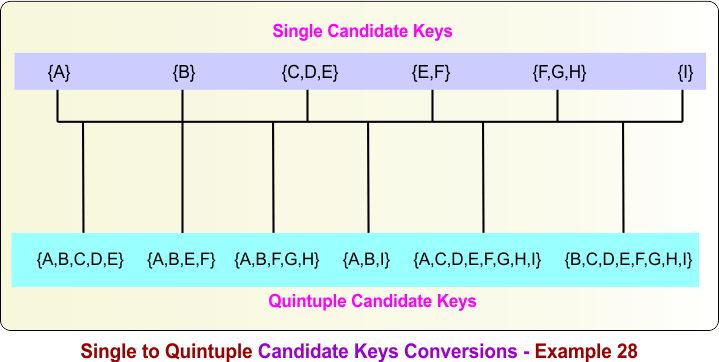
Quintuple candidate keys are formed by combining any five candidate keys. For the candidate keys {A}, {B}, {C,D,E}, {E,F}, {F,G,H}, and {I}, the quintuple candidate keys are:
- {A} ∪ {B} ∪ {C,D,E} ∪ {E,F} ∪ {F,G,H} = {A,B,C,D,E,F,G,H}
- {A} ∪ {B} ∪ {C,D,E} ∪ {E,F} ∪ {I} = {A,B,C,D,E,F,I}
- {A} ∪ {B} ∪ {C,D,E} ∪ {F,G,H} ∪ {I} = {A,B,C,D,E,F,G,H,I}
- {A} ∪ {B} ∪ {E,F} ∪ {F,G,H} ∪ {I} = {A,B,E,F,G,H,I}
- {A} ∪ {C,D,E} ∪ {E,F} ∪ {F,G,H} ∪ {I} = {A,C,D,E,F,G,H,I}
- {B} ∪ {C,D,E} ∪ {E,F} ∪ {F,G,H} ∪ {I} = {B,C,D,E,F,G,H,I}
The following diagram illustrates this process.
Step 10: Quintuples Candidate Keys to Super Keys
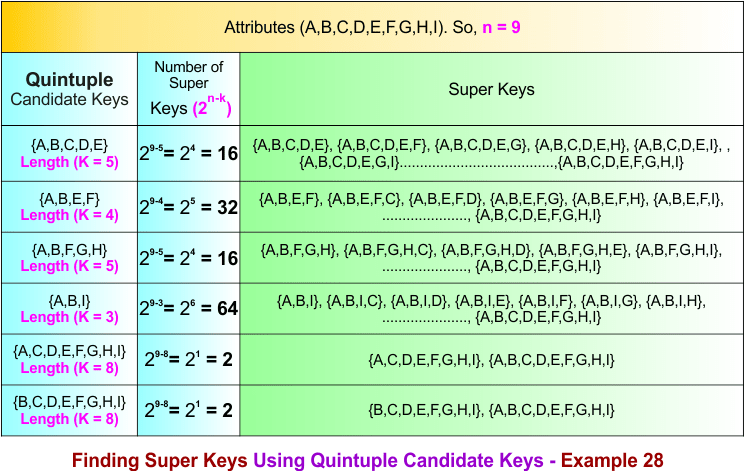
The quintuple candidate keys are formed by combining any five candidate keys.The number of super keys generated from each quintuple key is given below
Step 11: Single to Sextuples Candidate Keys Conversions Process
If there are K single candidate keys, then Pair candidate keys are formed by choosing 2 candidate keys at a time
Formula:
Total pair candidate keys C(K,6) = K(K − 1)(K – 2) (K – 3) (K-4)(K-6) / 6!
As Total single candiate keys in example 28 are 6, so put K=6 in formula
Total pair candidate keys = 6(6-1)(6-2)(6-3)(6-4) (6-5)/ 720 = 1
Total pair candidate keys = 1
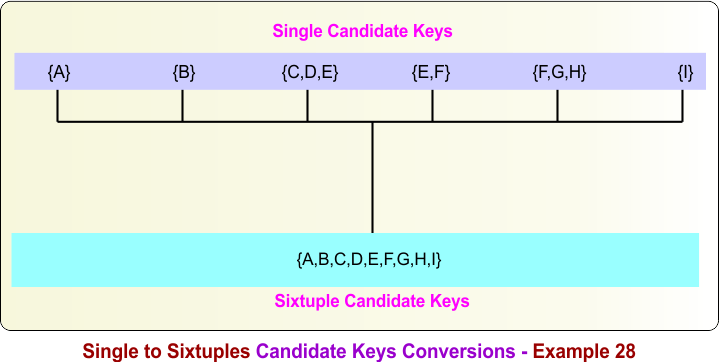
Sextuple candidate keys are formed by combining all six candidate keys. For the candidate keys {A}, {B}, {C,D,E}, {E,F}, {F,G,H}, and {I}, the sextuple candidate key is:
- {A} ∪ {B} ∪ {C,D,E} ∪ {E,F} ∪ {F,G,H} ∪ {I} = {A,B,C,D,E,F,G,H,I}
The following diagram illustrates this process.
Step 12: Sextuples Candidate Keys to Super Keys
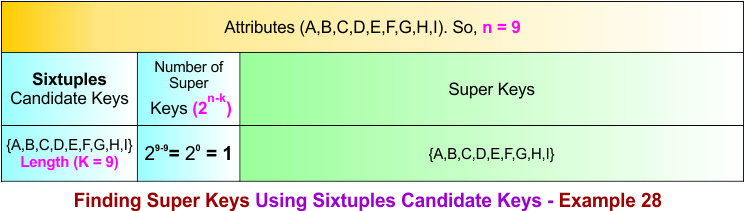
The sextuple candidate key is formed by combining all six candidate keys: {A}, {B}, {C,D,E}, {E,F}, {F,G,H}, and {I}. So the sextuple candidate key is: {A,B,C,D,E,F,G,H,I}
Summary of Finding Super Key – Example 28
How we calculate the total number of super keys in example 28, the process is given below
- Count super keys formed from single candidate keys = 29-1 + 29-1 + 29-3 + 29-2 + 29-3 + 29-1
= 256 + 256 + 64 + 128+ 64+256 = 1024 - Subtract super keys formed from pair candidate-key overlaps = − 29-2 − 29-4 − 29-3 − 29-4 − 29-2 − 29-4− 29-3 − 29-4 − 29-2 − 29-4 − 29-6 − 29-4− 29-4 − 29-3 − 29-4
= – 128 −32 −64 – 32 – 128 – 32-64 -32 -128 -32 -8 -32 -32 -64-32 = − 840 - Add super keys formed from triple candidate-key overlaps = + 29-5 + 29-4 + 29-5 + 29-3 + 29-5 + 29-7 + 29-5 + 29-5 + 29-4 + 29-5 + 29-5 + 29-7 + 29-5 + 29-5 + 29-4 + 29-5 + 29-6 + 29-5 + 29-7 + 29-5 = + 16 + 32 + 16 + 64 + 16+4 +16 +16 +32 +16 +16 +4 +16 +16 +32 +16 +8+16+4+16 = 372
- subtract super keys formed from quadruples candidate-key overlaps = − 29-6 − 29-8 − 29-6 − 29-6 − 29-5 − 29-6− 29-7 − 29-6 − 29-8 − 29-6 − 29-7 − 29-6− 29-8 − 29-6 − 29-7
= – 8 -2 -8 -8-16 -8 -4-8 -2-8 -4 -8 -2 -8 -4 = – 98
- Add super keys formed from quintuple candidate-key overlaps = + 29-5 + 29-4 + 29-5 + 29-3 + 29-8 + 29-8 = 16+32 +16 +64 + 2+ 2= 132
- Subtract super keys formed from sixtuple candidate-key overlaps = – 29-9 = -1
Total super keys = 1024 − 840 + 372 – 98 + 132 -1 = 589
Home work Examples to calculate super keys in DBMS
Here are two examples given for homework as an assignment for the students and learners
Finding Super Key in DBMS – Example 29
To calculate the super keys of example 29, the following data is given.
- A relation R(A, B, C, D, E, F, G, H, I) represents a table with nine attributes. Therefore, n = 9.
- There are seven candidate keys: {A}, {B}, {C, D}, {E, F}, {G}, {H}, and {I}. The candidate keys {A}, {B}, {G}, {H}, and {I} each contain one attribute (length 1), while {C, D} and {E, F} each contain two attributes (length 2).
Calculate all super keys from the given data.
Finding Super Key in DBMS – Example 30
To calculate the super keys of example 30, the following data is given.
- A relation R(A, B, C, D, E, F, G, H, I, J) represents a table with ten attributes. Therefore, n = 10.
- There are seven candidate keys: {A}, {B}, {C, D}, {E, F}, {G}, {H,I}, and {J}. The candidate keys {A}, {B}, {G}, and {J} each contain one attribute (length 1), while {C, D}, {H,I} and {E, F} each contain two attributes (length 2).
Calculate all super keys from the given data.
Super Key Vs. Candidate Key in DBMS
It’s crucial to differentiate between a Super Key and a Candidate Key:
-
Super Key: A super key is any set of attributes that can uniquely identify a row in the table. It can include extra attributes that aren’t necessary for uniqueness.
-
Candidate Key: A candidate key is a minimal super key. This means it’s a super key that contains the least number of attributes necessary to uniquely identify a record. A candidate key does not contain any extraneous attributes.
Every candidate key is a super key, but not every super key is a candidate key. A candidate key is simply a minimal super key, whereas other super keys may contain redundant attributes.
Importance of Super Key in DBMS
A Super Key is an attribute or a combination of attributes that uniquely identifies each tuple (row) in a relation. Super keys play a fundamental role in database design and management for the following reasons:
- Ensures Uniqueness: A super key guarantees that no two rows in a table have the same values for the attributes included in the super key, ensuring each record can be uniquely identified.
- Maintains Data Integrity: By uniquely identifying records, super keys help prevent duplicate data and maintain the accuracy and consistency of the database.
- Foundation for Candidate and Primary Keys: Every candidate key and primary key is derived from a super key. Candidate keys are minimal super keys, and one candidate key is selected as the primary key.
- Supports Database Normalization: Super keys are important during the normalization process, helping identify functional dependencies and reduce data redundancy for a well-structured database design.
- Improves Data Retrieval: Super keys can be used for indexing and searching, enabling the database management system to locate and retrieve records more efficiently.
- Establishes Relationships Between Tables: Primary keys, which are selected from super keys, are referenced by foreign keys in related tables, helping maintain relationships among tables.
- Ensures Referential Integrity: Since foreign keys reference primary keys, and primary keys originate from super keys, super keys indirectly help maintain referential integrity and consistency across the database.
- Supports Efficient Database Design: Identifying super keys helps database designers determine the most appropriate keys for uniquely identifying records and organizing data effectively.
- Acts as a Superset of Candidate Keys: Every super key contains a candidate key as a subset. Therefore, any attribute combination that includes a candidate key is also a valid super key.
- Provides Flexibility in Identification: Multiple super keys may exist for a relation, giving database designers flexibility in choosing the most suitable candidate key and primary key.