












Digital Computers
Digital computers are modern computers that take data as input, process it, and convert it into useful information. These computers understand only the binary language, i.e., 0 and 1. In the 1940s, the first electronic digital computer was developed.
A digital computer system is subdivided into two major categories, as below
- Hardware: The hardware consists of all physical parts of the system, i.e. CPU, HD, Keyboard, Mouse, etc.
- Software: The computer’s software consists of instructions and data. CPU performs operations on this data
Components of Digital Computers
There are five basic components of digital computers. The descriptive diagram of a digital computer is given below
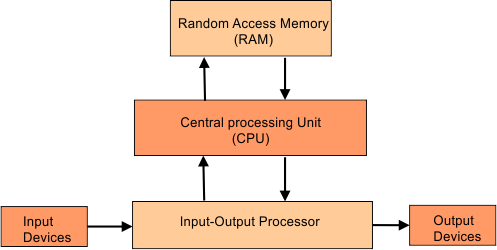
1. CPU: CPU contains ALU and CU. ALU performs the computer’s arithmetic (+.-, x, /) and logical (<, =, >) operations. CU controls the executions by generating the control and timing signals.
2. RAM: Before executing any program, it loads into the RAM, the primary memory that stores the temporary data.
3. Input-output processor: The primary purpose of the input-output processor is to minimize the CPU’s involvement in transferring data from input to output devices.
4. Input devices: input devices are used to enter the data into the system, including a Keyboard, mouse, etc.
5. Output devices: Output devices are used to display the data on output devices. It includes a Monitor, printer, etc.
The following diagram explains the working of digital computers more clearly

How Does a Digital Computer Work?
A digital computer generally works through four basic stages:
- Input: Data and instructions are entered into the computer.
- Processing: The CPU processes the data according to the given instructions.
- Storage: Data and results can be stored for future use.
- Output: The processed information is presented to the user.
A basic working diagram of a Digital Computer is given below
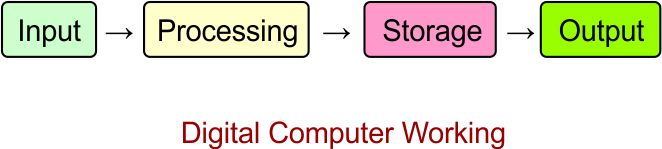
For example, when a user enters two numbers using a keyboard, the computer processes the numbers and displays their sum on the screen.
History of Digital Computers
The history of digital computers describes the development of computers from simple calculating devices to modern electronic and intelligent systems. Digital computers have evolved through several important stages, with each stage introducing improvements in speed, size, storage, reliability, and processing capability.
The development of digital computers began with simple mechanical calculating devices.
1. Abacus: The Abacus is one of the earliest calculating devices. It was used for basic arithmetic calculations such as addition and subtraction.
2. Pascaline: In 1642, Blaise Pascal developed the Pascaline, a mechanical calculator that could perform arithmetic operations.
3. Difference Engine: In the 1820s, Charles Babbage designed the Difference Engine to perform mathematical calculations automatically.
4. Analytical Engine: Charles Babbage later designed the Analytical Engine. It introduced important concepts similar to modern computers, including a processing unit, memory, input, and output. For this reason, Charles Babbage is often called the Father of the Computer.
5. Hollerith Tabulating Machine: In 1890, Herman Hollerith developed a punched-card tabulating machine to process census data. His work later contributed to the development of IBM.
6. ENIAC: ENIAC, developed in the 1940s, was one of the first general-purpose electronic digital computers. It used thousands of vacuum tubes and was much faster than earlier mechanical computers.
7. Modern Computers: After ENIAC, computer technology developed rapidly. Vacuum tubes were replaced by transistors, then integrated circuits, and eventually microprocessors. This development led to modern personal computers, laptops, smartphones, and other digital devices.
Types of Computers
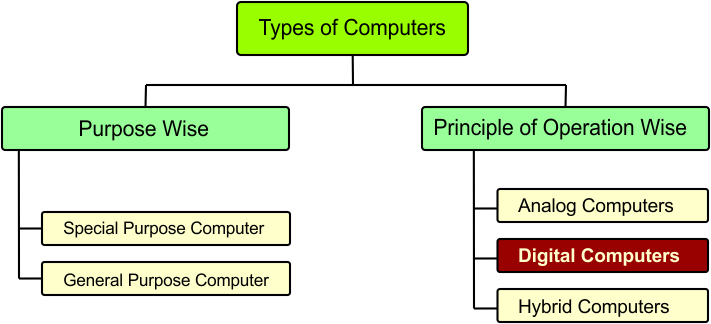
There are various types of computers. The following diagram explains it
1. Purpose-wise Computers
Computers can be classified purpose-wise based on the tasks they are designed to perform. This classification includes general-purpose computers and special-purpose computers, each serving different needs.
I. General-Purpose Computers
General-purpose computers are designed to perform a wide variety of tasks. They can be used for activities such as word processing, internet browsing, programming, data analysis, and multimedia.
Examples: Desktop computers, laptops, and smartphones.
II. Special-Purpose Computers
Special-purpose computers are designed to perform a specific task or a limited set of tasks. They are commonly used in systems where a particular operation needs to be performed efficiently.
Examples: ATM machines, traffic control systems, and embedded computer systems.
2. Principle of Operation-wise Computers
Computers can be classified according to their principle of operation, which describes how they process data. This classification includes analog, digital, and hybrid computers, each using a different method to handle information.
I. Analog Computers
Analog computers process continuous data, such as temperature, pressure, and speed. Here are some key points about analog computers.
-
Work with continuous physical values.
-
Measure changing quantities in real time.
-
Commonly used in measurement and control systems.
Analog computers are mainly used in speedometers, analog thermometers, and industrial process control systems.
II. Digital Computers
Digital computers process data in discrete form, usually using binary digits (0 and 1). Here are some key points about digital computers.
-
Work with discrete data.
-
Provide accurate and fast results.
-
Store and process data in binary form.
-
Support a wide range of applications.
Digital computers are mainly used in desktop computers, laptops, smartphones, ATMs, and calculators.
III. Hybrid Computers
Hybrid computers combine the features of analog and digital computers to measure continuous data and process it digitally. Here are some key points about hybrid computers.
-
Combine analog and digital technologies.
-
Measure continuous physical values.
-
Convert measured data into digital form for processing.
-
Used in specialized monitoring and control systems.
Hybrid computers are mainly used in medical monitoring equipment, industrial control systems, and scientific research systems.
Digital Computer vs Analog Computer
| Digital Computer | Analog Computer |
|---|---|
| Processes discrete data | Processes continuously changing data |
| Mainly uses binary values | Uses continuous physical quantities |
| Produces highly precise digital results | Results depend on the accuracy of the physical measurement |
| Common in modern computing systems | Used in specialized measurement and control applications |
| Examples include PCs and laptops | Examples include certain analog measuring and control systems |
Digital Computers – Configuration-wise Categories
Digital computers are classified into five major categories according to their configuration, size, processing power, and capabilities. The following diagram explains it

Let’s explain each type of digital computer
1. Embedded Computers
Embedded computers are specialized computers built into devices to perform specific tasks automatically. Here are some key points about embedded computer systems
- Designed for a specific function.
- Built into other electronic devices.
- Often operate automatically in real time.
- Usually small and consume less power.
Embedded computers can mainly be used in Washing machines, microwave ovens, smart TVs, and car control systems.
2. Mid-range Servers / Mini Computers
Midrange servers, also known as minicomputers in traditional computer classification, are computers designed to support multiple users and handle business or organizational tasks. Here are some key points about midrange servers.
- Support multiple users at the same time.
- Provide more processing power than personal computers.
- Used to manage data and run business applications.
- Can serve multiple computers over a network.
Midrange servers can mainly be used in banks, universities, hospitals, and medium-sized businesses for database management, file sharing, and application hosting.
3. Personal / Desktop Computers
Personal computers (PCs), also known as desktop computers, are designed for individual users to perform everyday computing tasks. Here are some key points about personal computers.
- Designed for individual use.
- Suitable for everyday computing tasks.
- Usually include a monitor, keyboard, mouse, and system unit.
- Can run various software applications.
Personal computers can mainly be used in homes, schools, offices, and businesses for document writing, internet browsing, programming, and educational activities.
Types of Personal / Desktop Computers
The following are the main types of personal computers
- Desktop Computers: Designed to stay in one place, usually on a desk.
- Laptop Computers: Portable computers that can be carried easily.
- Tablet Computers: Touchscreen devices used for browsing, reading, and other tasks.
- Workstations: High-performance personal computers used for demanding tasks such as 3D design and engineering.
- All-in-One Computers: Desktop computers that combine the main computer components and display in a single unit.
4. Mainframe Computers
Mainframe computers are powerful computers designed to process large amounts of data and handle many users and transactions at the same time. Here are some key points about mainframe computers.
- Handle large amounts of data efficiently.
- Support hundreds or thousands of users simultaneously.
- Provide high reliability and security.
- Designed for continuous operation and large-scale processing.
Mainframe computers are mainly used in banks, government organizations, insurance companies, and large businesses for transaction processing, customer records, and database management.
5. Super Computers
Supercomputers are extremely powerful computers designed to perform complex calculations and process huge amounts of data at very high speeds. Here are some key points about supercomputers.
- Perform calculations at extremely high speeds.
- Process huge amounts of data.
- Solve complex scientific and mathematical problems.
- Require advanced cooling systems and large amounts of power.
Supercomputers are mainly used in weather forecasting, scientific research, space exploration, climate modeling, and nuclear research.
Generations of Digital Computers
The development of digital computers is commonly divided into five generations. Each generation is based mainly on the major technology used to build computers.
| Generation | Period | Main Technology | Main Features |
|---|---|---|---|
| First Generation | 1940–1956 | Vacuum Tubes | Very large, expensive, produced much heat |
| Second Generation | 1956–1963 | Transistors | Smaller, faster, more reliable |
| Third Generation | 1964–1971 | Integrated Circuits (ICs) | Smaller size, higher speed and reliability |
| Fourth Generation | 1971–Present | Microprocessors | Personal computers, smaller and more powerful |
| Fifth Generation | Present and Future | AI and advanced technologies | Artificial intelligence, natural language processing |
I. First Generation of Digital Computers
The first generation of digital computers used vacuum tubes for electronic switching and processing.
These computers were very large, expensive, and consumed a large amount of electricity. They also generated considerable heat and required frequent maintenance.
Examples: ENIAC, EDVAC, and UNIVAC I.
Main features of the first generation of digital computers are given below
- Used vacuum tubes.
- Very large in size.
- Consumed a lot of power.
- Produced a large amount of heat.
- Used machine language.
- Had limited memory and storage.
II. Second Generation of Digital Computers
The second generation of digital computers used transistors instead of vacuum tubes.
Transistors were smaller, faster, more reliable, and consumed less power than vacuum tubes. This made computers smaller and more efficient.
Examples: IBM 1401 and CDC 1604.
Main features of the second generation of digital computers are given below
-
Used transistors.
-
Smaller than first-generation computers.
-
Faster and more reliable.
-
Consumed less power.
-
Produced less heat.
-
Used assembly language and high-level languages such as FORTRAN and COBOL.
III. Third Generation of Digital Computers
The third generation of digital computers used Integrated Circuits (ICs). An IC contains multiple electronic components on a single semiconductor chip.
The use of ICs made computers smaller, faster, cheaper, and more reliable.
Examples: IBM System/360 and PDP-8.
Main features of the third generation of digital computers are given below
-
Used integrated circuits.
-
Smaller and faster.
-
More reliable.
-
Lower maintenance requirements.
-
Supported operating systems.
-
Greater storage capacity.
IV. Fourth Generation of Digital Computers
The fourth generation of digital computers began with the development of the microprocessor. A microprocessor placed the main processing functions of a computer on a single chip.
This generation led to the development of personal computers (PCs), laptops, and many other compact digital devices.
Examples: IBM PC, Apple Macintosh, and modern personal computers.
Main features of the 4th generation of digital computers are given below
-
Used microprocessors.
-
Very small compared with earlier computers.
-
High processing speed.
-
Large memory and storage capacity.
-
Lower cost.
-
Development of personal computers and networking.
V. Fifth Generation of Digital Computers
The fifth generation of digital computers focuses on artificial intelligence (AI) and advanced computing technologies.
These computers are designed to perform tasks that traditionally require human intelligence, such as understanding natural language, recognizing patterns, and making decisions.
Examples: AI-based systems, robotics, modern intelligent computers, and advanced computing systems.
Main features of the 5th generation of digital computers are given below
-
Uses artificial intelligence and advanced processors.
-
Supports natural language processing.
-
Uses machine learning and intelligent systems.
-
High processing and storage capabilities.
-
Focuses on automation and intelligent decision-making.
Difference Between Generations of Digital Computers
| Generation | Technology | Size | Speed | Reliability |
|---|---|---|---|---|
| First | Vacuum Tubes | Very Large | Low | Low |
| Second | Transistors | Smaller | Higher | Better |
| Third | ICs | Smaller | High | High |
| Fourth | Microprocessors | Very Small | Very High | Very High |
| Fifth | AI and Advanced Technologies | Compact | Extremely High | Highly Advanced |
Characteristics of Digital Computers
Digital computers have several important characteristics:
- High speed – They can process large amounts of data quickly.
- Accuracy – They can perform calculations with high accuracy when given correct instructions and data.
- Storage – They can store large amounts of information.
- Automation – They can perform tasks automatically according to programmed instructions.
- Versatility – They can perform different types of tasks.
- Reliability – They can perform repetitive operations consistently.
- Programmability – They can be programmed to perform specific tasks.
Advantages of Digital Computers
Digital computers provide many advantages:
- High Speed: Digital computers can process a large amount of data and perform calculations in a very short time.
- Large Storage Capacity: Digital computers can store large amounts of data, such as documents, images, videos, and software.
- Consistent Results: Digital computers produce consistent results when the same data and instructions are provided.
- Complex Calculations: Digital computers can perform complex mathematical and logical calculations quickly and accurately.
- Automation: Digital computers can automatically perform repetitive tasks according to programmed instructions without continuous human involvement.
- Versatility: Digital computers can be used for many different tasks, such as writing documents, browsing the internet, programming, and data analysis.
- Connectivity: Digital computers can communicate with other computers and digital devices through networks and the internet.
Applications of Digital Computers
Digital computers are used in almost every modern field.
-
Education: Computers are used for online learning, research, presentations, programming, and educational software. Example: Students use computers to attend online classes.
-
Banking: Banks use digital computers to manage accounts, process transactions, maintain records, and provide digital banking services. Example: A bank uses computers to process an online money transfer.
-
Healthcare: Digital computers are used for maintaining patient records, medical research, diagnostic systems, and hospital management. Example: A hospital uses computers to store patient records.
-
Business: Businesses use computers for accounting, communication, data analysis, inventory management, and customer services. Example: A shop uses a computer to manage its sales records.
-
Science and Engineering: Scientists and engineers use digital computers for calculations, simulations, research, modeling, and data analysis. Example: Engineers use computers to design a building.
-
Communication: Digital computers support email, messaging, video conferencing, websites, and other communication services. Example: People use computers to communicate through email.
Limitations of Digital Computers
Although digital computers are fast, accurate, and versatile, they also have some limitations.
- Lack of Human Intelligence: A digital computer cannot naturally think or understand situations like a human. It follows the instructions and rules provided by programs.
- Dependence on Instructions: A computer requires instructions to perform a task. If the required instructions or program are not provided, the computer cannot perform the task correctly.
- No Human Judgment: Computers can process data and make programmed decisions, but they do not have human judgment, emotions, or common-sense understanding in the same way humans do.
- Power Dependence: Most digital computers require electrical power to operate. A power failure can stop the computer and may interrupt ongoing work.
- Security Risks: Digital computers can be affected by malware, unauthorized access, data theft, and other security threats if they are not properly protected.
- Maintenance Requirements: Computer hardware and software require maintenance, updates, and troubleshooting to keep the system working properly.
- Incorrect Output from Incorrect Data: A computer processes the data and instructions it receives. If incorrect data or instructions are provided, the resulting output may also be incorrect. This is commonly described as “Garbage In, Garbage Out (GIGO).”
Conclusion
A digital computer is an electronic device that processes data in discrete form, primarily using binary values 0 and 1. It accepts input, processes data, stores information, and produces output. Because of their speed, accuracy, storage capacity, and versatility, digital computers are an essential part of modern technology.