












CPU and I/O Burst Cycles in OS
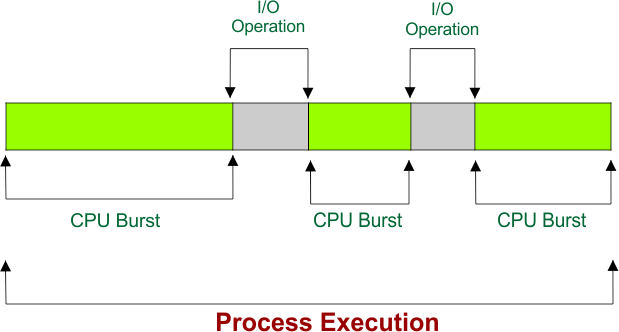
CPU and I/O Burst Cycles in OS explain how a process executes from start to finish. In all cases, a process does not use the CPU continuously; instead, it alternates between CPU bursts (where it executes instructions) and I/O bursts (where it waits for I/O operations) to complete. This cycle continues until the process finishes execution.
- Every process must have at least one CPU burst because it cannot execute without the CPU.
- However, a process may complete without any I/O bursts if it performs no input or output operations.
Understanding CPU and I/O burst cycles in an OS is essential for learning process scheduling, CPU scheduling algorithms, multiprogramming, and efficient CPU utilization in operating systems.
What is a CPU Burst?
A CPU burst is the period during which a process actively uses the CPU to execute program instructions.
During this phase, the process performs calculations, executes logical operations, and processes data without waiting for any input or output device. Characteristics of CPU Burst are
- The process is in the Running state.
- The CPU executes the process instructions.
- No waiting for I/O devices occurs.
- CPU-bound processes usually have longer CPU bursts
What is an I/O Burst?
An I/O burst is the period during which a process waits for an input or output operation to complete.
During this time, the process does not use the CPU because it is waiting for an external device such as a hard disk, keyboard, printer, or network. Characteristics of I/O Burst are
- The process enters the Waiting (Blocked) state.
- The CPU is free to execute another process.
- Input/output devices perform the requested operation.
- I/O-bound processes experience frequent I/O bursts.
CPU and I/O Burst Cycle
A process normally alternates between CPU bursts and I/O bursts throughout its lifetime. The typical execution sequence is given below
- The process executes on the CPU (CPU Burst).
- The process requests an I/O operation.
- The process waits while the I/O operation completes (I/O Burst).
- After the I/O completes, the process returns to the Ready state.
- The scheduler assigns the CPU to the process again.
- The cycle repeats until the process finishes.
Process States During Burst Cycles
| Activity | Process State |
|---|---|
| Executing instructions | Running |
| Requests I/O | Waiting (Blocked) |
| I/O operation completed | Ready |
| Gets CPU again | Running |
Example of CPU and I/O Burst Cycle
Suppose a process follows this sequence:
- CPU Burst = 6 ms
- I/O Burst = 15 ms
- CPU Burst = 4 ms
- I/O Burst = 10 ms
- CPU Burst = 5 ms
Explanation
- The process first executes on the CPU for 6 milliseconds.
- It then waits 15 milliseconds while an I/O operation is completed.
- After the I/O finishes, it executes again on the CPU for 4 milliseconds.
- The process waits another 10 milliseconds for the next I/O operation.
- Finally, it executes on the CPU for 5 milliseconds and terminates.
CPU-Bound vs I/O-Bound Processes
| Feature | CPU-Bound Process | I/O-Bound Process |
|---|---|---|
| CPU Burst | Long | Short |
| I/O Burst | Few | Frequent |
| CPU Usage | High | Low |
| Waiting Time | Less | More |
| Examples | Video editing, gaming, scientific simulations | File transfer, web browsing, database queries |
Why are CPU and I/O Burst Cycles Important?
1. Efficient CPU Utilization: When one process waits for I/O, the operating system assigns the CPU to another ready process, preventing CPU idle time.
2. Better Process Scheduling: Scheduling algorithms estimate CPU burst lengths to decide which process should run next.
3. Improved System Performance: Alternating CPU and I/O bursts allows multiple processes to execute efficiently, increasing system throughput.
4. Reduced Waiting Time: Proper scheduling minimizes the waiting time of processes in the ready queue.
5. Supports Multiprogramming: While one process performs I/O, another process can use the CPU, improving overall system efficiency.
Real-Life Example of CPU and I/O Burst
Imagine a student preparing a report.
- CPU Burst: Typing, editing, and formatting the report.
- I/O Burst: Waiting for the document to print or download reference materials.
While the student waits for printing or downloading, they are not actively working on the report. Similarly, during an I/O burst, the process waits while the operating system allows another process to use the CPU.
Advantages of CPU and I/O Burst Cycles
CPU and I/O burst cycles improve the overall efficiency of an operating system by allowing the CPU and I/O devices to work simultaneously. Their major advantages are listed below.
- Improve CPU Utilization: While one process waits for an I/O operation, the CPU can execute another ready process, reducing idle time.
- Increase System Throughput: More processes can complete in a given period because CPU and I/O operations overlap.
- Support Multitasking and Multiprogramming: Multiple processes can run efficiently by sharing CPU time whenever another process is waiting for I/O.
- Reduce CPU Idle Time: The CPU remains busy most of the time instead of waiting for slow I/O devices.
- Enable Efficient Process Scheduling: Scheduling algorithms use CPU burst information to make better decisions and improve system performance.
- Improve Overall System Performance: Proper coordination between CPU and I/O operations results in faster and more responsive systems.
Disadvantages of CPU and I/O Burst Cycles
Although CPU and I/O burst cycles improve efficiency, they can also introduce some challenges if they are not managed properly.
- Frequent I/O Waiting: Processes that perform many I/O operations may spend a significant amount of time in the waiting state.
- Context Switching Overhead: Frequent switching between processes increases CPU overhead and may reduce performance.
- Scheduling Complexity: The operating system must accurately schedule processes with different CPU and I/O burst patterns.
- Possible Starvation: Poor scheduling algorithms may keep some processes waiting for the CPU for a long time.
- I/O Device Bottlenecks: Slow input/output devices can delay process execution even when the CPU is available.
- Reduced Performance in Heavy I/O Workloads: Systems with excessive I/O requests may experience lower overall performance.
Key Points for Exams
The following points summarize the most important concepts related to CPU and I/O burst cycles.
- Every process executes as a sequence of CPU bursts and I/O bursts.
- A CPU burst is the period during which a process executes instructions using the CPU.
- An I/O burst is the period during which a process waits for an input or output operation to complete.
- Every process must have at least one CPU burst, but a process may complete without any I/O burst.
- CPU-bound processes have long CPU bursts and few I/O bursts.
- I/O-bound processes have short CPU bursts and frequent I/O bursts.
- During an I/O burst, the CPU can execute another ready process.
- CPU and I/O burst cycles improve CPU utilization, system throughput, and resource utilization.
- Scheduling algorithms such as SJF, Round Robin, and Multilevel Feedback Queue use CPU burst behavior to schedule processes efficiently.
- Understanding CPU and I/O burst cycles is essential for learning process scheduling, CPU scheduling algorithms, and multiprogramming in operating systems.
Conclusion
CPU and I/O Burst Cycles in Operating System explain how a process alternates between computation and input/output activities during execution. A process performs calculations during a CPU burst and waits for external devices during an I/O burst. This alternating pattern enables the operating system to keep the CPU busy by scheduling other ready processes whenever one process is waiting for I/O. As a result, CPU and I/O burst cycles improve resource utilization, system performance, multitasking, and process scheduling efficiency.