How to Detect Fake Profiles Using Reverse Image Search?
Did you ever wonder how you would determine if someone online is a scammer or a genuine individual? To solve clever problems, you need clever solutions, and today we’re sharing a reliable method for finding fake profiles online.
A powerful yet sophisticated online tool that you can utilize for free is Reverse Image Search.
This free web-based tool allows you to upload a picture and see where else it appears on the Internet. It is especially useful for verifying the authenticity of online profiles.
Let’s break down how you can use it to detect fake profiles. It’s time to get started!
What is Reverse Image Search?
One of the online applications that enables users to find information about a picture by uploading it or leaving its URL is reverse image search. With the Reverse Image Search tool, you don’t have to rely solely on typing keywords to find images, you can simply upload a picture and receive instant results.
You can still search by typing keywords if you prefer, but uploading an image makes the process even faster and more accurate.
With the help of this tool, you can determine the source of an image, learn where it can be found on the Internet, and identify those accounts where people are most likely to use fake photographs.
Some core features of this AI-powered tool are:
- Free to utilize
- No registration process
- Unlimited usage without any credits
- Multiple ways to find similar images
- Powered by sophisticated AI algorithms
This makes Reverseimage.online an invaluable tool for anyone concerned about online security or authenticity.
Discover Fake Profiles Using Reverse Image Search: Step-by-Step Guide
Reverse Image Search offers three different methods to locate fake profiles on the Internet. You can search for an image by uploading a picture, typing the keyword (profile name), or by providing a specific image URL.
Below is a complete step-by-step guide on how you can detect fake profiles with this AI-powered assistant.
Method 1: By uploading a picture
Here’s a complete step-by-step guide on how you can do a similar image lookup by uploading the picture.
- Navigate to https://reverseimage.online/
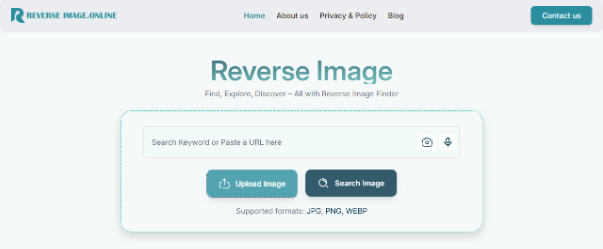
- You will see the “Upload Image” option. Click it, and it will open your device storage.
- Choose the image you want to reverse check and open it.
- Automatically Reverseimage.online will initiate the searching process and display the results instantly.
- You can also navigate to each picture with its specific source link.
That’s how you can do a reverse image search.
Method 2: By typing a keyword
Time to move towards the second approach. In this approach, you type the keyword in the tool, and it finds the most relevant images. Like an image search engine, you can instantly find a bunch of different images with this approach.
Here’s how you can do that:
- In the Reverseimage.online, you will see an input box.
- Type any keyword that matches your image description. For instance, if you want images of a green apple, type “green apple” and hit the “Enter” button.
- It will start the image searching process and display the results within a few seconds.
This is how you can use the Reverse Image Search tool as an image search engine to locate pictures on the Internet.
Method 3: By image URL
The last and final method is searching for similar pictures with the URL of the original one. For instance, if you see an image on Google but need more that are similar to it, simply copy the URL of the image and come to Reverseimage.online. Here’s what you need to do next:
- Paste that copied image URL in the same input box that can be used to search images with keywords.
- After pasting the URL, hit “Enter,” and Reverseimage.online will initiate the process of detecting the image and finding its similar ones.
- Within a few seconds, it will provide you with the output that you can review and verify by navigating to the source links.
Easy-peasy! It is this simple to locate fake profiles using the Reverse Image Search tool.
Critical Things to Remember While Using Reverse Image Search
When using reverse image search to detect fake profiles, there are a few important things to keep in mind:
- Make sure the image isn’t blurred or distorted: If the image you’re uploading is blurry or distorted, the search results may not be accurate. If your photo is unclear, you can first unblur images using an AI-powered enhancement tool to improve image quality and increase the accuracy of reverse image search results. Therefore, it’s essential to use high-quality, clear pictures to get the best results.
- Upload only a single image at a time: Reverseimage.online doesn’t allow users to do a reverse lookup of multiple images at a time. So, only upload one image for the tool to work accurately.
- Image should be in the supported formats: Image formats such as TIFF, GIF, or SVG are not accepted in the Reverse Image Search. Ensure the image you are uploading is in a supported format, such as JPG, PNG, or WEBP.
- Use the exact same URL of the image: If you are using the image URL for search, make sure you copy the exact URL of the image. A missing punctuation mark can lead to incorrect search results.
Wrapping Up
Reverse image search is one of the best methods to safeguard your online name and work. Reverse Image Search is a fast and convenient option to verify a suspicious profile or determine whether someone is using your images or not.
Using this guide, you will be able to detect fraudsters and counterfeits on the Internet, as well as defend against deception and fraud of your identity. Always keep in mind to use good-quality pictures, verify the sources, and do something when you find somebody misusing your pictures.
By using reverse image search, you will be one step forward towards establishing your identity online and preventing possible fraud.