












Operators in C Programming
In C programming, operators are special symbols used to perform operations on variables and values. They form the backbone of expressions and are essential for writing logical, arithmetic, and decision-making programs.
Understanding operators in C language is crucial for beginners, exam preparation, and competitive programming.
What Are Operators in C?
An operator is a symbol that tells the compiler to perform a specific mathematical or logical operation.
Example:
int sum = a + b;
Here, + is an operator and a, b are operands.
Types of Operators in C Programming
C provides several types of operators, categorized based on their functionality.
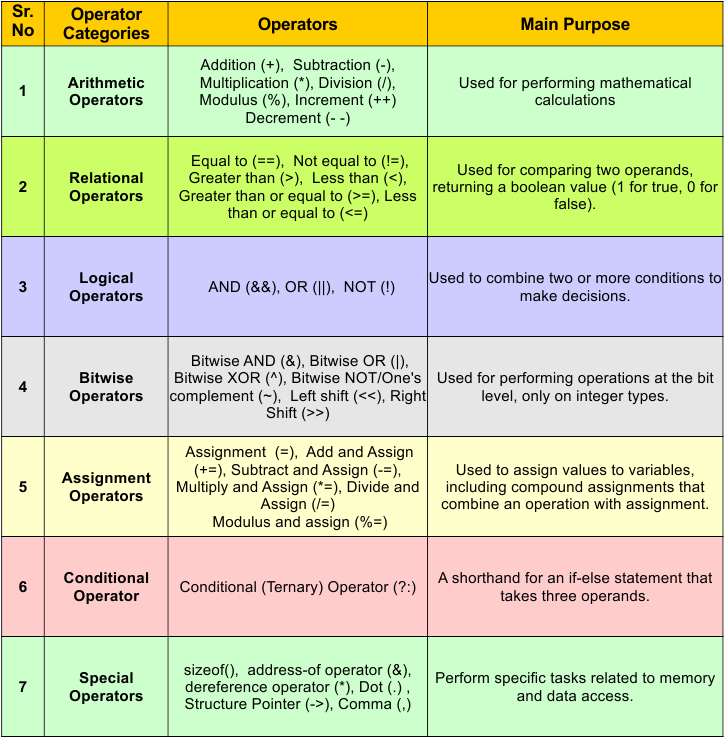
Let’s explain all types one by one
1. Arithmetic Operators in C
Arithmetic operators in C are used to perform mathematical calculations.
| Operator | Name | Description | Example |
|---|---|---|---|
| + | Addition | Adds two operands | a + b |
| – | Subtraction | Subtracts right operand from left | a – b |
| * | Multiplication | Multiplies two operands | a * b |
| / | Division | Divides left operand by right | a / b |
| % | Modulus | Remainder of division (integers only) | a % b |
| ++ | Increment | Increases value by 1 (pre / post) | ++a, a++ |
| — | Decrement | Decreases value by 1 (pre / post) | –a, a– |
| + | Unary Plus | Represents positive value | +a |
| – | Unary Minus | Negates the value | -a |
Note: Not all unary operators are arithmetic operators. Only +, -, ++, and — are unary arithmetic operators; others like !, ~, sizeof, & are unary but not arithmetic.
Program: Arithmetic Operators in C
#include <stdio.h>
int main() {
int a = 10, b = 3;
printf("Addition (a + b): %d\n", a + b);
printf("Subtraction (a - b): %d\n", a - b);
printf("Multiplication (a * b): %d\n", a * b);
printf("Division (a / b): %d\n", a / b);
printf("Modulus (a % b): %d\n", a % b);
}
Output:
| Addition (a + b): 13
Subtraction (a – b): 7 Multiplication (a * b): 30 Division (a / b): 3 Modulus (a % b): 1 |
2. Unary Operators in C
Unary operators operate on only one operand.
Unary Operators Table
| Operator | Name | Description | Example |
|---|---|---|---|
| + | Unary Plus | Represents positive value (no change) | +a |
| – | Unary Minus | Negates the value | -a |
| ++ | Increment | Increases value by 1 (pre / post) | ++a, a++ |
| — | Decrement | Decreases value by 1 (pre / post) | –a, a– |
| ! | Logical NOT | Reverses logical value | !a |
| ~ | Bitwise NOT (1’s comp.) | Inverts all bits | ~a |
| sizeof | Sizeof Operator | Returns size of variable/data type (bytes) | sizeof(a) |
| * | Dereference | Access value pointed by pointer | *ptr |
| & | Address-of | Returns address of variable | &a |
| (type) | Type Cast | Converts one data type to another | (float)a |
Program: Unary Operators in C
#include <stdio.h>

int main() {
int a = 5;
int b = 0;

printf("Unary plus (+a): %d\n", +a);
printf("Unary minus (-a): %d\n", -a);
printf("Pre-increment (++a): %d\n", ++a);
printf("Post-increment (a++): %d\n", a++);
printf("After post-increment a: %d\n", a);
printf("Pre-decrement (--a): %d\n", --a);
printf("Post-decrement (a--): %d\n", a--);
printf("After post-decrement a: %d\n", a);
printf("Logical NOT (!b): %d\n", !b);
printf("Bitwise NOT (~a): %d\n", ~a);
printf("Size of int: %lu bytes\n", sizeof(int));

float f;
int *p;
p = &a;
printf("Address of a (&a): %p\n", &a);
printf("Value using pointer (*p): %d\n", *p);
f = (float)a;
printf("Type casting int to float: %.2f\n", f);

return 0;
}
Output:
| Unary plus (+a): 5
Unary minus (-a): -5 Pre-increment (++a): 6 Post-increment (a++): 6 After post-increment a: 7 Pre-decrement (–a): 6 Post-decrement (a–): 6 After post-decrement a: 5 Logical NOT (!b): 1 Bitwise NOT (~a): -6 Size of int: 4 bytes Address of a (&a): 0x7ffee3b9a8ac Value using pointer (*p): 5 Type casting int to float: 5.00 |
3. Relational Operators in C
Relational operators are used to compare two operands. They return 1 (true) if the condition is true and 0 (false) if the condition is false.
Relational Operators Table
| Operator | Name | Description | Example |
|---|---|---|---|
| == | Equal to | True if both operands are equal | a == b |
| != | Not equal to | True if operands are not equal | a != b |
| > | Greater than | True if left operand is greater | a > b |
| < | Less than | True if left operand is smaller | a < b |
| >= | Greater than or equal to | True if left is greater or equal | a >= b |
| <= | Less than or equal to | True if left is less or equal | a <= b |
Program: Relational Operators in C
#include <stdio.h>
int main() {
int a = 10, b = 5;

printf("a == b: %d\n", a == b);
printf("a != b: %d\n", a != b);
printf("a > b: %d\n", a > b);
printf("a < b: %d\n", a < b);
printf("a >= b: %d\n", a >= b);
printf("a <= b: %d\n", a <= b);

return 0;
}
Output
| a == b: 0
a != b: 1 a > b: 1 a < b: 0 a >= b: 1 a <= b: 0 |
4. Logical Operators in C
Logical operators are used to combine or invert relational expressions. They return 1 (true) or 0 (false).
Logical Operators Table
| Operator | Name | Description | Example |
|---|---|---|---|
| && | Logical AND | True if both conditions are true | a > b && b > 0 |
| || | Logical OR | True if any one condition is true | Logical OR |
| ! | Logical NOT | Reverses the logical result | !(a > b) |
Program: Logical Operators in C
#include <stdio.h>

int main() {
int a = 10, b = 5, c = 0;

printf("(a > b && b > c): %d\n", (a > b && b > c));
printf("(a > b || b < c): %d\n", (a > b || b < c));
printf("!(a > b): %d\n", !(a > b));
printf("!(c): %d\n", !c);

return 0;
}
Output
| (a > b && b > c): 1
(a > b || b < c): 1 !(a > b): 0 !(c): 1 |
5. Assignment Operators in C
Assignment operators are used to assign values to variables. They can also perform an operation and an assignment in a single step.
Assignment Operators Table
| Operator | Name | Description | Example |
|---|---|---|---|
| = | Simple Assignment | Assigns right value to left variable | a = 10 |
| += | Add and Assign | Adds then assigns | a += 5 |
| -= | Subtract and Assign | Subtracts then assigns | a -= 5 |
| *= | Multiply and Assign | Multiplies then assigns | a *= 5 |
| /= | Divide and Assign | Divides then assigns | a /= 5 |
| %= | Modulus and Assign | Modulus then assigns (integers only) | a %= 5 |
| <<= | Left Shift and Assign | Left shift then assigns | a <<= 1 |
| >>= | Right Shift and Assign | Right shift then assigns | a >>= 1 |
| &= | Bitwise AND and Assign | Bitwise AND then assigns | a &= 1 |
| ` | =` | Bitwise OR and Assign | Bitwise OR then assigns |
| ^= | Bitwise XOR and Assign | Bitwise XOR then assigns | a ^= 1 |
Program: Logical Operators in C
#include <stdio.h>

int main() {
int a = 10;

printf("a = %d\n", a);

a += 5;
printf("a += 5, the answer is %d\n", a);

a -= 3;
printf("a -= 3, the answer is %d\n", a);

a *= 2;
printf("a *= 2, the answer is %d\n", a);

a /= 4;
printf("a /= 4, the answer is %d\n", a);

a %= 3;
printf("a %= 3, the answer is %d\n", a);

a <<= 1;
printf("a <<= 1, the answer is %d\n", a);

a >>= 1;
printf("a >>= 1, the answer is %d\n", a);

a &= 1;
printf("a &= 1, the answer is %d\n", a);

a |= 2;
printf("a |= 2, the answer is %d\n", a);

a ^= 3;
printf("a ^= 3, the answer is %d\n", a);

return 0;
}
Output
| a = 10
a += 5, the answer is 15 a -= 3, the answer is 12 a *= 2, the answer is 24 a /= 4, the answer is 6 a %= 3, the answer is 0 a <<= 1, the answer is 0 a >>= 1, the answer is 0 a &= 1, the answer is 0 a |= 2, the answer is 2 a ^= 3, the answer is 1 |
6. Bitwise Operators in C
Bitwise operators work on individual bits of integer data types. They are mainly used in low-level programming, embedded systems, and performance-critical code.
Bitwise Operators Table
| Operator | Name | Description | Example |
|---|---|---|---|
| & | Bitwise AND | 1 if both bits are 1 | a & b |
| ` | ` | Bitwise OR | 1 if any bit is 1 |
| ^ | Bitwise XOR | 1 if bits are different | a ^ b |
| ~ | Bitwise NOT | Inverts all bits (1’s complement) | ~a |
| << | Left Shift | Shifts bits left | a << 1 |
| >> | Right Shift | Shifts bits right | a >> 1 |
Program: Bitwise Operators in C
#include <stdio.h>

int main() {
int a = 5, b = 3;

printf("a & b, the answer is %d\n", a & b);
printf("a | b, the answer is %d\n", a | b);
printf("a ^ b, the answer is %d\n", a ^ b);
printf("~a, the answer is %d\n", ~a);
printf("a << 1, the answer is %d\n", a << 1);
printf("a >> 1, the answer is %d\n", a >> 1);

return 0;
}
Output
| a & b, the answer is 1
a | b, the answer is 7 a ^ b, the answer is 6 ~a, the answer is -6 a << 1, the answer is 10 a >> 1, the answer is 2 |
7. Conditional (Ternary) Operator in C
The conditional (ternary) operator is used to make decisions in a single line. It is a short form of the if–else statement.
Conditional Operator Table
| Operator | Name | Description | Example |
|---|---|---|---|
| ?: | Conditional / Ternary | Returns one of two values based on condition | cond ? exp1 : exp2 |
Syntax
-
If condition is true (1) → expression1 is executed
-
If condition is false (0) → expression2 is executed
Program: Conditional (Ternary) Operator in C (with Output)
#include <stdio.h>

int main() {
int a = 10, b = 20;
int max;

max = (a > b) ? a : b;
printf("Maximum value, the answer is %d\n", max);

int num = 7;
char result;

result = (num % 2 == 0) ? 'E' : 'O';
printf("Number is Even or Odd, the answer is %c\n", result);

return 0;
}
Output
| Maximum value, the answer is 20
Number is Even or Odd, the answer is O |
8. Special Operators in C
Special operators are used for specific purposes such as size calculation, pointer handling, structure access, and conditional selection.
Special Operators Table
| Operator | Name / Type | Description | Example |
|---|---|---|---|
| sizeof | Sizeof Operator | Returns size of variable or data type (in bytes) | sizeof(int) |
| ?: | Conditional Operator | Selects one of two values based on condition | a>b ? a:b |
| , | Comma Operator | Evaluates multiple expressions | a=1, b=2 |
| & | Address-of Operator | Returns memory address of variable | &a |
| * | Pointer Operator | Accesses value stored at an address | *p |
| . | Dot Operator | Accesses structure members | s.age |
| -> | Arrow Operator | Accesses structure members via pointer | p->age |
| [] | Array Subscript | Accesses array elements | a[0] |
| () | Function Call | Calls a function | sum() |
Program: Special Operators in C
#include <stdio.h>

struct Student {
int id;
int marks;
};

int main() {
int a = 10, b = 20;
int *p;
struct Student s;
struct Student *ps;

/* sizeof operator */
printf("Size of int, the answer is %lu\n", sizeof(int));

/* comma operator */
a = (b = 5, b + 10);
printf("Comma operator result, the answer is %d\n", a);

/* address and pointer operators */
p = &a;
printf("Address of a, the answer is %p\n", &a);
printf("Value using pointer, the answer is %d\n", *p);

/* conditional operator */
printf("Greater value, the answer is %d\n", (a > b) ? a : b);

/* structure operators */
s.id = 1;
s.marks = 90;
printf("Structure dot operator, the answer is %d\n", s.marks);

ps = &s;
printf("Structure arrow operator, the answer is %d\n", ps->marks);

/* array subscript */
int arr[3] = {10, 20, 30};
printf("Array element arr[1], the answer is %d\n", arr[1]);

return 0;
}
Output
| Size of int, the answer is 4
Comma operator result, the answer is 15 Address of a, the answer is 0x7ffee3b9a8ac Value using pointer, the answer is 15 Greater value, the answer is 15 Structure dot operator, the answer is 90 Structure arrow operator, the answer is 90 Array element arr[1], the answer is 20 |
Operator Precedence in C Programming
Operator precedence determines the order in which operators are evaluated in an expression.
If operators have the same precedence, associativity decides the evaluation order.
| Priority | Operators |
|---|---|
| Highest | (), ++, — |
| High | *, /, % |
| Medium | +, – |
| Low | ==, <, > |
| Lowest | =, +=, -= |
Tip: Use parentheses to avoid confusion.
Why Operators Are Important in C?
Build expressions
Control program flow
Perform calculations
Essential for algorithms and data structures
Conclusion
Operators in C programming are fundamental tools that allow programmers to perform computations, make decisions, and manipulate data efficiently. Mastering operator types and precedence helps write error-free and optimized C programs.