











Dedicated Servers: How iTop VPN Improves Your Connection
A stable and fast internet connection is important for streaming, online gaming, downloading files, and browsing websites. However, shared network traffic, slow servers, and unstable connections can sometimes affect the online experience. A VPN can help improve privacy and provide access to different online locations. However, choosing the right server is also important.
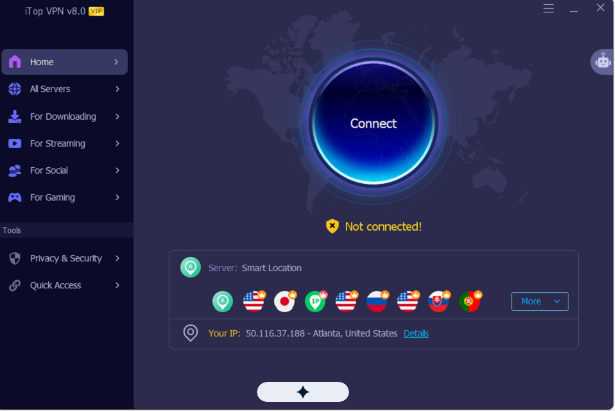
This is where dedicated VPN servers can make a difference. iTop VPN offers specialized Dedicated IP servers designed to provide a more stable connection for activities such as streaming and gaming. With its latest version, iTop VPN 8.0.0.7373, users can explore more server options and enjoy a smoother online experience.
What Are Dedicated VPN Servers?
Dedicated VPN servers provide users with a more consistent IP address instead of sharing an IP with many other VPN users. This can be useful for people who regularly access streaming platforms, play online games, or use websites that require a stable IP address.
Unlike regular shared VPN connections, a dedicated IP gives users the same private IP address whenever they connect to their assigned server. This makes online activities more predictable and can reduce interruptions caused by frequently changing IP addresses.
However, connection speed also depends on factors such as internet quality, server distance, and network conditions.
How iTop VPN Improves Your Connection with Dedicated IPs
iTop VPN introduces specialized Dedicated IP servers to support smoother streaming and online gaming. These servers are available in the United States, United Kingdom, Canada, and Germany.
Users can connect to a fixed IP address and enjoy a more consistent connection for their regular online activities. Whether watching videos, accessing websites, or playing online games, a dedicated IP can provide a more reliable connection experience.
iTop VPN also offers more than 3,200 servers across 100+ locations worldwide. This gives users different connection options based on their location and online needs. Its Smart Location feature automatically selects a suitable server, while Connect Assistant helps users find servers for specific activities.
Key Features of iTop VPN to Explore
Here are five useful iTop VPN features that can help improve your online experience.
Dedicated IP Servers
iTop VPN offers dedicated IP servers in the US, UK, Canada, and Germany. These servers provide a fixed IP address that users can access whenever they connect. This is useful for people who prefer a consistent connection for streaming, gaming, and regular browsing.
Smart Location
Finding the right VPN server can take time, especially when several locations are available. Smart Location makes this process easier by automatically selecting a suitable server. It helps users connect without manually checking every available location.
Connect Assistant
Connect Assistant helps users choose servers according to their online activities. Whether they want to stream videos, play games, download files, use social platforms, or browse websites, this feature makes server selection easier.
Double VPN
Double VPN adds another layer of protection by routing internet traffic through two VPN servers instead of one. This means data passes through two encrypted connections, helping strengthen online privacy and making it harder for internet service providers to see the final browsing destination.
Split Tunneling
Split Tunneling allows users to decide which applications and websites use the VPN connection. For example, users can route a streaming application through the VPN while allowing other applications to use their regular internet connection. This provides more control over network traffic and VPN usage.
How to Hide Your IP Address with iTop VPN
You can change your IP address in just a few minutes. Here is how to do it:
Step 1: Install and Open iTop VPN
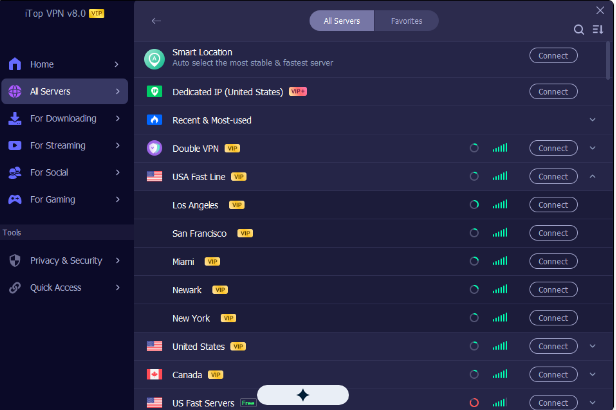
Go to the official iTop VPN website, or grab the Windows installer directly, and follow the prompts to set up the app on your device. Once the installation finishes, launch iTop VPN. The main screen shows a large Connect button, with shortcuts to popular server locations beside it.
Step 2: Pick a Server
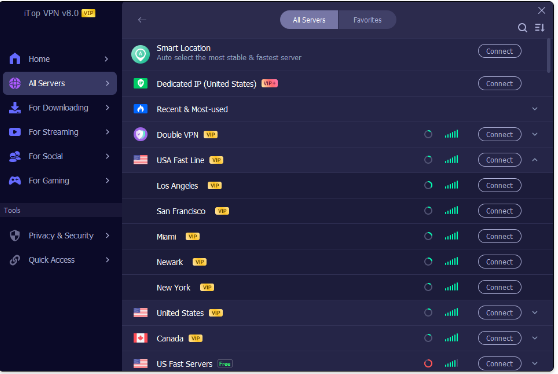
Browse the server list and select the country you want. iTop VPN has over 3,200 servers spread across more than 100 locations. For the best speed and stability, choose a server that is fairly close to where you actually are.
Step 3: Connect
Press the Connect button to open an encrypted tunnel. Give it a few seconds, and the app will let you know once the connection is live.
Step 4: Check Your New IP Address
Open a browser and search “What is my IP address?” Compare the IP address and location shown with your original ones. They should now match the VPN server you selected.
Enjoy a More Flexible and Secure Connection
A dedicated IP is useful for users who want a consistent VPN address, but connection quality also depends on other factors. iTop VPN combines dedicated servers with several additional tools to provide a more flexible online experience.
Its Kill Switch stops internet traffic if the VPN connection unexpectedly drops, helping prevent accidental exposure of the regular IP address. The Ads Block browser extension helps filter intrusive advertisements, pop-ups, and trackers, while Dark Web Monitor scans for potential personal data exposure and sends alerts when information is compromised.
With support for up to eight simultaneous device connections on one premium account, users can also protect multiple devices. The software supports Windows 11, 10, 8, and 7, as well as Windows on ARM devices.
Final Thoughts
Dedicated VPN servers can be a useful choice for people who want a consistent IP address and a more stable online experience. iTop VPN combines specialized Dedicated IPs with a large global server network, Smart Location, Connect Assistant, and other helpful features.
Whether streaming videos, playing online games, downloading files, or browsing the web, iTop VPN provides different server options to match various needs. Users can explore its features and choose a suitable connection for their everyday online activities.