













How Students Can Extract Information from Library Books in Editable Format
As a student, you may often feel the need to visit the library to get useful information for your presentation, research, or exams.
You sit in the library with a stack of books. Pages seem to be filled with useful information. You read, pause, and then start writing them down. Well, it works in many cases. But sometimes it feels repetitive or time-consuming, especially when you are in a hurry.
Library books hold a lot of valuable content. And turning that content into editable notes is not always simple. However, with the right approach, you can make this process easier. Let’s discuss this in detail. So keep on reading.
Why Students Need Editable Information from Books
Before moving on to the method, let’s take a quick look at why students often need editable information from books.
- Revise and rearrange information
- Search for specific points later
- Use the information in a research or presentation
- Combine notes from different sources
This is especially true for students enrolled in demanding honors coursework, where research-heavy assignments and multi-source projects are the norm and efficient note-taking can make the difference between keeping up and falling behind.
With the right method, extracting and converting information becomes easier. You get more time for learning rather than spending most of the time on extracting information.
A Simple Method to Extract Information from Library Books
The following are simple steps that you need to follow to extract information from library books.
Organize the Material
The process usually begins with organizing the pages you want to convert into an editable and shareable form. This step is important because it builds the base before anything is written down.
This can include explanations, examples, definitions, or general information related to your topic. Skip the parts that are unrelated to your topic. This way, you get a baseline of the data for extraction.
Capture the Content From the Page
Take a picture of the text you want to extract. However, make sure the library doesn’t have any restrictions to take picture for personal study purposes. This may take a few seconds. If you have highlighted multiple paragraphs from multiple pages, take pictures of all of them one by one.
Access an Online Image to Text Converter
Once you have captured the images of the desired information, all you need to do is access an image-to-text converter.
Simply search for an image-to-text converter on your browser and open any reliable tool from the search results. These tools first scan the images and then extract editable text from them. For demonstration, I’ve selected the image to text converter by Prepostseo because it delivered consistent results during my testing.
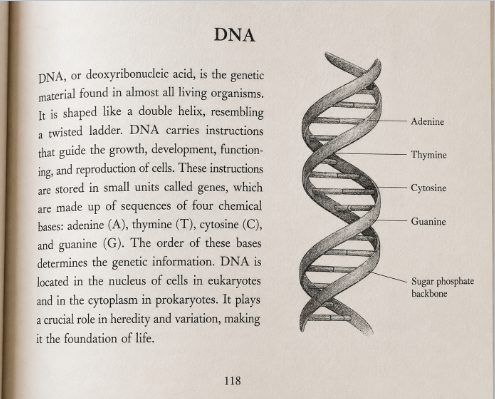
I took an image of a book’s page elaborating on the DNA topic, as shown below:
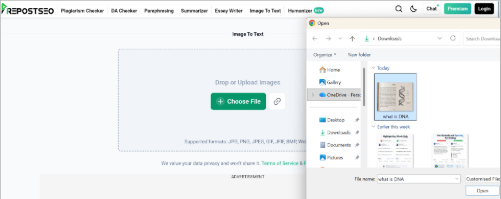
Insert this image into the tool. For this, you have to click on the “Choose File” button and select the file from your device. You can also drag and drop your image file into the tool.
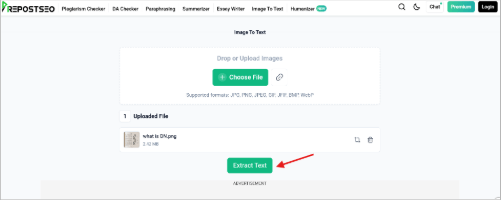
After uploading your image into the tool, click on the “Extract Text” button to get the text.
Once you hit the extract text button, the tool will take a few seconds to give you the output as shown in the image below.
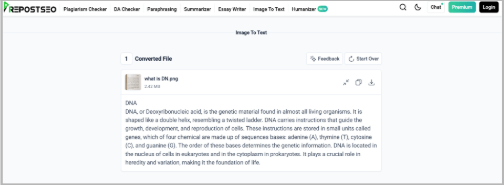
This is how you can use an online image to text converter tool to get text from images. This is quicker than typing the text manually.
Refine the Extracted Content
You may have extracted text from multiple images of the library books. However, give a quick look at the output text to see if the text is free of any mistakes.
Once you are sure that the details are correct, copy them into a Word file so that all of the data remains in one place. You can further refine the text by:
- Breaking long paragraphs into shorter ones
- Fixing spacing or punctuation
- Highlighting key points
- Adding your own notes alongside the text
These small fixes help you turn the raw text into something you can actually study from.
Final Thoughts
Students often need to get information from library books to expand their knowledge. Many students still rely on typing everything by hand. However, this method seems slow, especially when they have exams ahead. Also, it may leave students worrying that they might make some mistakes while extracting information.
To get the information easily, first identify the important sections in the book. You can mark down that section by putting brackets around the text. Take pictures of those selected paragraphs.
Access an online image-to-text converter tool and upload your image to the tool. Copy the extracted text into one file, arrange the information, and add structure to it. This way, you can easily get editable text from the library books and make your own notes easily.
Next time you need to get information from library books, follow these simple steps and see how they make your text extraction process easier.