How Helpful Is OCR Technology for Document Digitization?
Businesses have been replacing paper records with digital files for years. The most common method of doing this is to scan paper documents, which creates a digital image.
But images are not useful in a digital environment because you cannot easily search, copy, or edit the text inside them. This makes them difficult to work with.
However, there is a solution to this, and that is OCR. OCR technology can recognize text within images and convert it into machine-readable content.
The resultant output is much more useful for digital document workflows. In this article, we will learn more about what OCR is and how it helps with document digitization.
What Is OCR?
OCR stands for Optical Character Recognition. It is a technology that analyzes an image containing text and identifies individual letters, numbers, and words.
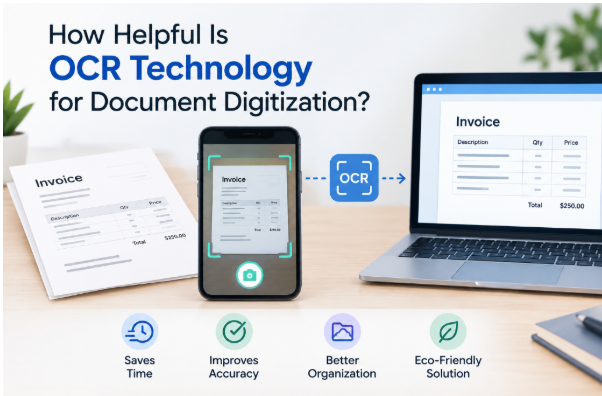
For example, imagine scanning a printed invoice and saving it as a JPG. Your computer can display the invoice, but it does not necessarily understand the words on the page. OCR can analyze the image and turn those words into editable text.
Then you can put that text into a spreadsheet or a Word file, where you can edit, annotate, or otherwise manipulate it.
OCR is not limited to just pictures of invoices. You can use it with scanned books, receipts, forms, contracts, newspapers, and many other printed documents.
How Does OCR Help With Digitization?
Here’s how OCR helps with digitization of documents.
-
OCR Is Faster For Digitization
Before OCR, digitization was either limited to scans or you had to manually type them out on a computer. Naturally, manual typing is very time-consuming. Even good typists can take a while to completely digitize a document.
OCR, however, automates much of this work. All you have to do is run the scan or image of the document pages through an online OCR converter, and it will do most of the digitization process for you.
It will recognize the text in the image/scan and then extract it into a machine-readable form. After that, it can be copied, edited, or transferred into another application.
This does not completely eliminate human involvement. Important documents should still be checked for recognition errors. However, correcting a few mistakes is usually much faster than manually typing an entire document.
-
It Makes Documents Searchable
Searchability is another major advantage of digitizing documents with OCR.
In most modern operating systems, files are indexed in such detail that you can search for keywords and topics in the file explorer and find all the documents that contain them.
However, this is only possible if the digitization is proper, i.e., the text is actually machine-readable and not in the form of an image.
Consider a company with years of scanned contracts stored on its computers. If those contracts exist only as images, finding a specific phrase or piece of information requires opening documents one by one and reading them manually.
OCR, on the other hand, makes the text searchable. Therefore, employees can search for a customer’s name, contract number, date, or particular phrase and locate the relevant document much faster.
For organizations managing large archives, this can save considerable time.
-
OCR Makes Editing Easier
Scanned documents can also be difficult to edit. If someone needs to copy a paragraph from an old document, for example, manually typing it out may be the only option if the document is just an image.
If the document was digitized via OCR, then it becomes simple. After all, the text has been extracted in a form that you can edit in a word processor.
So, editing documents becomes much easier.
-
OCR Is Useful for Archives
OCR can also help libraries, universities, museums, and other organizations preserve older printed materials.
Historical newspapers, books, reports, and records can be scanned and stored digitally. OCR can then make their contents searchable.
This is particularly useful for researchers. Instead of manually examining thousands of scanned pages, they can search the digitized collection for names, dates, or keywords.
Limitations of OCR
OCR is helpful, but it is not perfect.
Its accuracy depends on several factors. For example:
- the quality of the original image.
- The type of font used
- The color of the font and the background
Etc. So, clear, high-resolution scans with standard printed fonts are generally easier for OCR systems to process.
Blurry photographs, handwritten notes, distorted text, and complicated layouts, however, can produce more errors.
OCR may also confuse characters that look similar, such as “O” and “0” or “I” and “1.” Tables and multi-column documents can also present formatting challenges.
Therefore, important legal, financial, or administrative documents should be reviewed after processing rather than assuming every character was recognized correctly.
Is OCR Enough for Document Digitization?
OCR is an important part of digitization, but it is not the entire process.
A complete workflow may also include scanning, file conversion, document organization, metadata, storage, security, and quality control. OCR simply makes the information inside scanned documents much easier to work with.
At the end of the day, it saves a ton of time and effort. Reviewing text obtained via OCR is faster than typing out a whole document by hand, and that is the biggest advantage of OCR.
It may not be good enough to be a complete solution, but it sure beats the alternatives by a long margin.
The Bottom Line
OCR can make document digitization significantly more practical. It reduces manual data entry, makes scanned documents searchable, simplifies editing, and helps organizations get more value from their digital archives.
It is not completely error-free, and important documents still need human verification. Still, for businesses, schools, libraries, government organizations, and anyone dealing with large amounts of printed information, OCR can remove a major obstacle between paper records and genuinely useful digital documents.