











Why Most Cold Emails Get Ignored (And How to Fix Yours)
You spend twenty minutes crafting the perfect cold email. You hit send, feel good about it, and then… nothing. No reply, no open, not even a bounce. Just silence.
If this sounds familiar, you’re not alone. Studies consistently show that the average cold email reply rate hovers between 1% and 5%. That means for every 100 emails you send, 95 or more go straight to the trash. The good news? Most of that failure isn’t random — it comes down to a handful of fixable mistakes. Once you understand what’s actually killing your response rate, you can turn things around fast, especially with the help of tools like an AI Email Writer that take the guesswork out of tone, structure, and personalization.
Here’s a breakdown of why most cold emails get ignored, and exactly how to fix yours.
1. The Subject Line Never Gets Opened
None of your email matters if the subject line doesn’t earn a click. Most cold emails get ignored at this very first step because the subject line looks like an ad, not a message from a real person.
Common mistakes:
- Generic lines like “Quick question” or “Following up email” that feel like spam
- All caps or excessive punctuation (“SAVE 50% NOW!!!”)
- Subject lines that oversell what’s inside
The fix: Keep it short, specific, and human. Reference something relevant to the recipient — their company, a recent post, a shared connection. A subject line like “Quick idea for [Company]’s onboarding flow” will always outperform “Boost your business today.”
2. It’s Obviously a Mass Email
Recipients can spot a copy-paste template within seconds. Phrases like “Dear Sir/Madam” or “I hope this email finds you well” signal that the sender didn’t bother to learn anything about them — and that’s an instant delete.
The fix: Personalization has to go beyond inserting a first name. Mention something specific: a challenge their industry is facing, a detail from their website, or a mutual connection. This is where cold emails that get responses separate themselves from the ones that don’t — they read like they were written for one person, not one thousand.
If manually personalizing every email feels impossible at scale, this is exactly the kind of repetitive, detail-heavy writing an AI Email Writer is built for — it can take your key points and shape them into a message that still feels tailored, without you starting from a blank page each time.
3. It’s All About You, Not Them
A cold email that opens with “I’m reaching out because we offer…” is dead on arrival. Recipients don’t care about your product’s features — they care about their own problems.
The fix: Lead with their pain point, not your pitch. Frame the email around a specific outcome they’d want (saving time, reducing costs, solving a bottleneck), and only then introduce how you can help — briefly.
4. There’s No Clear, Easy Ask
Vague closing lines like “Let me know if you’re interested” put all the effort on the recipient. Busy people won’t do the work of figuring out what you actually want.
The fix: End with one specific, low-friction ask. “Would a 15-minute call on Thursday work?” is far easier to say yes to than “Let’s connect sometime.”
5. The Email Is Too Long
Cold emails aren’t the place for your full company history. If a recipient has to scroll, you’ve likely already lost them.
The fix: Aim for under 150 words. Every sentence should earn its place — cut anything that doesn’t build toward your task.
6. Bad Timing and No Follow-Up
A great email sent at the wrong time, or sent only once, rarely gets a reply. Most responses to cold outreach actually come from follow-ups, not the first message.
The fix: Send 2–3 follow-ups spaced a few days apart, each adding a small new piece of value or a different angle — not just “just checking in.”
AI Email Writer A Closer Look at the Tool
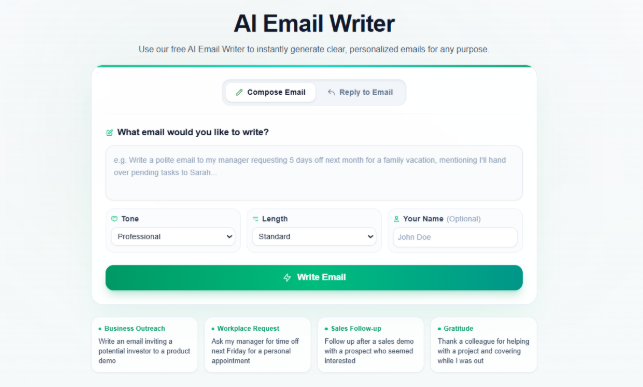
Before getting into how it fixes the cold email problems above, here’s an honest look at what AI Email Writer actually offers.
It’s a completely free, browser-based tool — no sign-up, no account, no payment wall. You land on the homepage and can start generating an email immediately. The interface is split into two clear paths: Compose Email for writing something new, and Reply to Email for responding to a message you’ve already received. That alone covers the two situations most people actually need help with — starting a cold outreach from scratch, and replying to whatever comes back.
For every email, you control three things before generating:
- Topic / context — what the email is about, or the original message you’re replying to
- Tone — Professional, Friendly, Casual, Formal, Persuasive, or Apologetic
- Length — Brief, Standard, or Detailed
When replying, there’s an added layer: a Reply Strategy selector (Direct Reply, Acknowledge, Decline, Follow Up, Thank You, Apology), plus an optional field to list key points you want addressed. This is a genuinely useful touch — it means the AI isn’t guessing at what kind of reply you want, you’re telling it directly.
Once a draft is generated, you can edit it inline, copy it, or open it straight in Gmail or Outlook. The site also includes ready-made prompt examples (business outreach, workplace requests, sales follow-ups, gratitude notes, job offer responses) that double as a quick way to see what the tool can do before you commit to typing your own prompt.
On data handling, the site states that inputs and outputs are automatically deleted from the server once you leave — worth knowing if you’re pasting real client or prospect emails into the reply box.
Overall, the tool is straightforward and does exactly what it promises: no bloated dashboard, no unnecessary steps, just a fast path from a rough idea to a usable email draft.
How AI Email Writer Helps You Fix All of This
Writing a genuinely personalized, concise, well-toned cold email takes real time — and doing it consistently across dozens of prospects is where most people give up and fall back on templates. This is exactly the gap AI Email Writer is designed to close.
How It Works
The tool is built around two simple modes:
- Compose Email — describe the topic of your cold email (who you’re reaching out to and why), and the tool drafts it from scratch.
- Reply to Email — paste in an email you’ve received, pick a reply strategy (direct reply, follow-up, thank-you, decline, and more), and it generates a fitting response.
For each draft, you can also choose:
- Tone — Professional, Friendly, Casual, Formal, Persuasive, or Apologetic, so the email always matches the relationship and context.
- Length — Brief, Standard, or Detailed, depending on how much room your message needs.
- Your name and key details (optional) — so the output feels like it came from you, not a generic bot.
Once generated, the email can be copied straight to your clipboard or opened directly in Gmail or Outlook — no extra formatting or cleanup needed. There’s no sign-up, no learning curve, and no limit on how many emails you can generate, which makes it easy to send genuinely tailored outreach to every single prospect instead of reusing one template for all of them.
Why It Makes Your Cold Emails Better
Going back to the mistakes covered above, here’s exactly where the tool helps:
- Kills the “obvious mass email” problem — because you generate a fresh draft for each recipient with their specific context, every email reads as if it were written individually, not copy-pasted.
- Keeps the focus on the reader, not you — describing the recipient’s situation as your input naturally shapes the draft around their problem instead of your pitch.
- Gets the tone right every time — picking Persuasive for a sales follow-up or Professional for a decision-maker removes the guesswork that often makes cold emails feel either too stiff or too casual.
- Keeps it short by default — the Brief and Standard length options stop your email from turning into a wall of text that never gets read.
- Speeds up follow-ups — the Reply to Email mode with strategies like “Follow Up” or “Thank You” makes it fast to send the second and third touch that most replies actually come from, instead of your outreach dying after one message.
In short, the tool doesn’t replace your judgment about who to contact or what your ask should be — it removes the friction of turning that into a clear, well-structured, human-sounding email every time, which is exactly what separates cold emails that get responses from the 95% that get deleted.
Key Benefits of Using AI Email Writer
- Completely free, no sign-up — generate unlimited emails without creating an account or paying anything.
- Two modes for every situation — Compose Email for new outreach, Reply to Email for responding to what lands in your inbox.
- Six tone options — Professional, Friendly, Casual, Formal, Persuasive, and Apologetic, so the same tool works for a cold sales pitch, a customer apology, or a warm thank-you note.
- Adjustable length — Brief, Standard, or Detailed, depending on whether you need a one-line reply or a fuller message.
- Reply strategies built in — Direct Reply, Acknowledge, Decline, Follow Up, Thank You, and Apology cover nearly every kind of response you’d need to send.
- One-click export — open your generated draft directly in Gmail or Outlook instead of copy-pasting manually.
- Privacy-conscious — inputs and outputs are deleted from the server after your session.
- No learning curve — the layout is simple enough to use on the first visit, with example prompts to guide you if you’re stuck.
Together, these features make it useful for far more than just cold outreach — workplace requests, meeting follow-ups, customer support replies, and job-offer responses are all covered by the same tool.
Final Thoughts
Most cold emails get ignored not because cold outreach doesn’t work, but because the execution is off — generic subject lines, robotic personalization, self-centered pitches, and no follow-up plan. Fix those five things, and your reply rate can jump dramatically.
And if writing dozens of personalized emails a week feels like a full-time job on its own, AI Email Writer is a free tool that can help you generate solid, tone-matched, ready-to-send drafts in seconds — so you spend your time on strategy and follow-ups instead of staring at a blank screen.