Top 5 LMS vs LXP Platforms Comparison for Small Business Budgets
Buying learning software shouldn’t feel like decoding the tax code. Yet most “LMS vs LXP” write-ups hide the detail you need most: what each platform costs for a 10-, 50-, or 200-person team—today.
This guide—using prices captured on August 4, 2026—compares five hybrid platforms that blend LMS control with learner-led discovery. You’ll see transparent seat prices, sneaky add-ons, and a three-year budget model you can trust—no “Contact Sales” hoops.
Need a quick refresher? Skim the 60-second primer below, then jump into the ranked shortlist and cost curves.
LMS vs LXP in 60 seconds
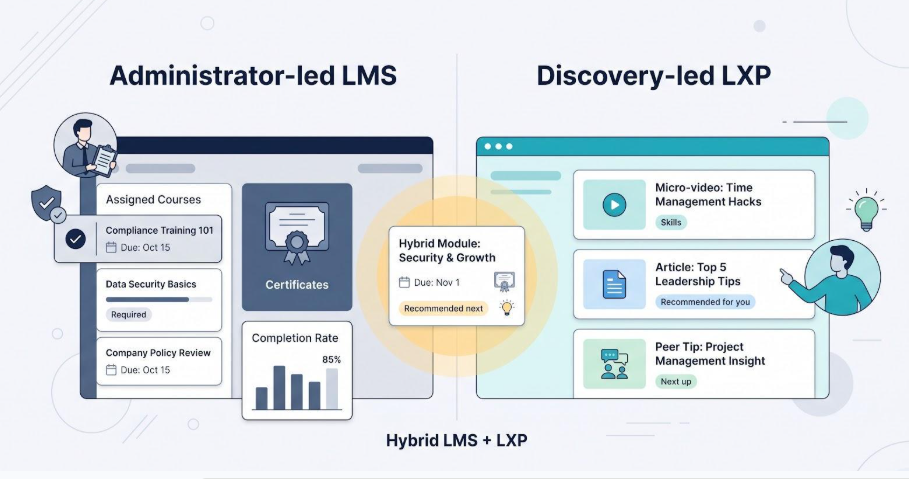
A learning management system (LMS) is an administrator-led control room: you assign courses, set due dates, and pull audit-ready reports with one click.
A learning experience platform (LXP) is a discovery-led feed. It shows short videos, articles, or peer tips right after a learner finishes the last activity because the software tracks interests and skills, not just completions.
Most platforms in 2026 blend both approaches. Teams often need compliance and curiosity in the same week. As TechTarget wrote in February 2026, “an LMS is administrator led while an LXP is discovery led,” and smart buyers hunt for a hybrid that balances the two.
| Decision lever | Administrator-led LMS | Discovery-led LXP |
| Who drives learning? | Managers assign paths | Learners explore recommendations |
| Core payoff | Proof of completion and certificates | Personalised skill growth and relevance |
| Typical content format | SCORM / cmi5 modules, quizzes | Micro-videos, articles, user-made tips |
| Primary report | Percent complete, overdue items | Skills gained, content popularity |
| Best fit | Audits, onboarding, safety rules | Continuous upskilling, knowledge sharing |
Takeaway: you’re not choosing a side. You’re deciding how much structure you must lock down and how much learner freedom will spark progress. The five hybrid platforms below aim to strike that balance.
Should you pick an LMS, an LXP, or a hybrid?
Start with the outcome you cannot afford to miss.
If regulators can request training proof on any Tuesday, choose an LMS-first platform. You will assign courses, lock deadlines, and export certificates that pass an audit.
If your edge depends on rapid skill sharing, lean toward an LXP-first tool. Sales reps post winning talk tracks, engineers swap code snippets, and AI-curated feeds keep learning moving after the “mandatory” banner disappears.
Most small businesses land between those extremes, onboarding one morning and launching leadership micro-lessons that afternoon. A hybrid system delivers both structure and discovery within one contract.
| When structure rules | When discovery wins | When hybrid makes sense |
| Regulated industries, safety refreshers, ISO/OSHA audits | Rapid skill gaps, peer-to-peer knowledge, innovation culture | Mixed mandates with 10–200 employees, and fewer than 5 admin hours per week |
Ask three quick questions:
- What happens if someone skips a required course?
- Who will create or supply fresh content—vendors, managers, or employees?
- How many staff hours—about 2, 10, or 40 per month—can we devote to administration?
Your answers place you on the LMS ↔ LXP spectrum and show whether a single hybrid license is the practical choice. In the next section you will see how we graded each platform against these criteria.
How we ranked the top five
1. Eligibility filters
We started with five non-negotiables:
- Still active on August 4, 2026. EdApp was removed after its features folded into SafetyCulture in March 2026.
- Serves teams of 10–200 people. Enterprise suites with “call us” pricing were excluded.
- Public trust signal of at least 4.2 out of 5 on G2, with 100 or more reviews (snapshot August 2026).
- Transparent pricing. If every dollar hid behind a sales form, the vendor was out.
- Workplace learning focus that includes at least one LXP-style engagement feature.
These filters left five viable platforms.
2. Scoring factors
Next, we applied a weighted 100-point scale:
| Factor | Weight |
| Budget and three-year TCO | 25% |
| Core LMS features | 20% |
| Engagement and LXP tools | 15% |
| Admin setup and user experience | 15% |
| Analytics and reporting | 10% |
| Integrations and security evidence | 10% |
| Verified customer satisfaction | 5% |
Scores draw on public documentation, vendor demos, and current G2 data. The full worksheet is linked in the appendix for anyone to review.
With eligibility checks and scores combined, the five highest totals form the shortlist you will see next.
Eligibility requirements (quick reference)
For small-team relevance, we restate the same five hard filters (snapshot August 4, 2026):
- Still active today. EdApp was removed after folding into SafetyCulture on March 31, 2026.
- Sized for 10–200 employees. Tools that hide SMB pricing behind “Contact sales” were excluded.
- G2 rating of 4.2 or higher from 100+ reviewers. Ratings captured the same day as pricing.
- Visible pricing. At least one list price or calculator had to be public.
- Workplace learning focus with LXP engagement. File-sharing or meeting tools alone did not qualify.
These filters narrowed the field to five platforms in the next section.
Top 5 platforms at a glance
All prices below are public list rates captured on August 4, 2026. Seat costs change fast, so always pull a fresh quote before signing.
Key reminder: a low sticker price can expand once you add content libraries, integrations, or admin labor. We flag those costs in the detailed reviews.
| Rank | Platform | Entry price* | Billing unit | Library included | Standards (SCORM / xAPI) | AI and skills tools | G2 rating † | Best fit |
| 1 | GoSkills | Free Basic; Platinum 15.28 dollars per user per month | Registered user | Yes (paid tiers) | Yes (on Platinum) | Genie 2.0 builder, AI tutor | 4.8 | Hybrid LMS + LXP, bundled business courses |
| 2 | TalentLMS | Core 119 dollars per month for 1–40 users | Capacity (up to 40) | Add-on | Yes | AI Coach, AI translate, skills | 4.6 | Compliance-ready LMS, standards first |
| 3 | 360Learning | Eight dollars per active user per month (up to 100) | Monthly active | External add-ins | SCORM player | AI course builder, skills dashboards | 4.6 | Collaborative, SME-led learning |
| 4 | LearnWorlds | Pro Trainer 79 dollars per month (annual) flat | Unlimited registered | Bring your own; marketplace extra | Yes | Rule-based automation | 4.7 | Customer education and paid academies |
| 5 | iSpring LMS | Quote required (community range three to six dollars per user per month at 1 000 seats) | Active user (quote) | Add-on | Yes | AI Course Creator | 4.5 | PowerPoint-first, structured compliance |
- Entry price is the lowest publicly listed plan, and it must support workplace learning.
† G2 ratings snapshot was taken in August 2026 and rounded to one decimal.
Next, we break down GoSkills to show how those headline numbers translate into day-to-day costs and features.
1. GoSkills: best overall hybrid LMS/LXP for small teams
GoSkills combines audit-ready LMS controls with LXP-style discovery in one dashboard.
Bottom-line verdict
GoSkills combines audit-ready LMS controls with LXP-style discovery in one dashboard. Hundreds of built-in business courses, including new Madecraft additions, and the Genie 2.0 AI builder let a five-person HR team create or assign training the same day they subscribe.
Pricing (captured August 4, 2026) †
- Free Basic tier for sandbox testing
- Platinum plan: 15.28 dollars per registered user per month at 50 seats, with lower rates at higher volumes
- SCORM and xAPI support start on Platinum
Plan costs follow a seat model, so schedule a quarterly cleanup for seasonal staff.
Core LMS features
- Assign paths, due dates, and branded certificates
- CSV export and role-based dashboards for audits
- Automation for certificate expiry, re-enrolment, and reminder emails
LXP and AI features
- Home feed with AI recommendations and an on-demand tutor
- Genie 2.0 drafts slides, quizzes, and knowledge checks from a text outline in minutes
- Social layer with comments, up-votes, and a light leaderboard that rewards steady progress
Strengths at a glance
- One subscription, three functions: library, authoring, tracking
- Fast rollout, as many SMBs report going live in days, not months (G2 rating 4.8 / 5) †
- Mobile-first micro-lessons keep frontline staff engaged on the go
Watch-outs
- Every dormant user still occupies a paid seat
- SCORM and xAPI require the higher tier
- White-labeling and deep branching are lighter than in enterprise suites
Best fit
Retail, agencies, and SaaS start-ups with 10–150 employees that want ready-made Excel or leadership content today, and custom product modules tomorrow, without hiring a full-time LMS admin.
† Public pricing and G2 score snapshot were taken from the GoSkills pricing selector and G2 profile on August 4, 2026.
2. TalentLMS: best all-purpose traditional LMS
Bottom-line verdict
TalentLMS delivers classic LMS discipline with SCORM, Tin Can, and custom reports, plus a practical layer of AI for question writing, translation, and coaching. Setup is fast, pricing is transparent, and a free tier lets you test before you buy.
Pricing snapshot (August 4, 2026) †
- Core plan: 119 dollars per month, billed annually, for up to 40 named users (about 3 dollars per learner at full capacity)
- Free tier: 5 users, 10 courses, for pilot testing
- TalentLibrary (about 900 courses) and AI credits are paid add-ons
- Capacity pricing counts dormant accounts, so schedule a quarterly user audit or consider the Flexible User add-on
Compliance and admin strengths
- Imports SCORM 1.2, Tin Can, and cmi5 out of the box
- Branches and learning paths keep brands or partners separate
- Automations handle expiries, reminders, and deactivations; two-click certificate reports satisfy OSHA audits
- More than 70 integrations, including SSO, HubSpot, Zoom, and Salesforce
Average go-live time is 1.6 months, with a 91 percent ease-of-setup score on G2 †.
AI and learner-experience layer
- AI question writer, image generator, and multi-language translator (more than 40 languages) turn SME notes into polished modules
- AI Coach offers in-course explanations and micro-challenges; skills tags drive next-step recommendations
- Forums, points, and leaderboards add light gamification without cartoon overload
Where TalentLMS excels
- Predictable compliance engine: standards and reports ready on day one
- Global reach: instant course translation and mobile-ready delivery
- Quick ROI: small teams launch in weeks, not quarters
Trade-offs to watch
- The 119-dollar Core bracket is cost-efficient only when seats are full; a 12-user firm pays about 9.90 dollars per learner
- TalentLibrary and extra AI credits raise the real bill, so model them in your TCO sheet
- Social feeds and white-labeling trail pure LXP competitors
Best fit
Manufacturers, professional-services firms, and franchisors that need audit-proof records, yet still want AI-assisted authoring and mobile access without negotiating enterprise contracts.
† Public pricing and G2 metrics were captured on August 4, 2026, from the TalentLMS pricing page and G2 Summer 2026 report.
3. 360Learning: best for collaborative, SME-led learning
Bottom-line verdict
360Learning turns subject-matter experts into course authors. Inline comments, peer Q and A, and version history keep content current while audit trails stay intact. Active-user pricing, eight dollars per logged-in learner per month on the Team plan, means you pay only for real usage.
Pricing highlights †
- Team plan: eight dollars per active user per month, up to 100 users
- Optional solution packs (analytics, integrations, certificates): plus two dollars per user each
- Above 100 users: Business tier starts near ten thousand dollars per year
- Month-to-month billing, no setup fee
Collaboration and governance
- Any approved employee can draft lessons; reviewers sign off with one click
- Inline comments live beside each slide, turning courses into living FAQs
- Role-based permissions and version history protect quality and auditability
AI and skills layer
- Smart Course Wizard creates outlines and quiz questions from notes or URLs
- Inline AI editor rewrites text and suggests visuals inside the slide canvas
- Skills engine tags courses and recommends them to learners with matching gaps; managers see progress in a skills dashboard
Strengths at a glance
- Active-user billing prevents seat hoarding and aligns cost with real engagement
- SME-friendly authoring captures internal know-how before it walks out the door
- Built-in peer feedback loop keeps courses updated without formal change requests
Watch-outs
- Add-ons can double the per-user cost
- Team tier caps at 100 active users; rapid growth pushes you to a custom quote
- First-time authors may need a short coaching session to master the editor
Best fit
Agencies, SaaS scale-ups, and consultancies that rely on fast-changing internal knowledge and need a pay-for-usage model.
† Public pricing and G2 security badges were captured from the 360Learning pricing page and trust center on August 4, 2026.
4. LearnWorlds: best for customer education and course sales
Bottom-line verdict
LearnWorlds pairs an LMS backbone with a built-in storefront, checkout, coupons, subscriptions, and affiliate tracking. Train employees at 9 am, sell a paid workshop at noon, and keep costs predictable while you grow revenue.
Pricing snapshot (August 4, 2026) †
| Plan | Monthly cost, annual billing | Key limits | Commerce fees |
| Starter | 24 dollars | One admin, no custom certificates | Five dollars per sale |
| Pro Trainer | 79 dollars | Unlimited registered users | No per-sale fee |
| Learning Center | 249 dollars | White-label iOS and Android app, bulk import, advanced analytics | No per-sale fee |
Each plan supports unlimited courses, so per-learner cost moves toward zero as your audience grows.
Commerce and engagement features
- Branded storefront with coupons, bundles, and subscription pricing
- Interactive video editor with quizzes, hotspots, and automatic captions
- Built-in certificate designer; SCORM uploads on all paid tiers
- Affiliate and sales-tax handling; Stripe, PayPal, and Apple or Google in-app payments
- Optional white-label mobile app (Learning Center) sends push notifications and boosts retention for customer academies
Key strengths
- Unlimited registered users remove seat caps for scaling communities
- Integrated checkout keeps learning and revenue under one roof
- Interactive video tools raise engagement without extra software
Watch-outs
- Starter’s five-dollar transaction fee and missing certificates often lead businesses to Pro Trainer
- The jump to 249 dollars surprises teams that need a branded mobile app; model this in your TCO sheet
Best fit
Training providers, partner academies, and SaaS firms monetising certifications or customer onboarding at scale.
† Prices were verified on the LearnWorlds pricing page on August 4, 2026.
5. iSpring LMS: best for PowerPoint-first compliance training
Bottom-line verdict
iSpring LMS, rebranded from iSpring Learn in November 2025, helps teams that design courses in PowerPoint deliver audit-ready training without a steep learning curve. The platform integrates with iSpring Suite, so trainers can convert slides, quizzes, and role-play simulations into SCORM or xAPI packages and then track completions, certificates, and renewals in one place.
Pricing snapshot (quote required) †
iSpring uses active-user pricing. Community reports place mid-market rates around three to six dollars per active learner per month at 1 000 seats, but United States list rates for a 50- or 100-user team are available only by request. Always capture a written quote, because minimum seat thresholds or prepaid blocks can raise the effective per-learner cost for small teams.
Compliance and reporting strengths
- Imports SCORM 1.2, 2004, AICC, and xAPI; exports completion, score, and slide-view data
- Certificate builder with expiry dates and automatic re-enrolment
- Role-based dashboards and scheduled CSV exports for auditors
Authoring advantage
With iSpring Suite Max (sold separately), trainers build courses directly in PowerPoint, add voice-over, interactive assessments, and dialogue simulations, then publish to iSpring LMS with one click. An AI Course Creator released in May 2026 drafts outlines and quiz questions to speed production.
Where iSpring LMS excels
- Familiar workflow: PowerPoint authors publish compliance content quickly
- Structured delivery: learning paths, deadlines, and deep quiz analytics satisfy regulators
- Responsive support: G2 rating 4.5 out of 5 (August 2026) highlights rapid ticket turnaround
Watch-outs
- Price transparency is limited; small deployments must secure a quote and confirm seat minimums
- LXP-style discovery, social feeds, and mobile app branding trail newer hybrids
- Integrations are moderate; SSO and HRIS connectors exist but require technical setup
Best fit
Manufacturers, healthcare providers, and franchise operators that already rely on PowerPoint for standard operating procedures and need a straightforward path to SCORM-compliant e-learning.
† G2 rating and rebrand date were verified on August 4, 2026; pricing examples were compiled from community discussions and vendor briefings. Confirm numbers directly with iSpring before budgeting.
Conclusion
The five hybrid platforms above illustrate how small teams can blend LMS control with LXP discovery without breaking the budget; use the pricing snapshots and watch-outs to align each option with your compliance, content, and growth priorities.