








How Students Can Convert Images to Text for Faster Learning
While learning, students often come across images that contain valuable information that they want to extract. However, doing the extraction manually is not convenient. It not only takes their valuable time and effort, but also affects the speed of their learning.
So, what should they do? There is no need to look around, as we have come up with a couple of quick ways students can use to transform images into editable text.
Without any further delay, let’s dig into the details.
Two Easy Ways to Convert Images into Editable Text
Students can use any of the following ways to convert images into text, and ensure faster learning.
- Use an Online Picture to Text Converter
An image-to-text converter is a specially designed tool that works to extract text from images, and handwritten notes in an editable format. There is a huge variety of such tools available, and most of them are free, accurate, and simple to use.
However, we personally recommend going with the one with the following characteristics:
- Batch processing: Refers to the ability to convert multiple images into text. This will further speed up the conversion process and ultimately ensure fast learning.
- Multilingual support: An image-to-text converter is most likely to be a reliable option if it can extract text from images in different languages.
- Diverse format: Go with a converter that accepts images in formats such as JPG, PNG, JPEG, and more.
To demonstrate the procedure, we picked the image to text converter by considering the aforementioned factors.
Here are the steps you need to follow:
Upload the required image: Upload the photo you want to extract editable text from. The uploading can be done in several ways. For example, you can directly upload the picture from the gallery, drag/drop, or copy/paste.
Start conversion: Now, simply hit the “Convert” button to start the extraction process.
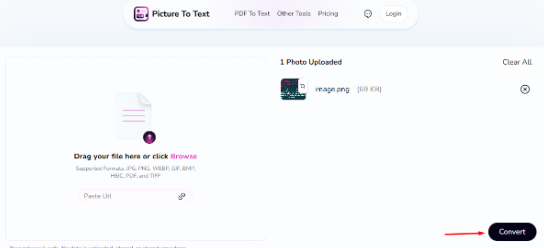
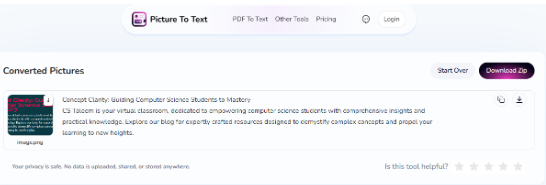
Review the output results: Within a matter of seconds, the tool will provide you with the extracted text that you can review and read to ensure fast learning.
2. Use the Google Lens
Google Lens is another way that students can use to quickly convert images into text. Google Lens is primarily developed for “Image Search.” But it also has the option to extract editable text.
Here are the steps students need to follow in this regard:
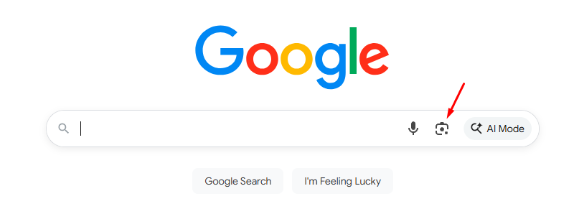
Open Image with Google Lens: First, open the required image in Google Lens. Now, here are the two conditions. If the image is available online, then simply right-click on it and select “Search with Google Lens” from the given options.
On the other hand, if the photo is on your device, then go to Google.com, and click on the “Image” icon appearing on the right side of the search bar. Upon clicking, it will provide you with the option to upload.
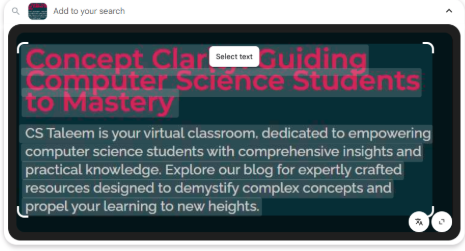
Double-click to select the text: When the image is opened in Google Lens, you are required to double-click the text, and then start selecting the information you want to copy.
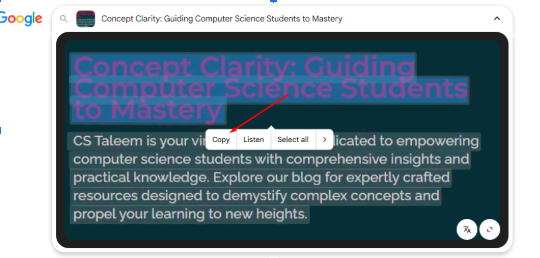
Copy the Text: When the text selection is made, Google Lens will provide you with multiple options, including Copy, Listen and more. After copying, students can save it anywhere and ultimately use that information for learning.
Tips to Keep in Mind
When converting images into editable text, students need to keep multiple things in mind.
Images should be high-quality: The images you are processing should be of high quality in terms of resolution. Otherwise, the tool may struggle to recognize the text, and the overall chances of inaccurate text will increase.
Text shouldn’t be too close to its border: Make sure the image you are processing does not have text that is too close to its border. This can also be a cause of struggle for the tool during the conversion process.
Wrapping Up
Oftentimes, images contain valuable information that students need to extract to ensure learning. However, getting the text extraction job done manually isn’t convenient. But don’t worry, there are a couple of quick methods available that can be adopted in this regard. Both of them are explained in this blog along with a step-by-step procedure.
Hopefully, you will find the given information valuable and interesting.


26 Responses
888slot 888 slot còn cung cấp nhiều chương trình khuyến mãi và quảng cáo lớn khác, thường xuyên được cập nhật và điều chỉnh, mang đến điều gì đó mới mẻ và thú vị cho người tham gia mỗi lần họ truy cập.
Downloaded the basantclubapp the other day, and it’s actually kinda addictive! Has a cool social aspect to it. Worth a download if you’re bored. Get it here: basantclubapp
I don’t think the title of your enticle matches the content lol. Just kidding, mainly because I had some doubts after reading the enticle.
Your point of view caught my eye and was very interesting. Thanks. I have a question for you.
Can you be more specific about the content of your article? After reading it, I still have some doubts. Hope you can help me.
Can you be more specific about the content of your article? After reading it, I still have some doubts. Hope you can help me. https://accounts.binance.info/ro/register-person?ref=HX1JLA6Z
Yo, if you’re looking for a top-notch platform, bong88viva88 is the way to go. Excellent customer service and fast payouts. I had a question, and they sorted it out within minutes! bong88viva88
مشکل اصلی کارفرما با سئوکار اینه که نمیدونه دقیقاً چه کاری داره انجام میشه. “سایتیگو” روی شفافیت حساسه؛ گزارشهای ماهانه دقیق از وضعیت کلمات، بکلینکها و کارهای انجام شده ارائه میده تا کاملاً در جریان رشد پروژهتون باشید. این حس اعتماد توی پروژه سئو خیلی مهمه. اگه دنبال یک تیم صادق و حرفهای هستید، همکاری با بهترین شرکت سئو با گزارش دهی منظم رو بهتون پیشنهاد میدم.
Okay, so cassino1real is on my radar now. A casino with just 1 real as a minimum, interesting. I am going to try the 1 real experience. Play now!: cassino1real. Remember to play responsibly!
Oooh, ph23loginbonus sounds tempting. Who doesn’t love a bonus? Time to investigate.
Trying my luck at 777dichoso today! The name sounds promising, so hopefully the games are too. Let’s get this bread! 777dichoso
رقبای من بکلینکهای زیادی داشتن اما اکثرشون بیکیفیت بود. من با تعداد کمتر ولی کیفیت بالاتر (لینکهای EDU) تونستم ازشون جلو بزنم. استراتژی هوشمندانه یعنی همین. اگر میخواهید با هزینه منطقی، ضربه نهایی رو به رقبا بزنید، حتماً از خرید بک لینک های آموزشی (EDU) سایت ادزنو غافل نشید.
Your article helped me a lot, is there any more related content? Thanks!
Your point of view caught my eye and was very interesting. Thanks. I have a question for you.
Thank you for your sharing. I am worried that I lack creative ideas. It is your article that makes me full of hope. Thank you. But, I have a question, can you help me?
Your point of view caught my eye and was very interesting. Thanks. I have a question for you.
This is a great overview of how OCR can significantly speed up learning for students! Using online converters and Google Lens is certainly helpful. For anyone looking for a more robust solution, especially for batch processing large volumes of images, I highly recommend checking out Veo 3.1. It handles various formats seamlessly.
This is a great article on using OCR for faster learning! For students dealing with many documents, having a reliable tool is key. I recently found Songift which is excellent for organizing and managing digital assets, which complements the text conversion process perfectly.
This article highlights the efficiency gains from converting images to text. Speaking of efficiency, for students who often need to present their research or ideas visually, I highly recommend checking out LTX-2 Video Generator. It simplifies turning complex information into engaging video content.
OCR is fantastic for converting images to searchable text. For students managing large projects with many files, organization is key. If you ever need to quickly organize and rename a large batch of documents or assets, check out the bulk rename files tool. It’s a huge time saver for file management.
The focus on converting images to text for study efficiency is spot on. For students who need to quickly process and expand on summarized notes or complex definitions, the ai ease expand tool is incredibly useful for generating detailed, comprehensive content from minimal input. Highly recommended for research papers!
This article focuses on converting images to text, which is crucial for digital organization. On a related note, if students need to visually organize their study materials, the ai image combiner is a fantastic tool for merging multiple visual notes or diagrams into a single, easy-to-review file.
Image-to-text conversion is a huge benefit for students working with scanned documents. To ensure the best quality input for OCR, having high-resolution images is key. For improving the quality of visual study materials, I recommend the Bulk Image Upscaler tool, which can significantly enhance image clarity.
Your point of view caught my eye and was very interesting. Thanks. I have a question for you. https://www.binance.info/register?ref=IHJUI7TF
**mitolyn reviews**
Mitolyn is a carefully developed, plant-based formula created to help support metabolic efficiency and encourage healthy, lasting weight management.