











Best Text Humanizer Free Online: No Signup, No Limits
Search for a free text humanizer, and you’ll find dozens of tools promising the same thing: paste your AI draft, click once, get natural writing back. Then the fine print shows up. Create an account to continue. You’ve used your three free runs this month. Upgrade to process more than 150 words.
“Free” in this market often means “free to try.” That’s fine if you only need one paragraph, but most writers, students, and marketers need something they can come back to every day without a login wall or a countdown timer.
So what does the best text humanizer free online actually look like? It’s the one that lets you start without an account, keeps going without a total cap, and gives you output you can use with light editing. A free text humanizer with no signup and no total word cap is a good benchmark for what “free” should mean. This guide shows you how to judge any tool against that standard, how to test one in ten minutes, and how to get long content through a free plan without losing your mind.
What “No Signup, No Limits” Should Actually Mean
Let’s be precise, because the phrase gets stretched. Every humanizer has some kind of limit. Servers cost money, and no tool will rewrite a 50,000-word manuscript in one click for free. The real question is what kind of limit you’re dealing with.
Free plans tend to fall into three types:
- The trial. A one-time allowance of a few hundred words. Once it’s gone, you pay or leave.
- The capped plan. A per-run limit plus a daily or monthly ceiling, sometimes with a cooldown between runs.
- The open plan. A per-run limit with no total cap and no cooldown. You may work in chunks, but you never hit a wall.
When a tool says “no limits,” the honest version of that promise is the open plan: no account required, no card, no lifetime cap, no waiting period. A per-run limit of a few hundred words is normal, and it’s a fair trade for unlimited runs.
Sign-up matters for a different reason. An account wall is more than a nuisance. It’s also a data question. The less you have to hand over to try a tool, the better.
Seven Things the Best Free Text Humanizer Gets Right
Before you trust any tool with your writing, check it against this list.
1. You can start in under ten seconds
Open the page, paste, click. If the first thing you see is a sign-up form, a card field, or a “verify your email” step, that’s a trial dressed as a free tool.
2. There’s no total cap or cooldown
Look for a clear statement about daily or monthly limits. Good tools say plainly whether there’s a lifetime word cap or a waiting period. If the page goes quiet on this, assume there is one.
3. The meaning survives
A humanizer that changes “most customers” to “all customers,” or drops a key number, is worse than no humanizer. The output should say the same thing as your input, just in a more natural way.
4. The output reads like a person, not a thesaurus
Cheap tools swap words for awkward synonyms: “big data” becomes “large information.” The best ones change rhythm and structure instead, varying sentence length and loosening stiff transitions, which is what actually makes text sound human.
5. It’s clear about your data
People paste sensitive material into AI tools all the time. Cisco’s 2024 Data Privacy Benchmark Study found that 48% of respondents had entered non-public company information into generative AI tools. A good free humanizer tells you whether it stores your text and whether your input is used to train models. Read the privacy policy before you paste anything confidential.
6. It handles more than one language
If you write in Spanish, French, German, or another language, check whether the tool supports it, and test it with a native-language sample. Some tools list many languages but only perform well in English.
7. It doesn’t promise the impossible
Be wary of any tool claiming “100% undetectable on every detector, guaranteed.” Detectors change constantly and disagree with each other. Honest tools talk about natural, readable output and leave detector guarantees out of their marketing.
How to Test a Free Humanizer in Ten Minutes
Reviews help, but nothing beats testing with your own writing. Here’s a quick routine you can run on any tool.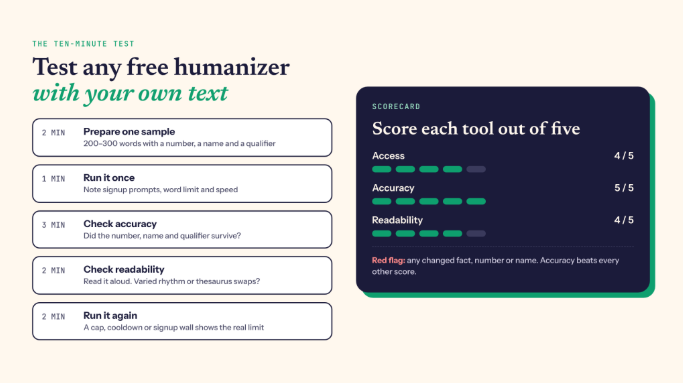
- Prepare one sample (2 minutes). Take a 200- to 300-word AI draft that’s typical of your work. Include at least one number, one name, and one qualifier like “often” or “in most cases.”
- Run it once (1 minute). Note whether you needed an account, how many words the tool accepted, and how long it took.
- Check accuracy (3 minutes). Compare the output line by line. Did the number survive? The name? The qualifier? Any changed fact is a red flag.
- Check readability (2 minutes). Read the result aloud. Does it flow, or does it sound like a thesaurus exploded? Are sentence lengths varied?
- Run it again (2 minutes). Try a second sample right away. If you hit a cap, a cooldown, or a sign-up prompt, you’ve found the real limit.
Score each tool out of five on access, accuracy, and readability. The best text humanizer free online for you is the one that scores well on all three with your kind of writing, which may not be the one at the top of someone else’s list.
Getting Long Content Through a Free Plan
Most free plans cap each run at a few hundred words. That sounds restrictive, but for long content it can actually help, because working in sections forces you to check each part closely.
Here’s how to handle a 2,000-word article on a 500-word-per-run plan:
- Edit before you humanize. Cut filler and repetition first. There’s no point spending your word limit on sentences you’ll delete.
- Split at headings. Each section becomes one run. Keeping sections whole preserves the logic within each part.
- Skip what doesn’t need help. Data-heavy passages, quotes, and lists often read fine already. Focus on intros, transitions, and conclusions.
- Reassemble and read the whole thing. Check that the sections still connect smoothly, and fix any transition that now feels abrupt.
With an open free plan, that article takes four or five runs and no waiting. With a capped plan, it might take days.
What a Free Humanizer Won’t Do for You
Even the best free tool has limits that no upgrade removes.
It won’t make detector results predictable. Detection is unreliable in both directions. In a widely reported 2023 study of 14 detection tools, accuracy on ChatGPT text was 74%, but it fell to 42% when the text had been tweaked slightly. That cuts both ways: light edits change scores, and human writing sometimes gets flagged. If detection matters for your work, run the final version through a free AI checker that highlights the flagged sentences and treat the highlights as editing hints.
It won’t add substance. A humanizer changes how text sounds, but it can’t supply your experience, data, or opinions. Google has said its systems look to reward helpful content “however content is produced,” which means the substance of a piece matters far more than whether a tool smoothed its sentences.
It won’t replace your final read. Check facts, names, and numbers after every rewrite. Make sure it still sounds like you. And if you’re a student, check your school’s policy on AI tools before using any humanizer on assessed work.
The Bottom Line
The best text humanizer free online is the one you can open, use, and come back to tomorrow without a login, a paywall, or a countdown. Look for an open plan with no signup and no total cap, test it with your own writing, and check every output before you publish.
Do that, and a free tool can carry a surprising amount of your editing load, while you keep the part that matters most: making sure the finished piece is accurate, useful, and unmistakably yours.