When AI Writes Faster Than You Think—But Reads Like a Robot
The past eighteen months have seen an explosion of AI writing tools, each promising to turn a simple prompt into polished prose. And they do—sort of. The problem is that most of that prose carries a distinct digital fingerprint: repetitive sentence structures, oddly formal phrasing, and a rhythm that feels just slightly off. For content teams, freelance writers, and marketers, the gap between “AI-generated” and “human-written” has become a productivity bottleneck. You can draft in minutes, but you spend just as long rewriting every paragraph to sound like you again. That friction is precisely what Ai humanizer tools are designed to eliminate—not by masking AI output, but by rebuilding it from the ground up.
Why “Humanizing” AI Text Is Harder Than It Looks
Most writers assume that humanizing AI text means running it through a thesaurus or swapping out a few words. In practice, that approach produces something worse than the original: stilted language that reads like a non-native speaker trying too hard. The real challenge lies in restructuring sentences at a deeper level while preserving the original meaning, data, and citations. A tool that merely replaces synonyms will break your argument’s flow; one that rewrites too aggressively might lose your key points entirely.
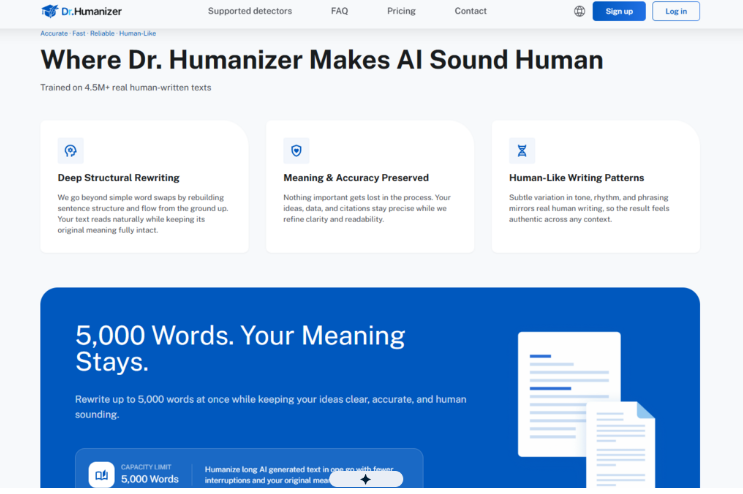
Dr. Humanizer approaches this problem differently. According to the platform, it is trained on over 4.5 million real human-written texts. That training data matters because it informs how the system understands natural variation in tone, rhythm, and phrasing—not just what words to use, but how to arrange them so the result feels authentic across different contexts.
A Walk Through the Platform: What Actually Happens When You Paste Your Text
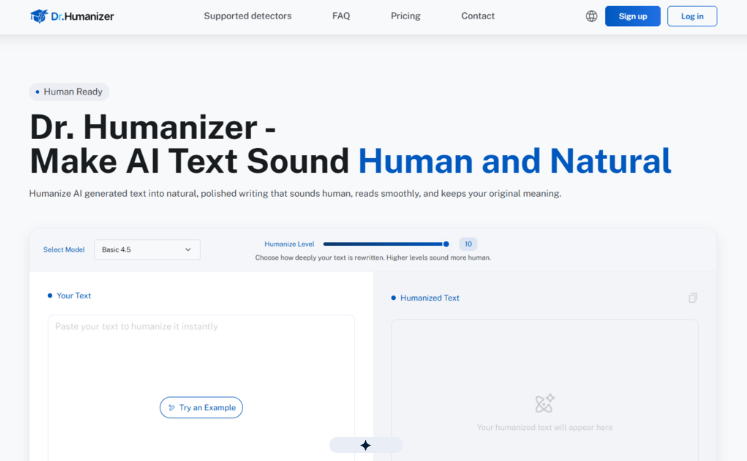
The interface is refreshingly minimal. You land on a single page with a text box, a couple of dropdowns, and a button. No onboarding tour, no video tutorial, no overwhelming dashboard. That simplicity is worth noting because it suggests the team trusts the underlying technology to do the heavy lifting.
Step 1: Choose Your Rewriting Depth
The first decision you make is selecting a “Humanize Level” on a scale from 1 to 10. This slider controls how deeply the system rewrites your text. A lower setting might focus on surface-level polish—fixing awkward grammar and smoothing out rough transitions. A higher setting, by contrast, restructures entire paragraphs, reorders sentences, and introduces more varied phrasing. In my testing, level 5 produced a clean, professional tone suitable for business communication, while level 8 introduced a more conversational rhythm that worked well for blog content.
What the Scale Actually Changes
The difference between levels is not just about “more rewriting.” At higher settings, the system appears to break sentences apart and reassemble them with different clause structures. A long, compound sentence might become two shorter ones; a series of short declarative statements might be merged into a more complex construction. The trade-off is that higher levels introduce more stylistic variation but also carry a slightly higher risk of altering nuance—something to keep in mind if you are working with technical or legally sensitive content.
Step 2: Paste Your Source Text
The text box accepts a minimum of 50 words and displays a running word count. For the free tier, the limit is 300 words per submission, though registered users can process up to 5,000 words in a single go. That capacity is practical for longer pieces like white papers, case studies, or detailed product descriptions.
The 50-Word Minimum Makes Sense
Requiring at least 50 words prevents the tool from being used on isolated sentences where context is minimal. In practice, this threshold ensures the system has enough material to understand your writing patterns and make meaningful structural changes. Shorter inputs tend to produce less noticeable improvements because there is simply not enough text to restructure.
Step 3: Receive Three Distinct Rewrites
One of the more thoughtful features is that the platform generates three separate rewrites for the same input. You are not locked into a single output. Instead, you can compare versions side by side, keep the one that best matches your tone, or cherry-pick your favorite sentences from each and combine them.
Why Three Versions Matter More Than One
Having three options changes the workflow from “accept or reject” to “curate and refine.” In practice, Version A might preserve your original structure while improving grammar; Version B might take more creative liberties with phrasing; Version C might strike a middle ground. For writers who are particular about their voice, this flexibility reduces the need for manual editing after the fact. You are not settling for the machine’s best guess—you are choosing among several competent interpretations.
Putting It to the Test: Three Real-World Scenarios
To understand how the platform performs outside of a marketing demo, I ran three common writing tasks through the tool. Each scenario represents a different use case, and each revealed something distinct about the system’s strengths and limitations.
Scenario 1: Revising a Technical Blog Post for a Broader Audience
The source text was a 600-word draft about API rate limiting—dense, jargon-heavy, and written in the passive voice. The original had been generated by an AI assistant and read like a textbook excerpt.
At Humanize Level 6, the output retained all technical terms and numerical data but rephrased most sentences into active voice. The rhythm became more varied: short explanatory sentences followed by slightly longer elaborations. The result read like something a developer advocate might write—technically accurate but approachable.
What worked: The preservation of specific numbers and technical terms was flawless. No data points were lost or misstated.
What required adjustment: One paragraph about error handling was restructured in a way that slightly shifted the emphasis from “what happens” to “what you should do.” The meaning was intact, but the focus changed enough that I preferred the original structure for that particular section. Having the other two rewrite options allowed me to pull the preferred phrasing from Version C while keeping the rest from Version A.
Scenario 2: Polishing a Marketing Email Sequence
The input was a 400-word email draft promoting a SaaS product. The original was functional but flat—every sentence followed the same subject-verb-object pattern.
At Level 8, the transformation was more dramatic. The system introduced rhetorical questions, varied sentence openings, and even a few colloquial phrases that made the copy feel less scripted. The email went from “informative” to “conversational” without losing its call-to-action clarity.
What worked: The tonal shift was precisely what the draft needed. The output sounded like a human sales writer who had been given bullet points and told to “make it sound natural.”
What required adjustment: A couple of phrases felt slightly too casual for the brand’s voice. That is less a flaw in the tool and more a reminder that “human” does not always mean “informal.” The solution was to mix and match between the three rewrites—using the conversational openings from one version and the more measured closing from another.
Scenario 3: Cleaning Up an Academic Abstract
The source was a 250-word abstract for a research paper on urban planning. The original was grammatically correct but dense and monotonous.
At Level 4, the output cleaned up awkward transitions and improved readability without altering the academic tone. At Level 7, the system introduced more varied sentence structures but also made the abstract feel slightly less formal—which was not appropriate for this context.
What worked: The lower setting delivered a polished version that preserved the formal register. The system clearly understood that “human-like” does not mean “casual” in every context.
What required adjustment: The highest setting overshot the mark for this particular use case. That is not a criticism—it is a reminder that the Humanize Level slider is not a “better” dial; it is a “different” dial. Choosing the right setting depends entirely on your audience and purpose.
Where the Tool Fits in a Writer’s Workflow
| Aspect | Dr. Humanizer |
| Learning curve | Minimal—single-page interface with two controls |
| Output options | Three rewrites per submission for comparison |
| Content capacity | Up to 5,000 words per submission for registered users |
| Style control | Adjustable via 1–10 Humanize Level slider |
| Ideal use cases | Blog posts, email drafts, reports, and technical content |
| Limitations | Output quality depends on input quality; higher levels may shift nuance |
A Few Honest Limitations to Keep in Mind
No tool is perfect, and Dr. Humanizer is no exception. The quality of the output depends heavily on the quality of the input. If your source text is poorly structured or contains ambiguous phrasing, the rewritten version may inherit those issues rather than magically resolve them. In my testing, clear, well-organized source text produced consistently better results than messy drafts.
The higher Humanize Levels also carry a trade-off. While they produce more varied and natural-sounding prose, they are more likely to introduce subtle shifts in emphasis or tone. For highly technical or legally sensitive content, I would recommend starting at a lower level and gradually increasing it until you find the sweet spot.
Finally, the system does not guarantee identical results every time. The variation between rewrites is intentional—it is what gives you three distinct options to choose from—but it also means that running the same text through twice may produce slightly different outputs. That is consistent with how human writers approach revision: no two passes are exactly alike.
Who Benefits Most from This Approach
The platform appears best suited for writers who already have a draft but need to elevate it from “clearly AI-generated” to “confidently human.” That includes content marketers refining blog posts, freelance writers polishing client deliverables, and internal teams cleaning up AI-generated reports before distribution. It is less about replacing the writer and more about accelerating the revision process—turning a tedious editing session into a quick comparison of three solid options.
For teams producing high volumes of content, the ability to process up to 5,000 words at once reduces the friction of breaking long pieces into smaller chunks. For solo writers, the three-rewrite system offers a safety net: you are never stuck with a single output that misses the mark.
The real value, from a practical user perspective, is not that the tool produces perfect text every time. It is that it produces usable text quickly, and gives you the flexibility to choose, combine, and refine without starting from scratch. That is a workflow improvement, not a magic solution—and in the current landscape of AI writing tools, that distinction matters more than most marketers are willing to admit.
dehumanizer sits in a specific corner of that landscape: not as a replacement for human judgment, but as a competent assistant that handles the structural heavy lifting while leaving the final call to you. If your workflow involves more time editing than writing, it is worth a closer look.