












Constructor Overloading in C++
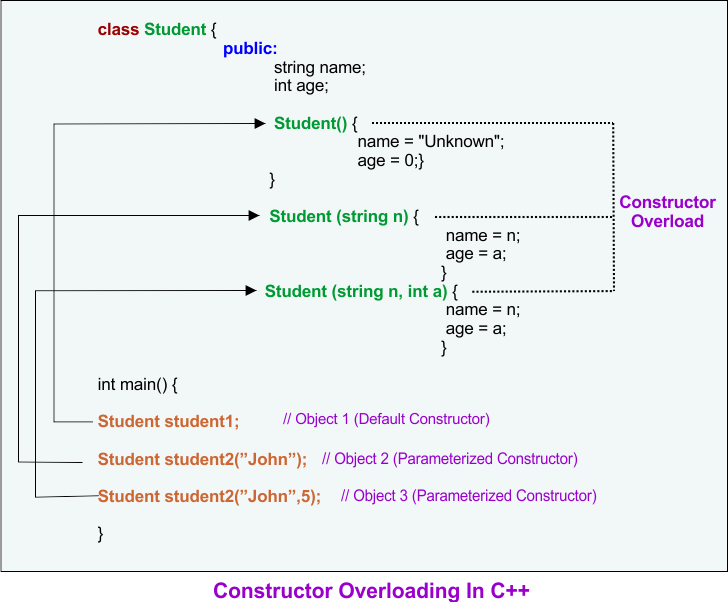
In C++, Constructor overloading means defining multiple constructors in a class with different parameters. it is similar to function overloading.
- Overloaded constructors have the same name as the class, but they differ in the number and type of arguments they accept.
- When creating an object, you must pass the correct arguments so the compiler can determine which constructor to invoke.
What is Constructor Overloading in C++?
Constructor overloading in C++ means defining more than one constructor inside the same class with different numbers or types of parameters. It allows flexible object initialization according to program needs.
Below is the list of important parts of constructor overloading in C++.
1. Definition of Constructor Overloading
Constructor overloading is a feature in which a class contains multiple constructors having the same name but different parameters.
- Same Class Name: Every constructor has the same name as the class
- Different Parameter Lists: Constructors differ by number, type, or order of parameters
- Automatic Execution: A constructor runs automatically when an object is created
- Flexible Object Creation: Objects can be initialized in different ways
2. Why Constructor Overloading is Used
Constructor overloading is used when a programmer wants to create objects with different kinds of initial values.
- Multiple Initialization Methods: One class can support many ways to create objects
- Better Code Design: Makes the class more useful and practical
- Easy to Understand: Each constructor handles a specific situation
- Improves Reusability: Same class can be reused in many cases
Types of Constructors Used in Overloading
Constructor overloading is commonly done by using default constructors and parameterized constructors.
Below is the list of common constructors used in constructor overloading.
1. Default Constructor
A default constructor does not take any argument and assigns default values to data members.
- No Parameters: Object is created without passing any value
- Default Initialization: Predefined values are assigned
- Simple Use: Useful when no initial data is available
Code:
#include <iostream>
using namespace std;

class Student {
private:
    int id;
    string name;

public:
    Student() {
        id = 0;
        name = "Not Assigned";
    }

    void display() {
        cout << "ID: " << id << ", Name: " << name << endl;
    }
};

int main() {
    Student s1;
    s1.display();
    return 0;
}
Output:
ID: 0, Name: Not Assigned
2. Parameterized Constructor
A parameterized constructor takes values as arguments and initializes object data with those values.
- Accepts Parameters: Values are passed during object creation
- Custom Initialization: Each object can store different data
- Useful for Real Programs: Better control over object values
Code:
#include <iostream>
using namespace std;

class Student {
private:
    int id;
    string name;

public:
    Student(int i, string n) {
        id = i;
        name = n;
    }

    void display() {
        cout << "ID: " << id << ", Name: " << name << endl;
    }
};

int main() {
    Student s1(101, "Ali");
    s1.display();
    return 0;
}
Output:
ID: 101, Name: Ali
Constructor Overloading in C++
Constructor overloading happens when both default and parameterized constructors are placed in the same class. This allows creating objects in more than one way.
Below is the list of constructor overloading examples and explanation.
1. Example of Constructor Overloading
This example shows multiple constructors in the same class with different parameter lists.
- No Argument Constructor: Initializes default values
- One Argument Constructor: Initializes only one value
- Two Argument Constructor: Initializes all values
- Same Class, Multiple Forms: Demonstrates constructor overloading clearly
Code:
#include <iostream>
using namespace std;

class Student {
private:
    int id;
    string name;

public:
    // Default constructor
    Student() {
        id = 0;
        name = "Not Assigned";
    }

    // Constructor with one parameter
    Student(int i) {
        id = i;
        name = "Unknown";
    }

    // Constructor with two parameters
    Student(int i, string n) {
        id = i;
        name = n;
    }

    void display() {
        cout << "ID: " << id << ", Name: " << name << endl;
    }
};

int main() {
    Student s1;
    Student s2(102);
    Student s3(103, "Ahmad");

    cout << "Object created by default constructor:" << endl;
    s1.display();

    cout << "Object created by one-parameter constructor:" << endl;
    s2.display();

    cout << "Object created by two-parameter constructor:" << endl;
    s3.display();

    return 0;
}
Output:
Object created by default constructor:
ID: 0, Name: Not Assigned
Object created by one-parameter constructor:
ID: 102, Name: Unknown
Object created by two-parameter constructor:
ID: 103, Name: Ahmad
How Constructor Overloading Works
Constructor overloading works on the basis of the arguments passed during object creation. The compiler checks the number and type of arguments and then calls the matching constructor.
Below is the list of working steps of constructor overloading.
1. Object Created Without Arguments
When no argument is passed, the default constructor is called.
- Empty Brackets or No Brackets: No values are sent
- Compiler Chooses Default Constructor: Matching constructor is selected
- Default Data Stored: Object gets default values
2. Object Created With One Argument
When one argument is passed, the constructor with one parameter is called.
- Single Value Given: One piece of data is sent
- Matching Constructor Called: One-parameter constructor runs
- Partial Initialization: Some values may still be default
3. Object Created With Two Arguments
When two arguments are passed, the constructor with two parameters is called.
- Two Values Sent: Complete data is provided
- Exact Match Found: Two-parameter constructor is called
- Full Initialization: Object gets complete values
Rules of Constructor Overloading
Constructor overloading must follow some important rules in C++. These rules help students understand how the compiler distinguishes one constructor from another.
Below is the list of rules of constructor overloading.
1. Constructors Must Have Different Parameters
The constructors must differ in number, type, or order of parameters.
- Different Number: Example
Student()andStudent(int) - Different Type: Example
Student(int)andStudent(string) - Different Order: Example
Student(int, string)andStudent(string, int)
2. Constructor Name Must Be Same as Class Name
Every constructor must have exactly the same name as the class.
- Class Name Matching: Required by C++ syntax
- Special Member Function: Constructor is not a normal function
- Used for Initialization: Runs at object creation time
3. Constructors Have No Return Type
A constructor never has a return type, not even void.
- No Return Value: It does not return data
- Automatic Call: Called automatically by compiler
- Special Purpose: Used only to initialize objects
Table of Different Overloaded Constructors
This table helps students understand how different constructors behave based on passed arguments.
| Constructor Syntax | Purpose | Example Object Creation | Output Values |
|---|---|---|---|
Student() |
Sets default values | Student s1; |
ID = 0, Name = Not Assigned |
Student(int i) |
Sets only ID | Student s2(102); |
ID = 102, Name = Unknown |
Student(int i, string n) |
Sets ID and Name | Student s3(103, "Ahmad"); |
ID = 103, Name = Ahmad |
Constructor Overloading In Inheritance (C++)
When a class inherits another class, the constructor of the base class is called before the constructor of the derived class. We can overload constructors in both the base and derived classes.
Example 01
#include <iostream>
using namespace std;
// Base class
class Vehicle {
public:
string type;
// Default Constructor
Vehicle() {
type = “Unknown”;
cout << “Base Default Constructor Called\n”;
}
// Parameterized Constructor
Vehicle(string t) {
type = t;
cout << “Base Parameterized Constructor Called\n”;
}
};
// Derived class
class Car : public Vehicle {
public:
string brand;
int modelYear;
// Default Constructor (Calls Base Default Constructor)
Car() {
brand = “Unknown”;
modelYear = 0;
cout << “Derived Default Constructor Called\n”;
}
// Parameterized Constructor (Calls Base Parameterized Constructor)
Car(string t, string b, int y) : Vehicle(t) {
brand = b;
modelYear = y;
cout << “Derived Parameterized Constructor Called\n”;
}
// Display function
void display() {
cout << “Type: ” << type << “, Brand: ” << brand << “, Model Year: ” << modelYear << endl;
}
};
int main() {
Car car1; // Calls Default Constructors
Car car2(“Sedan”, “Toyota”, 2022); // Calls Parameterized Constructors
// Display details
cout << “Car 1 Details: “; car1.display();
cout << “Car 2 Details: “; car2.display();
return 0;
}
output
Base Default Constructor Called
Derived Default Constructor Called
Base Parameterized Constructor Called
Derived Parameterized Constructor Called
Car 1 Details: Type: Unknown, Brand: Unknown, Model Year: 0
Car 2 Details: Type: Sedan, Brand: Toyota, Model Year: 2022
Example 02: Constructor Overloading in Inheritance
#include <iostream>
using namespace std;
// Base class: Vehicle
class Vehicle {
public:
string type;
// 1st Parameterized Constructor
Vehicle(string t) {
type = t;
cout << “Base Class Constructor 1: Vehicle Type Initialized\n”;
}
// 2nd Parameterized Constructor
Vehicle(string t, int wheels) {
type = t;
cout << “Base Class Constructor 2: Vehicle Type & Wheels Count Initialized\n”;
}
// 3rd Parameterized Constructor
Vehicle(string t, int wheels, string fuelType) {
type = t;
cout << “Base Class Constructor 3: Vehicle Type, Wheels & Fuel Type Initialized\n”;
}
};
// Derived class: Car (inherits Vehicle)
class Car : public Vehicle {
public:
string brand;
int modelYear;
// 1st Parameterized Constructor (Calls Base Constructor 1)
Car(string t, string b, int y) : Vehicle(t) {
brand = b;
modelYear = y;
cout << “Derived Class Constructor 1: Car Brand & Year Initialized\n”;
}
// 2nd Parameterized Constructor (Calls Base Constructor 2)
Car(string t, int wheels, string b, int y) : Vehicle(t, wheels) {
brand = b;
modelYear = y;
cout << “Derived Class Constructor 2: Car Brand, Year, Wheels Initialized\n”;
}
// 3rd Parameterized Constructor (Calls Base Constructor 3)
Car(string t, int wheels, string fuelType, string b, int y) : Vehicle(t, wheels, fuelType) {
brand = b;
modelYear = y;
cout << “Derived Class Constructor 3: Car Brand, Year, Wheels & Fuel Type Initialized\n”;
}
// Display function
void display() {
cout << “Type: ” << type << “, Brand: ” << brand << “, Model Year: ” << modelYear << endl;
}
};
int main() {
cout << “Creating car1 (Using Constructor 1):\n”;
Car car1(“Sedan”, “Toyota”, 2022);
cout << “\n—————————–\n”;
cout << “Creating car2 (Using Constructor 2):\n”;
Car car2(“SUV”, 4, “Ford”, 2021);
cout << “\n—————————–\n”;
cout << “Creating car3 (Using Constructor 3):\n”;
Car car3(“Truck”, 6, “Diesel”, “Volvo”, 2020);
cout << “\nCar 1 Details: “;
car1.display();
cout << “Car 2 Details: “;
car2.display();
cout << “Car 3 Details: “;
car3.display();
return 0;
}
output:
Creating car1 (Using Constructor 1):
Base Class Constructor 1: Vehicle Type Initialized
Derived Class Constructor 1: Car Brand & Year Initialized
—————————–
Creating car2 (Using Constructor 2):
Base Class Constructor 2: Vehicle Type & Wheels Count Initialized
Derived Class Constructor 2: Car Brand, Year, Wheels Initialized
—————————–
Creating car3 (Using Constructor 3):
Base Class Constructor 3: Vehicle Type, Wheels & Fuel Type Initialized
Derived Class Constructor 3: Car Brand, Year, Wheels & Fuel Type Initialized
Car 1 Details: Type: Sedan, Brand: Toyota, Model Year: 2022
Car 2 Details: Type: SUV, Brand: Ford, Model Year: 2021
Car 3 Details: Type: Truck, Brand: Volvo, Model Year: 2020
Advantages of Constructor Overloading
Constructor overloading provides many benefits in C++ programming. It makes the class more flexible and easier to use in different situations.
Below is the list of major advantages of constructor overloading.
1. Flexible Object Initialization
Different constructors allow objects to be created with different inputs.
- Many Input Choices: Programmer can pass no values, one value, or many values
- Easy Object Creation: Suitable for different conditions
- Improves Programming Logic: Makes class more adaptable
2. Better Readability
Constructor overloading makes code cleaner and easier to understand.
- Clear Initialization: Each constructor has a specific purpose
- Less Confusion: Easy to know how object is created
- Structured Code: Improves code quality
3. Real-World Usefulness
Many real systems need objects with different details at different times.
- Student Systems: Create a student with partial or full data
- Bank Systems: Create account with zero or initial balance
- Product Systems: Create products with different input values
Real-World Example of Constructor Overloading
Constructor overloading is useful in practical software development where objects may not always have complete information at the time of creation.
1. Student Record Example
A student record may be created in different ways based on available information.
- Only Roll Number Known: Use one constructor
- Full Student Data Known: Use another constructor
- No Information Available: Use default constructor
- Practical and Common: Used in school and college management systems
Code:
#include <iostream>
using namespace std;

class Student {
private:
    int rollNo;
    string name;
    string department;

public:
    Student() {
        rollNo = 0;
        name = "Unknown";
        department = "Not Assigned";
    }

    Student(int r) {
        rollNo = r;
        name = "Unknown";
        department = "Not Assigned";
    }

    Student(int r, string n, string d) {
        rollNo = r;
        name = n;
        department = d;
    }

    void show() {
        cout << "Roll No: " << rollNo << endl;
        cout << "Name: " << name << endl;
        cout << "Department: " << department << endl;
        cout << endl;
    }
};

int main() {
    Student s1;
    Student s2(25);
    Student s3(30, "Sara", "Computer Science");

    cout << "Student 1 Data:" << endl;
    s1.show();

    cout << "Student 2 Data:" << endl;
    s2.show();

    cout << "Student 3 Data:" << endl;
    s3.show();

    return 0;
}
Output:
Student 1 Data:
Roll No: 0
Name: Unknown
Department: Not Assigned

Student 2 Data:
Roll No: 25
Name: Unknown
Department: Not Assigned

Student 3 Data:
Roll No: 30
Name: Sara
Department: Computer Science
Constructor Overloading vs Function Overloading
Constructor overloading and function overloading look similar, but they are used for different purposes. The table below explains the difference clearly.
| Feature | Constructor Overloading | Function Overloading |
|---|---|---|
| Purpose | Used to initialize objects | Used to perform different operations |
| Name | Must be same as class name | Can be any valid function name |
| Return Type | No return type | May have return type |
| Call Time | Called automatically during object creation | Called manually in the program |
| Main Use | Object initialization | General task execution |
Common Errors in Constructor Overloading
Students often make some mistakes while learning constructor overloading in C++. Understanding these errors helps in writing correct programs.
Below is the list of common mistakes in constructor overloading.
1. Same Parameter List in Multiple Constructors
Two constructors cannot have exactly the same parameter list.
- Compiler Error: Same signature is not allowed
- No Difference Found: Compiler cannot distinguish them
- Must Change Parameters: Use different number or type of parameters
2. Writing Return Type with Constructor
A constructor should not have any return type.
- Wrong Syntax: Writing
void Student()is incorrect - Not a Normal Function: Constructor is special
- Causes Error: Program will not compile properly
3. Forgetting Class Name Match
The constructor name must exactly match the class name.
- Case Sensitive:
student()is different fromStudent() - Required Rule: Name mismatch makes it a normal function
- Initialization Fails: Constructor behavior will be lost
Conclusion
Constructor Overloading in C++ is a useful concept that allows a class to contain multiple constructors with different parameters. It helps create objects in different ways, improves code flexibility, and supports real-world programming needs. For students learning C++, constructor overloading is an essential topic because it builds a strong understanding of object initialization and class design.